Managing construction operations across projects, teams and finances quickly becomes complex without the right systems in place. Construction ERP software brings structure to that complexity by centralizing data, processes and controls. For growing contractors and developers, choosing the right platform can improve visibility, reduce risk and support smarter decisions as operations scale.
What Is Construction ERP Software?
At its core, construction enterprise resource planning software, most commonly referred to as construction ERP software, is an integrated system that combines financial management, project controls, procurement, resource planning and reporting into a single platform. Rather than relying on disconnected tools, ERP software creates a unified source of truth that allows construction organizations to manage costs, schedules, contracts and operations more consistently.
ERP software is best used when construction businesses reach a level of complexity that spreadsheets and standalone tools can no longer support. Multi-project environments, growing teams and tighter margins benefit most, as ERP systems improve coordination, standardize workflows and provide real-time insight across departments and job sites. For these reasons, ERP software is mostly used by larger firms in the construction industry.
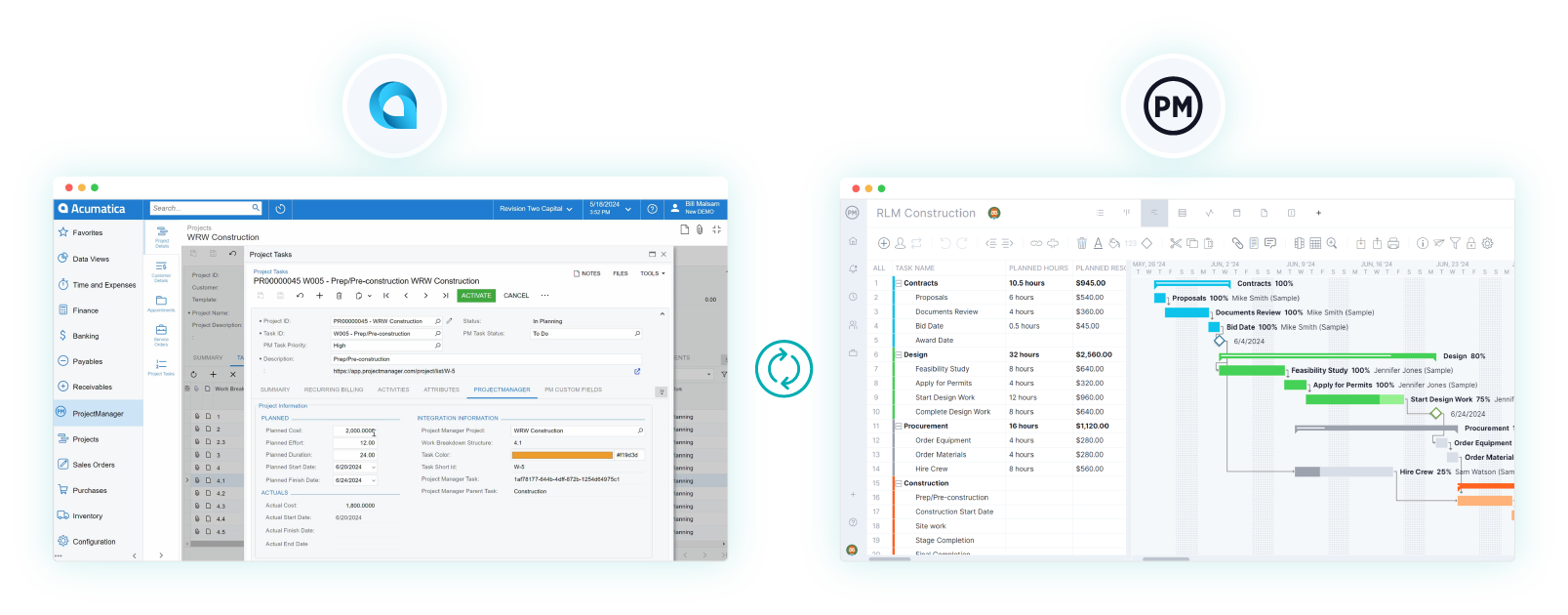
ProjectManager’s construction project management software is recognized as an official Acumatica Application, meaning it meets rigorous standards for integration and technology. ProjectManager provides users with a bi-directional project management application that empowers them to synchronize project data, automate financial tasks and optimize workflow processes within their Acumatica ERP system. Learn more about our Acumatica integration.
Who Needs Construction ERP Software?
As construction operations become more interconnected, certain teams feel the strain of disconnected systems sooner than others when managing construction projects. Construction enterprise resource planning software is most valuable where financial control, operational coordination and cross-project visibility directly affect profitability and risk.
- General contractors coordinating multiple active job sites who need synchronized cost tracking, scheduling data and procurement workflows to maintain control across projects without relying on fragmented tools.
- Mid-sized construction firms transitioning from spreadsheets to integrated systems as transaction volume increases and manual processes begin to introduce reporting delays and financial inaccuracies.
- Construction finance and accounting teams responsible for job costing, forecasting and compliance who require a single system to connect budgets, commitments, invoices and revenue recognition.
- Operations and project executives overseeing portfolios who need consolidated dashboards and standardized reporting to compare performance, identify risks and make timely strategic decisions.
- Enterprises with complex subcontractor, equipment and materials management needs that benefit from centralized purchasing, contract administration and resource planning within one platform.
Related: 20 Best Construction Scheduling Software for 2026 (Free & Paid)
Key Features of Construction ERP Software
Modern construction projects demand tight integration between finance, operations and field execution, making feature selection critical when evaluating ERP platforms. Understanding core construction ERP software capabilities helps buyers compare systems objectively, avoid unnecessary complexity and ensure the software supports cost control, compliance, scalability and real-time decision-making across projects effectively consistently.
- Project Cost Accounting: Construction ERP software provides centralized job cost ledgers, real-time cost rollups and automated cost allocation, enabling accurate construction accounting, profitability tracking, variance analysis and financial reporting across projects and portfolios.
- Progress Billing: ERP systems automate progress billing workflows by linking contracts, schedules and completed work, generating compliant invoices, managing retainage and synchronizing billing data with accounting and revenue recognition.
- Time Tracking: Built-in time tracking tools capture labor data from the field and sync it directly with payroll, real-time analytics, job costing and productivity reports, eliminating manual entry and improving labor cost accuracy.
- Cost Management and Budgeting: Construction ERP platforms continuously forecast costs by combining original budgets, committed costs and actuals, giving teams early warnings of overruns and tools to adjust projections in real time.
- Contract Management: ERP software centralizes contracts and change orders, enforcing approval workflows, tracking financial impact automatically and ensuring contract values stay aligned with budgets and billing.
- Inventory Management: Enterprise resource planning systems track materials across warehouses and job sites, update stock levels in real time and connect inventory data to purchasing and project schedules to reduce waste and delays.
- Payroll Management: Construction ERP software automates payroll processing by applying wage rates, union rules and tax requirements while pushing labor costs directly into job cost and financial reports.
- Equipment Management: ERP platforms monitor equipment utilization, maintenance and costs, linking asset data to projects to support scheduling decisions, cost recovery and lifecycle management.
- Supply Chain Management: Construction ERP software integrates procurement, supplier management and delivery tracking, providing visibility into lead times, commitments and material flow to keep projects supplied and schedules protected.
- Document Management: Construction ERP software centralizes drawings, contracts, RFIs and approvals in a controlled repository, enabling version control, permission management and real-time access across office and field teams.
- Resource Allocation: Enterprise resource planning systems allocate labor, equipment and materials across projects using availability and workload data, helping managers balance capacity, avoid overallocation and align resources with construction schedules.
Top 5 Construction ERP Software for 2026
The construction ERP software market continues to evolve as contractors demand tighter financial control, deeper project visibility and systems that scale with growth. The following platforms stand out in 2026 for their construction-specific capabilities, enterprise readiness and ability to support complex, multi-project operations across finance, field execution and management.
1. Acumatica
Acumatica is widely recognized for its flexible, cloud-native ERP platform tailored to construction and project-based businesses. It offers strong job cost accounting, project tracking and real-time financial visibility without user-based licensing limits. Acumatica’s construction edition integrates project management, compliance tracking and billing workflows into a unified system. Its open architecture allows deep customization and integration with third-party tools, making it attractive to growing contractors that need scalability without sacrificing control. The platform is particularly well-suited for companies transitioning from disconnected systems to a centralized ERP while retaining flexibility in how processes are configured.
2. Oracle NetSuite ERP
Oracle NetSuite ERP is an enterprise-grade cloud platform designed for organizations that require advanced financial management and global scalability. While not construction-exclusive, it is commonly adopted by large contractors and developers with complex accounting, multi-entity operations and rigorous reporting needs.
NetSuite excels in financial consolidation, cost management and revenue recognition and compliance, making it a strong fit for firms managing portfolios across regions. Construction companies often pair NetSuite with industry-specific extensions to support job costing and project controls while leveraging its robust financial backbone and analytics capabilities.
3. Sage 300 Construction and Real Estate
Sage 300 Construction and Real Estate is a long-established ERP solution built specifically for construction and property-focused businesses. Known for its depth in job cost accounting, project management and payroll, it supports contractors managing detailed cost structures and regulatory requirements.
The platform offers strong reporting, change management and compliance features that appeal to experienced finance teams. While traditionally deployed on-premises, cloud-hosted options have expanded its accessibility. Sage 300 remains a preferred choice for firms prioritizing proven construction functionality and industry-aligned financial workflows.
4. SAP S/4HANA
Built for large, complex organizations, SAP S/4HANA is an enterprise ERP platform used by major construction firms operating at scale. Rather than focusing solely on project execution, it excels at integrating finance, procurement, supply chain and asset management across global operations.
Construction companies use SAP S/4HANA to manage large capital programs, multi-entity accounting and long-term asset lifecycles with strict governance requirements. Its real-time data model supports advanced analytics and forecasting, while extensive configuration options allow alignment with highly structured internal processes. SAP S/4HANA is best suited for enterprises with mature controls, dedicated IT resources and complex reporting obligations.
5. Microsoft Dynamics 365 Business Central
Positioned as a flexible ERP for small to mid-sized organizations, Microsoft Dynamics 365 Business Central offers construction firms a balance between financial control and operational simplicity.
It integrates accounting, project management and procurement within a familiar Microsoft ecosystem, making adoption easier for teams already using Microsoft tools. While not construction-specific out of the box, it supports job costing, budgeting and project tracking through configuration and extensions. Business Central is often chosen by growing contractors that need stronger financial oversight and scalability without the complexity or cost of enterprise-heavy ERP platforms.
Free Construction Project Management Templates
We’ve created dozens of construction project management templates for Excel, Word and Google Sheets you can download for free.
Construction Management Plan Template
Before work begins, teams need a clear roadmap for execution. This construction management plan template helps define responsibilities, coordination methods and control procedures to keep construction activities aligned and risks managed throughout delivery.
Construction Budget Template
Cost visibility is critical once construction is underway. This construction budget template supports detailed cost tracking for labor, materials and equipment while allowing teams to compare forecasts against actual spending in real time.
Construction Scope of Work Template
Clarity around what is included—and excluded—prevents disputes later. This construction scope of work template documents tasks, deliverables and responsibilities to align expectations, limit scope creep and support accurate pricing and contracts.
ProjectManager Integrates with Acumatica Construction ERP Software
Acumatica doesn’t have a project management module, but it partners with resellers like ProjectManager to offer best-in-class project management tools in the construction industry. Acumatica’s “project management as a service” helps partners achieve ERP implementation. As the sole project management software integration available on the Acumatica marketplace, ProjectManager helps gain portfolio insight, reduce data gaps and better understand a project’s financial impacts.
Build Construction Schedules on Powerful Gantt Charts
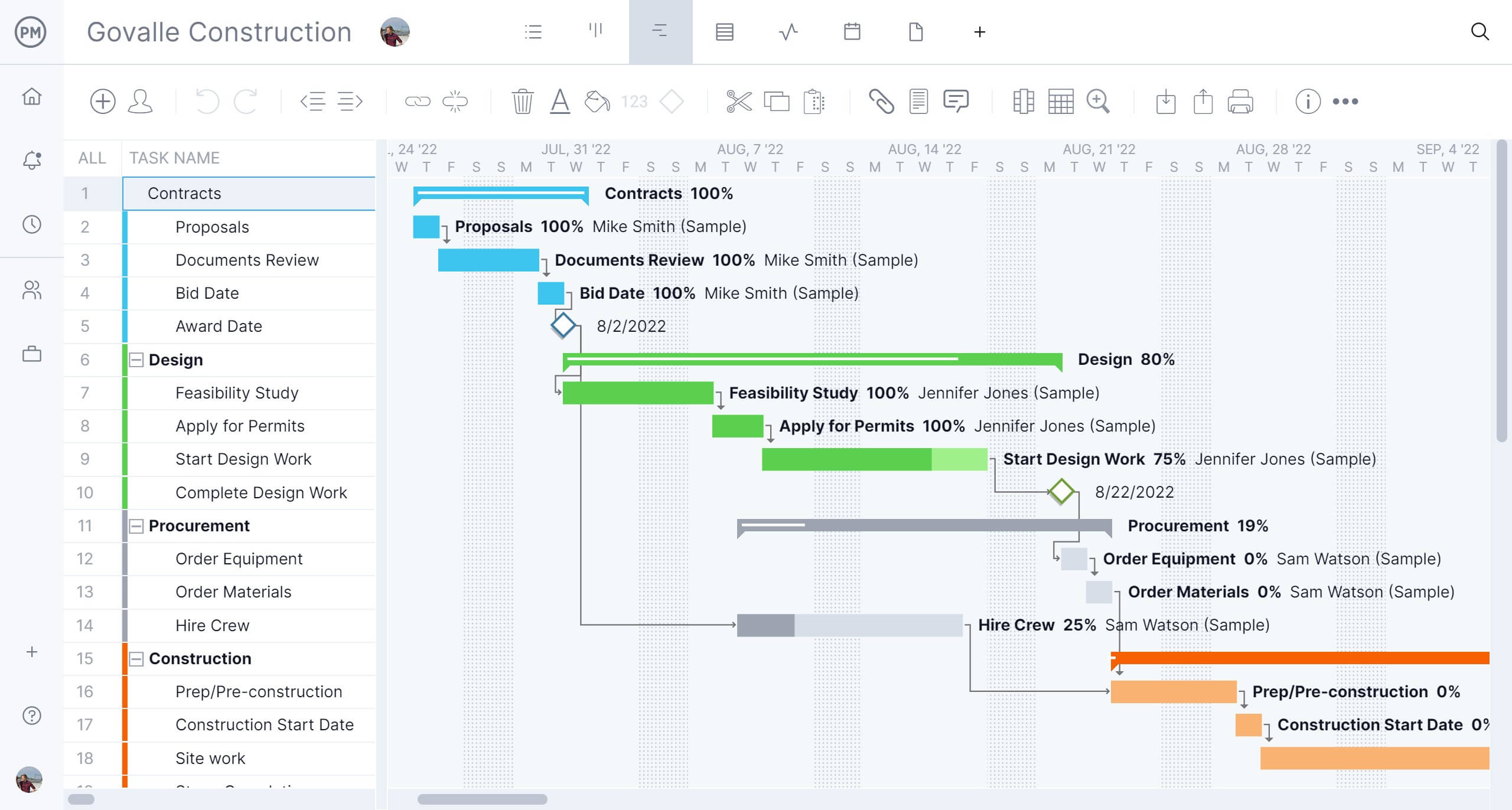
Construction industry teams rely on ProjectManager’s in-depth Gantt charts that can track all four types of dependencies, set milestones, filter for the critical path and more. These interactive Gantt charts allow you to collaborate with your field team and view progress with taskbar shading.
Leverage AI-Informed Reports
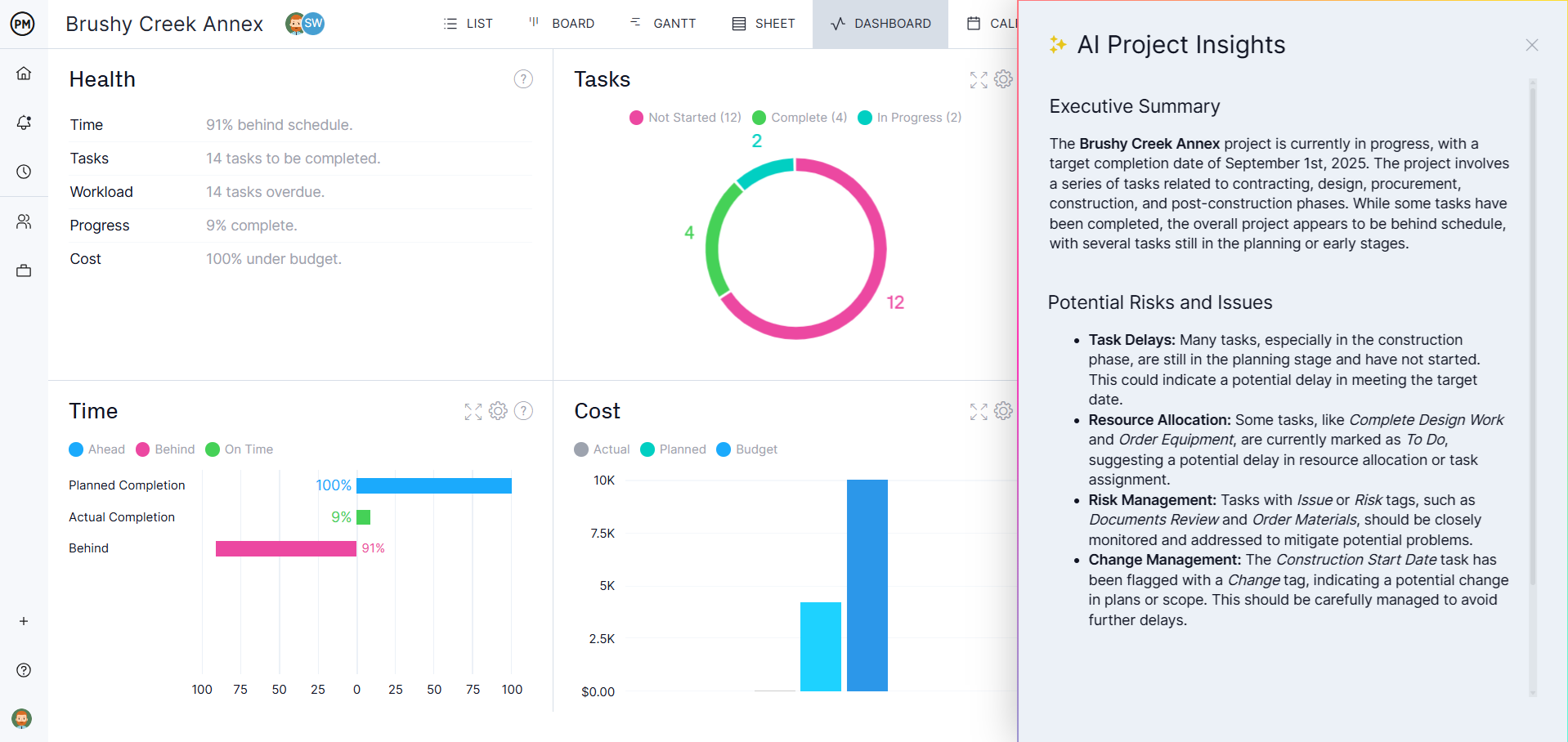
Construction projects have a lot of stakeholders who need to be in the loop. Once the schedule is made, use other tools like AI Project Insights and our reporting feature to keep stakeholders informed on progress. AI Project Insights leverages OpenAI’s latest technology to provide informed guidance in a matter of seconds. Then, generate a custom report to print or email to stakeholders.
Related Construction ERP Content
ProjectManager is online project and portfolio management software that connects teams whether they’re in the office, out in the field or anywhere in between. They can share files, comment at the task level and stay updated with email and in-app notifications. Get started with ProjectManager integration with Acumatica today.