
Managing inventory is critical whether in manufacturing, retail, construction or any industry that lives and dies by having the right resources when needed. An inventory template is a structured tool that helps record, manage and track inventory items.
Using an inventory list template helps managers avoid inaccurate records, poor demand forecasting, overstocking and stockouts. Download any of the free inventory sheet templates below to analyze inventory metrics and adjust quickly to market changes.
Built for flexibility, this inventory template works across industries and operational setups. Whether you’re managing raw materials for manufacturing, tracking finished goods for retail, organizing spare parts for maintenance or monitoring supplies for a construction project, it centralizes stock data in one structured spreadsheet. You can monitor inventory levels, calculate total inventory value, identify reorder points and reduce stockouts without needing specialized inventory management software.
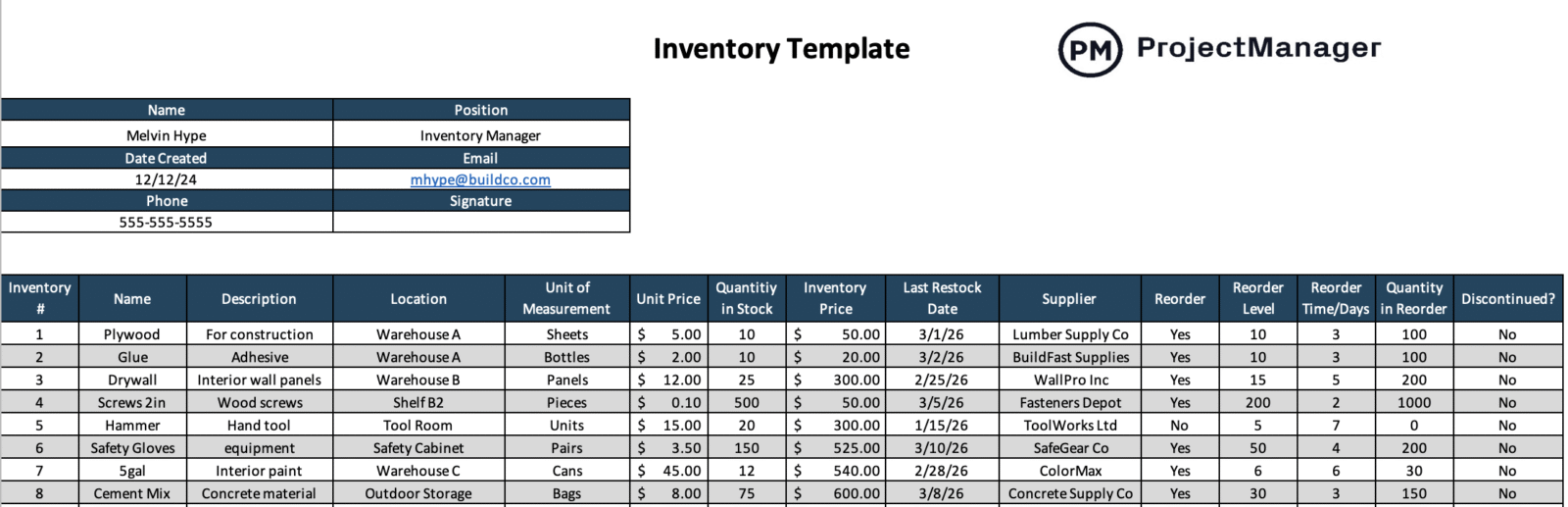
- Inventory item name: Clearly identifies each product, material or component so teams avoid confusion when tracking stock movements and updating inventory records.
- Inventory item description: Provides additional specifications such as size, model, category or usage to distinguish similar items and support accurate inventory control.
- Location: Indicates the warehouse, storage room, shelf or job site where the item is physically stored for faster retrieval and audits.
- Unit of measurement: Defines how the item is counted, such as pieces, boxes, kilograms or liters, ensuring consistent stock tracking.
- Quantity in stock: Shows current inventory levels available for use or sale, helping prevent shortages and unexpected stockouts.
- Unit price / Total inventory price: Captures cost per unit and automatically calculates total inventory value for budgeting and financial reporting.
- Last restock date: Records the most recent replenishment date to monitor supplier performance and inventory turnover rates.
- Reorder level / Time / Quantity: Establishes minimum stock thresholds, supplier lead times and optimal reorder quantities to maintain supply continuity.
- Supplier: Lists the vendor responsible for providing the item, simplifying procurement tracking and future purchase orders.
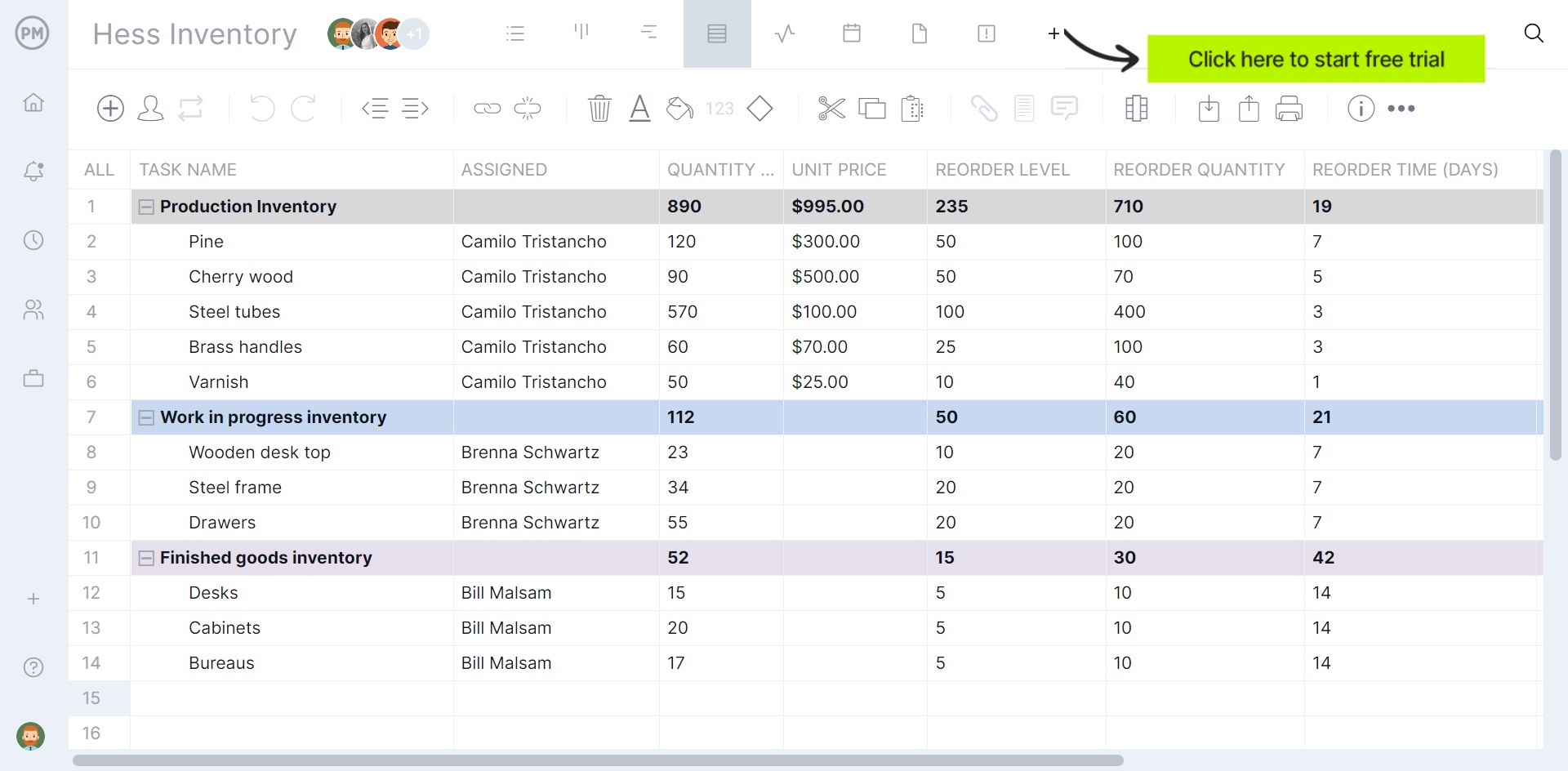
However, this isn’t a perfect solution. Templates can track inventory and costs, but they must be manually updated. This means that someone has to do that job and the template won’t be updated. It will always lag, which can cause problems. Project management software can solve those problems. ProjectManager is award-winning project and portfolio management software that is online. It delivers real-time data to show what’s in stock and alert managers when to restock. Our software has multiple project views for everyone on the team, but managers will gravitate to the sheet view to track purchases, costs, inventory and more in real time. Get started with ProjectManager today for free.
Structurally, this Google Sheets inventory template mirrors the inventory template for Excel, using the same fields and calculations for inventory tracking and stock management. The difference shows up in how teams use it. Because it runs in Google Sheets, multiple users can update quantities, adjust reorder levels and review inventory data simultaneously. Changes sync in real time, which improves visibility across departments and supports faster purchasing decisions without emailing spreadsheet versions back and forth.
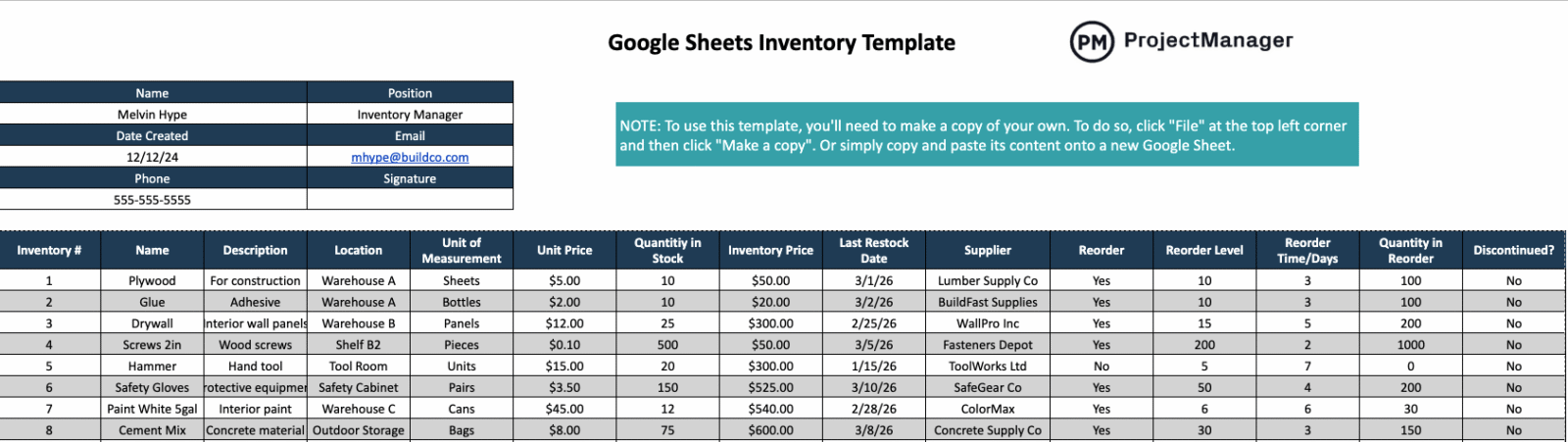
Control over user access is another major advantage. With Google Sheets, you decide exactly who can view, comment or edit the inventory spreadsheet, which reduces the risk of accidental changes to inventory data. Warehouse staff can update stock quantities, purchasing teams can modify reorder points and executives can review inventory reports in view-only mode. This permission-based access keeps inventory control organized while still allowing real-time collaboration across departments.
At its core, a stock register is a structured log that records every movement of inventory entering and leaving a business. Manufacturing companies, construction firms, retail operations and warehouse-based distributors rely on a stock register to maintain accurate inventory levels and prevent stock discrepancies. Unlike basic inventory lists, a stock register tracks transactions over time, showing how purchases, issues and returns affect available stock. Among inventory templates, this format is especially valuable for businesses that manage high-volume materials or operate multiple storage locations.

What makes this stock register template practical is how it connects item data with real transaction activity. The top section captures company details, location and approval information, while the item descriptions define SKU codes, units of measurement and reorder thresholds. Below that, transactional data logs purchase and issue entries with dates, reference numbers and suppliers. Each transaction automatically updates running stock quantities, unit costs and closing stock value, giving managers real-time visibility into inventory movement, stock valuation and purchasing needs.
Unlike a detailed stock register that logs every transaction, a stock sheet provides a clear snapshot of current inventory levels in a simple, row-based format. Small to mid-sized businesses, retail stores, hardware suppliers and warehouse teams often use a stock sheet to monitor available quantities without diving into full transaction histories. It focuses on what is currently on hand, where it is stored and how much it is worth.
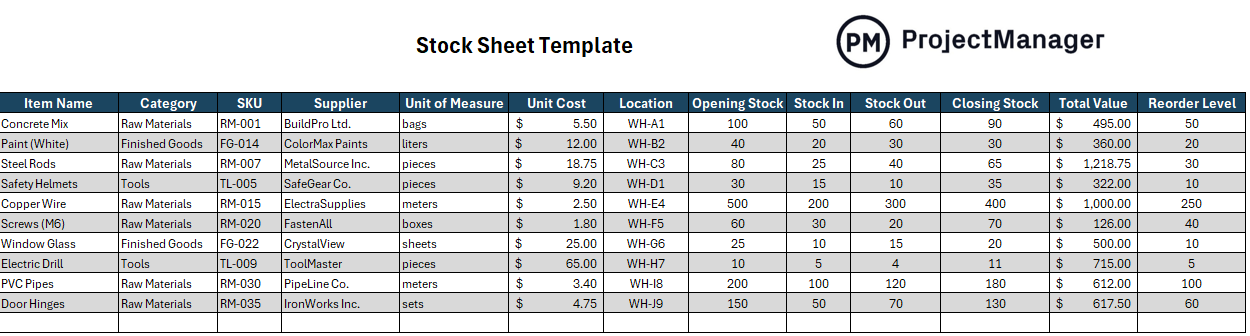
This stock sheet template organizes inventory by item name, category, SKU and supplier, making it easy to identify materials across locations. Opening stock, stock in and stock out columns calculate closing stock automatically, helping teams maintain accurate inventory levels. Unit cost and total value fields support inventory valuation and budget tracking, while reorder level thresholds flag when replenishment is required. Because everything appears in one structured grid, managers can quickly review stock movement, detect discrepancies and plan procurement without reviewing separate transaction logs.
Not all inventory is the same. While there are many types of retail stock or components used in manufacturing, equipment must be recorded and tracked. Depending on the business, equipment inventory can be IT-related, such as computers, printers, etc., and construction and manufacturing businesses might have heavy equipment to keep track of. Either way, this free inventory template will help manage equipment and cover everything from serial numbers to loan payments.
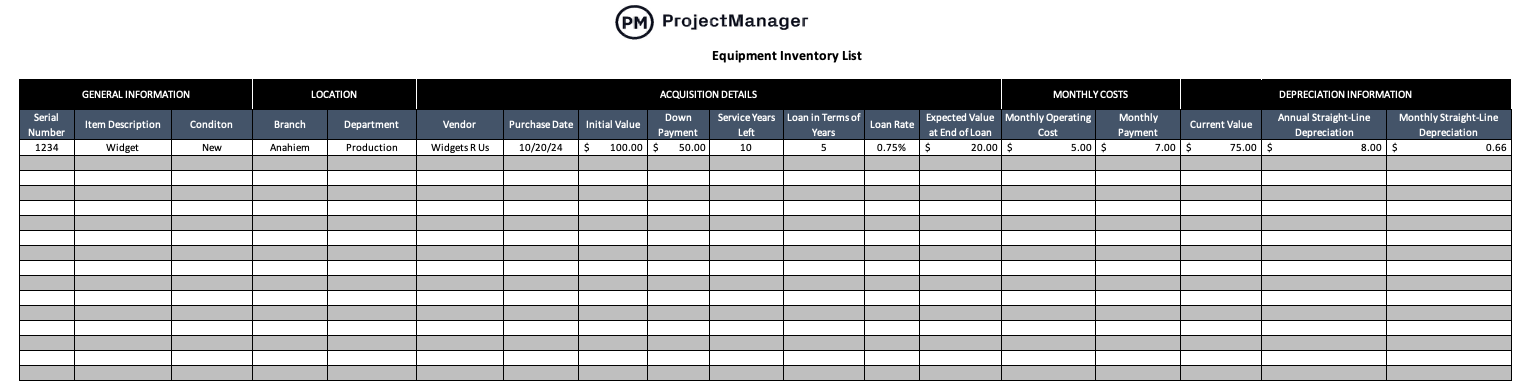
Download this free equipment inventory template for Excel for a more thorough inventory of equipment, but also track those assets to know what’s available and if there are any inventory gaps. Don’t let equipment costs throw the budget into disarray and cause project cost overrun. This inventory list template tracks costs, letting managers know when old equipment needs to be replaced before it malfunctions and causes work slowdowns.
Use the inventory template to schedule maintenance to keep equipment running as it should to avoid breakdowns and delays that can impact the budget. Keep employees accountable by always knowing who is working on what based on sign-outs and usage.
Before work begins on a job site or production run, teams need a structured breakdown of required materials. A material list outlines every component, quantity and specification necessary to complete a project. Construction contractors, engineering teams and manufacturing operations use material lists to estimate costs, coordinate procurement and prevent delays caused by missing supplies or inaccurate quantity calculations.

Designed to support planning and purchasing, this material list template organizes materials by description, grade or specification and trade category. Required quantities, unit cost and total cost fields help calculate accurate project budgets, while supplier details and required delivery dates improve procurement scheduling. Delivery location and storage requirements ensure materials are handled correctly once received, giving project managers stronger control over cost forecasting, logistics coordination and on-site inventory readiness.
When materials are needed on-site or in production, teams don’t simply pull items without documentation. A material requisition formally requests specific materials from inventory for operational use. Construction companies, manufacturing plants and maintenance departments rely on material requisitions to control internal inventory movement, prevent unauthorized withdrawals and maintain accurate stock levels while keeping projects aligned with their schedule and resource plan.
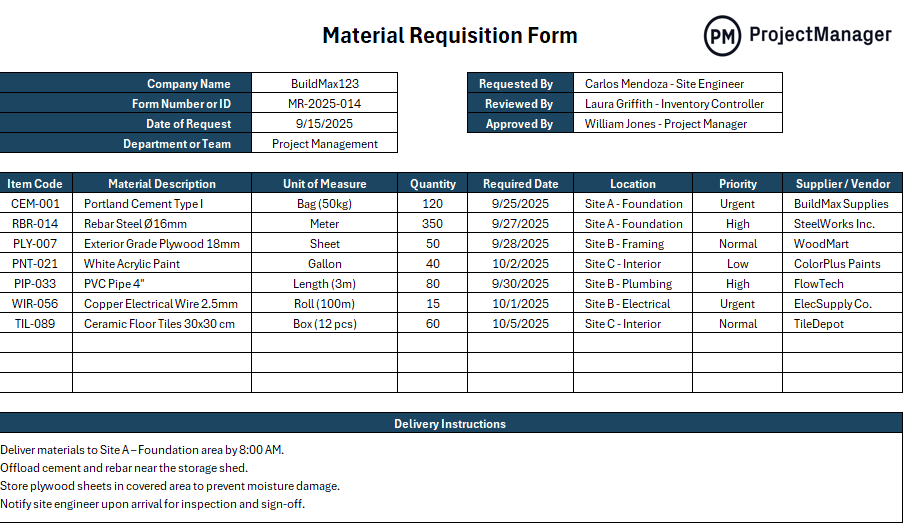
Structured for accountability, this material requisition template captures company details, request dates and approval signatures before any material is released. Item codes, descriptions, required quantities and needed-by dates connect each request to a specific location and priority level. Supplier references and delivery instructions clarify logistics, while approval tracking ensures oversight. By documenting internal material transfers, teams protect inventory accuracy and reduce stock discrepancies.
Before money is committed to a supplier, organizations typically require formal internal approval. A purchase requisition is a documented request asking management or procurement to authorize buying specific goods or services. Medium to large businesses, government agencies and structured operations use purchase requisitions to enforce budget control, maintain procurement policies and ensure purchasing decisions align with financial planning.
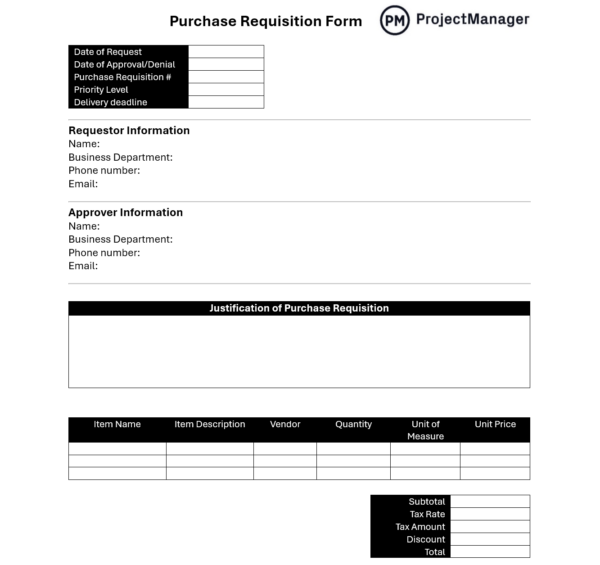
Designed to streamline approval workflows, this purchase requisition template records request dates, priority level and delivery deadlines at the top for quick visibility. Requestor and approver information creates clear accountability, while the justification section explains the business need. Item details, quantities, unit pricing and vendor fields provide cost transparency. Subtotal, tax and discount calculations summarize financial impact before approval is granted.
In manufacturing, production and inventory go hand-in-hand. Production scheduling requires the inventory it needs when it needs it, and inventory must have those items in stock to keep the facility running without interruption. Therefore, this free production schedule template for Excel is an important companion piece to all the inventory templates that can be downloaded from this page.
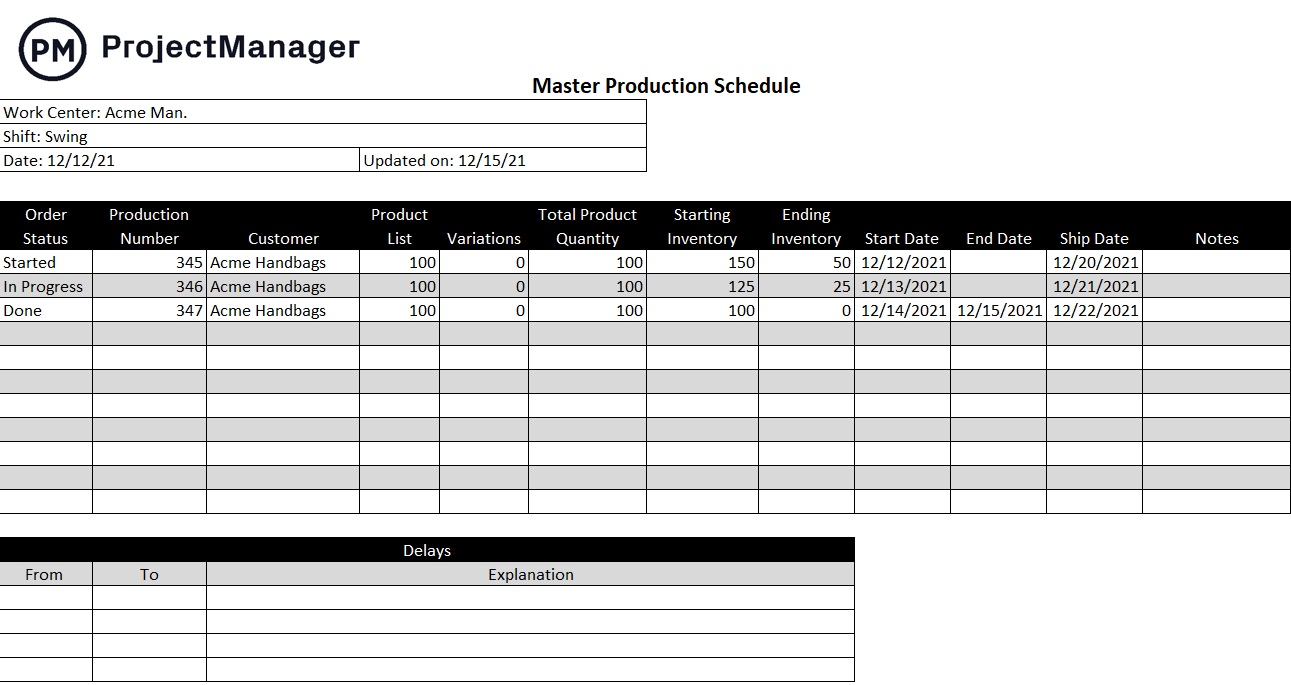
This free production schedule template for Excel ensures that manufacturers have the materials they need, scheduled for the production cycle to meet customer demand. Use this inventory template to balance supply with demand when producing any commodity. It tracks the product as it moves through the production cycle over a specific period with the flexibility to respond to fluctuations in demand and set up stock to avoid stockouts.
A production schedule template is a vital part of any supply chain management. It manages resources, helps the sales team deliver goods to customers as needed and allows managers to make accurate and realistic production plans. Amid production planning, this free template manages the means to track targets, manage deliveries and allocate both human and nonhuman resources.
A bill of materials is used in manufacturing to list what’s needed to assemble a product. It’s connected to inventory in that those items must be in stock when production needs them. Therefore, this free bill of materials template for Excel is an essential inventory tool as it acts as an instruction manual to help production and inventory avoid delays and waste in the production cycle. Download this important inventory template to help with estimates, planning and inventory control.
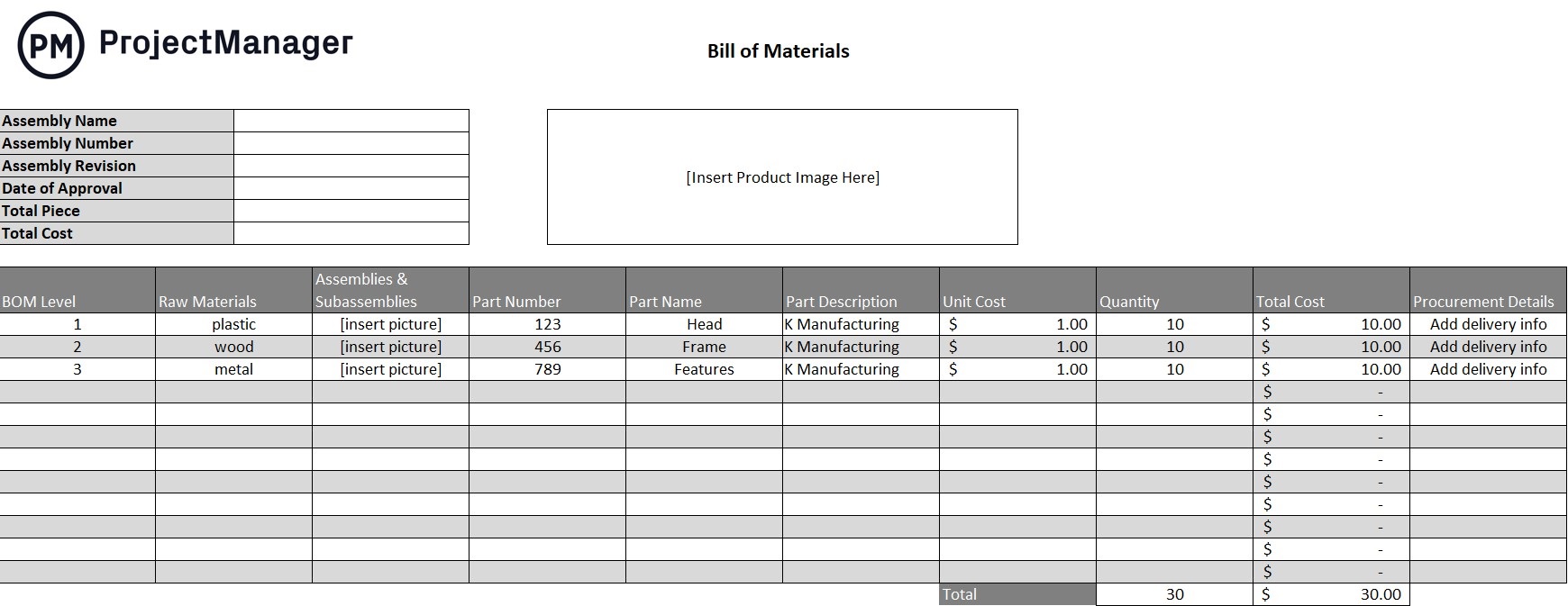
Use this inventory list template to identify all the pieces needed to create the final project in an assembly line. The bill of materials isn’t solely an instruction manual for the product, but it addresses packing, as it relates to how the product will be shipped or even used. The template lists the quantities and costs of each component and can be used to communicate the procurement process and assemble and even repair the product.
This will add efficiency to the supply chain and ensure materials are on hand when needed. Without a bill of materials, there can be delays or extra costs in warehousing. Manage production costs and inventory and streamline production all with one template.
Inventory requires the procurement of components, raw materials and more. A purchase order streamlines that process by reducing confusion and providing a paper trail for legal purposes, if necessary. This free purchase order template for Excel is a contract between the buyer and seller. It’s legally binding, outlining the price, quantity, delivery window and terms of payment for an item.
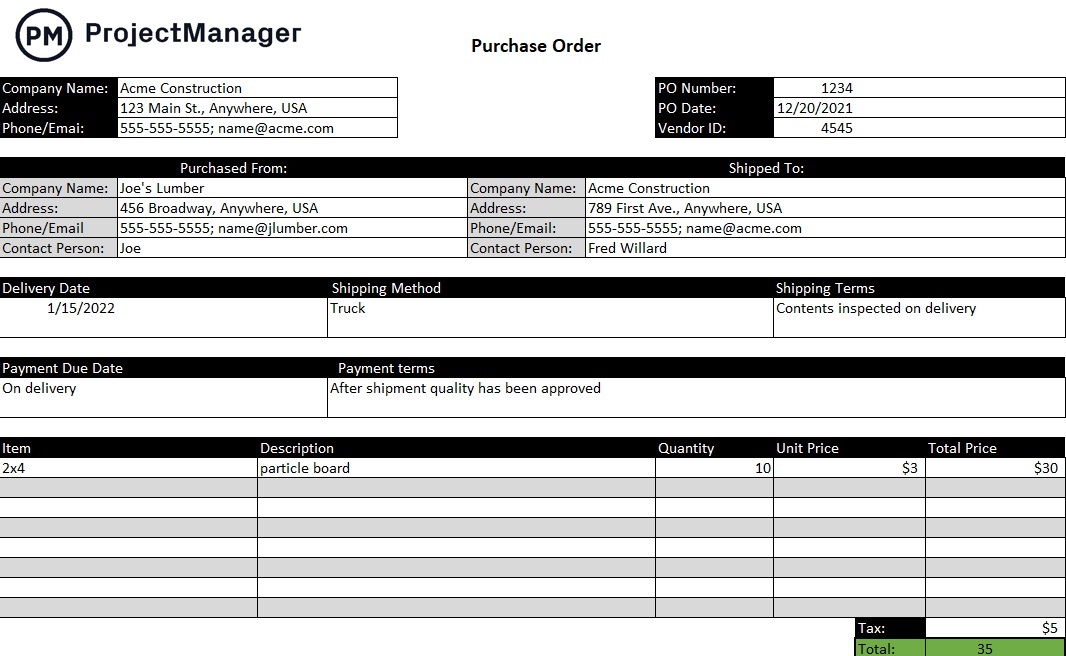
This inventory template creates an agreement between buyer and seller and can be used in almost any type of business, especially manufacturing and construction project management that require materials on time and purchased at a price point that fits into their budgets.
Using a purchase order template saves time in the procurement process. It is legally binding, which is important when materials need to be delivered within a specific timeframe, but it’s also a communication tool allowing the buyer and seller to find common ground, which helps to avoid problems later when they can delay projects and threaten the budget.
Vendors prepare this commercial document for customers, which is called a sales order. This free sales order template for Excel confirms the sale, including details about the transaction, payment, delivery and more. As an inventory template, it can be used in industries as diverse as retail, supply, wholesale and manufacturing.
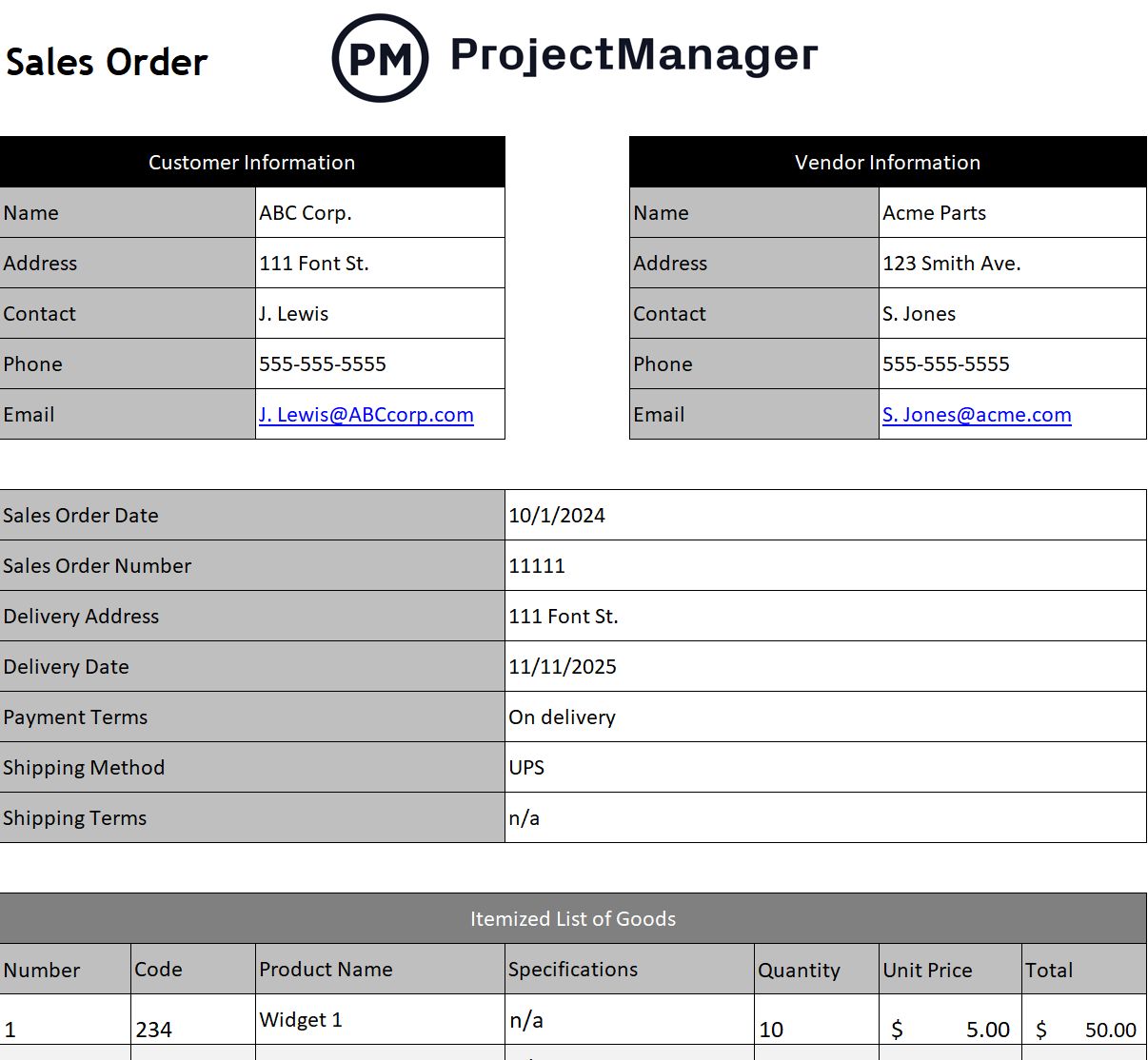
This inventory template allows vendors and customers to keep accounts orderly. It also helps with inventory management by being able to know what orders need fulfillment before being shipped. This prevents backorders and optimizes the procurement process.
This inventory list template has everything needed to create a legally binding and useful sale order. It has customer and vendor information. There’s a sales order number to track the order and space for the delivery address and when the items should be delivered. Feel free to add payment terms, shipping methods and much more.
ProjectManager Manages Inventory Better Than Templates
Inventory templates are helpful to a point. They can start a process, but not see it through to the end. That’s because they’re static documents that must be manually updated and are not designed for collaboration. Even Google Sheets, which are collaborative, aren’t inventory management software. They’re just online spreadsheets. Don’t run projects on spreadsheets, not when there is project management software. Upgrade to ProjectManager, an award-winning project and portfolio management software that helps managers plan, manage and track inventory in real time.
Manage and Track Inventory With Kanban Boards
Inventory templates can sync with production schedules to ensure materials are on hand when workers need them on the assembly line. Our software has multiple project views so if a production schedule is created on the Gantt chart or sheet view, the production floor crew can view it on kanban boards. These visualize workflow as tasks move from one stage of production to the next. Workers can manage their jobs, but managers get transparency into the process and can ensure that resources are available when needed.

Keep Track of Resources in Real Time
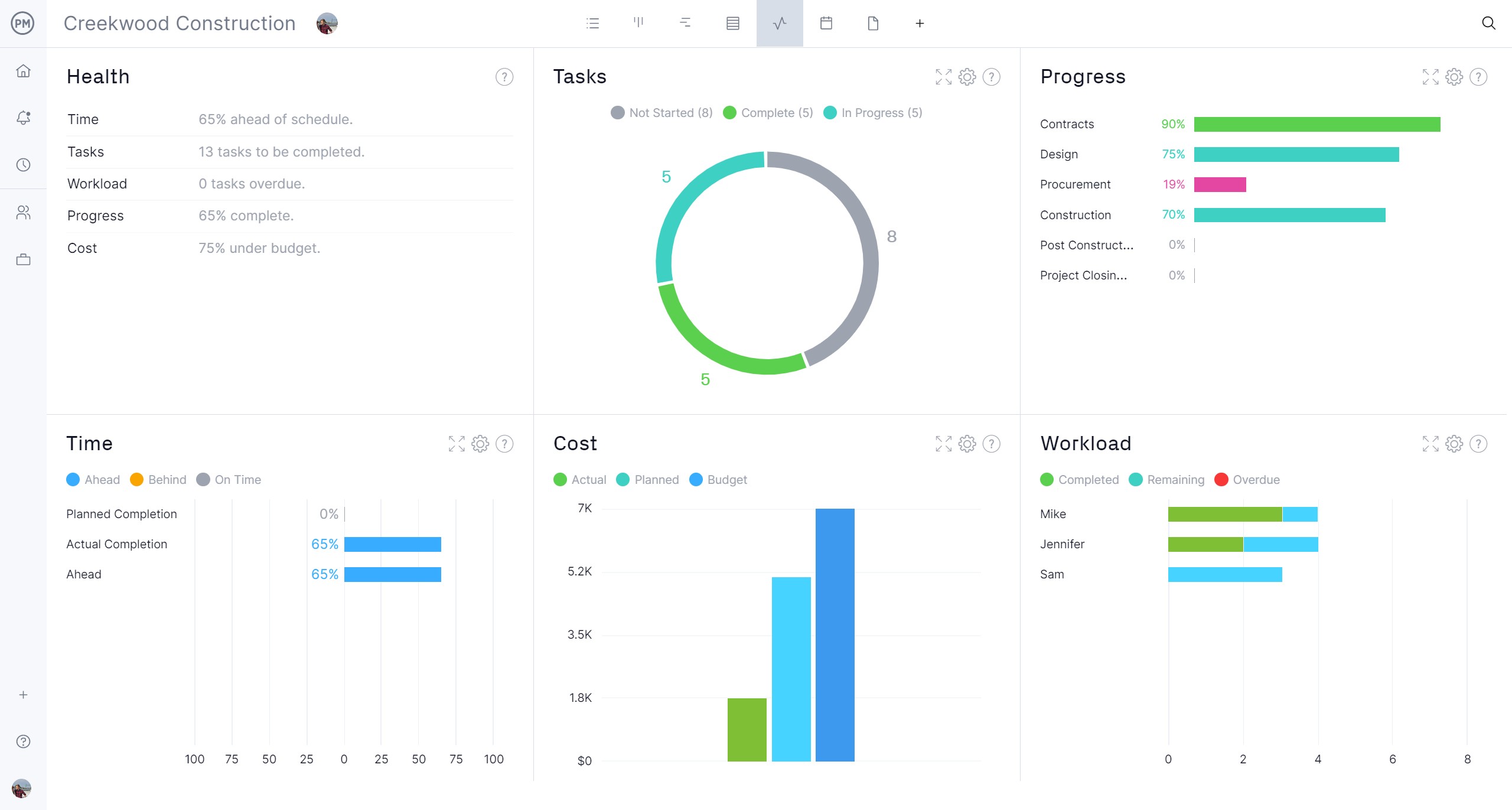
When a baseline is set on the Gantt chart or sheet view, it captures the production plan. Now the software can compare planned costs, time and resources to actual progress, spending and resource utilization in real time. Managers can get a high-level view with real-time project and portfolio dashboards, where live data is displayed on easy-to-read graphs and charts that show time, cost, workload and more. Customizable reports go deeper into that data and can be filtered to share more general information to keep stakeholders informed. Templates can’t do that.
Related Inventory Content
Inventory templates only scratch the surface of inventory management. For those who can’t get enough of this subject, here are recent posts that cover equipment inventory, warehouse optimization and more.
ProjectManager is online project and portfolio management software that connects teams whether they’re in the office or on the production floor. They can share files, comment at the task level and stay updated with email or in-app notifications. Join teams from Avis and Nestle to Siemens who use our software to deliver successful projects. Get started with ProjectManager today for free.