
When projects stall or risks start compounding, an escalation matrix gives teams a structured way to act fast and involve the right people without overreacting or losing control.
What Is an Escalation Matrix?
An escalation matrix is a decision-making framework that defines how issues move through an organization when they cannot be resolved at the current level. It should define issue ownership, issue priority levels, response paths and contacts. It is used when delays, risks, conflicts or service failures threaten outcomes and timely issue management responses are needed to restore control.
Related: Top 7 Decision-Making Templates: Free Excel & Word Downloads
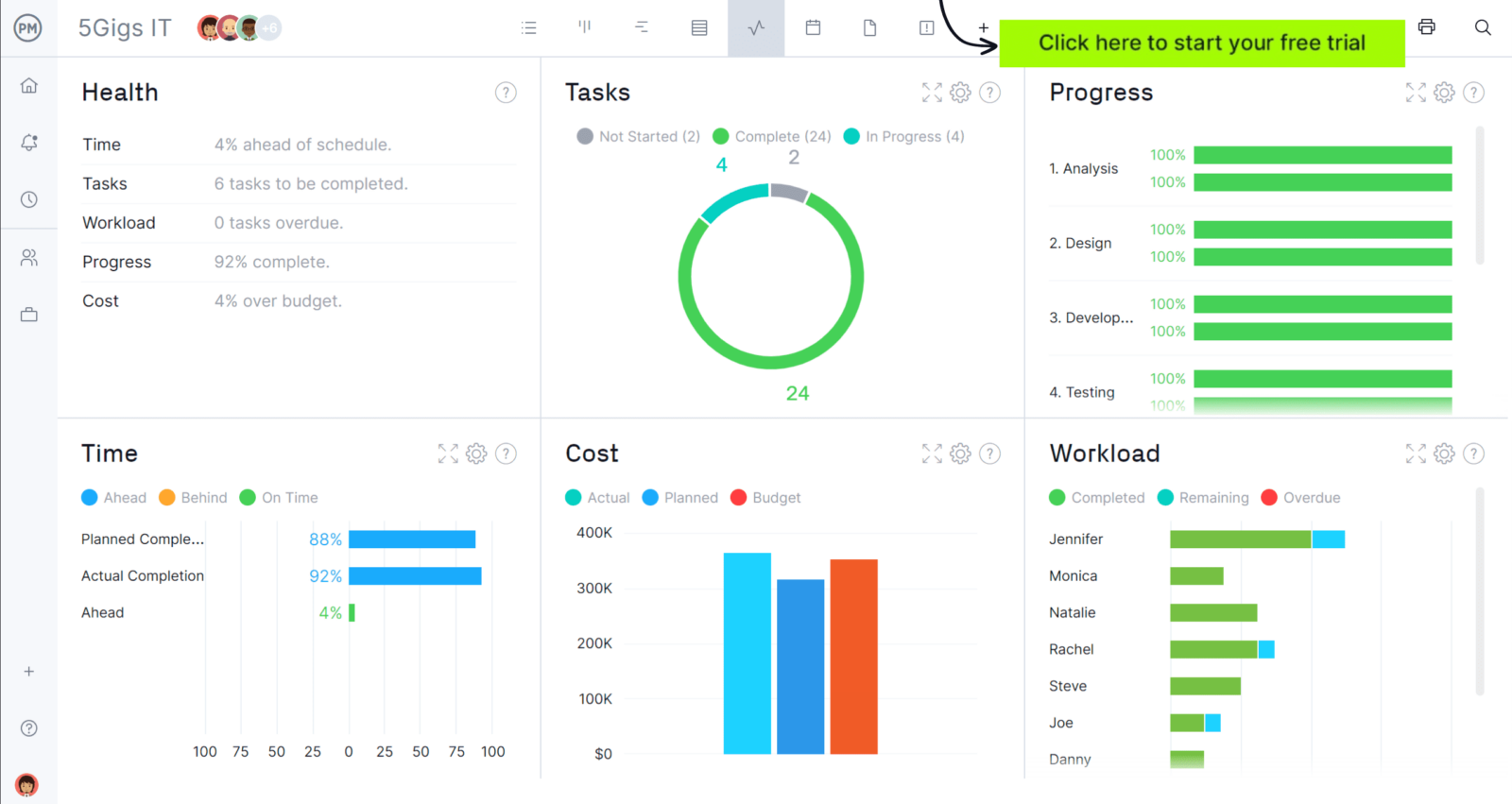
Whenever you’re ready to start managing projects, give ProjectManager a try. ProjectManager is an award-winning project management software designed to plan, schedule and track projects from start to finish. Build detailed project schedules, allocate resources, monitor costs and compare estimates against actual performance using a complete set of powerful project management tools. Get started for free today.
What Is the Purpose of an Escalation Matrix?
The purpose of an escalation matrix is to give teams a clear path for raising issues before they damage project schedules, budgets, service levels or relationships. By defining who gets involved, when action is required and how decisions move upward, it helps organizations respond faster, reduce confusion, maintain accountability and resolve problems at the right level before they escalate further.
- Establish a consistent route for handling unresolved issues so teams do not rely on assumptions, urgency or informal workarounds.
- Clarify who owns each stage of escalation, which speeds up decisions and reduces delays caused by unclear responsibility.
- Set practical thresholds for when problems involving cost, schedule, safety or performance require broader management attention.
- Improve communication during high-pressure situations by making sure the right people are notified with the right context.
- Protect project delivery and operational stability by preventing small issues from growing into larger business disruptions.
Get your free
Escalation Matrix Template
Use this free Escalation Matrix Template for Excel to manage your projects better.
What Should Be Included In an Escalation Matrix?
A practical escalation matrix should show more than just names on a contact list. It needs the controls, rules and decision points that tell teams what issues qualifiy for escalation, how urgency is measured, who takes over at each level and what steps must happen from identification through resolution and closure.
Document Control
Every escalation matrix needs a clear way to stay accurate as it changes over time. Document control defines who owns the file, who approves updates and how revisions are tracked. It ensures the latest version is always used and provides a reliable record of changes for accountability and audit purposes.
Purpose & Scope
Before using an escalation matrix, teams need to understand exactly when it applies and why it exists. The purpose and scope of an escalation matrix define the types of issues that require escalation, including operational, technical, safety, financial and contractual concerns, while making clear what falls outside its use to prevent confusion or misuse.
Roles & Responsibilities
When issues escalate, confusion over ownership can delay decisions and slow resolution. Roles and responsibilities clarify who is accountable, who takes action and who provides support at each stage. This ensures every issue has a clear owner, decisions are made quickly and escalation moves forward without duplication or gaps.
Escalation Principles
Without clear guidelines, escalation quickly becomes inconsistent and driven by urgency or hierarchy rather than actual need. Escalation principles set the rules for how issues should be handled, prioritizing resolution at the lowest level, focusing on impact instead of titles and ensuring timely action without blame or unnecessary escalation.
Priority Levels
Not all issues require the same level of attention or resource allocation, so teams need a consistent way to prioritize them. A severity classification system defines how issues are ranked based on impact and urgency, helping determine response times and escalation levels. This ensures critical problems are addressed immediately while lower-priority issues are handled appropriately.
Escalation Triggers
Teams need clear criteria to know when an issue can no longer stay at its current level. Escalation triggers define specific conditions, such as time delays, cost overruns or safety incidents, that require action. This removes guesswork, ensures consistency and prevents issues from lingering until they become more serious or disruptive.
Escalation Levels & Hierarchy
When escalation is required, everyone needs to know who becomes responsible at each step. Escalation levels define the chain of involvement, from initial response to executive intervention, ensuring issues are handled by the right people. Clear roles prevent confusion, speed up decisions and ensure accountability as problems move through the organization.
Escalation Contact Matrix
Once escalation occurs, teams need immediate access to the right contacts without delays or confusion. The escalation contact matrix provides a centralized list of key individuals by role and level, including primary and backup contacts. This ensures availability at all times and allows issues to move forward quickly when timely response is critical.
Escalation Workflow
An escalation matrix only works if there is a clear process behind it. The escalation workflow defines each step from identifying an issue to resolving and closing it. It ensures problems are logged, assessed, escalated when needed and documented properly, creating a consistent approach that teams can follow under pressure.
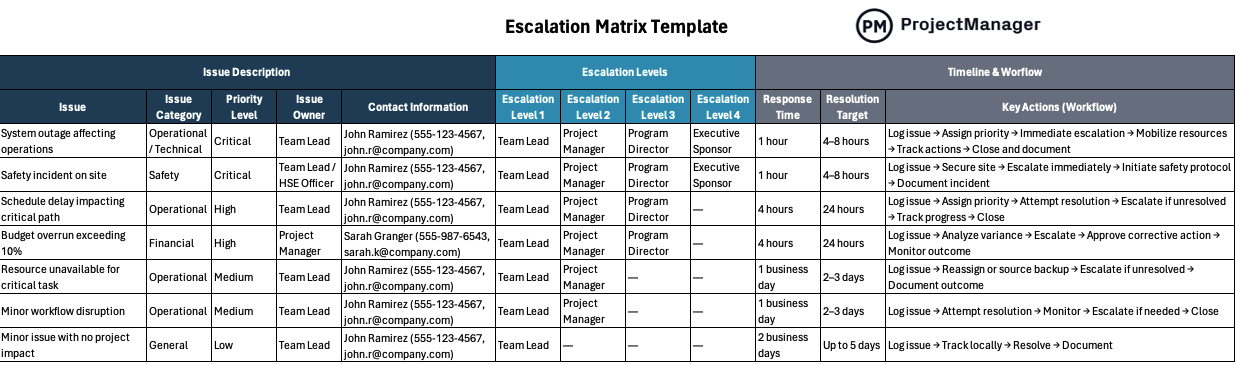
This free escalation matrix template for Excel is designed to help teams manage issues based on priority, ownership and defined escalation levels. It organizes issue categories, assigns responsible contacts and outlines response times and workflows. By standardizing how problems are escalated and resolved, it enables faster decision-making, improves accountability and keeps projects moving without unnecessary delays.
Escalation Matrix Example
The best way to understand how to use an escalation matrix is to think of a real-life scenario. Imagine a construction company managing a large infrastructure project where delays, safety incidents and cost overruns begin affecting progress. As issues emerge across teams, the escalation matrix guides who steps in, how priorities are assigned and when decisions move to higher management levels.
Document Control
| Field | Data |
| Document Title | Escalation Matrix Template – Construction Projects |
| Version Number | v1.3 |
| Date Created | 2026-03-15 |
| Last Updated | 2026-04-10 |
| Author / Owner | Kayla Lawrence – PMO Lead |
| Approval Authority | Director of Operations |
| Distribution List | Project Managers, Site Engineers, HSE Team |
| Change Log | v1.3 – Updated escalation thresholds and contacts |
Purpose & Scope
The purpose of this escalation matrix is to provide a structured process to escalate issues that impact project performance, safety or delivery timelines.
| Sc0pe Category | Description |
| Operational Issues | Delays in construction activities, resource shortages, workflow disruptions |
| Technical Issues | Design conflicts, engineering errors, system failures |
| Safety Issues | Workplace incidents, hazardous conditions, regulatory violations |
| Financial Issues | Budget overruns exceeding 10%, unexpected cost increases |
| Contractual Issues | Scope disputes, vendor non-compliance, contract breaches |
| Out of Scope | Minor day-to-day issues resolved within team, administrative tasks with no project impact |
Roles & Responsibilities
| Role | Responsibility | RACI Classification |
| Issue Owner | Identify, document and track the issue | Responsible |
| Team Lead | Attempt initial resolution and assess severity | Responsible |
| Project Manager | Manage escalation process and coordinate stakeholders | Accountable |
| Functional Lead | Provide technical or domain expertise | Consulted |
| Program Manager | Approve major changes to scope, cost or schedule | Accountable |
| Executive Sponsor | Remove strategic blockers and provide direction | Accountable |
| Stakeholders | Receive updates and provide input when required | Informed |
Escalation Principles
| Principle | Description |
| Resolve at Lowest Level | Teams must attempt resolution before escalating |
| Impact Over Hierarchy | Escalate based on severity, not job title |
| No-Blame Approach | Focus on solving the issue, not assigning fault |
| Timeliness | Escalations must follow defined response timelines |
| Clear Communication | Provide complete and accurate issue details when escalating |
Priority Levels
| Level | Name | Description |
| 1 | Critical | Stops operations, safety risk or major financial impact exceeding $50K |
| 2 | High | Significant delays, major deliverable risk or escalating cost issues |
| 3 | Medium | Noticeable disruption with manageable impact on schedule or workflow |
| 4 | Low | Minor issue with little to no impact on project outcomes |
Escalation Triggers
| Trigger Type | Threshold |
| Time-Based | Issue unresolved after 24 hours (Critical) or 72 hours (High) |
| Budget Variance | Cost exceeds planned budget by more than 10% |
| Schedule Delay | Activity delayed by more than 3 days on critical path |
| Safety Incident | Any injury, near miss or regulatory violation |
| Client Escalation | Formal complaint or dissatisfaction reported by client |
| Resource Constraint | Key resource unavailable for more than 2 days |
Escalation Levels & Hierarchy
| Level | Role | Responsibility |
| 1 | Team Lead | Identify issue and attempt initial resolution |
| 2 | Project Manager | Coordinate resources and manage escalation process |
| 3 | Program Manager / Director | Make decisions affecting scope, cost or timeline |
| 4 | Executive Sponsor | Provide strategic direction and remove major blockers |
Escalation Contact Matrix
| Name | Role | Department | Level | Phone | Availability | Backup Contact | |
| John Ramirez | Team Lead | Construction | 1 | (555) 123-4567 | [email protected] | 7 AM – 5 PM CST | Maria Lopez |
| Sarah Granger | Project Manager | PMO | 2 | (555) 987-6543 | [email protected] | 8 AM – 6 PM CST | David Smith |
| David Smith | Program Director | Operations | 3 | (555) 222-3344 | [email protected] | 9 AM – 6 PM CST | Lisa Turner |
| Lisa Turner | Executive Sponsor | Executive | 4 | (555) 444-5566 | [email protected] | On-call | N/A |
Escalation Workflow
| Step | Action | Owner | Output |
| 1 | Identify issue | Team Member | Issue recognized and described |
| 2 | Log issue in system | Team Lead | Ticket created with details |
| 3 | Assign severity level | Team Lead | Priority defined |
| 4 | Attempt Level 1 resolution | Team Lead | Initial actions taken |
| 5 | Escalate if SLA exceeded | Project Manager | Issue moved to next level |
| 6 | Notify next level | Project Manager | Stakeholders informed |
| 7 | Track actions and decisions | Assigned Owner | Progress documented |
| 8 | Close and document | Project Manager | Issue resolved and recorded |
ProjectManager Is an Award-Winning Project Management Software
ProjectManager offers robust project management features such as Gantt charts, task lists, workload management charts, timesheets and real-time dashboards and reports. In addition to that, it’s also equipped with AI project insights, online team collaboration features and unlimited file storage that further help project managers ensure nothing falls through the cracks. Watch the video to learn more!
If you need a tool to help you manage projects, then signup for our software now at ProjectManager. Our online software helps teams across industries plan, track and oversee projects as they unfold. Sign up for a free 30-day trial today!