


Oracle understands that project management is a critical function of many organizations. That’s why there are so many Oracle project management products. But what is the right Oracle project management tool for your organization? The question may make you feel overwhelmed.
Why Does Oracle Have So Many Project Management Tools?
Searching for “Oracle project management software” tends to raise more questions than it answers. Oracle didn’t build one project management tool—it built (and acquired) a whole family of them, each aimed at a different kind of project, team, or industry. There’s a construction-specific stack, a professional-services stack, a native ERP module and a couple of specialist tools bolted on top. None of it is labeled clearly for a newcomer and Oracle has renamed more than one of these products mid-life, which only adds to the fog.
Don’t worry, this guide breaks down what each Oracle tool actually does, who it’s genuinely built for and where the rough edges are—based only on what Oracle itself publishes about these products. However, despite Oracle being an established name in the space, Oracle’s project management lineup is fragmented across separate products with overlapping names, which is why we also feature a project management software alternative.
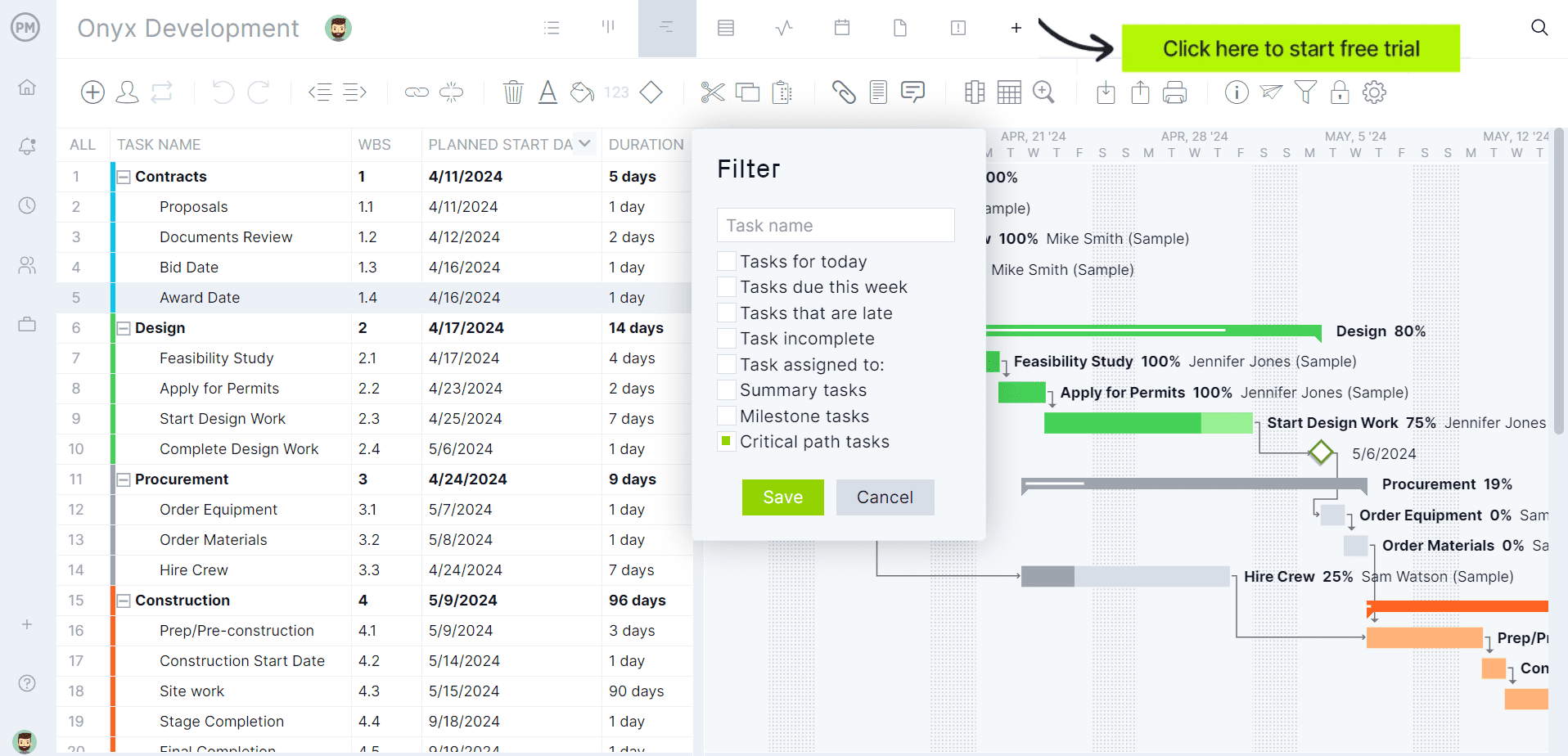
ProjectManager is award-winning project and portfolio management software that is less expensive, easier to learn and more efficient than piecing together multiple Oracle products. Rather than license and configure several separate Oracle tools, ProjectManager has multiple project views, from Gantt charts that automatically update, link all four types of task dependencies, filter for the critical path and can set a baseline to track project variance in real time. Plus, there are kanban boards, calendars, task lists and other tools to plan, schedule and track projects from start to finish. Get started with ProjectManager today for free.
Plus, ProjectManager connects natively with QuickBooks, Acumatica and MYOB Acumatica, syncing tasks, timesheets and costs between project and finance teams automatically. It also links to 100+ tools like Microsoft Project, Excel, Salesforce and Zapier.
10 Oracle Project Management Tools, Explained
Below are the ten Oracle products people most often ask about when they say “Oracle project management.” A few are built for heavy construction and engineering programs, a few live inside Oracle’s ERP and NetSuite platforms for services and finance-driven teams and a couple are narrow specialist tools for risk or payments.
1. Primavera P6 Professional
P6 Professional is Oracle’s desktop scheduling application and it’s the one most veteran schedulers picture when they hear “Primavera.” According to Oracle’s own documentation, it’s a comprehensive, multiproject planning and control tool that lets you budget, prioritize, plan, administer and manage multiple projects, optimize shared resources, control changes and keep projects moving toward on-time, on-budget completion.
It supports critical-path-method (CPM) scheduling, work and organizational breakdown structures, resource leveling and a Visualizer tool for building time-based Gantt and timescaled logic diagram reports. It can run as a fully standalone application or connect into a larger Primavera P6 EPPM database.
The catch is that this power comes with a learning curve most casual project managers will never need to climb. P6 Professional is a desktop client built for dedicated planners and schedulers, not a lightweight tool a whole project team logs into daily. It’s also licensed and priced separately from the web-based EPPM edition, so larger organizations often end up needing both: P6 Professional for the scheduling specialists and P6 EPPM for everyone else who just needs visibility.
Main Use Cases for Primavera P6 Professional
- Building and maintaining detailed multiproject schedules using critical-path-method logic.
- Managing unlimited resources and target plans on large, complex programs.
- Producing Gantt charts and timescaled logic diagrams for stakeholder reporting.
- Tracking dynamic, cross-project rollups of cost, schedule and earned value.
- Running as a standalone scheduling tool without needing the full EPPM environment.
Who Is Primavera P6 Professional For?
- Dedicated project schedulers and planners on large infrastructure or industrial programs.
- Project controls specialists who need unlimited resource and target-plan flexibility.
- Organizations that need a powerful desktop scheduling tool independent of a web platform.
- Teams already using P6 EPPM who need a more technical scheduling client for specialists.
- Engineering and construction firms managing highly complex, multi-year project portfolios.
2. Primavera P6 EPPM
P6 EPPM (Enterprise Project Portfolio Management) is the web-based sibling of P6 Professional and it’s built for a much broader audience. Oracle describes it as a robust, easy-to-use solution for globally prioritizing, planning, managing and executing projects, programs and portfolios, scalable from a single user on a small project to tens of thousands of users across hundreds of projects, whether on-premises or in the cloud. It gives every role—executive, planner, or field team member—an interface suited to their job, including dashboards, web apps and mobile options like P6 Team Member for iOS and Android. It also connects to Primavera Unifier so cost codes and schedules stay tied together across the portfolio.
Because it’s an enterprise platform rather than a simple app, getting real value out of P6 EPPM usually means dedicated administrators to configure the Enterprise Project Structure, security and templates correctly before anyone sees a benefit. And since it shares the “P6” name with P6 Professional, plus a growing set of Primavera Cloud services layered on top, it’s genuinely easy for a newcomer to mix up which edition does what.
Main Use Cases for Primavera P6 EPPM
- Giving executives a real-time, portfolio-wide view of project performance.
- Managing incoming project demand and balancing resources across a program.
- Letting field and office teams update status through web, tablet, or mobile apps.
- Running interactive Gantt charts, calendars and activity network views for teams.
- Scaling project and portfolio management from one project to an entire enterprise.
Who Is Primavera P6 EPPM For?
- Enterprises managing large, multi-project, multi-user project portfolios.
- Executives and portfolio managers who need real-time visibility without using desktop software.
- Project teams who need role-based, web and mobile access to schedules and status.
- Organizations that also use Primavera Unifier for connected cost and schedule management.
- IT and project-controls administrators responsible for enterprise-wide configuration.
3. Oracle Primavera Cloud
Primavera Cloud is Oracle’s modern, all-in-one cloud platform for planning, scheduling, resource and risk management on engineering and construction projects. Oracle positions it as the tool that brings office and field teams together, connecting the contract schedule and the field schedule into one unified plan. It combines CPM scheduling with lean, collaborative planning tools, a centralized resource pool across the whole portfolio and built-in qualitative and quantitative risk management—including Monte Carlo simulations to forecast schedule and cost outcomes—without needing third-party add-ons.
Primavera Cloud shares a lot of conceptual ground with P6, which is exactly why it confuses people: Oracle built it to eventually replace P6 for many customers, but P6 hasn’t gone away and the two products organize data differently, so migrating from one to the other takes real planning rather than a simple export-import. Organizations with years of P6 project data shouldn’t assume Primavera Cloud will just absorb it without a dedicated migration effort.
Main Use Cases for Oracle Primavera Cloud
- Connecting contract schedules and field schedules into a single, unified project plan.
- Running lean, collaborative planning sessions with digital task cards and boards.
- Managing a centralized resource pool of labor, equipment and materials across projects.
- Running Monte Carlo risk simulations to forecast schedule and cost outcomes.
- Giving field teams offline access to update task progress from a jobsite.
Who Is Oracle Primavera Cloud For?
- Engineering and construction firms wanting a fully cloud-based planning and scheduling platform.
- Owners who want to connect delivery teams around one shared digital workplan.
- Project controls teams who need built-in risk analysis without extra tools.
- Organizations planning a longer-term move away from on-premises P6 environments.
- Field and office teams who need one system instead of separate contract and field schedules.
4. Oracle Aconex
Aconex is Oracle’s document, correspondence and process-control platform for large, multi-party construction and infrastructure projects. Per Oracle, it captures every document, message and decision in one system that nothing can delete or edit, creating a single, unalterable project record intended to reduce disputes and keep every organization working from the same version of the truth. It also includes model coordination for BIM files, automated clash detection and configurable workflows for bids, RFIs and approvals. Oracle notes the platform has supported more than 6 million users and over US$1 trillion in project value across 70 countries.
Aconex is a document-and-process control system, not a scheduling or cost-management tool—for that, teams need P6 or Primavera Cloud and Unifier. It’s also built for the scale of major infrastructure programs, so smaller contractors and subcontractors may find the correspondence rules and permission structure more formal than they’re used to, with a real onboarding curve for anyone new to the platform.
Main Use Cases for Oracle Aconex
- Creating a single, unalterable record of every document, RFI and correspondence on a project.
- Coordinating BIM models between design and construction teams with clash detection.
- Managing bid invitations, submissions and communication during procurement.
- Enforcing standardized, configurable review and approval workflows across organizations.
- Supporting secure, multi-party collaboration on large defense or infrastructure programs.
Who Is Oracle Aconex For?
- Owners and delivery teams on large-scale infrastructure, energy, or transport projects.
- Document controllers responsible for a project’s official record and audit trail.
- BIM coordinators managing model exchange and clash resolution between disciplines.
- Procurement teams running formal bid processes across many subcontractors.
- Government and defense programs needing FedRAMP-authorized document collaboration.
5. Primavera Unifier
Unifier is Oracle’s capital planning and project controls platform and it leans heavily on process automation rather than scheduling. Oracle describes Unifier Accelerator, its base configuration, as including more than 25 years of process expertise in the form of over 125 preconfigured business processes and 250-plus reports and dashboards spanning capital planning, project execution and facilities and asset management. It handles cost control, contract and change management, cash flow and even facilities functions like work orders, leases and space management—and it links directly to Primavera Cloud Portfolio and P6 so budgets and schedules stay connected.
Unifier’s biggest strength—its deep configurability with no-code and low-code tools—is also its biggest time sink. Getting Unifier to actually reflect an organization’s specific business processes usually means a real configuration project before go-live, not a quick setup. And because its scope stretches from capital planning all the way to facilities management, it’s easy for a team evaluating “just the project controls part” to end up licensing more than they need.
Main Use Cases for Primavera Unifier
- Managing capital planning, project selection and portfolio-level budget allocation.
- Automating contract, cost and change management processes across a capital program.
- Tracking cash flow, funding and budget variance in real time against the schedule.
- Administering facilities and asset functions like work orders, leases and space management.
- Configuring organization-specific workflows using no-code and low-code tools.
Who Is Primavera Unifier For?
- Capital planners selecting and prioritizing which projects an organization should fund.
- Project controls teams managing cost, contracts and change orders at scale.
- Owners who need facilities and asset management alongside project delivery.
- Organizations that want deep process configurability without custom-built software.
- Enterprises already using P6 or Primavera Cloud who want connected cost and schedule data.
6. Oracle Fusion Cloud Project Management
This is Oracle’s project management module inside Fusion Cloud ERP and it’s built for a different world than the construction-focused Primavera products: services delivery, product development and internal project cost tracking. Oracle says it gives organizations full control of their work, connecting the right people to the right projects, tracking financial performance across the portfolio and letting teams plan and schedule with drag-and-drop tools. It covers project planning, resourcing, cost management and billing and revenue recognition and it’s designed to work seamlessly with Fusion Cloud Financials, Procurement, HCM and Supply Chain. It even includes a digital assistant that lets people log time or update task status by voice or text.
Because it lives inside the broader Fusion Cloud ERP suite, it’s really meant for organizations already running (or planning to run) Oracle ERP—it isn’t a standalone project management app to adopt on its own. Organizations not on Fusion Cloud ERP, or whose projects are purely construction-scheduling focused, aren’t the use case Oracle designed this for; that’s what the Primavera suite is for.
Main Use Cases for Oracle Fusion Cloud Project Management
- Planning, scheduling and resourcing projects within a broader ERP environment.
- Standardizing cost collection and control across time, payroll, expenses and procurement.
- Automating project billing and revenue recognition to speed up cash flow.
- Coordinating related projects at the program level with rolled-up performance reporting.
- Using AI-assisted tools to reduce manual data entry for time and status updates.
Who Is Oracle Fusion Cloud Project Management For?
- Organizations already running Oracle Fusion Cloud ERP who need built-in project tracking.
- Services and product-development businesses managing project cost and billing together.
- Finance and project teams who need a single source of truth for project financials.
- Program managers coordinating multiple related projects across a business.
- Companies wanting project data to flow automatically into procurement, HR and accounting.
7. NetSuite OpenAir
OpenAir is Oracle NetSuite’s professional services automation (PSA) platform, built for services businesses that live and die by billable hours. According to NetSuite, OpenAir supports the entire project delivery lifecycle, replacing spreadsheets with real-time reporting and dashboards, time and resource tracking, project and expense management and advanced billing and invoicing—all aimed at helping services firms stay profitable while keeping visibility into every project.
Worth knowing upfront: Oracle officially rebranded OpenAir as SuiteProjects Pro in 2025, so both names may appear depending on which page a person lands on, which is exactly the kind of naming overlap that makes the whole Oracle project management lineup confusing to shop for. Functionally, OpenAir/SuiteProjects Pro is a genuinely deep PSA tool, but it’s overkill—and an added cost—for a small team that just needs basic project tracking; NetSuite’s own native project features may already cover that need without a separate license.
Main Use Cases for NetSuite OpenAir
- Managing the full project delivery lifecycle for professional services firms.
- Tracking resource availability, skills and utilization across a services team.
- Capturing time and expenses in real time and turning them into accurate invoices.
- Reporting on project profitability, pricing and staffing to protect margins.
- Supporting global services organizations with multi-currency and multi-entity billing.
Who Is NetSuite OpenAir For?
- Consulting, IT services and engineering firms whose revenue depends on billable hours.
- Resource managers who need visibility into who’s available and who’s overbooked.
- Finance teams responsible for project-based billing, invoicing and revenue recognition.
- Services organizations with global, multi-currency delivery teams.
- Companies already using NetSuite that have outgrown its native project features.
8. NetSuite Project Management
This is the native project functionality built into the core NetSuite ERP platform—distinct from OpenAir and often the source of real confusion for anyone comparing the two. Oracle’s own documentation describes it as a way to track projects during a sales process, define and manage project plans, assign resources and integrate project activity into the order-to-cash process. It supports project records, task hierarchies, resource assignments, job costing and project budgeting and Gantt-style tracking against a baseline, with time and cost data flowing straight into NetSuite’s general ledger.
The tradeoff is scope: this module is designed for straightforward project tracking tied to NetSuite’s financials, not for sophisticated resource planning across a large services organization. It doesn’t include the deeper utilization forecasting, skills-based staffing, or advanced multi-project portfolio views that OpenAir/SuiteProjects Pro offers, so growing services teams often end up adding OpenAir on top once native Projects stops being enough.
Main Use Cases for NetSuite Project Management
- Tracking projects tied to customers, including activities, time tracking and billing.
- Assigning resources to project tasks and monitoring allocation percentages.
- Calculating project costs and budgets directly against NetSuite’s general ledger.
- Comparing actual progress to a project baseline using built-in Gantt charts.
- Creating projects that aren’t tied to a customer, for internal work tracking.
Who Is NetSuite Project Management For?
- Smaller project-based businesses already running NetSuite as their ERP.
- Teams that need project tracking tied tightly to accounting and invoicing.
- Organizations with straightforward project structures that don’t need advanced PSA features.
- Finance-driven teams who want project costs to post directly to the general ledger.
- Companies evaluating whether they’ve outgrown native tools and need OpenAir instead.
9. Oracle Textura Payment Management
Textura is a specialist tool that solves one specific, painful problem: getting general contractors, owners and subcontractors paid accurately and on time. Oracle describes it as helping teams simplify and automate the draw process, rolling subcontractor invoices up into owner billing, managing lien waivers and compliance documents and giving every party visibility into payment status. Oracle also notes Textura has processed over US$1 trillion in payments since launching in 2006, supporting more than 120,000 projects.
Textura is purpose-built for billing and payment compliance—it isn’t a scheduling or document-management tool, so it’s typically deployed alongside P6, Primavera Cloud, or Aconex rather than instead of them. Because it’s licensed per project and integrates with a general contractor’s accounting system, smaller subcontractors sometimes experience it as “one more portal” they’re asked to join by a GC, rather than a tool they chose themselves.
Main Use Cases for Oracle Textura Payment Management
- Automating the construction draw process from pay application to disbursement.
- Rolling up subcontractor invoices into a general contractor’s owner billing.
- Managing lien waivers and compliance documents with a secure digital audit trail.
- Integrating billing and payment data automatically with accounting or ERP systems.
- Offering accelerated payment programs to help subcontractors with cash flow.
Who Is Oracle Textura Payment Management For?
- General contractors managing draw requests and payments across many subcontractors.
- Owners who want visibility and compliance controls over construction payments.
- Subcontractors submitting invoices and lien waivers on a GC-run project.
- Finance teams looking to eliminate manual, paper-based payment processes.
- Construction firms wanting payment data to sync automatically with their accounting system.
10. Primavera Risk Analysis
Primavera Risk Analysis (PRA) is Oracle’s dedicated Monte Carlo risk-modeling tool for project schedules and cost estimates and it has one of the more interesting backstories in this list: it began life as a separate product called Pertmaster before Oracle acquired it in 2008 and folded it into the Primavera family, where it remains a companion tool to Primavera P6 EPPM and P6 Professional.
It imports P6 schedules and runs qualitative risk scoring alongside quantitative Monte Carlo simulation, producing probability curves for cost and schedule outcomes and identifying which risks most affect a project’s finish date and budget. This same Monte Carlo-based risk analysis capability is also now built directly into Primavera Cloud’s Risk app, so organizations that have already moved to Primavera Cloud may not need the standalone tool at all.
That overlap is worth flagging: organizations on Primavera Cloud likely already have equivalent risk analysis built in, which makes PRA mostly relevant to organizations still running P6 on-premises. It’s also a specialist tool aimed squarely at project controls and risk analysts, not something a general project manager would use day to day.
Main Use Cases for Primavera Risk Analysis
- Running Monte Carlo simulations against an imported P6 schedule to model uncertainty.
- Producing confidence levels (such as P50, P80, P90) for project finish dates and costs.
- Generating tornado charts and sensitivity analysis to identify the biggest risk drivers.
- Modeling risk at both the individual project level and the portfolio level.
- Determining schedule and cost contingency needed before a project starts.
Who Is Primavera Risk Analysis For?
- Project controls professionals and risk analysts on complex, high-stakes programs.
- Organizations running Primavera P6 on-premises without Primavera Cloud’s built-in risk tools.
- Teams in oil and gas, EPC, infrastructure and construction managing schedule contingency.
- Planners who need to report confidence levels to stakeholders before committing to dates.
- Risk managers evaluating both threats and opportunities across a project portfolio.
ProjectManager Is the Best Project Management Software
Oracle’s project management tools have their advantages and disadvantages. But teams looking for a competitively priced, less complicated and all-in-one project management solution are sure to be frustrated by the fragmented naming, the separate licenses and the complexity associated with Oracle’s project management lineup.
ProjectManager is award-winning project management software that is the go-to tool preferred by project managers, resource managers and their teams. Even those who are wedded to Oracle’s tools because of their organization use our software to track work and stay on schedule, whether to avoid the lack of unified project views, the flexibility of our mobile app, or because they want one system instead of several. But that’s only the start of the benefits of moving from an Oracle project management tool to our software.
Multiple Project Management Views
Because every team works differently, project managers can plan and track work in whichever view suits the task at hand, then let everyone else see the same data in the view that suits them. Build out a project on the Gantt chart, link all four types of task dependencies, filter for the critical path and set a baseline to track planned versus actual progress in real time.
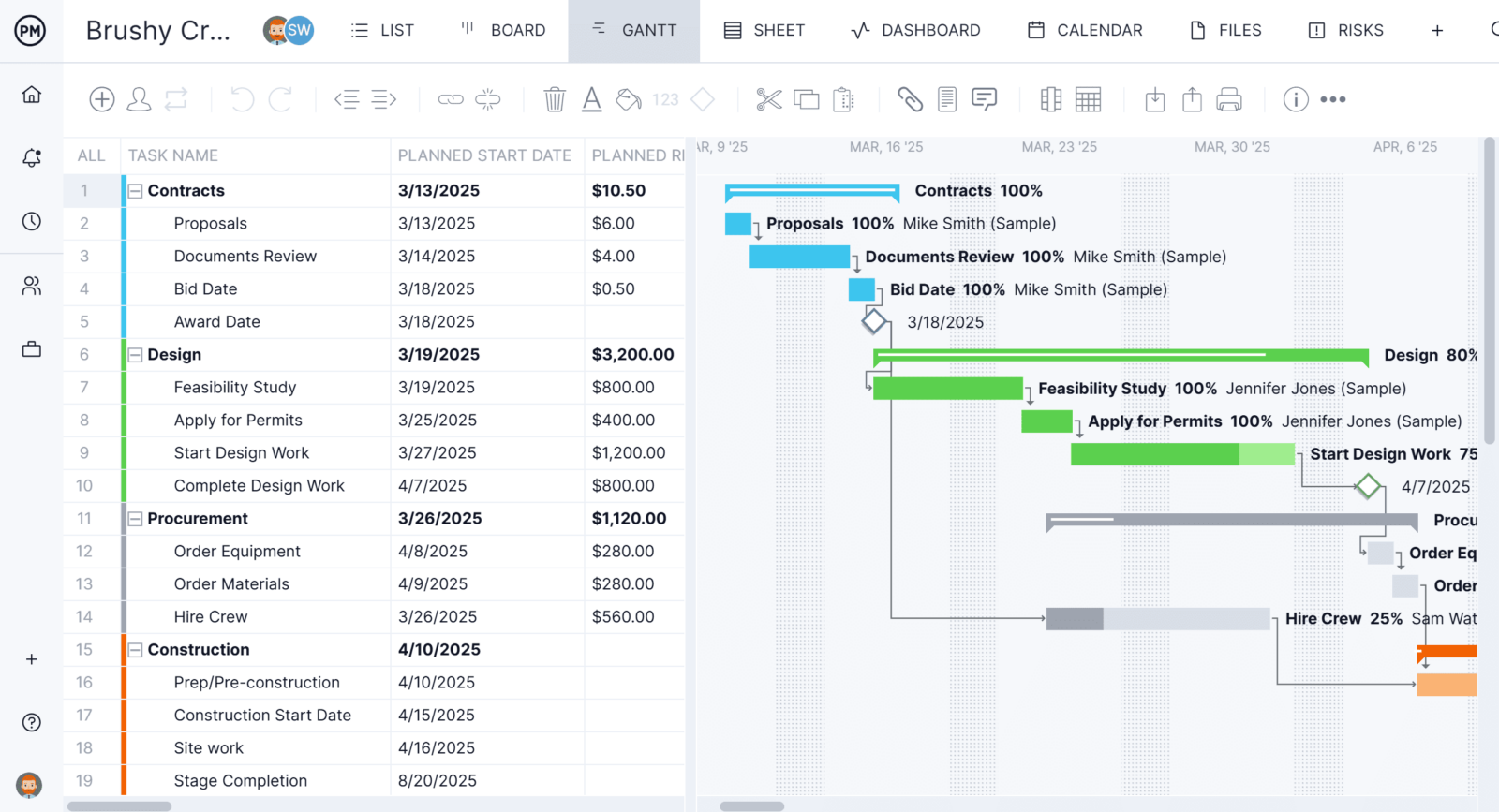
Prefer a more visual approach? The same tasks appear on a kanban board, where team members can drag and drop cards through custom workflow stages. There’s also a calendar view for scheduling at a glance and a simple task list view for anyone who just wants to check off what’s due today. Because these views are all pulling from one shared set of project data, a status update made in one view is instantly reflected in all the others, so nobody is stuck reconciling spreadsheets or asking which version is current.
Robust Resource Planning Features
Because our tool has real-time connectivity to teams and progress, project managers can plan resources and track them throughout the project’s life cycle. This begins when onboarding team members to the project. Project managers can set the availability of the team, from PTO and time off to holidays. This makes it easier to assign team members to tasks. Both human and nonhuman resources, like equipment and materials, can be planned on the Gantt chart and then tracked on the team page or color-coded workload chart. This allows project managers to see at a glance who is overallocated or underutilized and balance the team’s workload right from those pages to keep them working at capacity and staying productive.

Real-Time Cost, Time and Cost Data Project Dashboards
Other features track resources and more in real time. For example, secure timesheets streamline the payroll process, but they also provide visibility into labor costs to help keep projects on budget. For a high-level overview of key performance metrics (KPIs), use the real-time project or portfolio dashboard. It automatically collects live data and displays it on easy-to-read graphs and charts that track cost, time, workload and more. To get deeper into the data, there are customizable reports on project and portfolio status, variance, workload and timesheets, to name a few. They can be filtered to show general progress and then shared with stakeholders to keep them updated.

ProjectManager is online project management software that connects teams whether they’re in the office or working remotely. They can share files, comment at the task level and stay updated with email and in-app notifications. Join teams across industries who use our software to deliver successful projects. Get started with ProjectManager today for free.