



You’ve probably seen the definition: Risks, Assumptions, Issues and Dependencies. That’s the easy bit. The useful question is what you actually do with a RAID log once your project is underway.
You’ll hear project managers talking about their RAID logs as part of how to manage a project, or updating the RAID, but what does it all mean?
I’ve been working with RAID logs for over 20 years, so I have plenty of practical tips to share! My RAID log is THE most useful tool I use to keep my projects on track, and it will do the same for you.
Get a RAID log template as part of a complete project workbook here.
In this article, we look at everything RAID in project management — and it’s a key tool for project managers. There’s also a video interview where I talk about how a RAID log saved my project — scroll down for that.
What does RAID stand for in project management?
In project management, RAID is an acronym for:
- Risks
- Assumptions
- Issues
- Dependencies
These are key things to track as a project manager.
Your RAID log is one of the crucial project planning documents that helps you plan and control the work throughout the project lifecycle. It’s also useful for stakeholder communication and ensuring everyone knows what items are being monitored.
The RAID components give you a broad understanding of the context of the project and the environment in which you are operating. Here is a bit more detail on each of these elements.
Risks
Risks are things that might affect your project if they happen. We generally think of risks as things that could cause the project to go wrong, but risk could also be something positive. Anything that might have an impact on the project (but hasn’t happened yet) is a risk.
Talk to the project team, have some brainstorming sessions, look at past lessons learned documentation and use my list of common project risks to help you get started populating this section of the RAID.
Then add the risk mitigation strategies, risk owner, impact and likelihood scores so you know how best to address this risk. If you do a risk assessment document or any other kind of deep analysis (beyond the impact and likelihood), you can link to it, but I would store that separately. There’s unlikely to be space for it in your risk log.
Sometimes people get confused about the difference between project risk and RAID, because arguably the biggest and most valuable part of the log is the risk register. But risk management is only part of your RAID documentation.
You can add risk signals or proximity to the log if you care about these things.
Risks are potential issues, so if they come to pass, you’ll create a new entry on the Issues log. You can reference back to the original risk with the risk ID number.
Assumptions
Assumptions are things you have to assume because you don’t yet know if they are true. They may also be things you assume are going to stay the same. You have to work with these assumptions until you have either proven them or disproven them.
Typically, you create a list of assumptions during the project planning work when you get started. They will be things like:
- We assume all resource allocation requirements will be met and all resources are available from July.
- We assume Joe will have completed his security testing certification by the time of the testing phase and we won’t have to delay testing or hire in an external consultant.
During the project execution, you can test out and consider these assumptions, and make changes to the schedule and documentation (and stakeholder expectations) as necessary.
On a larger project, or one with lots of potential challenges, you could have a dozen or more assumptions being made during planning and scheduling.
When you have more information, you can update the project plan accordingly. That means assumptions can also be risks! Joy. This is where individual numbering of items on the RAID log comes in handy so you can cross-reference. If you have project management software that auto-creates numbers and lets you link items, even better.
Issues
Things that have happened and are causing a problem on your project get added to the issue log, which is one part of the RAID log. For example, a key project stakeholder who has just gone off sick, or a critical bug that has been discovered during testing that is going to affect the project timeline.
Issues are things you want to keep on top of and make sure no one on the project team forgets about, so you’ll be coming back to this tab regularly to make sure they get closed off.
Issue management means coming up with an action plan, maybe some proactive strategies, and assigning the task of sorting it out to an owner. All this, and all the steps or tasks involved in the resolution, get logged.
Some people also manage changes to the project as issues, but personally, I don’t. I add an extra tab to my RAID spreadsheet to track and manage changes. But RAIDC is difficult to say.
Dependencies
Dependencies are things that your project needs in order to be able to complete according to the plan. That could be a deliverable from another project that forms the basis of your project, input from an expert, or something else.
In my experience, the biggest dependency on projects is management decision-making. They need to make decisions so you can get on with your work!
Read more about dependencies here.
Dependencies can be added on to your Gantt chart so the team has visibility of them. It’s good practice for project control to manage dependencies actively, regularly talking to the other project team or operational team so they know what is coming or what you are expecting from them.
You might need to activate contingency plans if a dependency doesn’t work out or is a late, so you can also add the risk of this happening to the risk log.
The D in RAID: Dependencies or Decisions?
Formally the ‘D’ in RAID stands for Dependencies, but I get a lot more use out of recording Decisions. Ultimately, it’s up to you what you think is worth documenting on your project. Whether you document decisions in a RAID log or not, it is important to document them somewhere.
If possible, it’s also great to track any information relating to the decision made, such as emails, meeting minutes, or any other supporting documentation. Links or folder references be added to the spreadsheet as well.
It’s hard to remember details going back weeks, months, or even years, but you will be thankful to have it available if the decision comes into question. I’m sure it was an informed decision at the time, but can you prove it now?
The A in RAID: Actions or Assumptions?
Formally, the ‘A’ in RAID stands for Assumptions. But again, I get more mileage out of recording Actions.
I need to use and update the list of actions daily. The assumptions don’t change that often. You can choose to use both, or one or the other, as long as you are recording, tracking, and managing what you need to adequately manage the project.
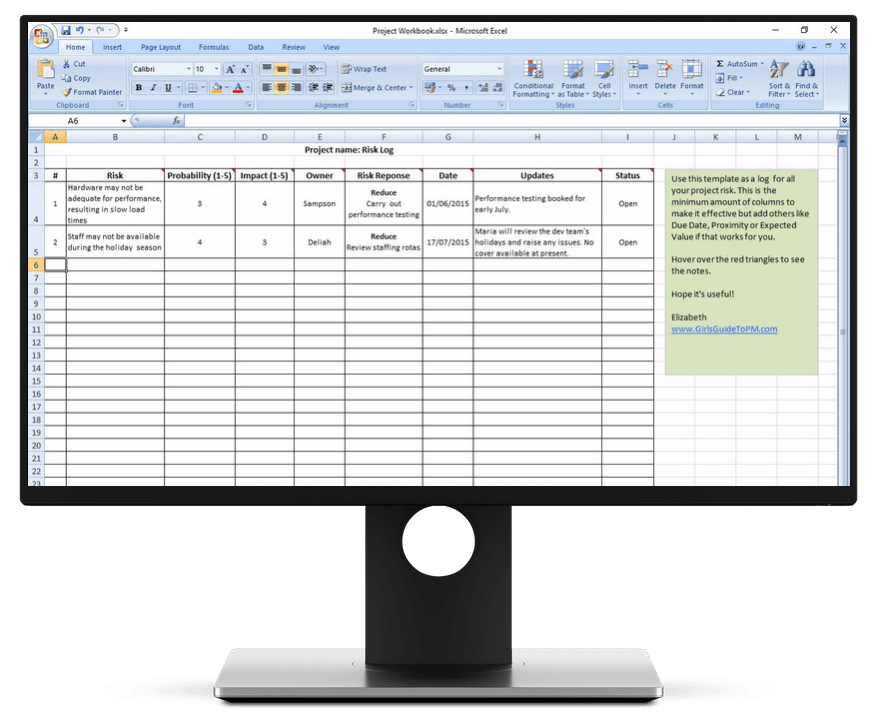
You record these items in a RAID log. The picture below shows the RAID log template I use – the worksheet shown is the risk tab.
What is a RAID log?
A RAID log is a list where you record the risks, assumptions, issues, and dependencies on a project. It could be a spreadsheet (like this one) or built into your project management tool in the form of a database or table.
A RAID log is a way of tracking the things that affect and influence your project. It is part of the governance and control mechanisms around your project.
However, in my experience RAID alone is not enough. As I mentioned above, I also use the same format to track:
- Actions
- Decisions
- Constraints
- Changes.
But that doesn’t make a neat acronym! Who wants to write RAAIDDCC?
When you use a RAID template in a spreadsheet, you can add as many tabs/worksheets as you like so that you can track everything in one place. This makes it easier to work with: you don’t want to be looking in multiple places for information about the key data elements of your project.
For me, my RAID log is the key project document I use daily. That’s mainly because I keep my action log in there too, and that’s what I use every day to manage the work that falls outside of the project schedule.
The RAID log is a way to keep the project on track with all the elements that are not purely schedule related. Any issues, risks, dependencies, actions, constraints etc that are not actively managed might impact your likelihood of success and could affect the schedule.
When to update your RAID log
You’ve got it all set up, but how do you track RAID in project management, on a day-to-day basis?
It’s easy: just open your spreadsheet or project management software and check in with each of the items.
The different elements of your RAID log will be updated at different times. For example, you won’t need to update project constraints every day. They just won’t change that often.
Updating actions
If you are tracking actions – these will generally change the most frequently. I update something in my action log at least once a day.
Updating risks
Risks should be updated at least monthly. Preferably more often, based on your management plan and how you are choosing to manage them.
Updating issues
Issues may need to be updated daily depending on what is going on. If you have hit a major problem and things are moving fast, you’ll want to record the actions taken and what you are doing to stay on top of the issue.
Updating dependencies
I review project dependencies about once a month, normally when I’m doing project reporting for the month. Just to check that nothing substantive has changed.
It’s a good idea to review everything on the log at least once a month to make sure that you haven’t forgotten to take any critical action, and that you know what your priorities are for next month.
Who updates the RAID log
The project manager should update the RAID log.
If you have project management software that incorporates a database for risks, issues, and changes, then you can delegate updating these items to the risk, issue, or change owner.
There’s no need for a workstream lead who is managing an issue to update you just so that you can update the software. They can just as easily do it themselves.
I prefer to keep ownership of the spreadsheet I use because I don’t want other people changing it. With software tools, you have an audit trail of what was changed and who changed it.
Generally, they can only change what they are tasked with, so they can’t accidentally delete a whole worksheet or update lines that relate to other people’s work.
Plus, I am a bit of a control freak and I like to know what is going on!
Using RAID for future projects
Another great thing about RAID logs is that they are a perfect source of information for lessons learned discussions and future project planning.
Use the info in the logs to set up your next project, as you’ll find many common risks occur on multiple projects.
Get A RAID project management template
My RAID project management template is an Excel spreadsheet. You can use it in
If you want to read about decision-making tools for groups check out the post here.
Why RAID is important
If you’ve read this far, you are clear on the ‘how’ of RAID logs, but are you clear on the ‘why’?
RAID items are the things that the project manager needs to be monitoring regularly, at least once a week, or the project might go off track for some reason. Maintaining a focus on these items means you are more likely to deliver the project outcomes.
If I was auditing your project, I’d assume that a poorly-filled in RAID log is a sign of poor project health, poor discipline and low levels of project governance maturity.
The log is also important for project post-mortems, retros and lessons learned, because you can pull all kinds of interesting data out of it. What caused the project delays? That should be in the change log. Did we struggle with resource constraints? That was flagged as a risk but it happened anyway. Your logs are evidence for how the project was delivered!
FAQ
What does RAID stand for in Agile?
In Agile project management, RAID stands for the same thing as it does in other delivery approaches: Risks, Assumptions, Issues and Dependencies.
How is a RAID log used in project management?
A RAID log is used to help the project manager keep track of what is going on and items that need attention. Risks, issues, assumptions, actions, decisions and dependencies all need constant monitoring to ensure that nothing falls through the cracks. The log helps keep all these things front and center so they can be tracked and updated regularly.
How can software tools enhance the management of RAID logs?
Software tools, like MS SharePoint lists or even Excel tables, can help project teams access the same version of the RAID log so they all have the same version of the truth. When the team members can all see the same records, it helps focus activity and reduces rework or miscommuncation.