



Businesses need to monitor work to make sure that they’re meeting milestones. They also need to have a means of communicating that information to their stakeholders. Business report templates are a tool that can do both.
Use these free 15 business report templates to create a project dashboard, progress report and workload analysis to make a strategy map, cost-benefit and balanced scorecard.
A project dashboard is a high-level overview of the project. It captures various key performance indicators (KPIs). It gives managers an instant status report to see if the project is progressing as planned, if costs are aligned with the budget and other metrics to help stay on track.
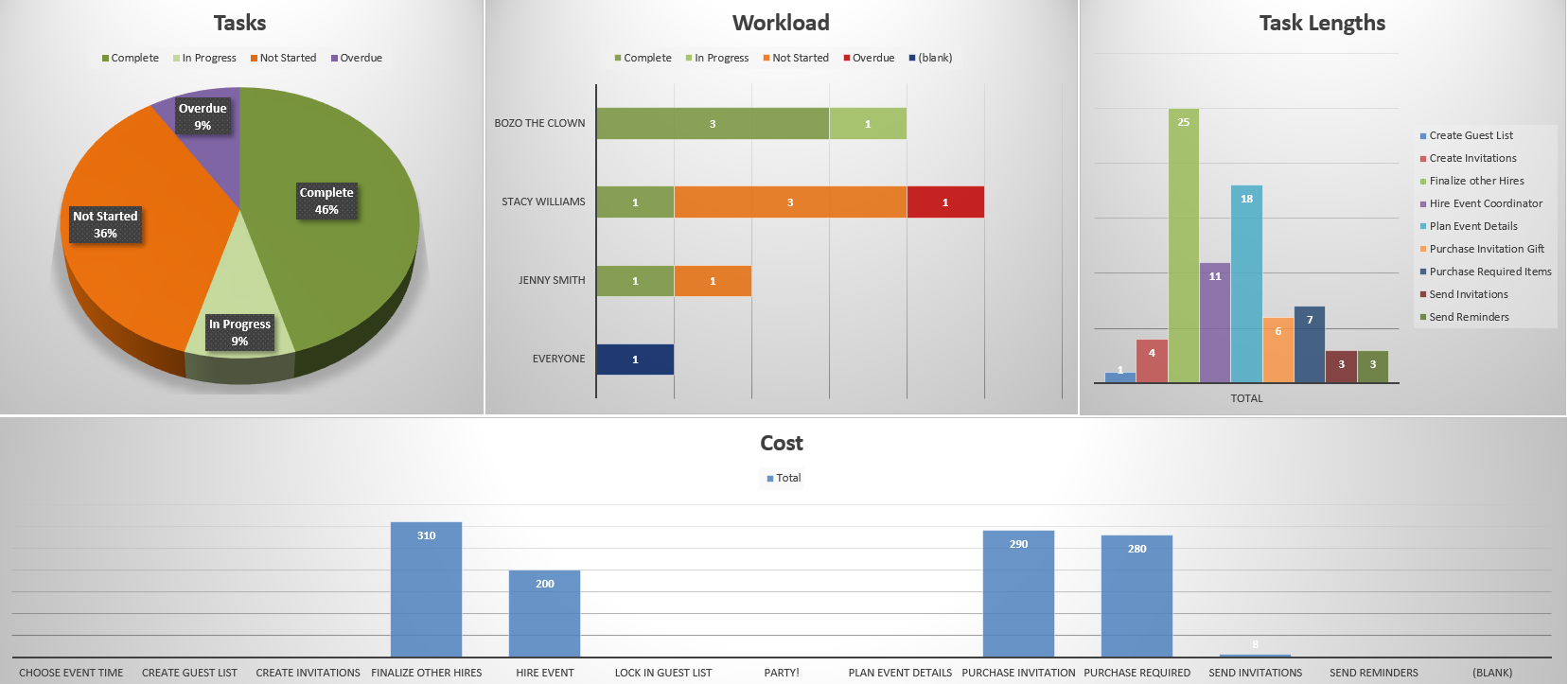
This free project dashboard template for Excel monitors tasks, workload, task lengths and costs. It does this with easy-to-read graphs and charts. The only problem is that the template must be manually updated, taking time away from the project and the data is already old by the time it’s been inputted.
ProjectManager is award-winning project and portfolio management software that has real-time project and portfolio software that don’t require any lengthy or complicated setup as with lightweight software alternatives. Unlike a template, users get live data and can view one project, a program or a portfolio of projects in real time. Get started with ProjectManager today for free.
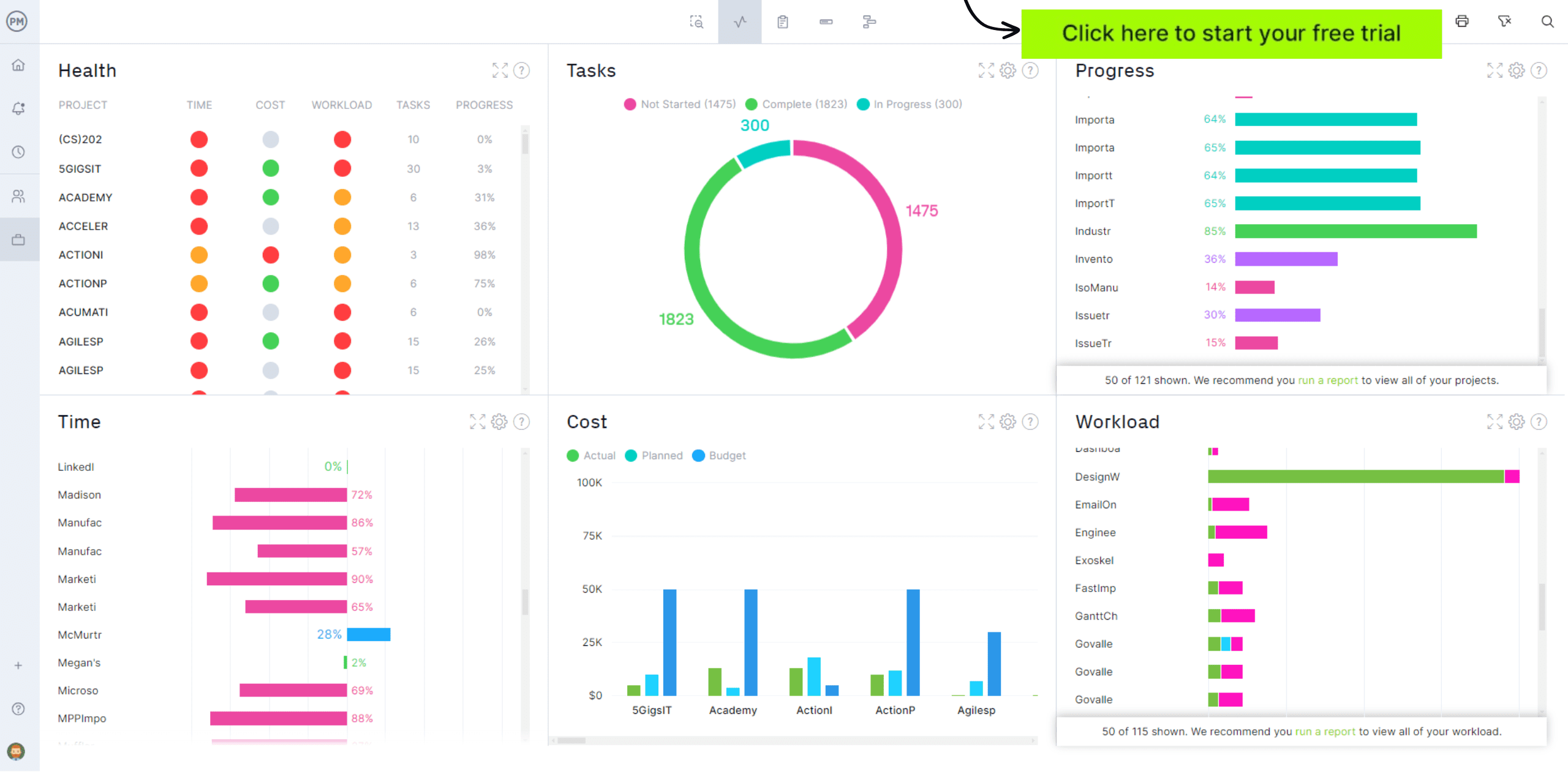
KPIs give executives and project managers a way to measure what matters most, but raw data spread across multiple reports makes it hard to see the full picture at a glance. A KPI dashboard template consolidates key performance indicators into a single visual display, making it faster to identify trends, spot issues and communicate performance to stakeholders.

This KPI dashboard template for Excel tracks performance metrics across multiple business areas, with charts and summary tables that update as data is entered. Teams can customize the indicators to reflect their own goals and use the dashboard in regular reporting cycles to compare current performance against targets and support data-informed decisions.
Tracking sales performance across products, regions and team members without a centralized view leads to missed trends and reactive decision-making. A sales dashboard template brings together revenue data, conversion rates, pipeline value and quota attainment so managers can quickly assess where the team stands and where attention is needed.
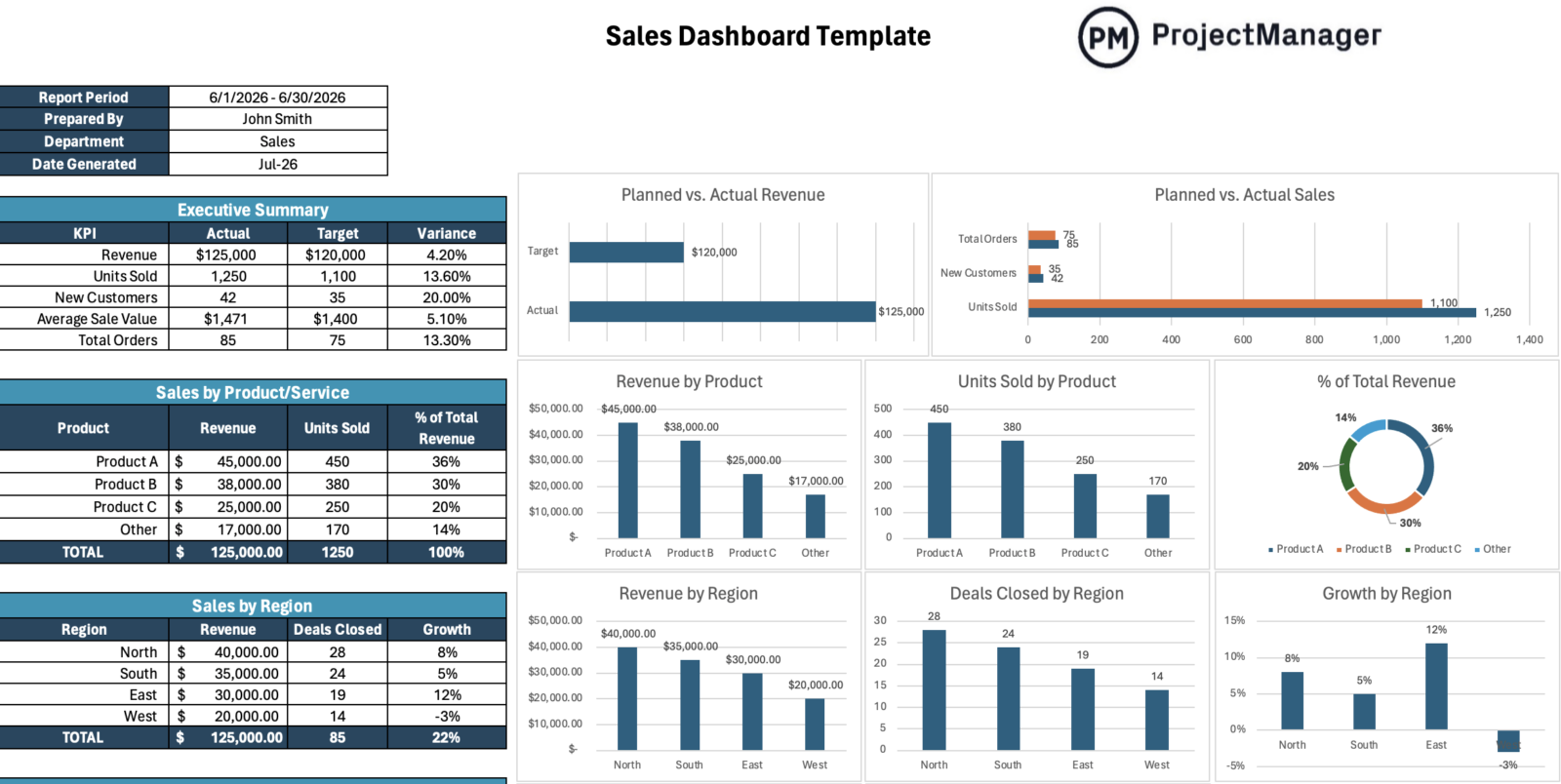
This sales dashboard template for Excel organizes key sales KPIs and metrics into visual charts and summary tables that make performance easy to read and present. Managers can use it in weekly team reviews, monthly leadership reports or quarterly business reviews to show progress, flag underperforming areas and align the team around shared targets.
One of the most common business report templates is the progress report. It captures a snapshot of the project over a specific period, providing an overview of all the activities and tasks that have taken place during that time. It highlights milestones and performance metrics such as risks, issues, changes and more.
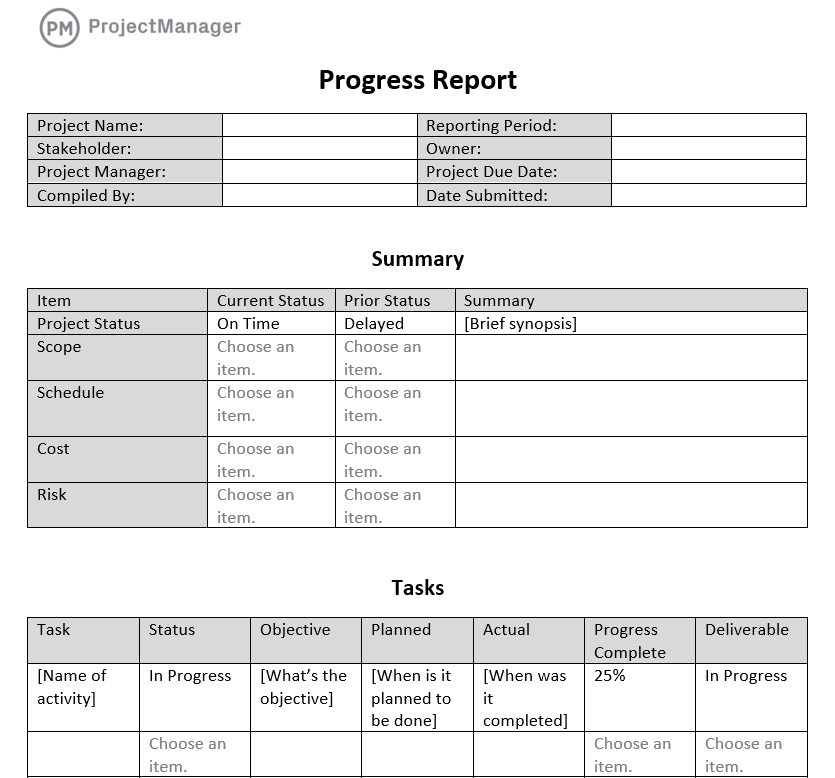
The free progress report template for Word captures all that data and more. It helps project managers understand if they’re on schedule and can be shared with stakeholders to keep them updated. Reviewing the progress report can open up discussions between the project manager and the stakeholder earlier when they can be dealt with easier than later when the issue is more embedded and harder to resolve.
A project status report is different from a progress report. Managers and stakeholders use them to stay updated on the project’s progress, but they differ in focus and scope. The status report is a broad overview of an entire project compared to its plan, while a progress report focuses more on specific tasks and milestones.
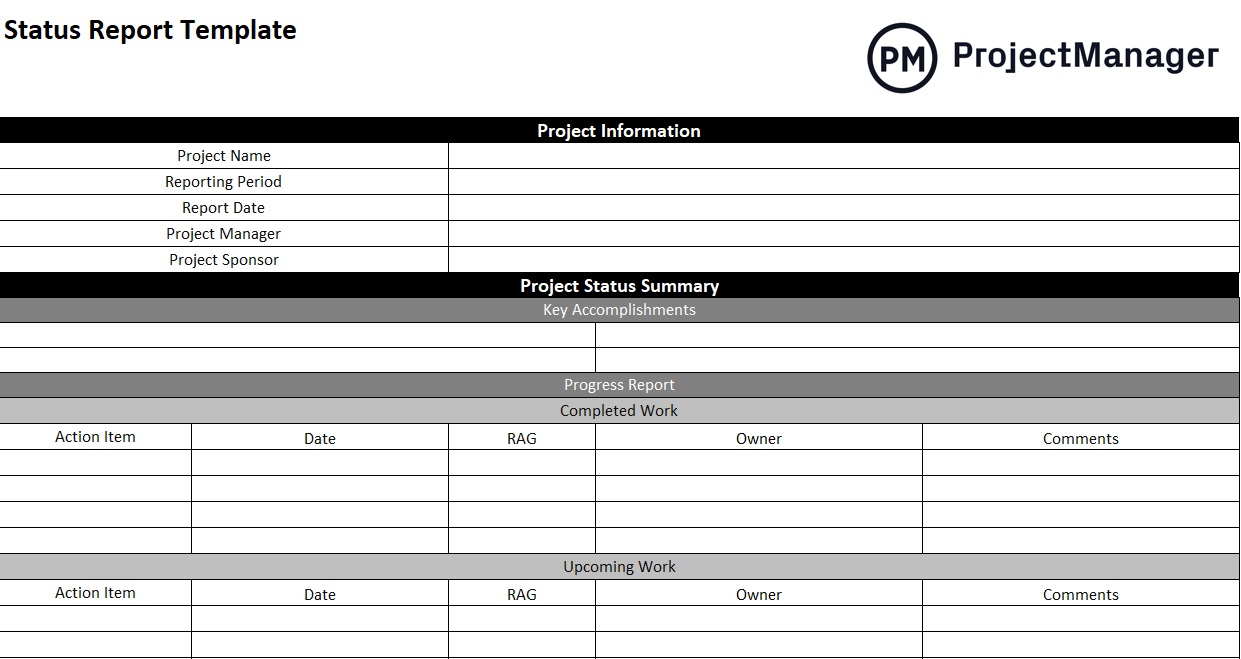
Use this free business report template to capture the project’s status and improve communication with key stakeholders. A free status report template for Excel has project information, a summary of the project’s status and health and a risk management overview. It offers recommendations moving forward.
Marketing teams run campaigns across multiple channels simultaneously, making it easy to lose track of what is working and what is not. A marketing report template brings together performance data across campaigns including reach, engagement, conversions and spend so teams can evaluate results and make informed decisions about where to invest next.

This marketing report template for Excel captures key campaign metrics including audience data, channel performance, budget utilization and goal attainment in a structured format that is easy to present to stakeholders. Teams can use it for monthly performance reviews, end-of-campaign summaries or budget planning discussions where a clear view of results is needed.
Teams that do not formally review what happened after a project or campaign concludes are likely to repeat the same mistakes. An after action report template structures that review, capturing what was planned, what actually occurred, what worked and what should be done differently, turning hindsight into a practical guide for the next effort.

This after action report template for Word walks teams through a systematic post-event analysis covering objectives, results, key successes and lessons learned. Project managers and team leads can use it immediately after project close or a major initiative to document findings while details are fresh and make those insights available across the organization.
SWOT stands for strengths, weaknesses, opportunities and threats. This free SWOT Analysis template for Word is a tool to assess a business’s competitive position, both internally and externally. It is a key technique in developing a strategic plan. It’s a business report template that gathers data to help make more insightful decisions.
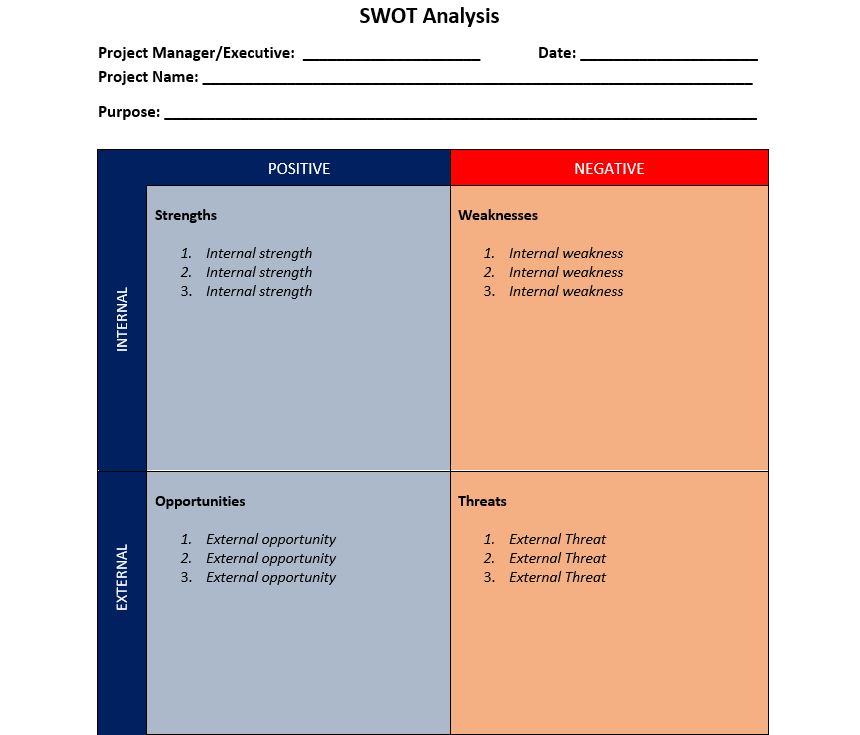
A SWOT analysis template is divided into four parts. These quadrants are labeled strengths, weaknesses, opportunities and threats. The vertical left-hand axis is divided into external and internal, while the top is broken down into positive and negative. Managers then add to each of these quadrants to get a better picture of the business and its competitive position.
A balanced scorecard is a document that looks at strategic measures and more traditional financial measures. This provides a more balanced perspective and holistic approach to managing a business’s strategy. This free balanced scorecard template for Excel is a strategic performance metric that businesses use to improve internal operations and external outcomes.
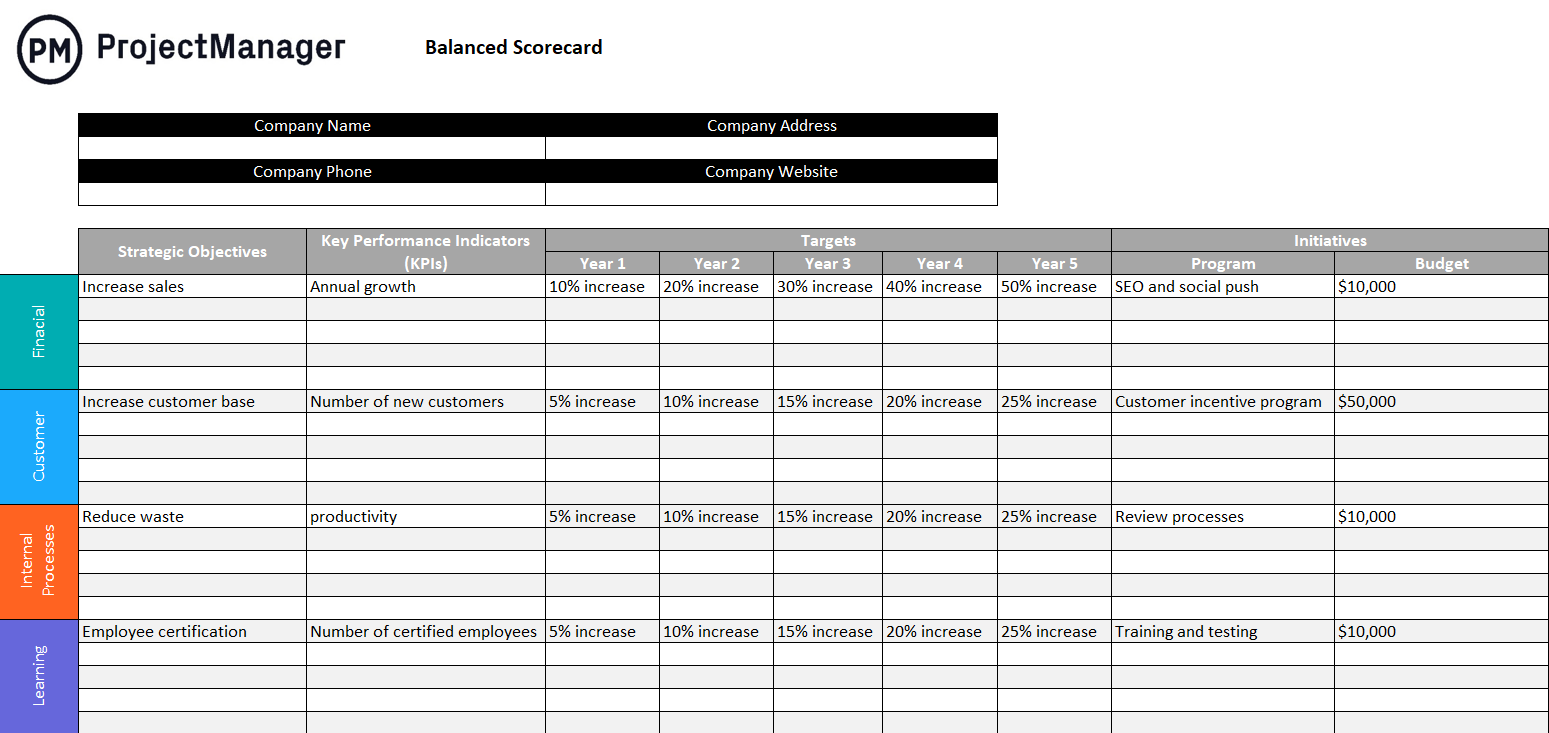
To use this business report template, first set strategic objectives, plan initiatives and establish key performance indicators (KPIs) and expected targets. Next, group strategic objectives using the four balanced scorecard perspectives: financial, customer, business process and learning and growth.
Use this free gap analysis template for Excel to take a business from its current state to the desired future state. It focuses on areas of improvement, a gap percentage, a timeline, resource requirements and much more. This business report template can be used for project management, business process improvement and product management.
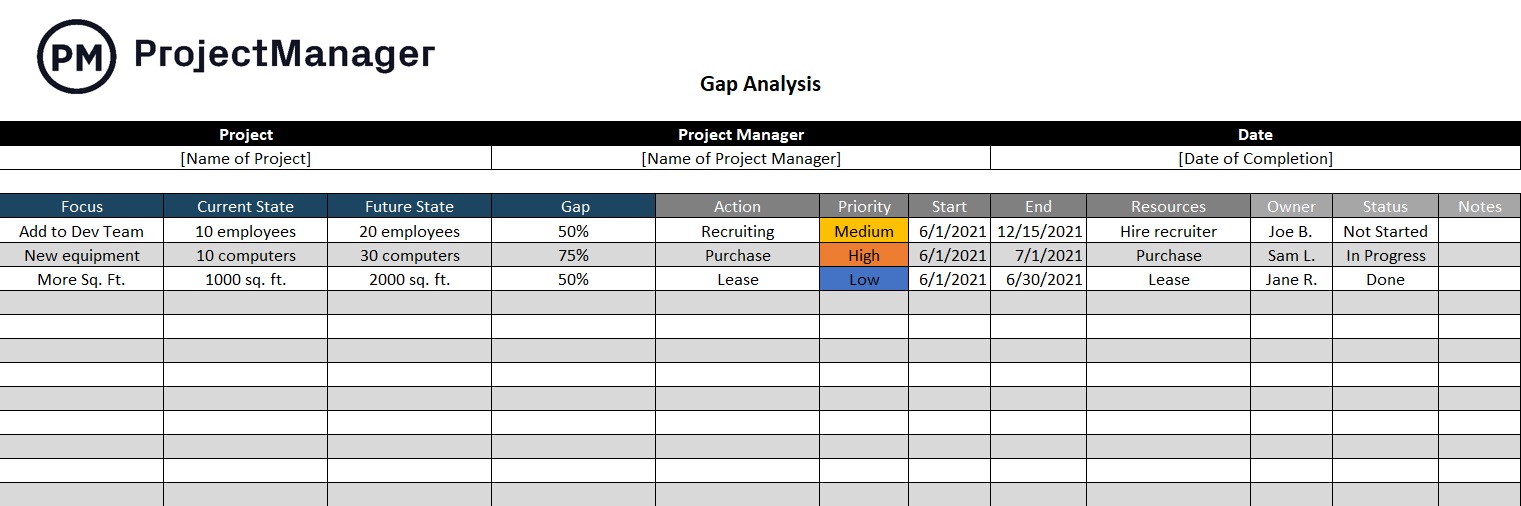
To use this free template, begin by losing the focus areas, such as a business process that needs improvement or a human resource gap. Then determine the current and future state of the focus area. Next, estimate the gap percentage and, finally, list the action items that will close that gap. There’s also space to list the responsible parties and the status of the work.
Using this free cost-benefit analysis template for Excel will determine the return on investment (ROI) for a project. Use it before approving a project to understand if the project is viable from a financial perspective. It’s a business report template that can help companies avoid investing in lost leaders.
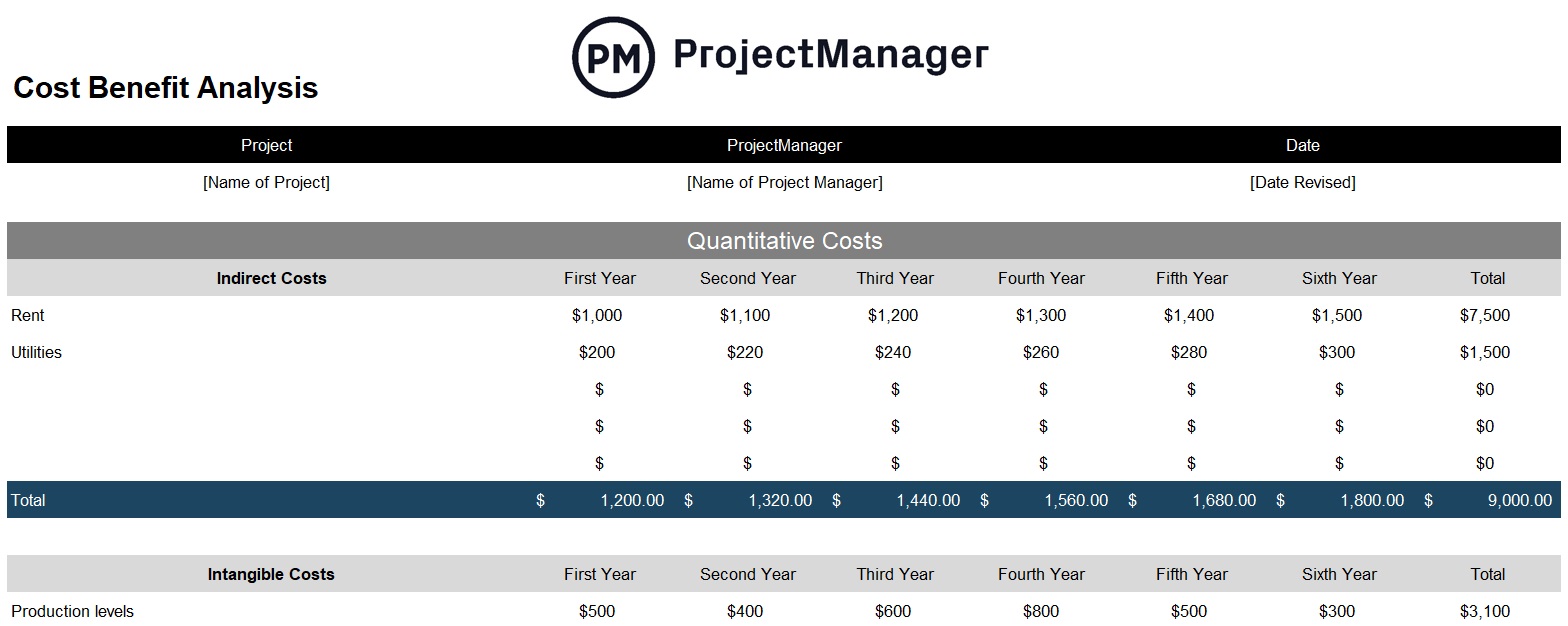
The free template works by capturing quantitative costs, indirect, intangible and opportunity. Then there’s a place to list the types of costs and the quantitative benefits. The cost-benefits analysis then compares the costs of doing the project compared to its financial benefits. This is an essential decision-making tool.
A root cause analysis, also called a fishbone diagram, is used to figure out what went wrong so it can be fixed rather than just patched up. This business report template is used to identify the cause of a process not conforming to its planned output. This is part of the larger total quality management process.
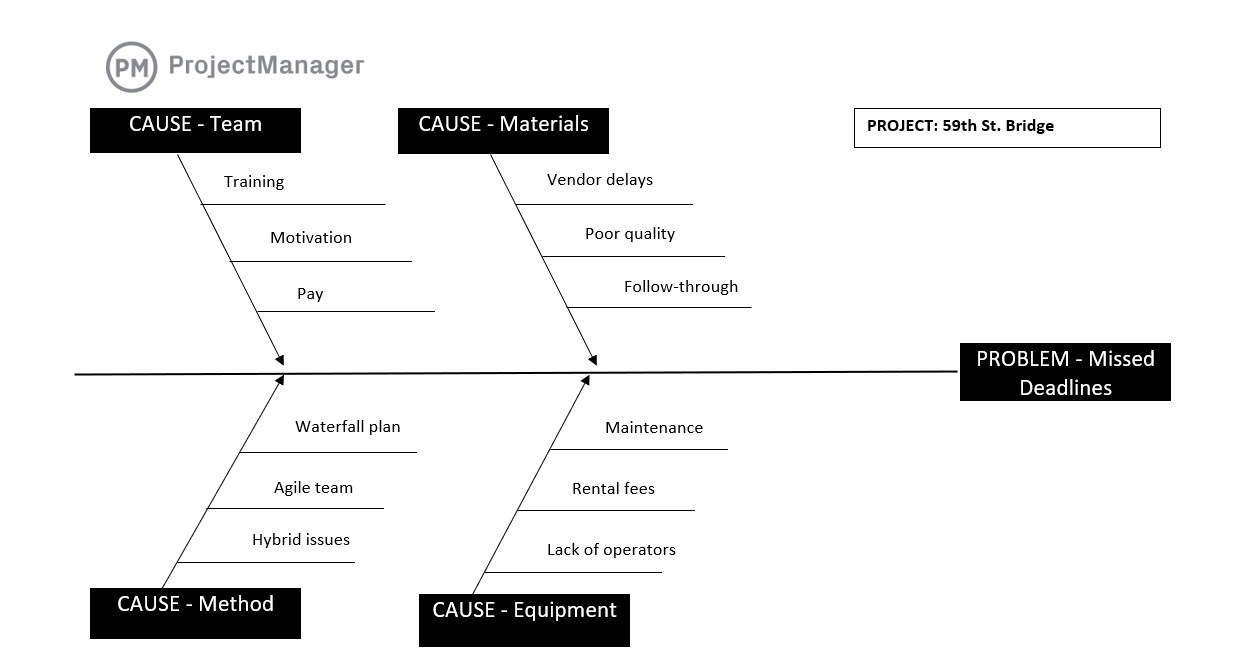
The root cause analysis template uses a fishbone diagram, which captures the cause-and-effect relationship in the process to uncover any imperfections, variations, defects or failures. This is used in product development to ensure that the product they’re working on will resonate with customers and work as planned.
Businesses use workload analysis to manage their workforce. The goal of workload analysis is balancing tasks across all project teams to ensure that no one is overallocated or underutilized, which slows down productivity and threatens to erode morale or create burnout. None of those should be acceptable to a business.

The free workload analysis template for Excel lists team members’ names and hourly rates. Managers enter their total available work hours per month. Then allocate work hours to each team member and monitor resource utilization rates and costs. This business report template helps keep everyone working at capacity.
This business report template applies to any industry that uses an operating budget to forecast revenue and expenses over a period of time. The free operating budget template for Excel is an essential tool for coming up with an accurate budget for a company’s quarter or even the full coming year.
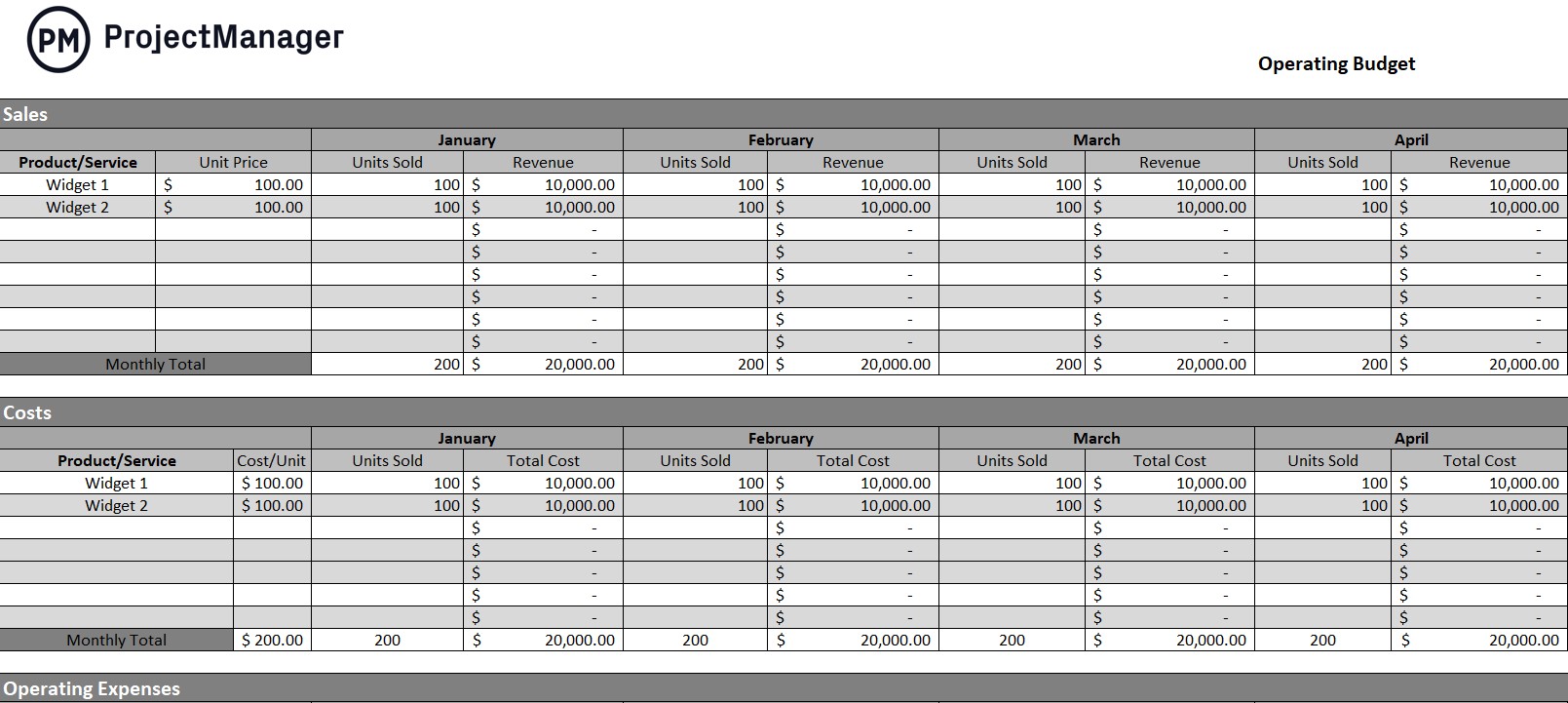
An operating budget is more than a picture of the financial dimensions of a business going forward. It can help set realistic business goals and determine if the results of the quarter or year match the forecast of the operating budget template. There could be unexpected expenses and the annual balance might need to be adjusted.
Use this free inventory template for Excel to record the level of stock and track turnover. This business report template lists all of a company’s inventory used in its daily operations and gives managers quick access to volume, price and more. There’s also a place to note when a reorder is needed and how long it will take to replenish that stock.
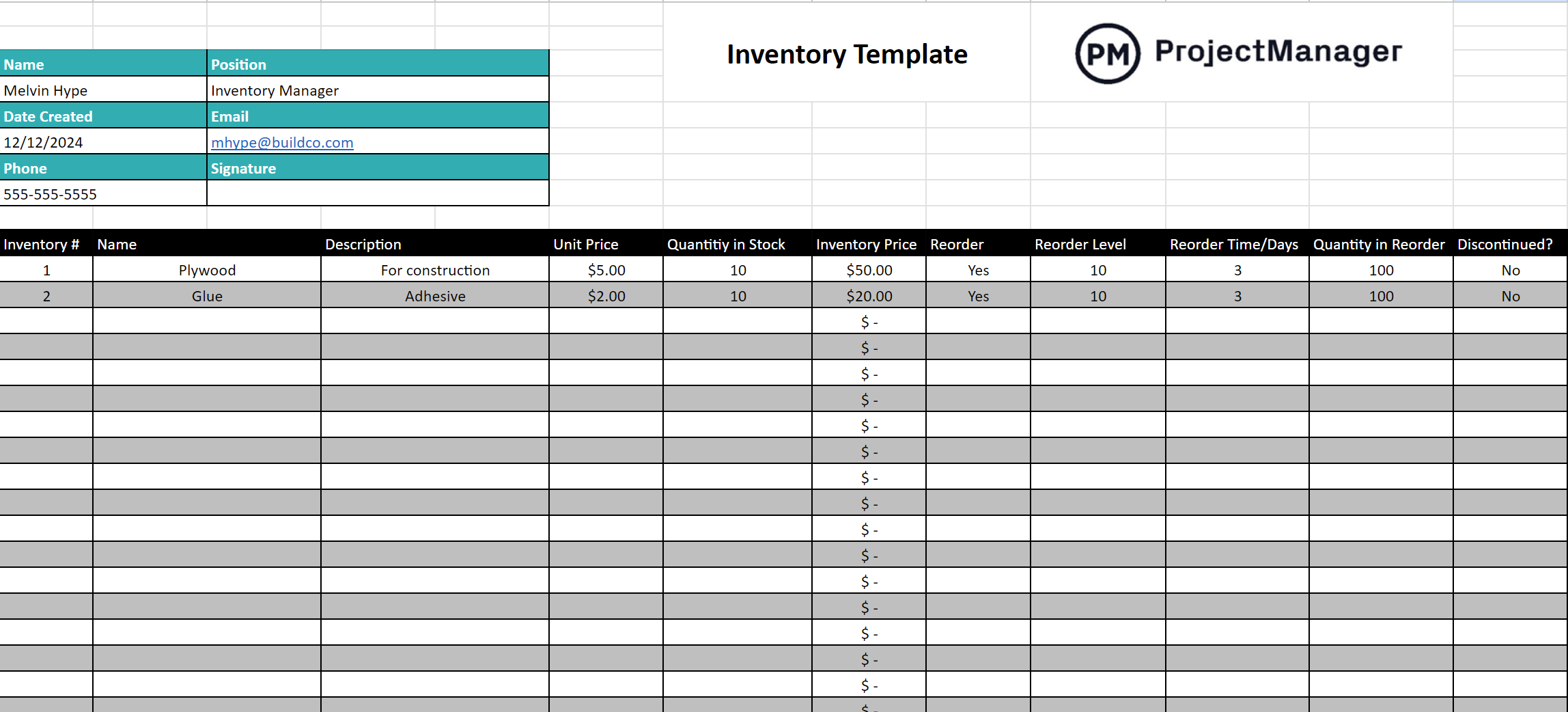
This business report template serves manufacturers and retailers alike. But it can also track tools or materials used to get work done. This prevents not having what is needed, which will slow down production and impact a business’s bottom line. Being able to track inventory keeps work moving smoothly.
ProjectManager Creates Better Reports Than Templates
Business report templates are fine, but they’re not ideal reporting tools. For one, these are static documents that don’t capture live data and, therefore, provide a dated picture of the project. Business report templates also must be manually updated, which takes time away from actually managing and executing the project. For those looking for a more effective alternative to Excel spreadsheets, there’s project management software. ProjectManager is award-winning project and portfolio management software that delivers live data to help make more insightful decisions whether managing one project, a program or a portfolio of projects.
Use Customizable Reports for Easy Analysis
Unlike with business report templates, there’s no manual inputting of data with our reports. They’re automatically collecting real-time data and turning complex information into helpful reports. There are status reports, portfolio reports and reports on variance, workload, timesheets and more. All reports can be created with a keystroke and shared with stakeholders and teams. They can also be filtered to drill down into projects for actionable data on particular team members or tasks. Use reports on progress, costs, time and more to better manage projects.

Collect All Project Data on One Powerful Project Portfolio Roadmap
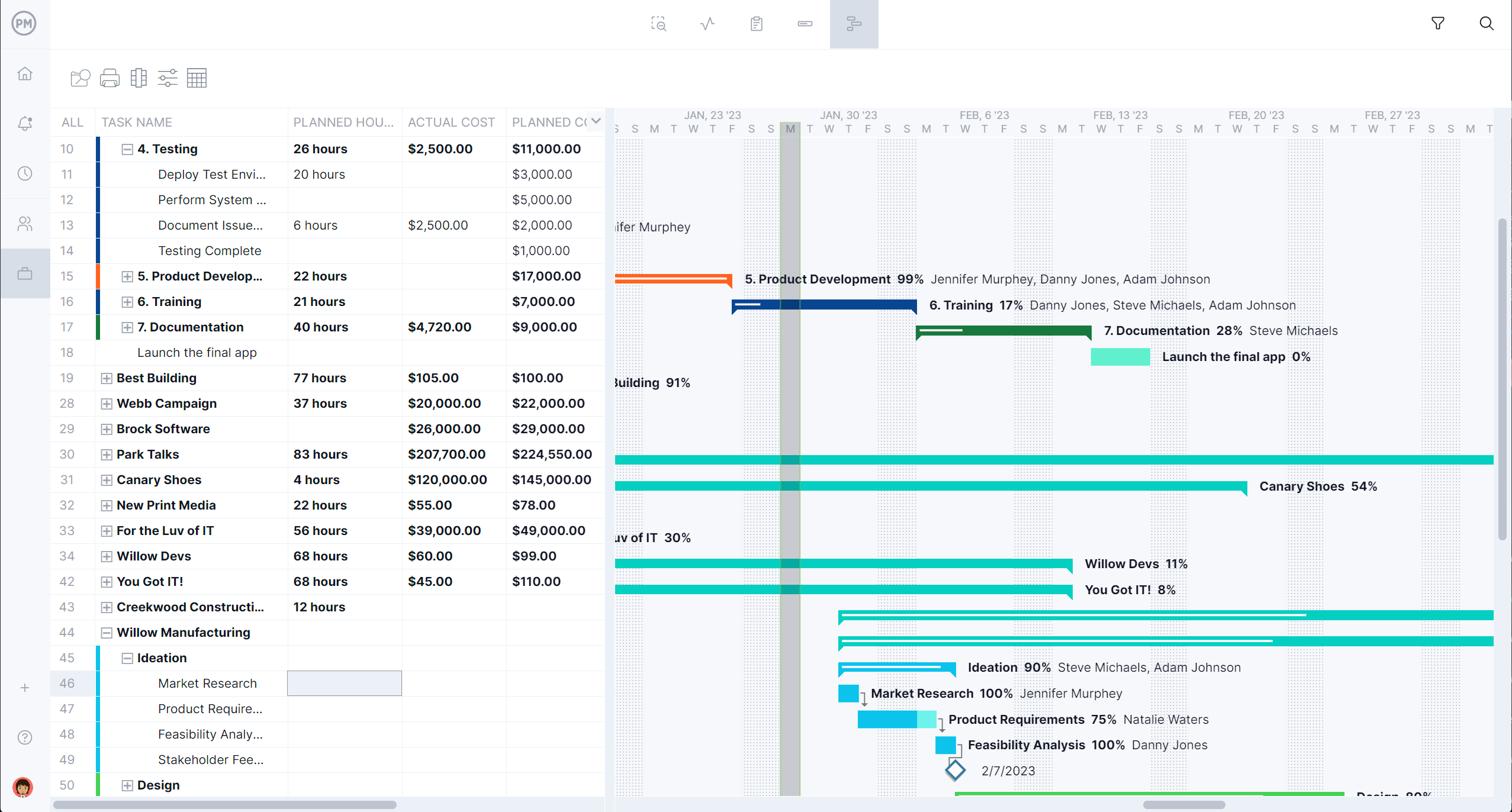
Use project portfolio roadmaps to view all projects in one Gantt chart-like timeline. This allows managers to better understand resource management and how to allocate limited resources across projects to work more efficiently and effectively. They can also track time and manage tasks. The portfolio roadmap can be filtered by assignee, project manager or customer to make forecasts, view which projects are open and who’s assigned to tasks as well as highlight key metrics for stakeholders.
Related Template Content
There’s more to templates than business report templates. For those not ready to upgrade to project management software, there are over 100 free project management templates that can be downloaded immediately from our site. They cover every phase of managing a project across multiple industries. Here are a few round-up blog posts that offer many free templates.
ProjectManager is online project and portfolio management software that connects teams whether they’re in the office or out in the field. They can share files, comment at the task level and stay updated with email and in-app notifications. Join teams at Avis, Nestle and Siemens who use our software to deliver successful projects. Get started with ProjectManager today for free.