



Projects are made or broken by how time is managed. Planning, scheduling, monitoring and controlling are all key elements of project management that work to ensure the time spent and progress made over the life cycle of the project is as efficient as possible.
Allocating resources helps to complete tasks on time and keeps the project on budget. While project management software is the best solution for managing project time, templates can also help. That’s why we’ve collected seven free time management templates to help deliver successful projects.
Why Use Time Management Templates?
Time management templates help deliver successful projects. That’s because time management is a key part of project management for many reasons. Time management templates help prioritize work, which allows teams to manage their time better. This leads to greater productivity.
Time management templates can also help with making important decisions. It allows managers and team members alike to make decisions quickly thanks to tasks and activities having deadlines and priorities. This also relieves the stress that comes from procrastination, which can lead to waiting until the last minute to complete work and that can lead to shoddy quality.
The only reason not to use time management templates is that they’re static documents that don’t foster collaboration and pull users away from their work to manually update them. ProjectManager is award-winning project and portfolio management software that has time management features, such as secure timesheets that can easily track time spent on tasks as well as the associated labor costs. Users can log hours anywhere to streamline payroll and save money with accurate project time management. Archiving timesheets gives managers historical data on labor costs that can help better estimate time and costs for future projects. Get started with ProjectManager today for free.

Best Time Management Templates for Excel
For those who aren’t ready to upgrade to project management software, these free time management templates for Excel can help them manage their projects and teams better. They can’t deliver the efficiency of a software solution, but they do a good job of creating timesheets, work schedules, project calendars and much more.
A daily schedule template helps individuals and teams map out their hours before the day begins, turning vague intentions into a structured plan. By assigning time blocks to specific tasks, it reduces the mental overhead of deciding what to work on next and keeps priorities front and center throughout the workday.
Using a daily schedule template consistently builds a habit of proactive time management rather than reactive task-switching. It also creates a record of how time was actually spent, which is useful for spotting patterns, adjusting workloads and improving personal productivity over time.
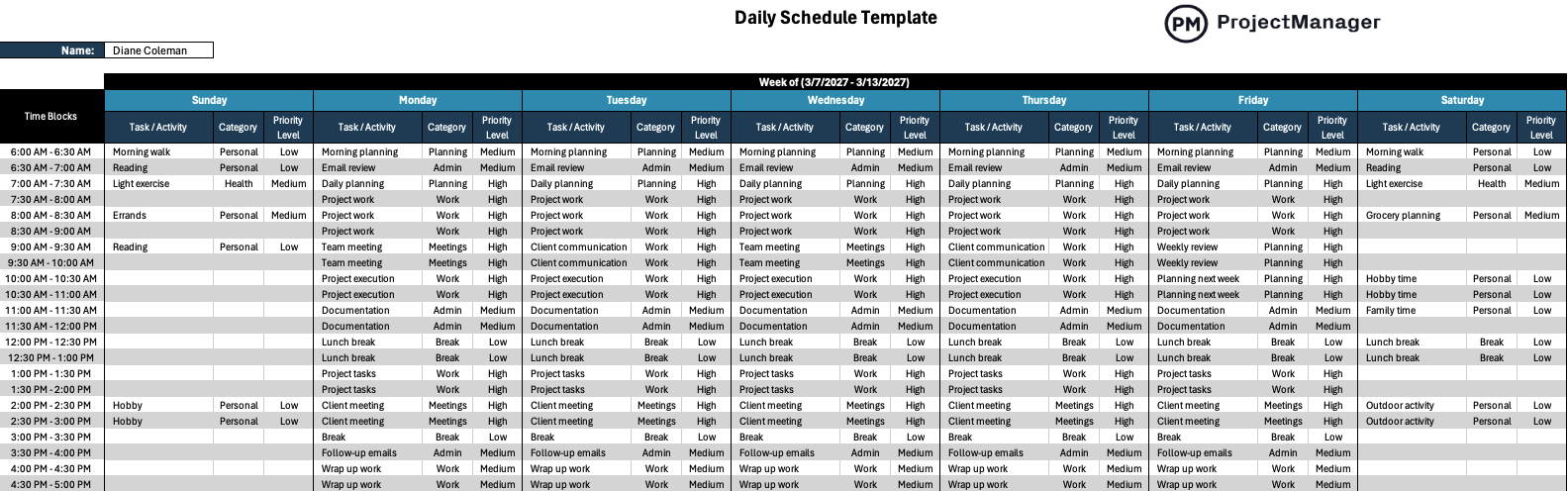
A weekly schedule template gives teams a bird’s-eye view of the full week ahead, making it easier to balance workloads, prepare for meetings and anticipate deadlines before they arrive. Planning at the weekly level reduces the risk of last-minute rushes by surfacing conflicts and gaps while there’s still time to act.
With a weekly schedule template, managers can distribute work more evenly across the team while individuals can align their daily priorities to broader weekly goals. Reviewing and updating the schedule at the start of each week is one of the simplest habits that consistently improves how time gets used across a project.

This work schedule is a time management template to plan and control the human resources of an organization or project. It lists all employees, their location, working times and responsibilities over a specific period. That period can be a day, week or month. It’s a way to ensure that employees and teams are productive and work as efficiently as possible. Use this free work schedule template for Excel to track resource utilization, streamline work scheduling processes and help meet deadlines.
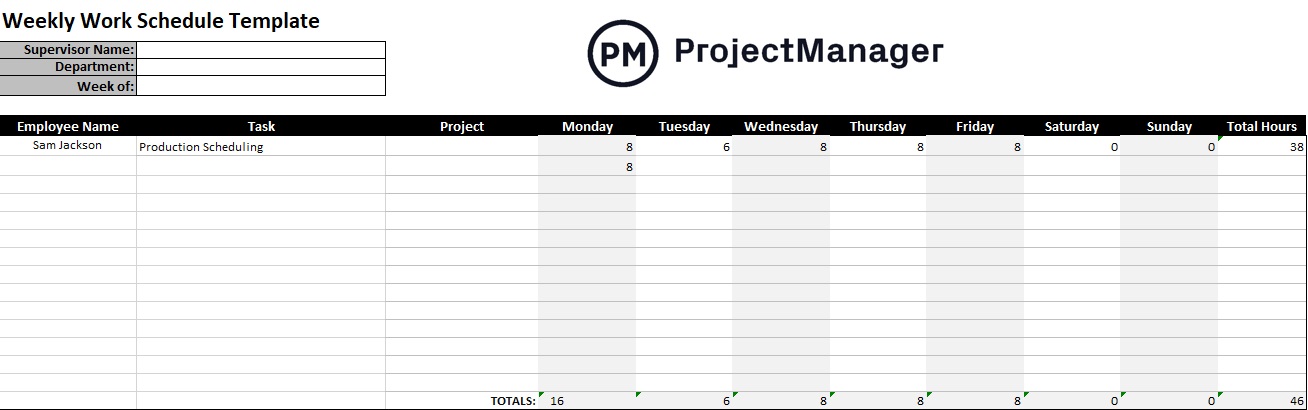
Use this free time management template as a weekly work schedule, which is especially useful for businesses with variable workloads, which plan their schedules based on customer demand forecasts. It can be a monthly work schedule for longer projects with clearly defined tasks and deliverables. The time management template can also be a daily work schedule where employee performance is monitored daily. It can also be used for a work shift schedule, flexible work schedule and part-time or full-time work schedules.
Another time management template is a project calendar template for Excel. This free template makes it easy to see assignments on a monthly grid, with deadlines and more. It’s a great tool for planning schedules, executing tasks and managing work throughout a project’s life cycle. Not only is it a time management template, but it is also a to-do list to help teams get their work done promptly. Therefore, it also acts as a task management tool, can help with team collaboration and communicate changes in workflow.
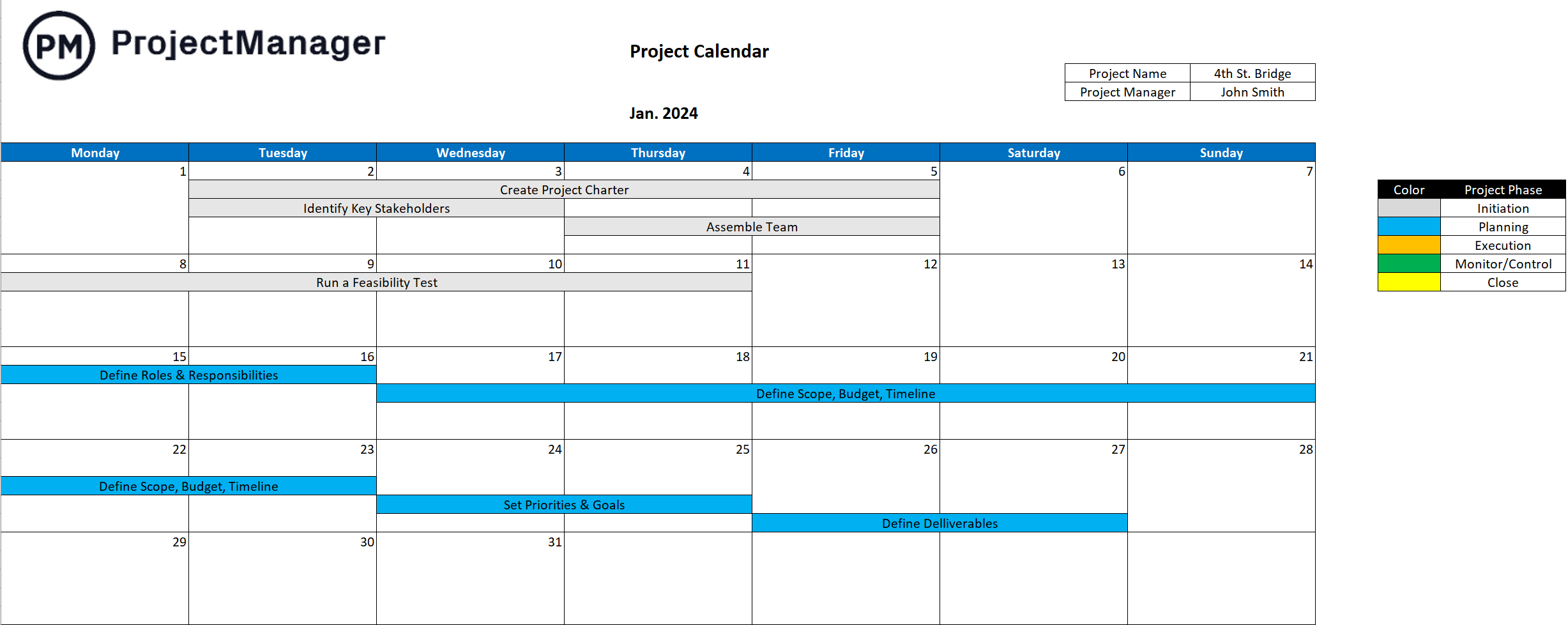
Project managers can use this time management template to chart the regular hours of their team, which makes it easier for them to see the availability of those team members when making assignments. The free calendar template can also be used to avoid scheduling delays by noting holidays, vacations and PTO of the team members. There are also resource management advantages to using this time management template as it helps schedule resources beyond human resources. It’s also a communication tool to keep everyone aware of their work and important dates.
A project timeline is used in planning to add project tasks, due dates and milestones. Most timelines are made with Gantt charts, which are divided into two parts: a spreadsheet with the data collected on the left and a timeline showing the entire project on the right. This time management template is the first step to managing the project schedule and delivering that project on time.
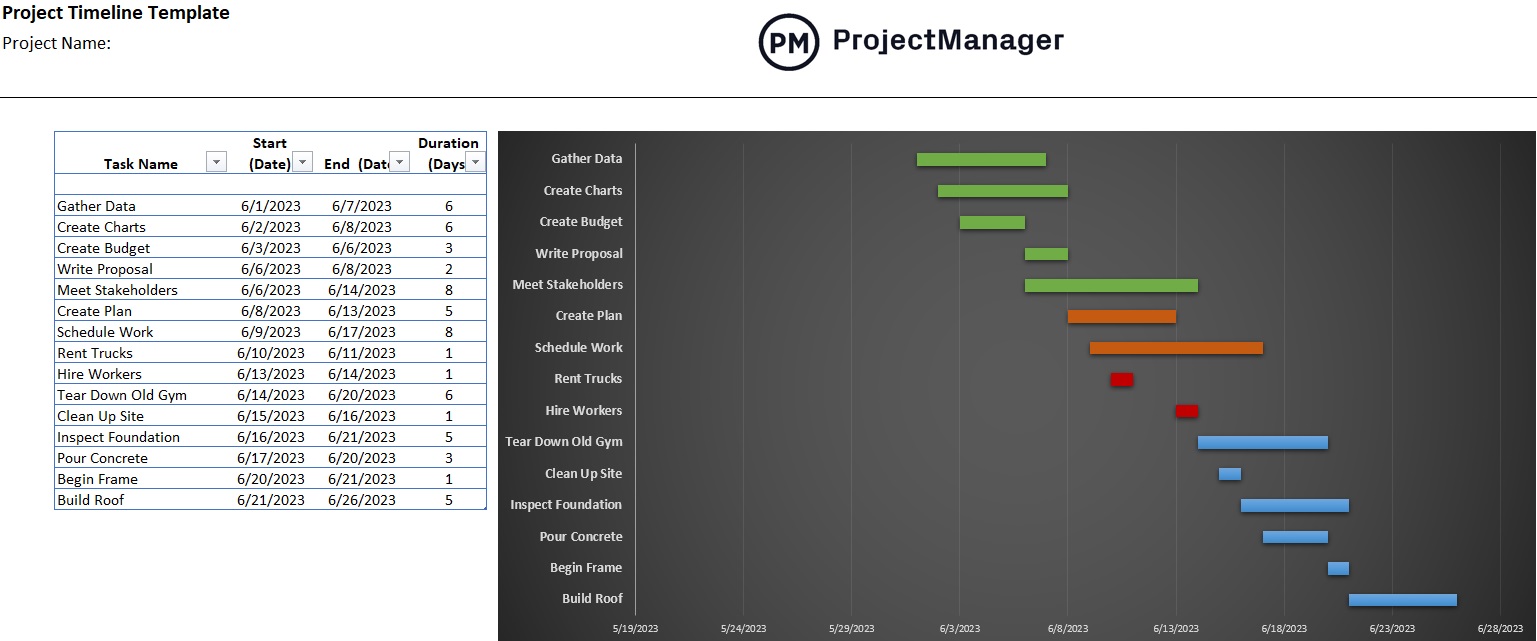
Download the free project timeline template for Excel to create a project schedule. It can also be used to share the project schedule with the team and stakeholders to manage their expectations. This time management template collects all the project tasks, start and end dates, plus duration on the left-hand spreadsheet. The right-hand timeline is then automatically populated with this data. The timeline taskbars, which represent the duration of specific tasks, can then be color-coded to differentiate the different phases of the project to make the time management template easier to read.
Workload analysis is used when managing a workforce. Its goal is to evenly distribute the workload across all team members to keep them working at capacity without risking burnout and eroding morale. This time management template is also a productivity tool and delivers better work quality while increasing team member satisfaction. The free workload analysis template for Excel identifies, measures and evaluates the amount of work each team member needs to do and how to balance that to avoid over-allocation.

This workload management tool will help managers get the most out of their workforce and help to produce high-quality deliverables. It can also help with resource identification and getting an accurate picture of the resources available for the project. Analyzing things like seasonality and potential disruptions to the workforce leads to a more strategic plan that helps managers better prepare for the unexpected.
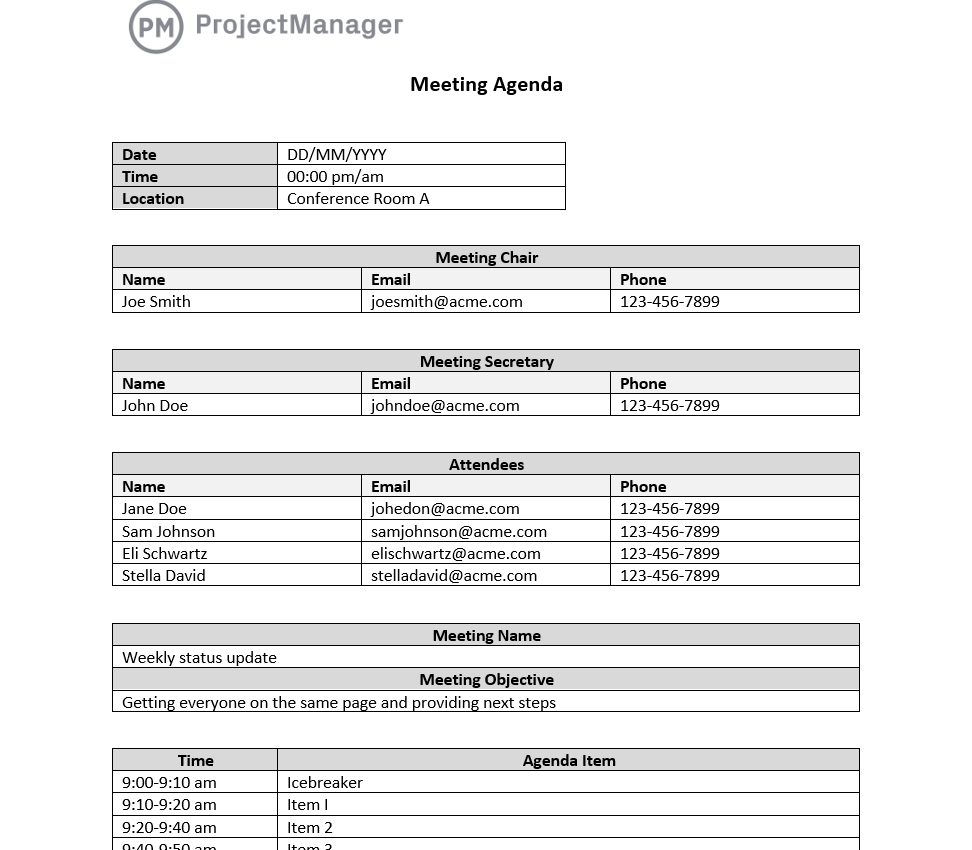
A meeting agenda template ensures every meeting starts with a clear purpose and a structured list of topics, preventing the unfocused discussions that make meetings feel like a waste of time. By distributing the agenda in advance, participants arrive prepared, which shortens meetings and produces better decisions.
Poor meeting management is one of the most common sources of lost time in the workplace. A meeting agenda template forces organizers to think through what needs to be decided before the meeting starts, making it easier to stay on track and end on time. It also creates a reference document for following up on action items after the meeting concludes.
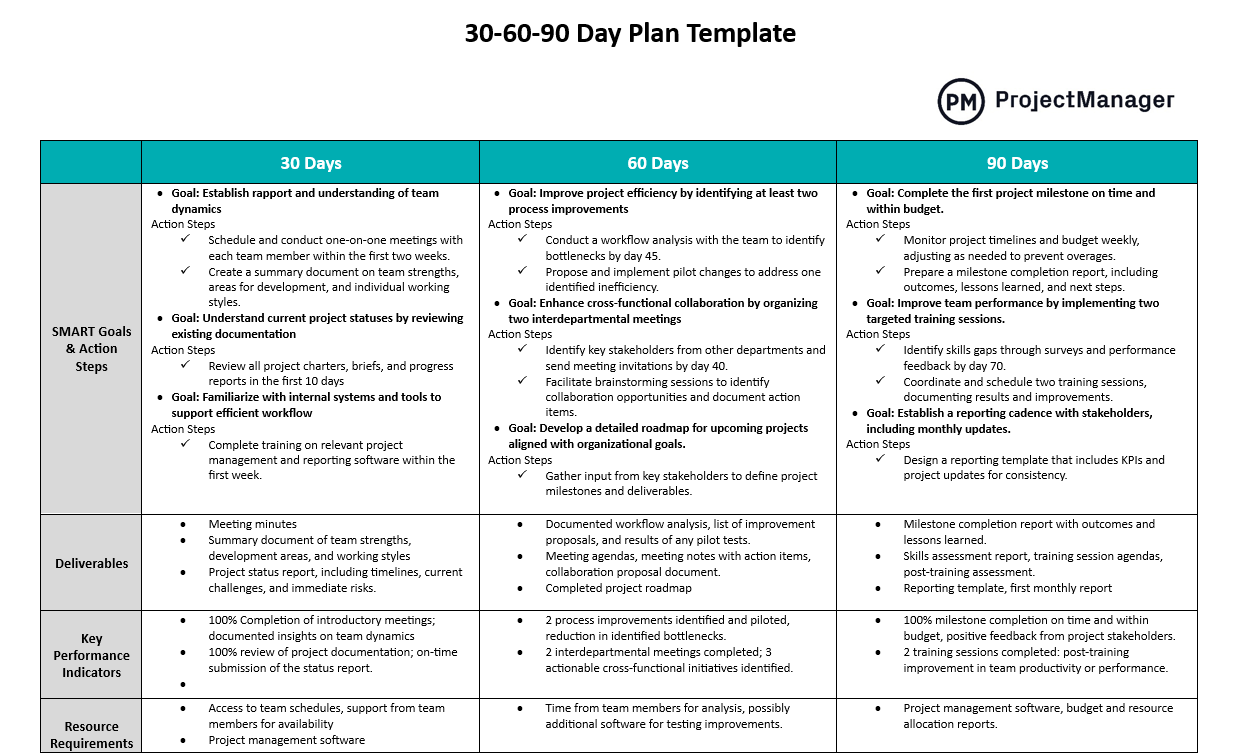
A 30-60-90 day plan template breaks a longer planning horizon into three focused phases, making large goals easier to sequence and execute. Commonly used for onboarding new hires or launching initiatives, it helps define what needs to be learned, contributed and led within the first three months.
Beyond onboarding, a 30-60-90 day plan template is useful any time a team needs to structure progress toward a milestone over a medium-term window. By setting expectations for each phase, it creates accountability checkpoints that keep work moving without requiring constant check-ins from management.
Pros and Cons of Using Excel for Time Management
Excel templates are only going to be helpful to a point. They serve a purpose, but eventually hit a wall and will be more frustrating than useful. That doesn’t mean Excel templates for time management are without merit. Here’s a short list of their pros and cons.
Pros of Excel for Time Management
- Easy to use
- Cost-effective
- Organize data
Cons of Excel for Time Management
- Needs technical expertise to get the most out of Excel templates, such as knowing formulas, conditional formatting and filtering
- Poor collaborative tool, as templates are static documents
- Risk of data loss or corruption
- Manual updates are time-consuming
Go Beyond Excel Time Management Worksheets With ProjectManager
It’s clear to see time management templates have their uses, but they fall short of project management software. Their limitations will frustrate managers who want to track time to ensure that teams are working efficiently and keeping to their schedule. To get the most out of time management and other project management techniques use ProjectManager, award-winning project and portfolio management software that uses multiple project views to plan, manage and track time throughout the project’s life cycle. For example, our Gantt charts schedule tasks and resources and filter for the critical path. Use timesheets to track time and labor costs or leverage other tools to monitor progress and more.
Track Time With Dashboard and Reports
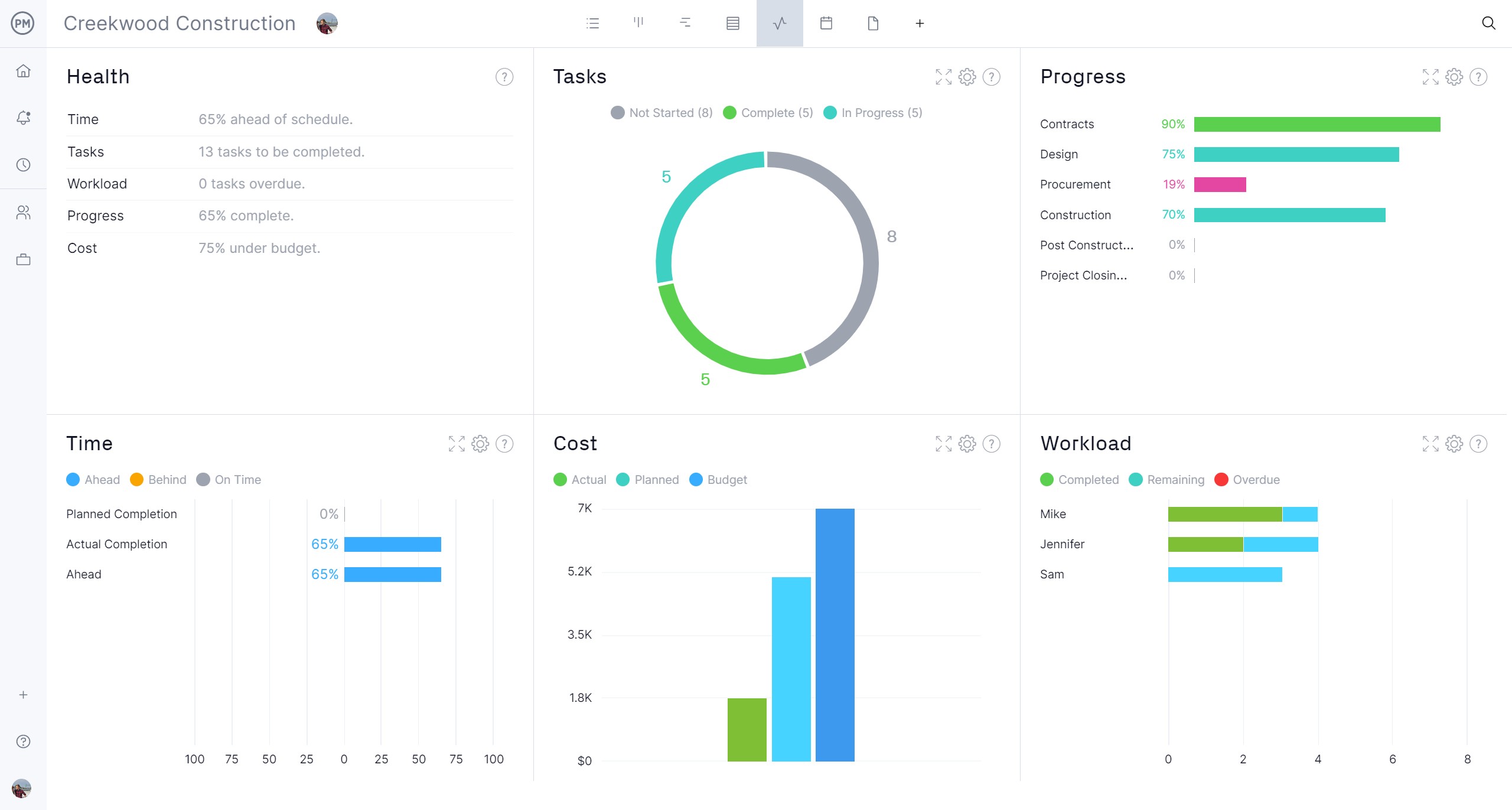
Monitoring the team’s progress with real-time project and portfolio dashboards is easy. They offer a high-level overview of the project, collecting live data and displaying it on easy-to-read graphs and charts that show time, but also costs, workload and more. Use this tool as an instant status report to spot issues and keep projects running on schedule. For more detail, toggle over to the customizable reports that can be generated with a keystroke and filtered to show details for managers and more general data to keep stakeholders informed. For example, timesheet reports can show the hours teams have submitted, get time estimates and streamline payroll.
Use Calendars and Resource Management Features
One of the multiple project views accessible with our software is the calendar. It can help managers plan availability for their team, which can be set when onboarding the team. The calendar can show if there are vacations, PTO or even global holidays. Managers can use the color-coded workload charts to easily see who is overallocated and then balance the workload right from that chart. This keeps teams working at capacity without burning them out.

Related Time Management Content
For those looking to explore time management beyond the time management template, there are many opportunities to do so on our site. We published weekly blogs, guides, eBooks and free templates on all aspects of project management as it relates to various industries. Here are some of the recent posts we’ve published on time management.
ProjectManager is online project and portfolio management software that connects teams whether they’re in the office, out in the field or anywhere else in the world. They can share files, comment at the task level and stay up to date with email and in-app notifications. Join teams at Avis, Nestle and Siemens who use our software to deliver successful projects. Get started with ProjectManager today for free.