



I often address Google Ads AI capabilities. AI can better target new and existing audiences and, when paired with first-party data and conversion tracking, can unlock opportunities. Yet what we tell AI to exclude is as important as what to target.
Advertisers have long used negative keywords and placement exclusions to instruct Google not to show ads for certain queries. For example, adding “cheap” as a negative keyword prevents ads from showing when it’s in the query.
But that’s not enough in today’s intent-driven search. You can add every synonym of “cheap” as a negative keyword, but it won’t detect a searcher with that goal, written or not. Someone looking for a cheap computer case may search only for “laptop cases.”
Advertisers must now instruct AI who to avoid.
Text Guidelines and Asset Optimization
The clearest way to do that is through text guidelines and asset optimizations. Both are available in Performance Max and AI Max Search campaigns. Google needs guardrails since it can dynamically create ad copy and determine where searchers land. Text guidelines help Google’s AI know who to target or avoid.
Here’s an example below of training the AI. We want searchers to know that our laptop cases aren’t inexpensive. We make only a few models, and they’re high quality. With text guidelines, we’re informing the AI to target prospects willing to spend more for a better case.
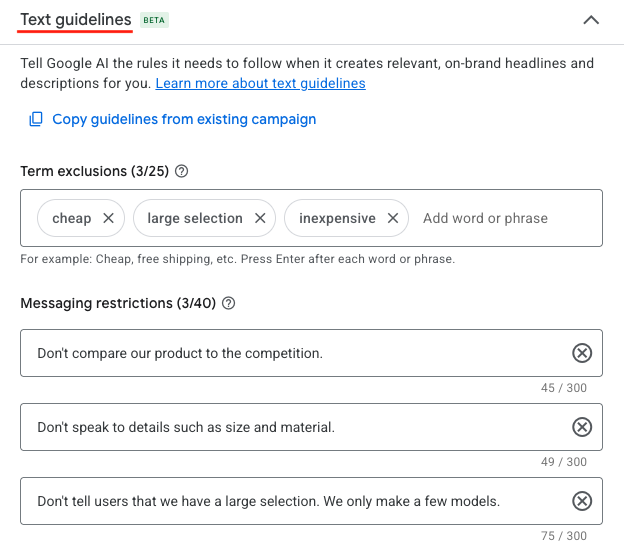
Text guidelines inform the AI who to target, such as prospects willing to spend more for a better laptop case.
Similarly, asset optimization lets you turn off automated image and video enhancements in Performance Max campaigns and facilitates text and URL exclusions in those and AI Max campaigns.
URL exclusions tell Google which landing pages to avoid, such as a clearance page for a premium item.
Automated Assets
Tucked into the Google Ads interface is “Account-level automated assets.” The feature is hard to find, but its potential impact is substantial. Google can dynamically populate an ad’s sitelinks, callouts, images, and more. Recently, automated promotions went live, wherein Google pulls, say, discounted items from an advertiser’s site.
To see your account-level automated assets:
- In the left navigation, click Campaigns > Assets.
- Click the “More” button above the main table to reach “Account-level automated assets.”
- Click another “More” button (with three dots) above the table for “Advanced settings.”
“Advanced settings” reveals the status of account-level automated assets. In the example below, automated promotions are turned off.
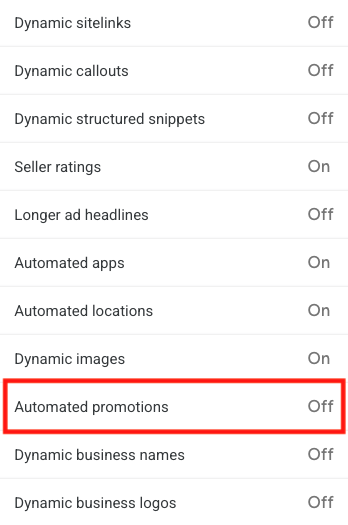
“Advanced settings” reveals the on-off status of account-level automated assets, such as automated promotions.
Google can automate the use of an advertiser’s names and logos (potentially causing inaccurate branding) unless those items are “off.” View which assets AI added by clicking the “Assets” link in the left navigation and filtering with “Added by: Google AI.”
Optimized Targeting and Audience Expansion
Search campaigns target Google Search Partners and its Display Network unless advertisers turn those options off. Similarly, Demand Gen and Video campaigns apply optimized targeting and audience expansion unless instructed otherwise.
Both options sound helpful, but they can pull budget from preferred audiences. I wouldn’t turn on the options until the campaigns have run long enough to gather adequate conversion data. Train the AI first, in other words.
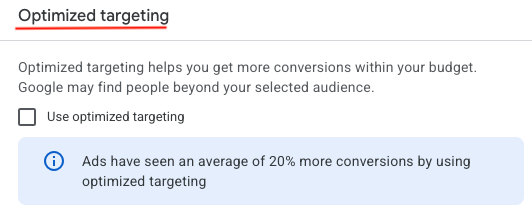
Turn on optimized targeting after gathering enough conversion data.