



Last updated: October 29, 2026
The best Microsoft Project alternatives for construction are ProjectManager, Primavera P6, Asta Powerproject, Procore, Smartsheet and Microsoft’s own Planner and Project Plan 3. ProjectManager is the best fit for general contractors and subcontractors who build CPM schedules in Microsoft Project and need superintendents and crews to see and update them, because it imports MPP files directly and runs in a browser and on mobile. Primavera P6 and Asta Powerproject suit professional schedulers on very large programs, Procore suits contractors who want the schedule inside a full construction platform, Smartsheet suits teams coming from spreadsheets, and Planner and Project Plan 3 suits teams that want to stay with Microsoft.
Microsoft retired Project Online on September 30, 2026, and is moving its cloud project tools into Planner. Construction teams that kept their schedules in Project Online now have to pick a new home for them, and many teams on the desktop version are using the change to ask whether Microsoft Project is still the right scheduling tool for the field.
This guide covers what changed at Microsoft, what to look for in a replacement and how six alternatives compare on critical path scheduling, MPP import, field access and price. It’s written for construction scheduling. For a broader list that covers every kind of team, see the 19 best Microsoft Project alternatives.
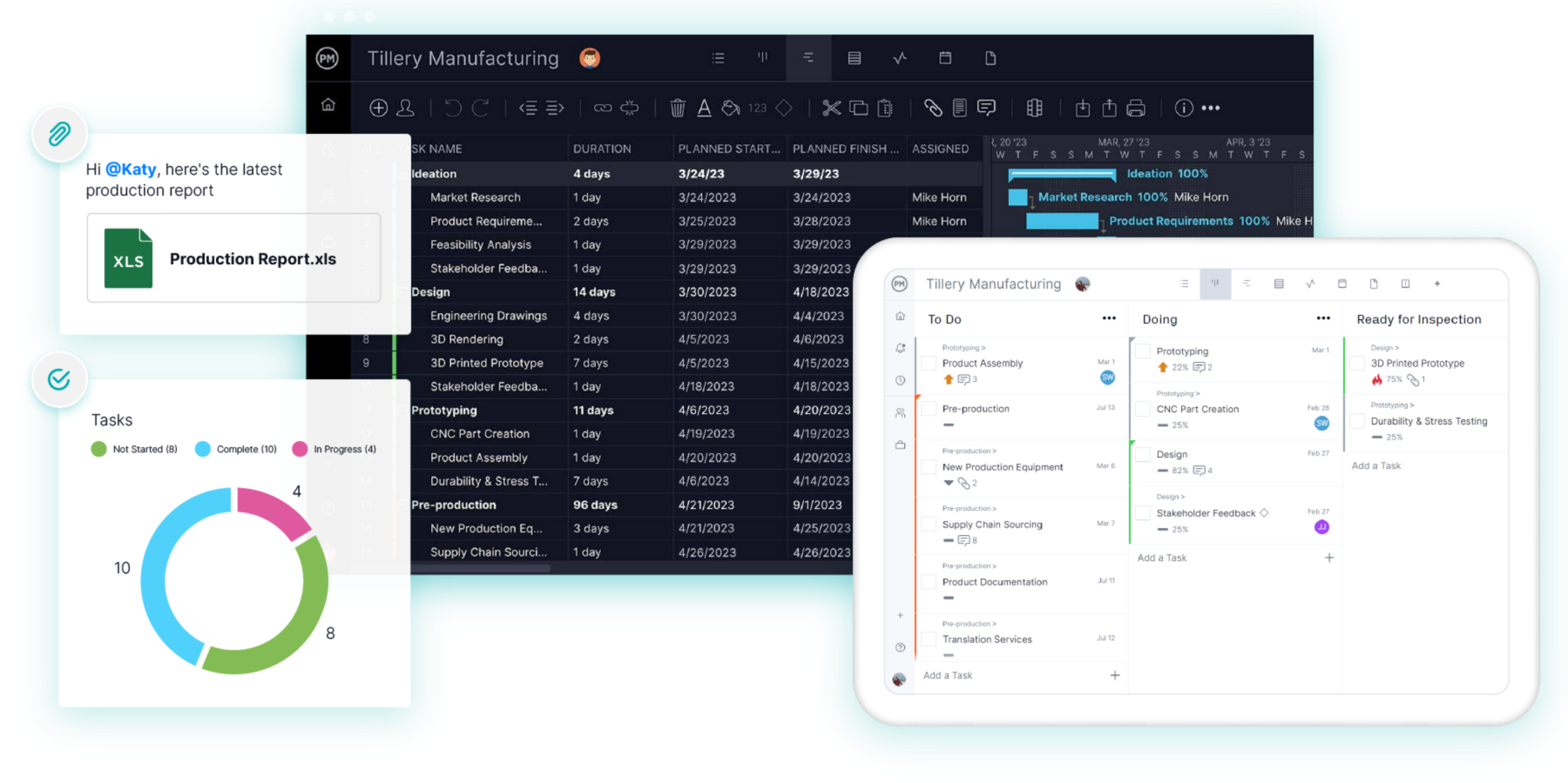
ProjectManager is online project management software for construction scheduling. Import your Microsoft Project schedule, filter for the critical path, set a baseline and give every super and foreman the schedule on their phone. Get started with ProjectManager today for free.
Why Construction Teams Are Leaving Microsoft Project
Construction teams are leaving Microsoft Project because Microsoft has retired its cloud version, changed its licensing again and still offers limited ways for field crews to work in the schedule. These are the main reasons:
- Project Online is retired. Microsoft stopped selling Project Online to new customers on October 1, 2025, and retired it on September 30, 2026, according to its Planner FAQ. Microsoft points Project Online customers to Planner’s premium plans or to Project Server Subscription Edition, which runs on your own servers.
- Desktop versions are aging out. Support for Project 2021 ended on October 13, 2026, per Microsoft’s lifecycle page. Project 2024 is supported until October 2029, so desktop users aren’t forced to move, but many are reviewing their options anyway.
- Licensing keeps changing. Project plans have been renamed and repackaged several times, and Microsoft has ended sales of Planner and Project Plan 5. Comparing what each plan includes takes time a contractor would rather spend on the job.
- The schedule stays in the office. Project desktop runs on Windows, and Microsoft says most new Planner features arrive on desktop and web first. In practice, the schedule often goes to the field as a PDF, so the superintendent works from a printout that’s out of date as soon as framing slips a day.
- One scheduler holds the file. With an MPP file on one person’s computer, foremen can’t mark work complete or flag an inspection hold. Updates come in by phone and text, and the scheduler re-enters them.
If you only need to keep using Microsoft Project desktop, nothing forces a change today. If your team used Project Online, or if the field can’t see the schedule, it’s a good time to compare alternatives.
What to Look for in a Microsoft Project Alternative for Construction
A good Microsoft Project alternative for construction keeps the CPM logic your schedules depend on, opens the MPP files you already have and puts the schedule in front of the field. Check for these features:
- Critical path scheduling. The tool should calculate the critical path from durations and dependencies. If framing slips three days, you need to see right away whether drywall, rough-in inspections and the finish date move with it.
- All four dependency types and lag. Finish-to-start, start-to-start, finish-to-finish and start-to-finish, plus lag for concrete cure time, inspection holds and material lead times. Your Microsoft Project schedules almost certainly use all of these.
- Baselines. Save the original plan and compare it with actual progress, both to run the job and to document delays if there’s a dispute. See baselines in construction for more.
- Resource visibility across jobs. When crews move between several job sites, you need to see each crew’s hours across every project, not one schedule at a time.
- MPP import. Check whether the tool reads MPP files directly or needs an XML export first, and whether dependencies, durations and assignments come through. Test with one of your real schedules before you commit.
- Field access. Superintendents and foremen should be able to view the schedule and update progress from a phone or tablet, without a desktop license.
- Predictable pricing. Count everyone who needs access, including supers, foremen and subcontractors, and compare per-user pricing with volume-based pricing.
Microsoft Project Alternatives for Construction Compared
| Tool | Best for | Critical path | MPP import | Field/mobile access | Starting price |
|---|---|---|---|---|---|
| ProjectManager | General contractors and subcontractors moving MPP schedules into a tool the whole team can use | Yes, critical path filter on the Gantt | Yes, MPP and Microsoft Project XML | Browser on any OS, iOS and Android apps | $15/user/month (Team), $28/user/month (Business), billed annually |
| Primavera P6 | Professional schedulers on very large programs and owner-mandated P6 jobs | Yes, by total float or longest path | Microsoft Project XML and MPX, not MPP | P6 EPPM in a browser; P6 mobile apps for updating assigned activities | Quote only |
| Asta Powerproject | Professional construction planners who want P6-level depth | Yes | Microsoft Project XML; MPP only with Microsoft Project installed | Asta Siteprogress app, licensed separately | Quote only |
| Procore | General contractors who want the schedule inside a full construction management platform | Yes, in Procore Scheduling | Yes, as a read-only schedule | iOS and Android apps to view schedules and update percent complete | Quote only, based on annual construction volume |
| Smartsheet | Teams moving from spreadsheets who want light scheduling and trackers | Yes, highlighted on the Gantt | Yes, MPP, MPX and XML | iOS and Android apps; Gantt view on mobile for reports only | $9/member/month (Pro), billed annually |
| Microsoft Planner and Project Plan 3 | Teams that want to stay with Microsoft 365 | Yes, in Planner premium plans and Project desktop | Opens in Project desktop (included); Planner needs a migration app | Planner web; timeline and critical path documented for web and desktop | $30/user/month, paid yearly |
Prices are list prices as of October 2026 and change often. Check each vendor’s site before buying.
6 Best Microsoft Project Alternatives for Construction
1. ProjectManager
ProjectManager is the most direct replacement for Microsoft Project on a construction team, because it imports your MPP files and puts the same CPM schedule in front of everyone on the job. Schedules are built on a Gantt chart with all four dependency types and lag, and a critical path filter shows the chain of tasks that sets the finish date. Superintendents and foremen open the schedule in a browser or on the iOS and Android apps and update progress from the site, so the office sees a delayed drywall delivery the day it happens.
ProjectManager also handles the part Microsoft Project leaves to spreadsheets: crews spread across several job sites. The workload page shows each person’s assigned hours across all projects on one chart, timesheets record actual hours and dashboards roll up progress. Equipment and subcontractors can be added as resources without buying them a license. For a feature-by-feature comparison, see Microsoft Project vs. ProjectManager.
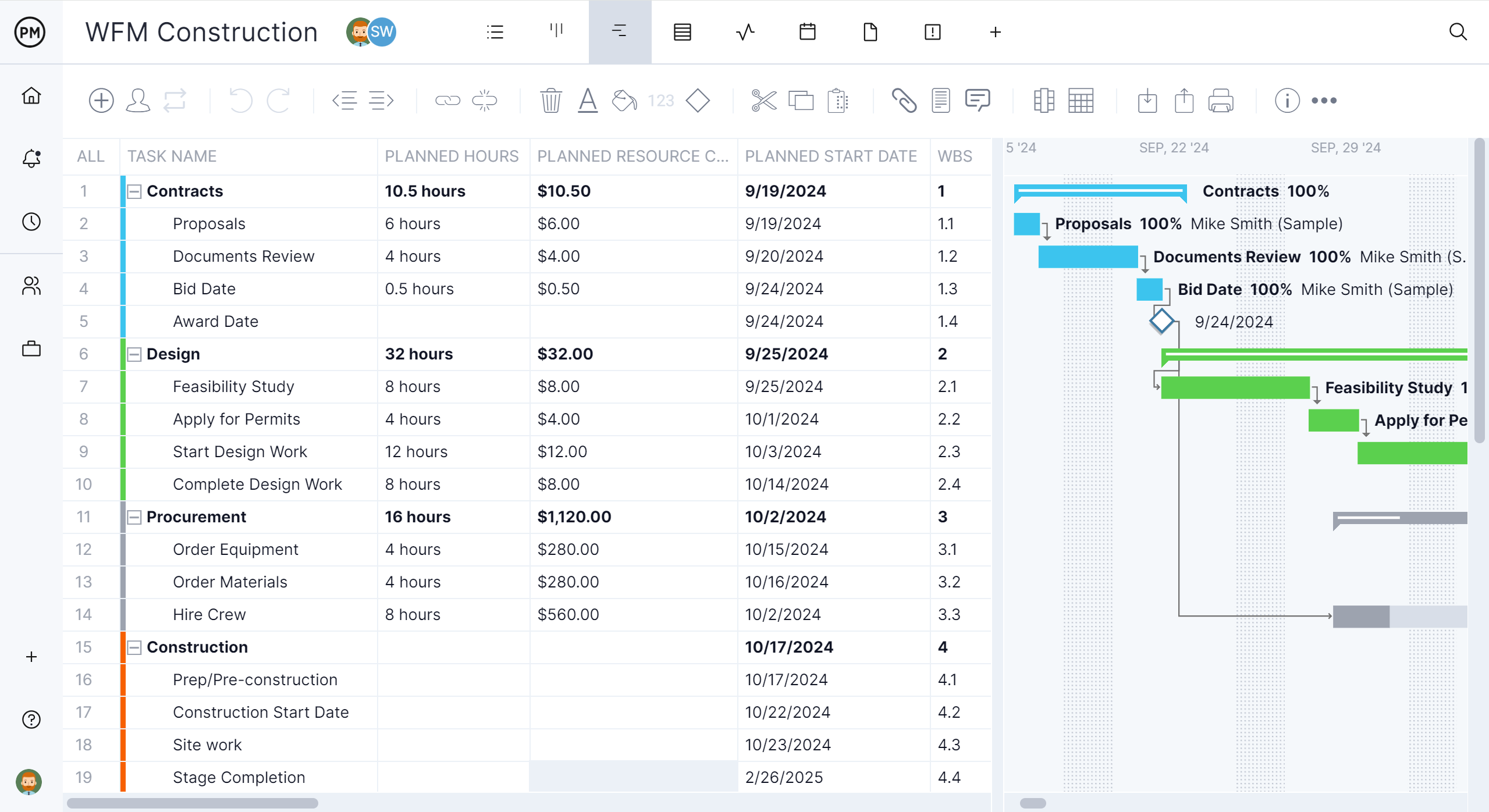
Best for: General contractors and subcontractors who build CPM schedules in Microsoft Project and need supers, foremen and crews across several jobs to see and update them.
Key features
- Import of MPP, Microsoft Project XML, Excel and CSV files, and export to MPP, XML, Excel and CSV
- Gantt charts with finish-to-start, start-to-start, finish-to-finish and start-to-finish dependencies, plus lag
- Critical path filter, baselines and variance reports
- Workload page showing hours across all projects (Business plan and above)
- Equipment and subcontractors as resources with no license cost
- Browser access on any operating system, iOS and Android apps, timesheets and dashboards
Pros
- Opens existing MPP schedules, so you don’t rebuild them
- Field staff can view and update the schedule without a desktop license or a Windows PC
- Scheduling, resources, time tracking and reporting in one tool
Cons
- No XER import or export, so jobs that require Primavera P6 submittals need P6 or a tool that writes XER
- The workload page and resource management need the Business plan or above
- Per-user pricing adds up if you give every crew member a seat, and very large programs with tens of thousands of activities may be better served by P6 or Asta
Pricing: Team $15/user/month, Business $28/user/month (billed annually), Enterprise by quote. 30-day free trial.
2. Primavera P6
Primavera P6 is the alternative for professional schedulers running very large or owner-mandated programs. Oracle’s scheduling software calculates the critical path by total float or longest path, handles tens of thousands of activities and produces the XER files many public owners require in their contracts. It comes as P6 Professional, a Windows desktop application, and P6 EPPM, which runs in a browser.
Moving from Microsoft Project to P6 takes more than a file conversion. P6 Professional imports Microsoft Project XML and MPX files, not MPP files, so you save each schedule as XML from Microsoft Project first. P6 also has a longer learning curve than Microsoft Project, and it usually stays with a trained scheduler rather than the superintendent. For a closer look at P6 and its competitors, see the best Primavera P6 alternatives.
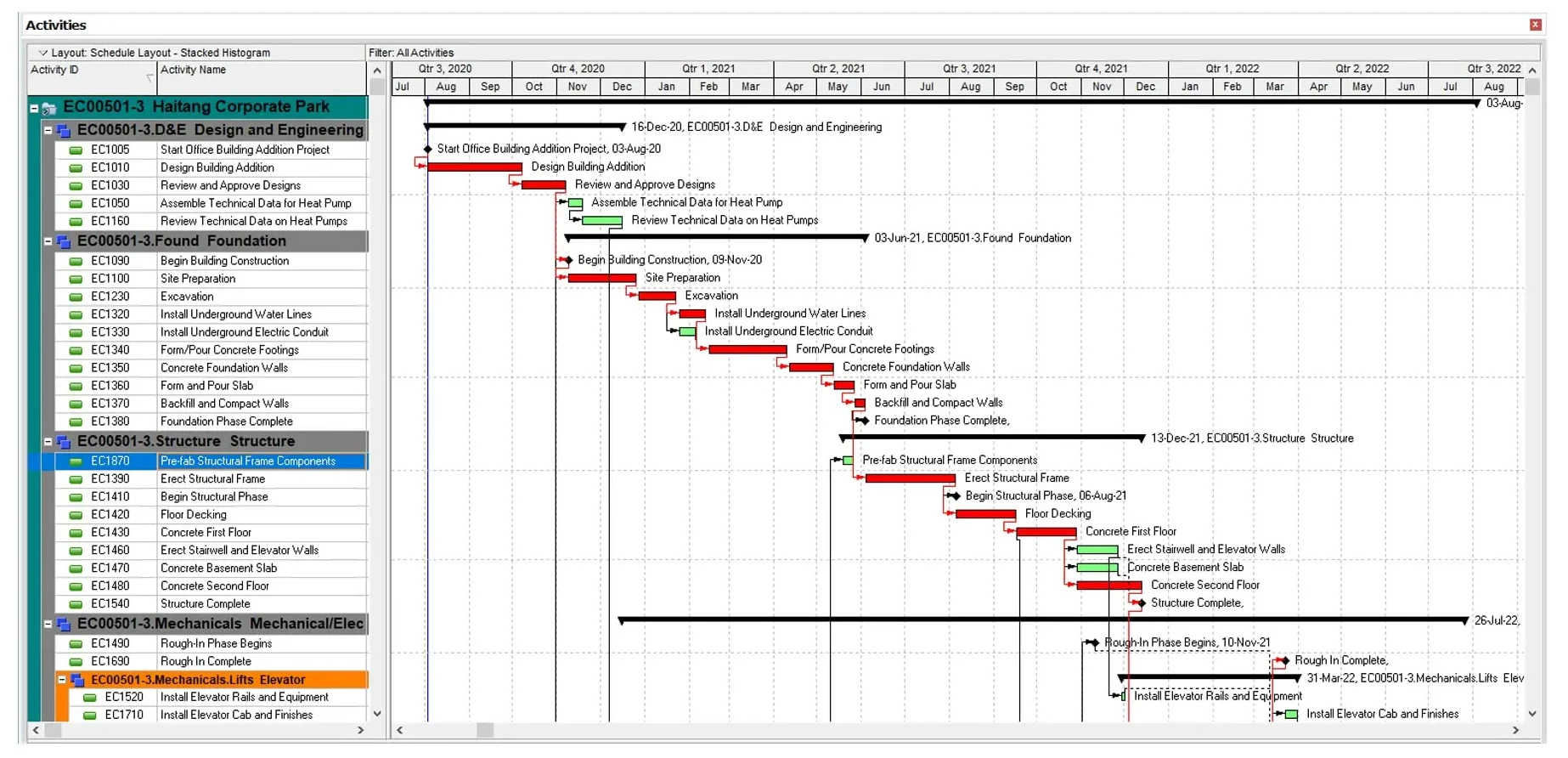
Best for: Professional schedulers on very large programs, and contractors whose owners require P6 or XER submittals.
Key features
- CPM scheduling with critical path by total float or longest path, and multiple float paths
- Detailed resource loading and enterprise project structures
- Import of Microsoft Project XML and MPX files
- P6 mobile apps for team members to update assigned activities and enter time
Pros
- The standard for large construction, infrastructure and energy schedules
- Produces XER files for owners and claims consultants who require them
- Handles schedules far larger than most tools can
Cons
- No direct MPP import, so every schedule goes through an XML export
- Steep learning curve, usually needing formal training
- The mobile apps are for updating assigned activities and timesheets, not for viewing or editing the full schedule
- Oracle doesn’t publish current prices
Pricing: By quote through Oracle or a reseller.
3. Asta Powerproject
Asta Powerproject is a construction scheduling tool for professional planners who want P6-level depth with a construction focus. Made by Eleco, it supports CPM scheduling with detailed logic, calendars, constraints and resource loading.
For Microsoft Project users, file handling depends on the format. Powerproject imports Microsoft Project XML without needing Microsoft Project installed, but MPP import and export work only if Microsoft Project is installed on the same computer. Field updates come through Asta Siteprogress, a companion app for iOS and Android that’s licensed separately.
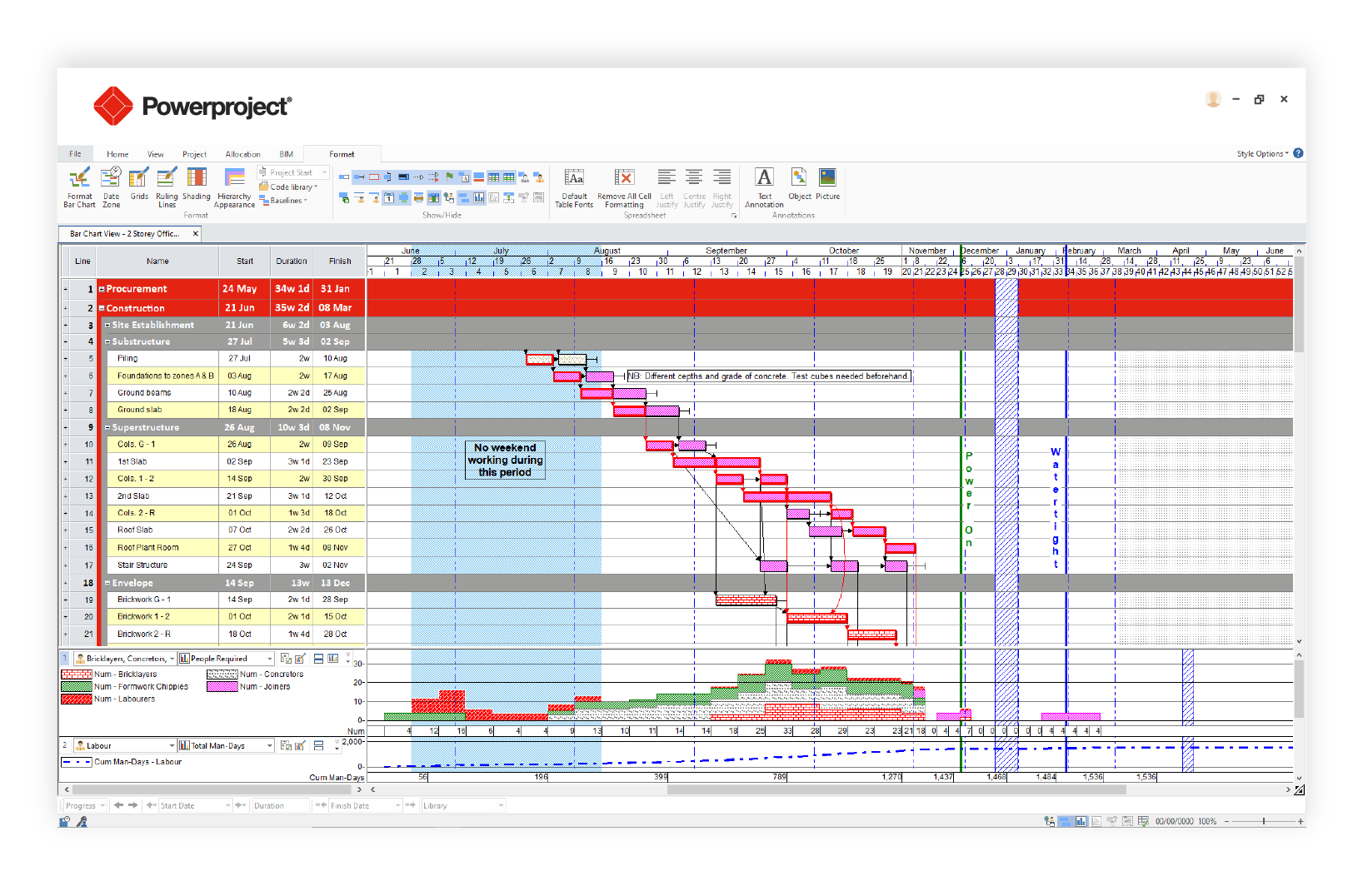
Best for: Professional construction planners and larger contractors who want deep CPM scheduling built for construction.
Key features
- CPM scheduling with critical path analysis, calendars and constraints
- Import of Microsoft Project XML files, and MPP files when Microsoft Project is installed
- Single-user, concurrent and cloud (SaaS) licensing
- Asta Siteprogress app for site progress updates, photos and notes, including offline
Pros
- Built specifically for construction planning
- Scheduling depth close to P6
- Free 14-day trial
Cons
- A specialist tool, with a learning curve for supers and project managers
- Direct MPP import needs a Microsoft Project installation on the same computer
- Field access needs the separately licensed Siteprogress app, charged by the number of active jobs
- Prices aren’t published
Pricing: Single-user, concurrent and SaaS licenses by quote. Free 14-day trial.
4. Procore
Procore is a construction management platform that now includes its own scheduling tool alongside documents, RFIs, submittals, budgets, quality and safety. Procore Scheduling, generally available since February 2026, lets teams build and edit schedules in Procore, track the critical path and create lookaheads.
Microsoft Project files come into Procore as read-only schedules. That option is meant for teams that keep the master schedule in Microsoft Project or P6 and use Procore to share it, so an MPP file won’t become an editable Procore schedule. If you want to move off Microsoft Project entirely, you’d rebuild the schedule in Procore Scheduling.
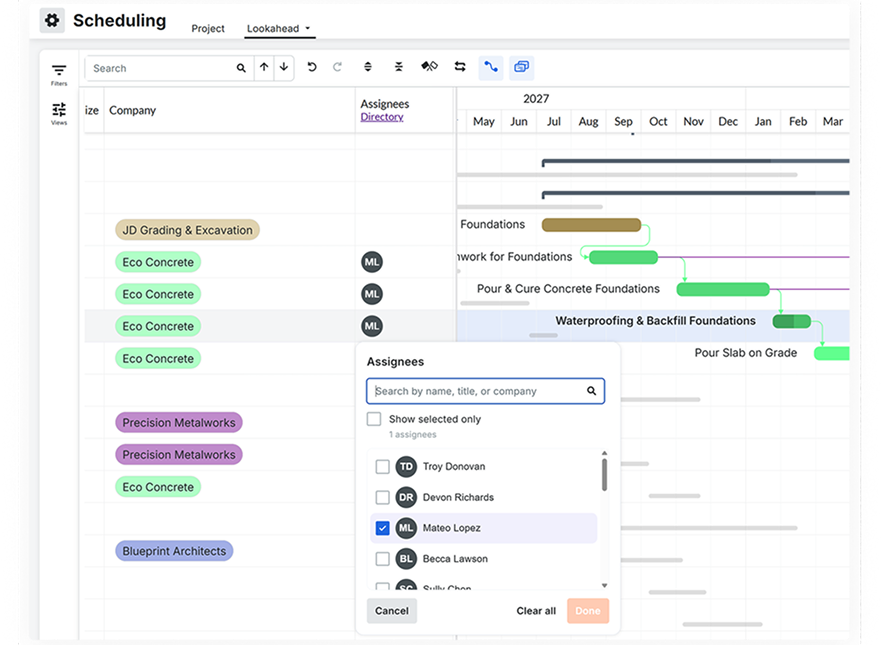
Best for: General contractors who want the schedule inside a full construction management platform with documents, RFIs and financials.
Key features
- Procore Scheduling with Gantt editing, critical path tracking and lookaheads
- Read-only import of MPP, XML and XER schedules
- Documents, RFIs, submittals, budgets, quality and safety tools
- iOS and Android apps to view schedules and update percent complete
Pros
- Puts the schedule next to the rest of the project record
- No charge for adding users
- Widely used by general contractors and owners
Cons
- Imported MPP schedules are read-only, so moving off Microsoft Project means rebuilding the schedule
- Lookaheads are created on the web, not in the mobile app
- Pricing is based on annual construction volume and can be high for smaller contractors
- More platform than you need if scheduling is the main problem
Pricing: By quote, as an annual fee based on the products you choose and your annual construction volume. No charge for additional users.
5. Smartsheet
Smartsheet is a spreadsheet-style work management tool with Gantt charts, dependencies and critical path highlighting. It imports MPP, MPX and XML files directly, which makes it easy to bring Microsoft Project schedules over for teams that also want submittal logs and punch lists in the same tool.
Its scheduling is lighter than a dedicated CPM tool. Smartsheet notes that Microsoft Project constraints aren’t supported on import and can put rows out of order, and imports are limited to 20,000 rows. On the mobile app, sheets open in grid, card and list views, while the Gantt view is available for reports only.

Best for: Teams moving from spreadsheets who want light scheduling and flexible trackers in one tool.
Key features
- Grid, Gantt, card and calendar views
- Dependencies and critical path highlighted on the Gantt (paid plans)
- Direct import of MPP, MPX and XML files
- Forms, automations and dashboards
Pros
- Familiar to anyone who works in spreadsheets
- Imports MPP files without Microsoft Project installed
- 30-day free trial with no credit card
Cons
- Microsoft Project constraints don’t carry over on import
- No Gantt view for sheets in the mobile app, so crews see the schedule as a list or grid
- Less control over complex logic than dedicated CPM tools
Pricing: Pro $9/member/month billed annually ($12 monthly), Business $19/member/month billed annually ($24 monthly), Enterprise by quote. 30-day free trial.
6. Microsoft Planner and Project Plan 3
Planner and Project Plan 3 is the option for teams that want to stay with Microsoft after Project Online. It combines Planner’s premium features, including a timeline (Gantt) view, dependencies, critical path and baselines, with the Project desktop client.
The catch is that your MPP files and your Planner plans live in different places. Project desktop opens MPP files as before, but Planner can’t import an MPP file directly. Moving a desktop schedule into Planner goes through a separate migration app or a partner tool. Microsoft also says new Planner capabilities reach desktop and web first, so check what your field crews will see on mobile before you rely on it.
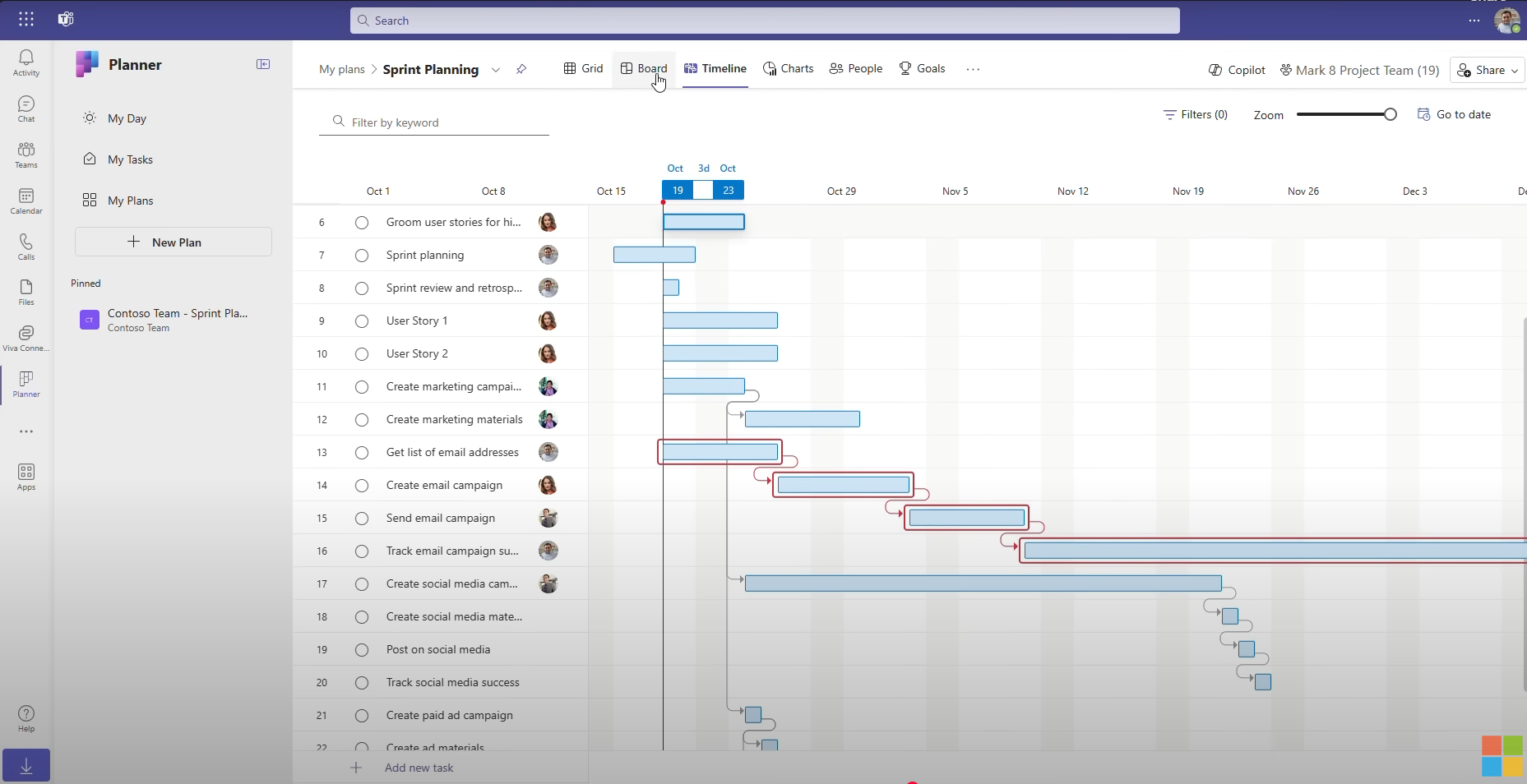
Best for: Teams already on Microsoft 365 that want to keep their schedules in Microsoft’s tools.
Key features
- Timeline (Gantt) view with dependencies and critical path in Planner premium plans
- Baselines in Planner premium plans
- Project desktop client included with Plan 3
- Works with Teams, Outlook and other Microsoft 365 apps
Pros
- Keeps you in Microsoft 365, with a single vendor and sign-in
- Project desktop still opens your existing MPP files
- Migration tools from Project Online to Planner
Cons
- Planner can’t open MPP files directly, so desktop schedules need a migration step
- Licensing has changed several times, and Planner and Project Plan 5 is no longer sold to new customers
- Only one baseline at a time in Planner
- Field access to the timeline and critical path isn’t clearly documented for mobile
Pricing: Planner Plan 1 $10/user/month and Planner and Project Plan 3 $30/user/month, both paid yearly.
How to Move a Microsoft Project Schedule Into ProjectManager
To move a Microsoft Project schedule into ProjectManager, set up a new project with matching working days, then import the MPP file and check the logic. ProjectManager imports MPP files and XML files exported from Microsoft Project, bringing over tasks, assignees, dependencies and planned dates, so you don’t need Microsoft Project installed to open the file.
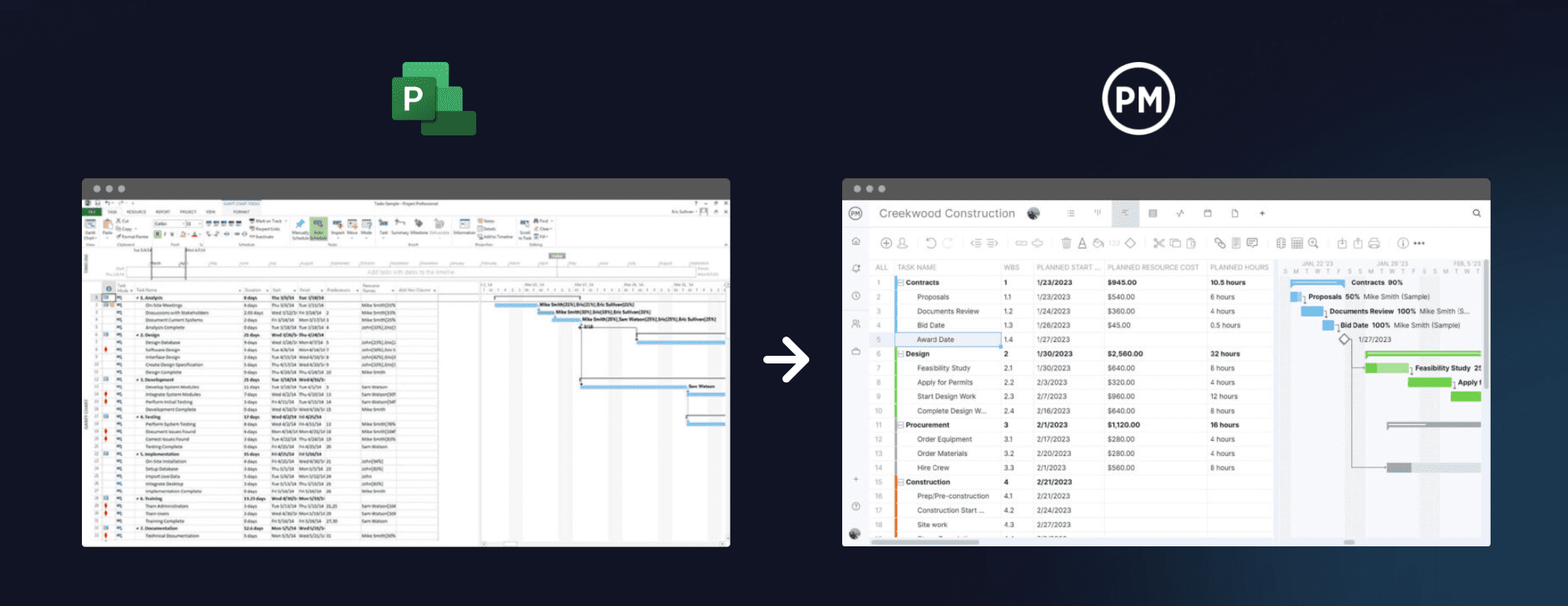
- Set working days first. In ProjectManager, click the + button and choose Project, then set your working days to match the calendar in your Microsoft Project file, such as a five-day or six-day work week. Working days are hard to change once the project exists. Add any global holidays now too, since they can’t be added to existing projects.
- Import the file. Choose Import File when creating the project, or click the import icon on the Gantt ribbon of an existing project. Click select file, upload your MPP or XML file and click next. If you’re importing into an existing project, choose Keep and append with the imported data or Replace with the imported data. Replace removes everything already in the project.
- Choose what to import. Choose whether to import the task list only or all data. Choose the task list only to bring over the schedule structure and dates, or all data to also bring over assignees and other details.
- Check the logic. Compare durations and dependencies with the original schedule. Pay attention to lag, such as cure time between a slab pour and framing, and to any constraint dates from Microsoft Project. Imported actual hours don’t go into timesheets, so add those separately if you need them.
- Filter for the critical path. Turn on the critical path filter and check that it matches the critical path in Microsoft Project. If it doesn’t, look for missing links, lag or constraints that didn’t carry over.
- Set a baseline. Once the schedule matches, set a baseline in Gantt settings so you can track variance from the start of the job.
Keep the original MPP file. If an owner or partner asks for the schedule in Microsoft Project format, ProjectManager can also export to MPP and XML.
Want to see your schedule in ProjectManager? Start a free 30-day trial, import an MPP file and turn on the critical path filter to compare it with Microsoft Project. Get started with ProjectManager today for free.
Microsoft Project Alternatives for Construction FAQ
What replaces Project Online?
Microsoft points Project Online customers to Planner’s premium plans, such as Planner and Project Plan 3, or to Project Server Subscription Edition for teams that want to host it themselves. Project Online was retired on September 30, 2026. Construction teams can also move to other tools, such as ProjectManager, which imports Microsoft Project files.
Can I open MPP files without Microsoft Project?
Yes. ProjectManager and Smartsheet import MPP files directly, and Procore can import an MPP file as a read-only schedule. Microsoft Planner can’t open MPP files directly, and Asta Powerproject needs Microsoft Project installed to read them. Primavera P6 imports Microsoft Project XML instead.
Is Microsoft Project good for construction scheduling?
Microsoft Project handles CPM scheduling, dependencies and baselines well, and many construction schedules already exist as MPP files. Its weak spots for construction are field access and visibility across jobs: the desktop version runs on Windows, and crews usually see the schedule as a PDF. Read more in Microsoft Project for construction: pros and cons.
Is Microsoft Project still available after Project Online’s retirement?
Yes. Microsoft says Project desktop and Project Server remain available and supported for existing and new customers. The retirement affected only Project Online, the older cloud service. Support for Project 2021 ended on October 13, 2026, while Project 2024 is supported until October 2029.
What is the best Microsoft Project alternative for a general contractor?
For most general contractors and subcontractors, ProjectManager is the best fit, because it imports MPP files, keeps critical path scheduling and baselines, and gives supers and foremen the schedule in a browser and on mobile. Contractors on very large or P6-mandated programs may need Primavera P6 or Asta Powerproject.
Does Procore replace Microsoft Project?
It can now. Procore Scheduling lets teams build and edit schedules with critical path tracking inside Procore. Imported Microsoft Project files stay read-only, though, so switching means rebuilding the schedule in Procore rather than converting your MPP files.