


Last updated: November 12, 2026
Seven Gantt chart tools stand out for Mac users: ProjectManager, OmniPlan, Merlin Project, GanttPRO, TeamGantt, Smartsheet and ProjectLibre. ProjectManager fits Mac users and mixed Mac and PC teams who want a full Gantt chart in the browser, OmniPlan is the strongest native Mac app for individuals who work offline, and Merlin Project fits teams that use only Apple devices. GanttPRO and TeamGantt fit small teams that want a simple online Gantt chart, Smartsheet fits teams that work in spreadsheets, and ProjectLibre is the top free pick for one person planning on a Mac.
ProjectManager is online project management software with a Gantt chart that runs in any browser on a Mac. Link tasks with all four dependency types, filter for the critical path, set a baseline and share the same chart with Mac and Windows users. Get started with ProjectManager today for free.
Why Mac Users Need Dedicated Gantt Chart Software
Microsoft Project, the most common desktop Gantt chart tool, doesn’t run on a Mac. Project Standard 2024, Project Professional 2024 and the desktop client that comes with Planner and Project Plan 3 are all Windows-only. Microsoft’s browser versions are gone too: Project for the Web was retired on August 1, 2025, and Project Online was retired on September 30, 2026.
Microsoft’s browser Gantt chart now lives in Planner. Planner Plan 1 ($10/user/month, paid yearly) has a timeline view with finish-to-start dependencies only, and critical path, baselines and the other dependency types need Planner and Project Plan 3 ($30/user/month, paid yearly). Mac users can also run Windows in a virtual machine; see how to use Microsoft Project on a Mac. For most people, though, it’s simpler to use a Gantt chart tool that runs on a Mac.
This guide compares tools by the Gantt chart experience on a Mac. If you mainly need to open and send back Microsoft Project files, see the best Microsoft Project alternatives for Mac instead.
What to Look for in Gantt Chart Software for Mac
A good Gantt chart tool for Mac lets you build a schedule quickly, keeps it accurate as dates change and lets everyone who needs it see it. Check for these features:
- Mac access. Native macOS apps work offline and feel at home on a Mac. Browser-based tools need an internet connection but work the same on a Mac, a Windows PC and Linux, so nobody is left out.
- Easy building and editing. You should be able to drag bars to change dates, drag between tasks to link them and add milestones without filling in forms.
- Dependency types and lag. Finish-to-start links cover most tasks, but real schedules also need start-to-start, finish-to-finish and start-to-finish links, plus lag for waiting time. See Gantt chart dependencies for more.
- Critical path. The tool should show which tasks drive the finish date, so you know which delays move the whole project. Check which plan includes it.
- Baselines. A baseline saves the original plan so you can compare it with actual progress.
- Sharing. Check whether Windows users and people without a license can view or update the chart, and whether they need to install anything.
- iPhone and iPad access. Some mobile apps show the full Gantt chart, while others show only a task list.
- Price. Compare per-user pricing, flat account pricing and one-time purchases, and count everyone who needs access.
Gantt Chart Software for Mac Compared
| Tool | Best for | Mac access | Dependency types and lag | Critical path | Baselines | Sharing and collaboration | iPhone/iPad app | Starting price |
|---|---|---|---|---|---|---|---|---|
| ProjectManager | Mac users and mixed Mac and PC teams | Browser | All four, with lag | Yes | Yes | Mac and Windows users edit the same chart online; unlimited free read-only guests | iPhone app; iPad in the browser | $15/user/month (Team), billed annually |
| OmniPlan | Individuals who want a native Mac app and offline work | Native | All four, with lead and lag | Yes | Yes, unlimited | Publish and sync through Omni Sync Server or WebDAV (Pro); no Windows version | Yes, iPhone and iPad | $199.99 one-time (Standard) |
| Merlin Project | Teams that use only Apple devices | Native | All four, with lead and lag | Yes | Yes, dynamic baseline | Shared files through iCloud Drive or Dropbox; free read-only access; no Windows version | Yes, iPhone and iPad (separate subscription) | $22.99/month or $229.99/year (Mac) |
| GanttPRO | Small teams that want critical path and baselines online at a low price | Browser | All four, with lead and lag | Yes, all plans | Yes, all plans | Shared team projects online; private share links for stakeholders | Yes, iOS app | $8/user/month (Core), billed annually, for 1–15 members |
| TeamGantt | Small teams that want a simple shared Gantt chart with flat pricing | Browser | All four, with lead and lag (advanced dependencies on Business and above) | Yes, all paid plans | Business and above | Collaborators update progress but can’t change dates; public share link | Yes, list view only | Free Personal plan; Base $59/month per account |
| Smartsheet | Teams that like working in spreadsheets | Browser | All four, with lag | Pro and above | Business and above (one per sheet) | Free Contributors view and comment; free external Guests can edit on Business and above | Yes, Gantt view in reports only | $9/member/month (Pro), billed annually |
| ProjectLibre | One person who wants a free desktop scheduler | Native (needs Java); paid Cloud version in the browser | All four, with lag | Yes | Yes | None in the desktop app; send the file around | No | Free (desktop) |
Prices are list prices as of November 2026 and change often.
7 Best Gantt Chart Software for Mac
1. ProjectManager
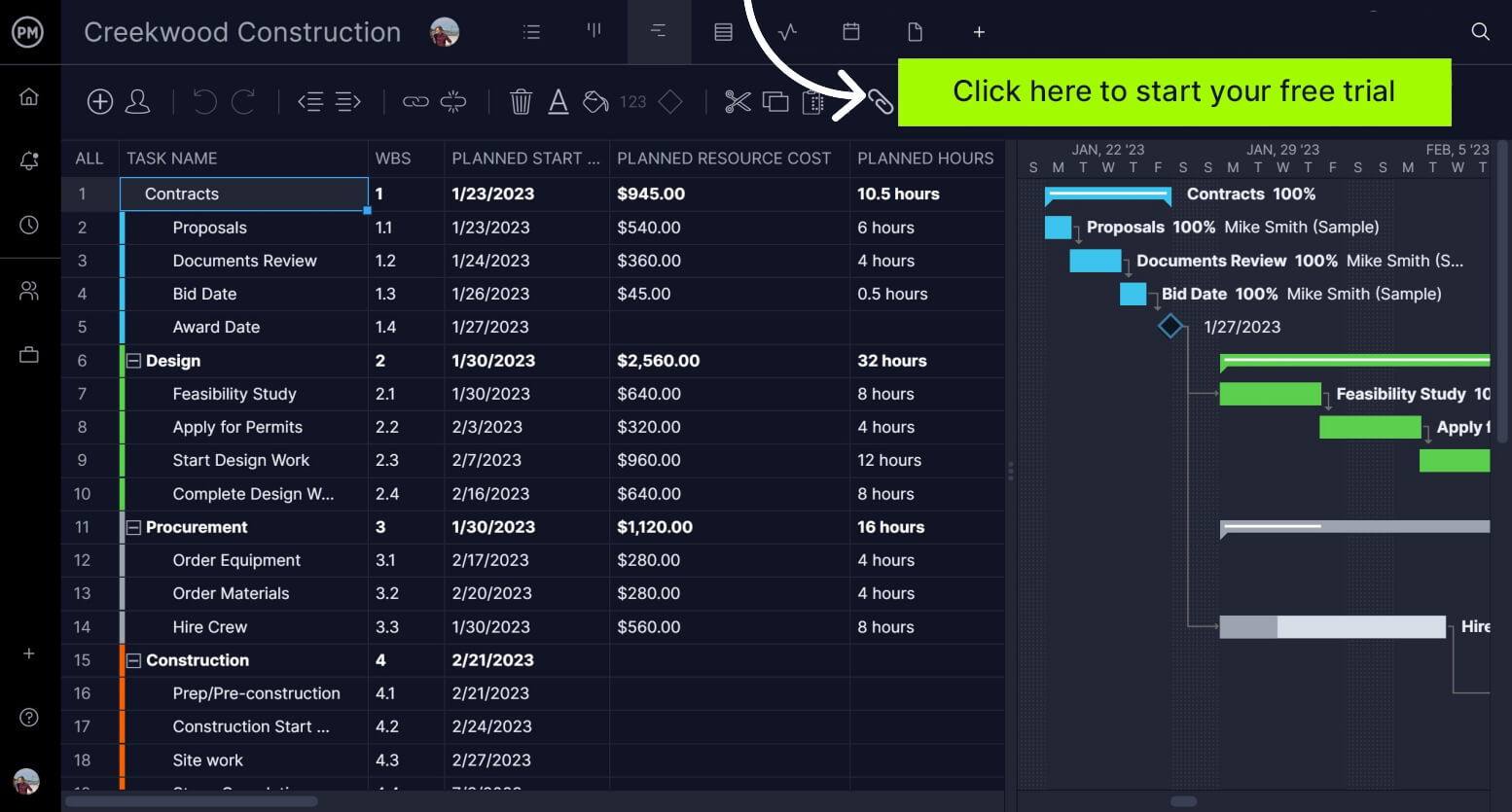
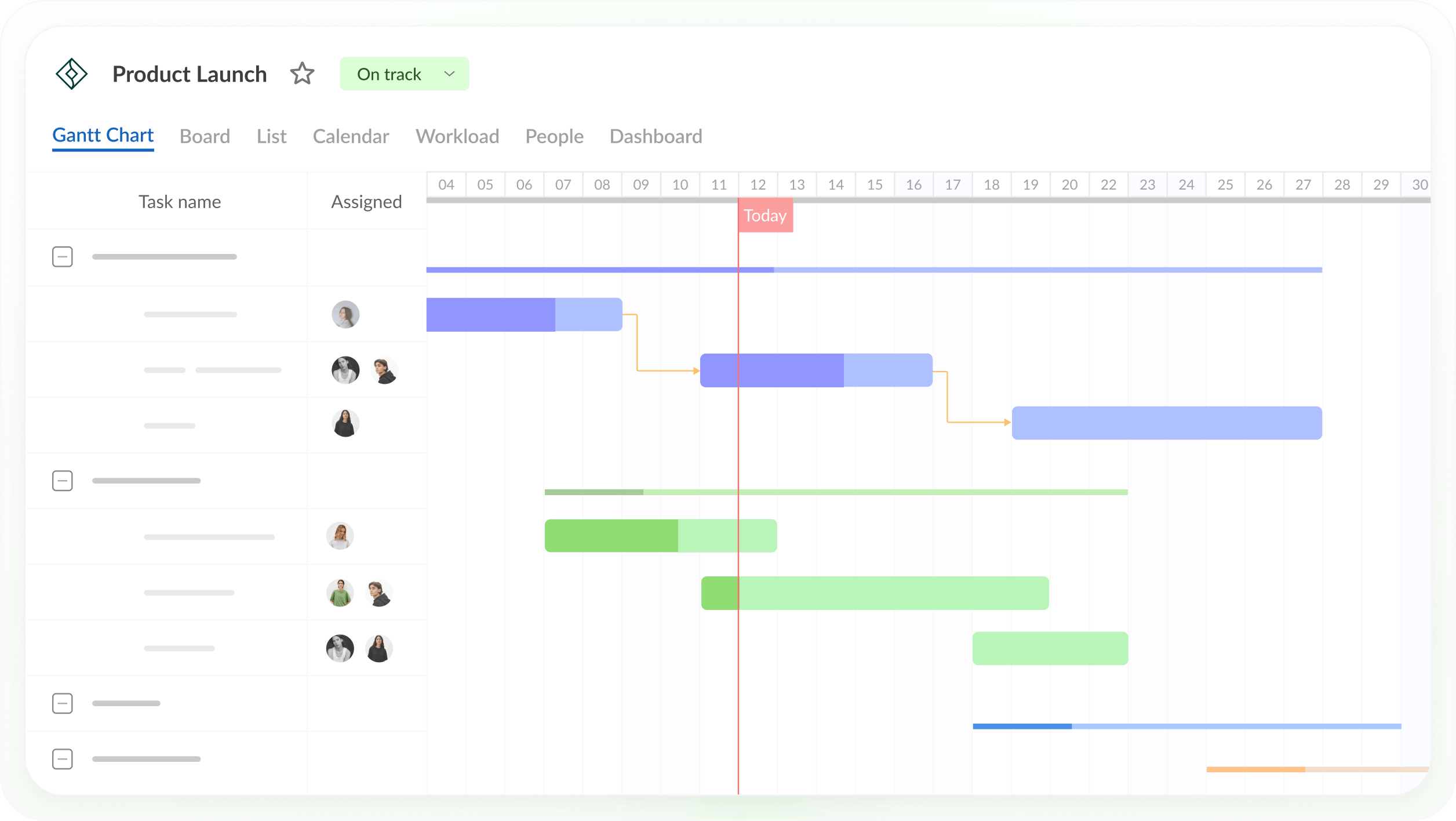
ProjectManager fits most Mac users who need a full Gantt chart, from one person planning a project to a team with a mix of Macs and PCs. It runs in any modern browser on macOS, Windows and Linux, so everyone works in the same Gantt chart with nothing to install. The Gantt supports all four dependency types with lag, a critical path filter shows which tasks drive the finish date, and baselines and variance reports show how far the plan has drifted.
Here’s a typical case. A project manager on a MacBook builds the schedule from a template, links the tasks and sets a baseline. Team members on Windows laptops update their own tasks in the browser, people in the field update them in the iPhone or Android app, and the client sees the plan as a free read-only guest. If someone sends an MPP file from Microsoft Project, ProjectManager imports it, and it exports MPP files back, lossless for schedule data.
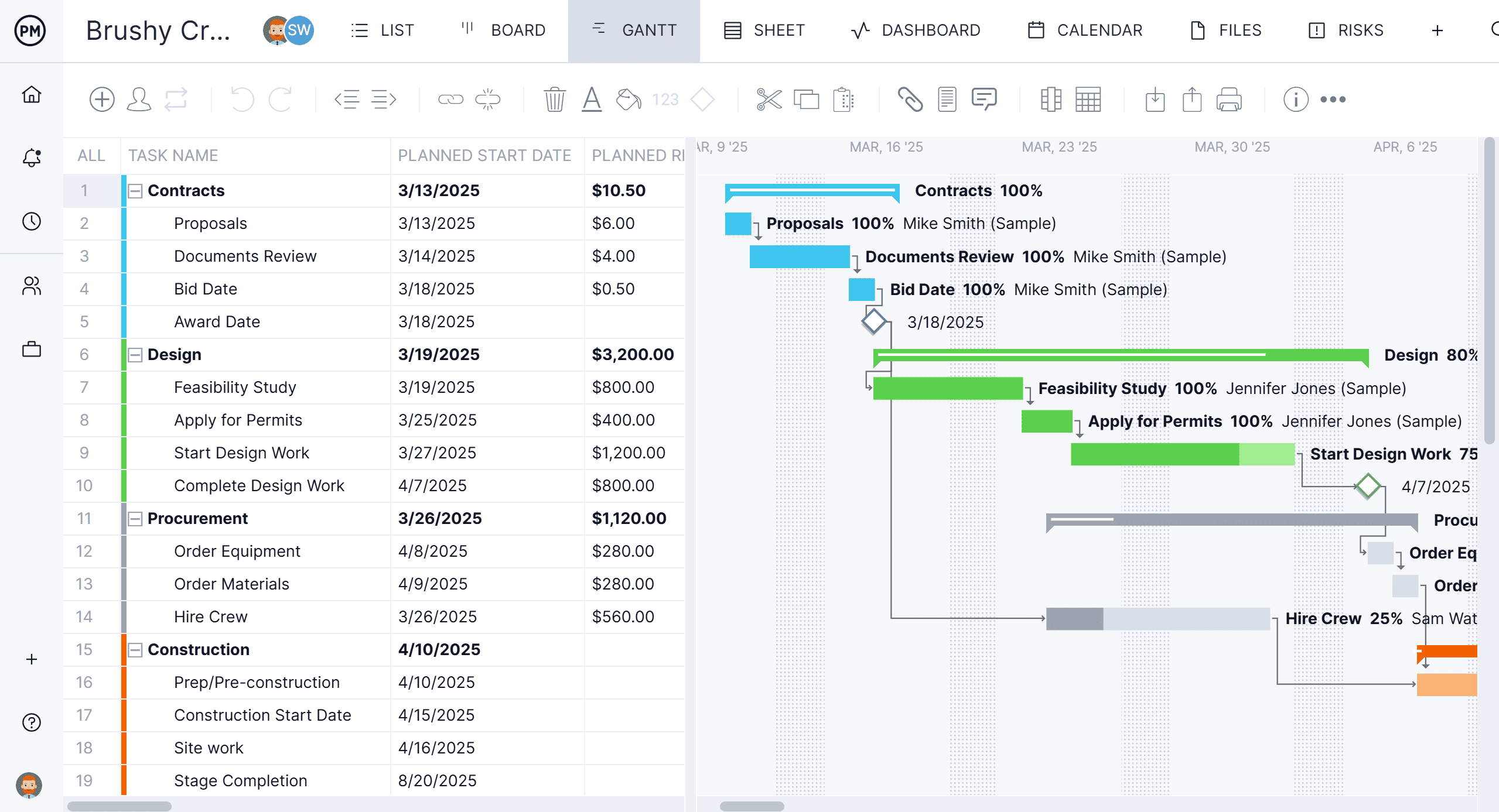
Mac access: Runs in any modern browser on macOS, Windows and Linux, plus iPhone and Android apps. On an iPad, ProjectManager runs in the browser. There’s no native Mac desktop app.
Best for: Mac users and mixed Mac and PC teams who want a full Gantt chart with critical path and baselines that everyone can open in a browser.
Gantt chart features
- Finish-to-start, start-to-start, finish-to-finish and start-to-finish dependencies, plus lag
- Drag bars to change dates, milestones and a critical path filter
- Baselines and variance reports
- Import from Excel, CSV, MPP and Microsoft Project XML; export to MPP, XML, Excel and CSV
- Switch the same plan to sheet, board, list or calendar view; workload page shows hours across all projects (Business plan and above)
Pros
- The same Gantt chart works on Macs, PCs, Linux and phones, with nothing to install
- Unlimited free read-only guests on the Team and Business plans
- MPP import and export, lossless for schedule data, for working with Microsoft Project users
Cons
- No native Mac desktop app and no offline mode
- The mobile app is for iPhone and Android; iPad users work in the browser
- Guests can’t edit, and the Team plan is limited to 10 users and 20 projects
Pricing: Team $15/user/month, Business $28/user/month (billed annually), Enterprise by quote. 30-day free trial.
2. OmniPlan
OmniPlan from The Omni Group is a native project planning app for Mac, iPad and iPhone, and it’s the strongest native Gantt chart app on this list. It calculates and highlights the critical path, supports all four dependency types with lead and lag, keeps as many baselines as you want and levels resources automatically. The Pro edition adds Monte Carlo simulation for schedule risk and a multi-project dashboard.
Native Mac apps such as OmniPlan are a strong fit for individuals who want a polished desktop app or work offline. A planner could build the schedule on a Mac on a flight, then update it on an iPad in a meeting. The limit is sharing: there’s no Windows or browser version, so colleagues on PCs can’t open the schedule in OmniPlan.
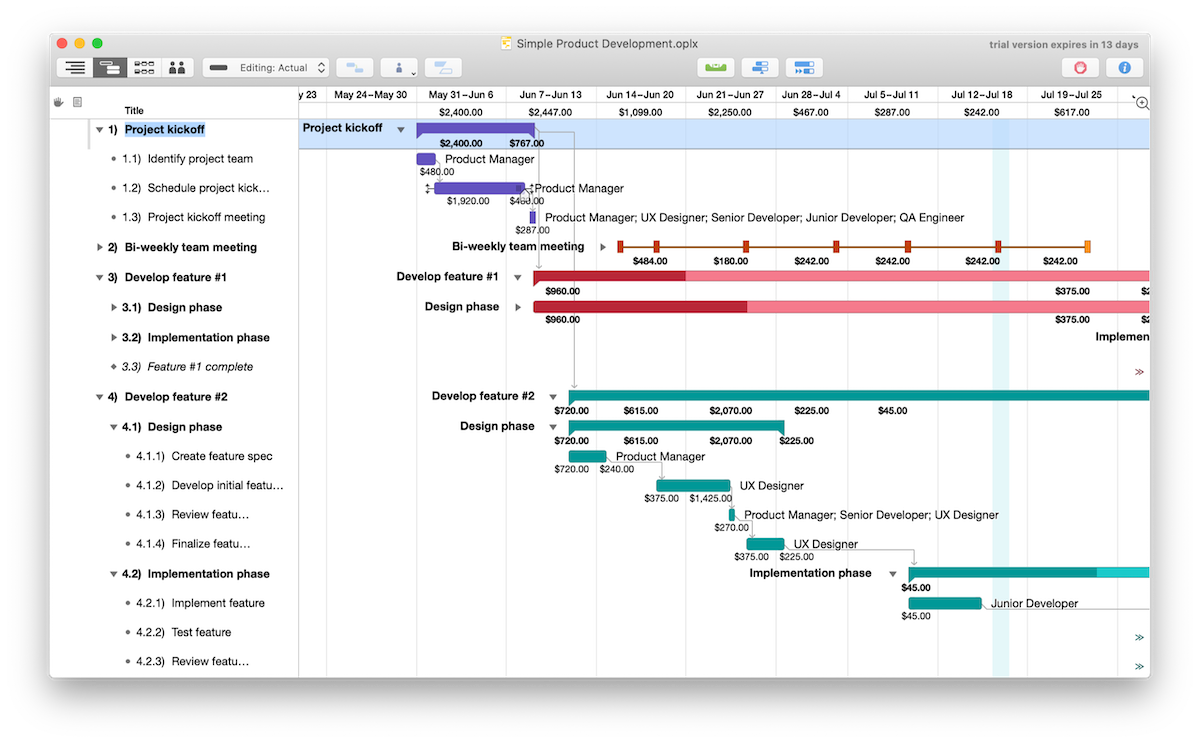
Mac access: Native macOS app (macOS 12 or later) with iPad and iPhone apps. There’s no Windows or browser version.
Best for: Individual Mac and iPad schedulers who want a native app, offline work and a one-time purchase.
Gantt chart features
- All four dependency types with lead and lag
- Critical path and unlimited baselines
- Automatic resource leveling
- Monte Carlo simulation, multi-project dashboard, Microsoft Project import and export and multi-user collaboration (Pro)
Pros
- Native Apple apps that work without an internet connection
- One-time purchase option instead of a subscription
- One purchase covers Mac, iPad and iPhone
Cons
- No Windows or browser version
- Collaboration and Microsoft Project files need the Pro edition
- Collaboration works by publishing and refreshing changes, not live editing in a shared chart
Pricing: Standard $199.99 and Pro $399.99, one-time, or a $199.99/year subscription that includes Pro features. 14-day free trial.
3. Merlin Project
Merlin Project from ProjectWizards is a native project management app for Mac, iPad and iPhone. Its Gantt chart supports all four dependency types with lead and lag, shows the critical path and levels resources, with resource pools shared across projects. Merlin Project 9 uses a dynamic baseline, so you can compare the plan with any past date without saving a baseline in advance.
Merlin Project suits teams where everyone uses Apple devices. Files sync through iCloud Drive or Dropbox and simultaneous edits are merged, and people without a subscription can open projects read-only. Colleagues on Windows can’t open the project in Merlin Project, though it exports Microsoft Project XML.
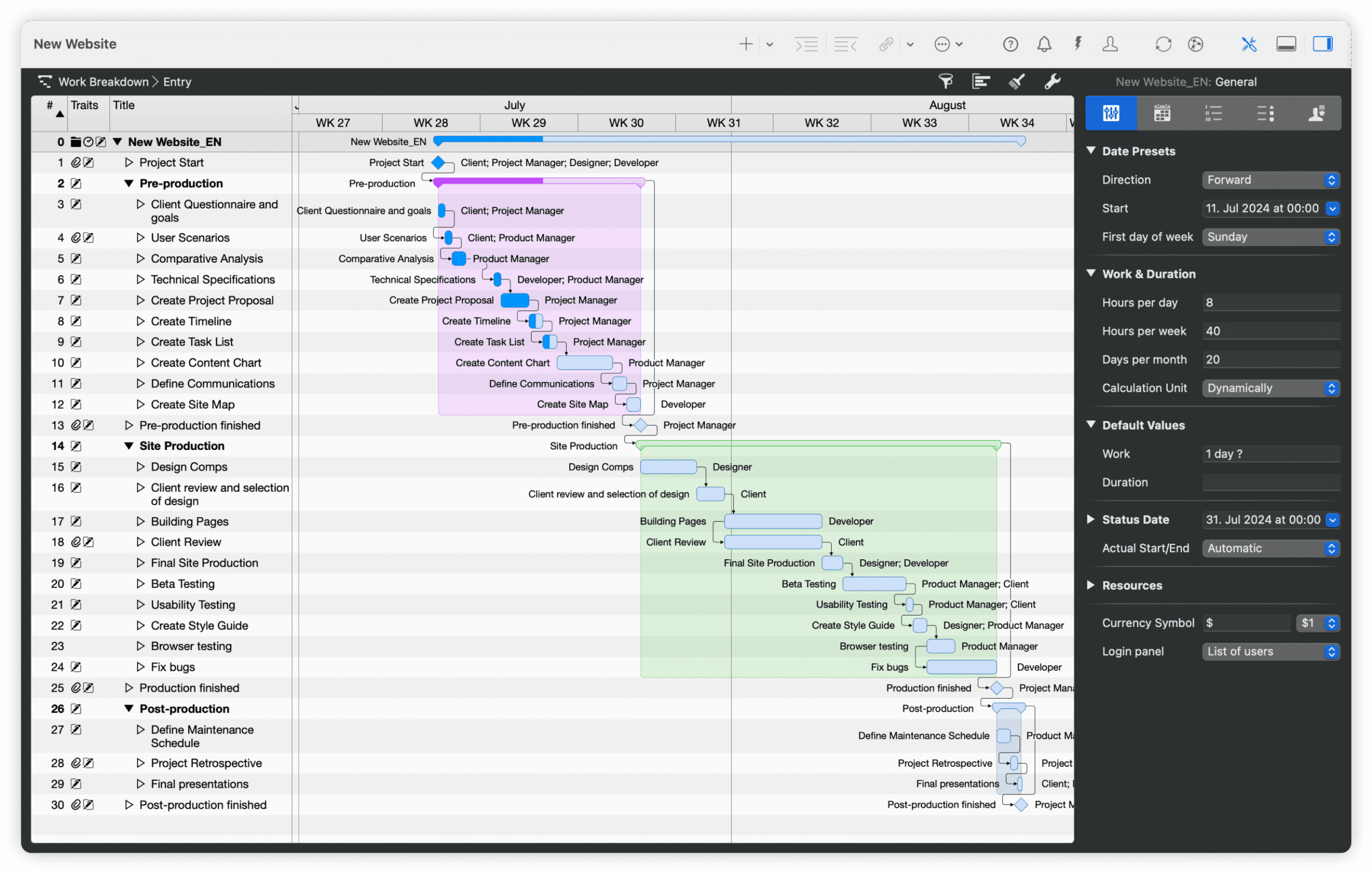
Mac access: Native macOS app (macOS 13 or later) with iPad and iPhone apps. There’s no Windows or browser version.
Best for: Teams that all use Apple devices and want a native planner with resource leveling, offline work and sync through iCloud or Dropbox.
Gantt chart features
- All four dependency types with lead and lag, and critical path
- Dynamic baseline
- Resource leveling and shared resource pools
- Gantt, kanban and mind map views; opens MPP, XML and MPX files
Pros
- Native Apple apps that work offline and sync when you reconnect
- Simultaneous edits merge through iCloud Drive or Dropbox
- Free read-only access for people without a subscription
Cons
- No Windows or browser version
- Subscription only, and the Mac and iPad apps are separate subscriptions
- Exports Microsoft Project XML, not MPP
Pricing: Merlin Project for Mac $22.99/month or $229.99/year. Merlin Project for iPad (also covers iPhone) $9.99/month or $99.99/year. Merlin Project Express (Mac, fewer features) $6.99/month or $69.99/year. 30-day free trial.
4. GanttPRO
GanttPRO is an online Gantt chart tool that runs in a browser on a Mac. Every plan includes all four dependency types with lead and lag, auto scheduling that moves linked tasks, the critical path and baselines, plus iOS and Android apps. An AI Gantt chart maker can draft a first schedule.
GanttPRO suits small teams that want critical path and baselines online without paying for a larger plan. The workload view, portfolio view, reports and time tracking need the Business plan, and the price per user depends on team size, so check the pricing page for your number of members.
Mac access: Runs in a browser on a Mac, plus iOS and Android apps.
Best for: Small teams that want critical path and baselines in an online Gantt chart at a low per-user price.
Gantt chart features
- All four dependency types with lead and lag, and auto scheduling
- Critical path and baselines on all plans
- Import from Excel, Microsoft Project and Jira Cloud; export to PNG, PDF, XML and Excel
- Workload across projects and time tracking (Business)
Pros
- Critical path and baselines on the lowest plan
- Private share links for stakeholders
- Free 14-day trial with no credit card
Cons
- No native Mac app
- Workload, portfolio view and reports need the Business plan
- Price per user changes with team size, and the 1-member plan is billed annually only
Pricing: For teams of 1–15 members, Core $8, Advanced $12 and Business $19 per user per month, billed annually ($7, $10 and $17 for 20+ members). Monthly billing from 5 members: $9, $15 and $24. Enterprise $25/user/month, billed annually. 14-day free trial.
5. TeamGantt
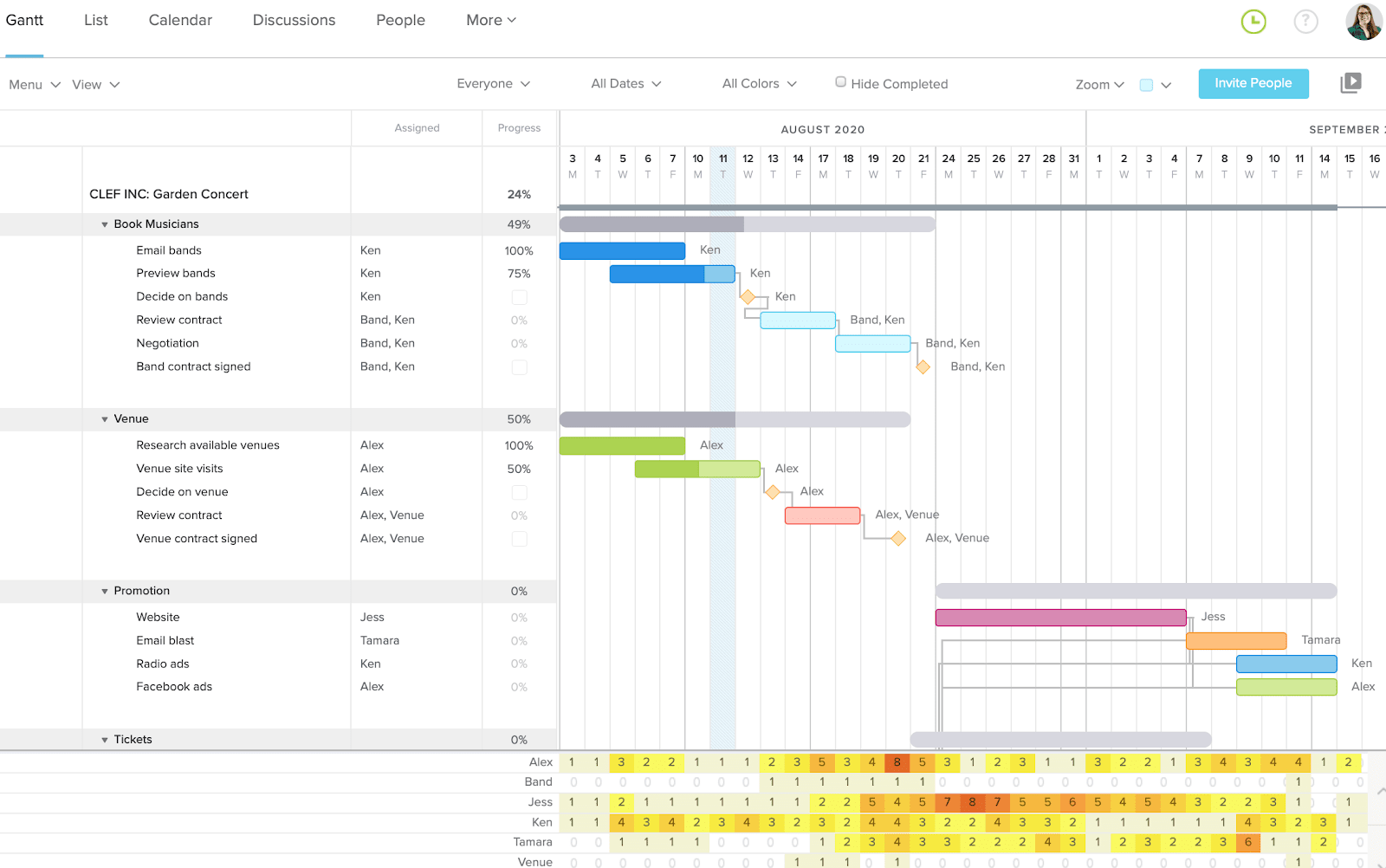
TeamGantt is an online Gantt chart tool that runs in a browser on a Mac. Its Gantt supports all four dependency types with lag and lead, and every paid plan shows the critical path and includes a public share link. A free Personal plan covers one user and one project.
TeamGantt suits small teams with many occasional collaborators, since it’s priced per account rather than per seat. Collaborators can update progress, comment and share files but can’t change dates. Baselines and advanced dependencies need the Business plan, every plan has a project limit, and the iPhone and Android apps show a list view rather than the Gantt chart.
Mac access: Runs in a browser on a Mac, plus iOS and Android apps (list view).
Best for: Small teams that want a simple shared Gantt chart with flat account pricing instead of per-seat licenses.
Gantt chart features
- All four dependency types with lag and lead (advanced dependencies on Business and above)
- Critical path on all paid plans
- Unlimited baselines and workload management (Business and above)
- MPP import (tasks, dependencies, dates and percent complete) and CSV import
Pros
- Easy to learn for people who don’t schedule full time
- Flat pricing with unlimited collaborators on Business
- Free Personal plan for one project
Cons
- No native Mac app and no Gantt view in the mobile apps
- Baselines need the Business plan
- Every plan has a project limit (Business includes 5 projects, up to 20 with add-ons)
Pricing: Personal free (1 user, 1 project, 40 tasks). Base $59/month (1 manager, 10 collaborators, 5 projects), Business $120/month (unlimited managers and collaborators, 5 projects included) and Builder Edition $199/month, billed monthly; annual billing saves 20%. Enterprise by quote. 14-day free trial.
6. Smartsheet
Smartsheet is a spreadsheet-style work management platform that runs in a browser on a Mac. Any sheet with dates can be shown as a Gantt chart that supports all four dependency types with lag. Critical path highlighting is on the Pro plan and above, and baselines, one per sheet, need the Business plan.
Smartsheet suits teams that like working in grids, forms and dashboards and want a Gantt chart as one view of their data. Smartsheet’s Mac and Windows desktop app is being retired on or after January 6, 2027, so Mac users should plan on the browser version. Full resource planning comes from Resource Management by Smartsheet, a paid add-on.

Mac access: Runs in a browser on a Mac, plus iPhone, iPad and Android apps.
Best for: Teams that like working in spreadsheets and want a Gantt chart alongside grids, forms and dashboards.
Gantt chart features
- All four dependency types with lag
- Critical path (Pro and above)
- Baselines, one per sheet (Business and above)
- Grid, Gantt, card and calendar views of the same sheet
Pros
- Familiar to anyone who works in spreadsheets
- Free external Guests can edit shared work on the Business plan and above
- 30-day free trial
Cons
- Baselines need the Business plan
- The Gantt view is available for reports only on mobile
- Full resource planning needs the paid Resource Management add-on
Pricing: Pro $9/member/month billed annually ($12 monthly). Business $19/member/month billed annually ($24 monthly). Enterprise by quote. 30-day free trial.
7. ProjectLibre
ProjectLibre is a free, open-source desktop scheduler that works much like Microsoft Project. Its desktop app runs on macOS, Windows and Linux and includes all four dependency types with lag, the critical path, float, baselines, a work breakdown structure, network diagrams and earned value.
ProjectLibre suits one person planning a project on a Mac who doesn’t want to pay. The desktop app is built for a single user and a single project, with no collaboration, and it needs Java installed. ProjectLibre Cloud, a separate paid product, adds browser access and real-time collaboration. For more free tools, see the free and open-source Microsoft Project alternatives.

Mac access: Native desktop app for macOS (also Windows and Linux) that needs Java. ProjectLibre Cloud runs in a browser.
Best for: Individuals who want a free desktop Gantt chart app with critical path and baselines on a Mac.
Gantt chart features
- All four dependency types with lag
- Critical path, float and baselines
- Work breakdown structure, network diagrams and earned value
- Opens MPP files; saves its own .pod files or Microsoft Project XML
Pros
- Free and open source
- Works offline, and files stay on your Mac
- Critical path and baselines at no cost
Cons
- Single user, with no collaboration in the free desktop app
- No mobile apps
- Can’t save or export MPP files, only Microsoft Project XML
Pricing: Desktop free. ProjectLibre Cloud Core $9.99/user/month and Enterprise/PMO Cloud $29.99/user/month, billed annually.
How to Make a Gantt Chart on a Mac in ProjectManager
Here’s how to make a Gantt chart on a Mac in ProjectManager. You don’t need to install anything, and the same steps work on a Windows PC.
- Sign up in your browser. Open ProjectManager in Safari, Chrome or another modern browser on your Mac and start a free 30-day trial.
- Set working days first. Click the + button and choose Project, then set the project’s working days, such as a five-day or six-day work week. Working days are hard to change once the project exists, and global holidays can’t be added to existing projects, so add those now too.
- Import a file or start from a template. Choose Import File to bring in an Excel, CSV or MPP file, or start from a template. If your tasks are in Apple Numbers, export them to Excel or CSV first. Excel and CSV columns are mapped to the Gantt chart’s columns during import.
- Add durations. Enter start and finish dates or durations for each task. The bars appear on the timeline, and you can drag either end of a bar to change its dates.
- Link dependencies. Link tasks that depend on each other, choose finish-to-start, start-to-start, finish-to-finish or start-to-finish, and add lag where there’s waiting time between tasks.
- Add milestones. Add milestones for key dates such as approvals and deliveries. They show as diamonds on the Gantt chart.
- Filter for the critical path. Turn on the critical path filter to see which tasks drive the finish date.
- Set a baseline. Set a baseline in Gantt settings so you can compare the plan with actual progress later.
- Share it with the team. Invite team members to update their own tasks from a Mac, a Windows PC or the iPhone and Android apps, and add clients and other stakeholders as free read-only guests.
Free Ways to Make a Gantt Chart on a Mac
If you only need a simple chart, a spreadsheet on your Mac can do the job. Each of these tools makes a Gantt chart from a stacked bar chart or formatted cells:
- Apple Numbers. Numbers is free on every Mac but has no Gantt chart type. You build one by listing tasks with start dates and durations, then formatting a stacked bar chart or coloring cells across a row of dates.
- Excel for Mac. Excel works the same way, with a stacked bar chart or conditional formatting. Start from ProjectManager’s free Gantt chart template instead of building one from scratch.
- Google Sheets. Google Sheets runs in a browser, so Mac and Windows users can edit the same chart. See these Google Sheets Gantt chart templates.
All three have the same limits. Every date change has to be updated by hand, tasks aren’t really linked, so a delay doesn’t move the tasks after it, and there’s no critical path or baseline. A spreadsheet chart works for a short, simple project but gets hard to keep accurate as the project grows.
If you want free software instead, ProjectLibre (above) and GanttProject are free desktop apps for macOS. GanttProject is open source, runs offline, supports all four dependency types with lag and opens Microsoft Project files.
Gantt Chart Software for Mac FAQs
How do I make a Gantt chart on a Mac?
List your tasks with start dates and durations, then put them in a Gantt chart tool. Native Mac apps such as OmniPlan and Merlin Project build the chart on your Mac, and spreadsheets such as Numbers and Excel for Mac can fake one with a stacked bar chart. ProjectManager, online project management software with Gantt charts, critical path, baselines and workload management across projects, does it in your browser: import an Excel or MPP file or start from a template, link tasks and filter for the critical path.
Does Apple have a Gantt chart app?
No. Apple doesn’t make a Gantt chart or project management app. Its spreadsheet app, Numbers, has no Gantt chart type, so you’d build one by hand from a stacked bar chart. For a real Gantt chart on a Mac, use a native app from another developer, such as OmniPlan or Merlin Project, or a browser-based tool such as ProjectManager, which also works on Windows PCs and has an iPhone app.
Can I make a Gantt chart in Numbers?
Yes, but only by hand. Numbers has no Gantt chart type, so you list tasks with start dates and durations and format a stacked bar chart, or color cells across a row of dates. The chart doesn’t link tasks, so every date change has to be updated manually, and there’s no critical path or baseline. If your tasks are already in Numbers, you can export them to Excel or CSV and import the file into ProjectManager to get a linked Gantt chart.
Is there a free Gantt chart app for Mac?
Yes. ProjectLibre and GanttProject are free, open-source desktop apps that run on macOS and work offline. ProjectLibre includes critical path and baselines, and ProjectLibre’s desktop app needs Java. Both are built for one person, with no collaboration in the free apps. TeamGantt also has a free Personal plan for one user and one project. Teams that want a shared Gantt chart can try ProjectManager free for 30 days.
Can I use Microsoft Project on a Mac?
Not directly. Microsoft Project desktop, including Project Standard 2024, Project Professional 2024 and the desktop client in Planner and Project Plan 3, runs only on Windows, and Microsoft retired Project Online and Project for the Web. Mac users can run Windows in a virtual machine or use Planner in a browser. ProjectManager runs in any Mac browser and imports and exports MPP files, lossless for schedule data, so you can work with Microsoft Project users.
Related Content
ProjectManager is project management software for Mac and PC users with Gantt charts that support all four dependency types, critical path and baselines. Teams on Macs, Windows PCs and phones work in the same plan, and timesheets, dashboards and workload management help them track it. See how it works for your next project with a free 30-day trial.