My To Do list is massive. So I have developed an action log to control my tasks, and those of the project team.
You can do the same, and honestly, it’s a game changer. The action register template I use is so simple (and you can grab it below from my project management resource library, which is full of editable templates).
Let’s learn about how to make the most of this amazing – and oh so simple – project management tool.
What is an action log?
A project action log is simply a single place for your team’s To Do list. It consolidates all the actions from meeting minutes, phone calls, conversations and more.
An action log saves you having to flick between different meeting minutes, emails and your notebook to remember all the tasks you have to do – and your team members and suppliers have promised to do as part of the project.
It is different to your project schedule, because that covers the meatier, deliverable-based work. The action log is your single location for all the other small tasks and To Dos that come up every day on the project.
The action log I use is a simple spreadsheet.
Why listen to me?
I’m a senior project manager with over 20 years of experience doing the job. I’ve been using and adapting my tools and techniques to fit the modern workplace for years. I’ve written several best-selling project management books and I’m an APM Fellow. In other words, I’ve probably faced all the same challenges as you!
Alternatives to spreadsheets for action logs
I know people who keep their action logs in project management software, in a Teams list, in OneNote, or in a notebook.
To be fair, I used to keep mine in a notebook but I can’t do that anymore. I’m responsible for leading multiple projects and I just have too much in my brain to take the risk of having it on paper.
I either use a notebook in meetings (learn how I keep my notebook organized), or take notes directly in OneNote, and then I copy out the actions into the log so they are all in one place.
I like a spreadsheet as it’s easy to filter, and everyone can access it and refer to it. It doesn’t matter what tech you use (or none) as long as it is a single repository for all your project’s To Dos, and preferably sortable so you can see owners and due dates.
On one project we use an MS Teams list. I have added extra fields like ‘Topic’ so we can filter based on the theme. That is useful for sub-meetings that are just about tech, for example, or just about finance.
- For that list, we have these fields:
- Title
- Description
- Date raised (auto populated by Teams)
- Due date
- Status (a field picker with In progress, Not started, Cancelled, On hold and Complete)
- Owner (colleague name from a Teams list)
- Update (long text field for status updates and progress notes)
- Exec (check box – ticked means we have to report this one to Steering)
- For discussion (Yes, No – this is my working column so I can highlight the actions I want to discuss in a meeting and see them easily)
- Theme (topic picker based on the key areas of the project)
There is also a field for attachments but I think Microsoft Teams might add that in automatically.
We have several views and my default is Tasks with status of In Progress or Not Started so I can quickly see what is outstanding.
It is surprisingly intuitive to create an action log in Teams, so give it a go! Your PMO might even have customizable templates you can start from. We have added it as a tab to the main project General Channel.

How I use the action log to track project tasks
I copy and paste actions from conference calls, team meetings and those chance conversations you have in the corridor into this. I can filter it by task owner or workstream lead when I am talking to someone and want to chase them up.
I can filter out the closed tasks without having to delete them – it’s simple, but it works for me. It’s the best way I have found to stay on top of all the things I’m supposed to be doing and what others are supposed to be doing as well.
Here’s what one reader had to say about this action register template:
Your action log has changed my life. As I’ve used it for a few weeks now it’s also starting to become a source of reassurance as I look at items now closed and think, “Phew I have done stuff”.
~ Caroline
And I’m giving it to you. If you want it. This free action log template is the one I use on all my projects.
It’s an Excel spreadsheet template will help you stay on top of your tasks. Feel free to recreate it in
Sign up to access the Resource Library: I’ll message you back a link to the resource library where you can download this comms plan template
How to use the action log template
Think of this as your amazing To Do list.
You record the task, who is responsible for it and what the latest updates are. You can add more updates as and when you need to, so that you keep the whole history of what is being done on that piece of work.
I like to record tasks that other people are responsible for as well. As a project manager, I’m responsible for checking in with others and making sure that they are doing the work that needs to be done.
In fact, making tasks transparent is one of the ways to get other people to take responsibility for their work.
Writing it down and sharing the list before each meeting makes it difficult for others to say that they didn’t know they had taken away an action from the previous meeting.
I talk about how to use an action log for your meeting action tracking and project management in the video below.
What makes a good action log?
A good action log is the one you use. It should be easy to access, available to everyone on the team and a file or view that serves your purposes.
It’s an action item list to help with task management. It tells you the responsible party for each task. It’s for tracking progress. It doesn’t have to be pretty!
An action log should help you hold people accountable, remind people what they said they would do and follow up after meetings.
As long as you have it open on the screen for real-time visibility and it’s useful for you, whatever that looks like, it’s good enough. You’ll build your own columns and variants, and bring in conditional formatting over time as you find out what you need to help you keep the project on track.
How to write an action item
As you can see from the examples below, the best practice is to start your action item with a verb.
- Create a slide deck
- Review the proposal from Finance
- Circulate vendor agreement
- Call Claire about the testing.
That helps focus the mind and keeps you on track with what actually needs to be done.
This is the title of your action. In the Description filed, you can add more context. For example, who is going to speak to who, what the criteria are for the proposal/slides/vendor agreement etc.
What’s in the action log template
This task tracking template is a really simple spreadsheet. You could probably come up with it yourself, but why bother when I’ve done it for you?
The spreadsheet includes columns to help you track:
- Action/task number – this makes it possible for you to easily refer to an action on the list instead of having to describe the work
- The task description
- Where the task originated from (did it arise from a meeting, an email, a corridor conversation? Categorize the tasks if it helps)
- The action owner who is responsible for doing the task
- The date the action was first raised (you can also include target completion date if you find that helpful to manage action priorities)
- Updates, so you can track each little step that is taken towards completing the action
- Action status: open, closed, on hold, complete etc, so you can easily filter out things that you don’t need to be paying attention to right now.
As it’s an Excel spreadsheet template, you can add or remove columns to make it work for you. You can add RAG color coding for things that are overdue (i.e. have passed the expected finish date) with conditional formatting if you want to bring in some extra flair!
Other things you might want to track include:
- Action type: If you have different types of actions you could include those.
- Related risks: If this action is the result of a risk, you can reference the risk ID number here
- Related issues: As above, if the action is something you are working on as a result of an open issue, you can refer to the issue ID in the table
- Notes: Any extra notes or links to documents.
Personally, I would keep your columns to the minimum. The fewer columns, the less work it takes to fill them in and keep them updated! Don’t make extra work for yourself.
How to keep track of meeting actions
List your meeting actions in an action log. After each meeting, copy and paste actions from the minutes into the log.
You could create an action log for meetings and one for other types of actions, but frankly I prefer to have everything in one place so there are fewer documents to look up.
I designed the template with project managers (me) in mind but actually it works well for anyone who needs to keep track of multiple actions. That makes it great for people who attend a lot of meetings and want to consolidate the actions in a single place.
Pro tip:
Use the category/theme column to track which type of meeting generated which action. Then, before your next meeting, filter the column on that meeting and review the outstanding actions.
When you get to the meeting, things will go more smoothly and you should be registering more progress, because people reviewed and completed their tasks before you met.
At least, that’s the theory!
In practice, most people need to be reminded of what they said they would do (especially on a large projects, or where they are managing multiple projects), so your task review needs to also include getting in touch with action owners and reminding them of the particular action they said they would complete.
You can adapt it as you see fit to make it work for you, add color coding or whatever you like.
Action log process: how to actually capture actions
Identify the action
Listen out for actions in meetings or spot them in your communication with the team.
For example, people might say, “I’ll do that,” or “I’ll ask Fred to do that.” Or you might see on Teams that someone needs to do something.
Record the action
Add the action details, date and owner to the action log. If you like, you can let the owner know that it’s been captured but most people will be OK with it being recorded if they’ve already said they would do it.
If the action is for someone who is not in the room, you can’t give them the action — that’s meeting etiquette. Give an action to someone who is there to go and talk to the person who needs to do the thing.
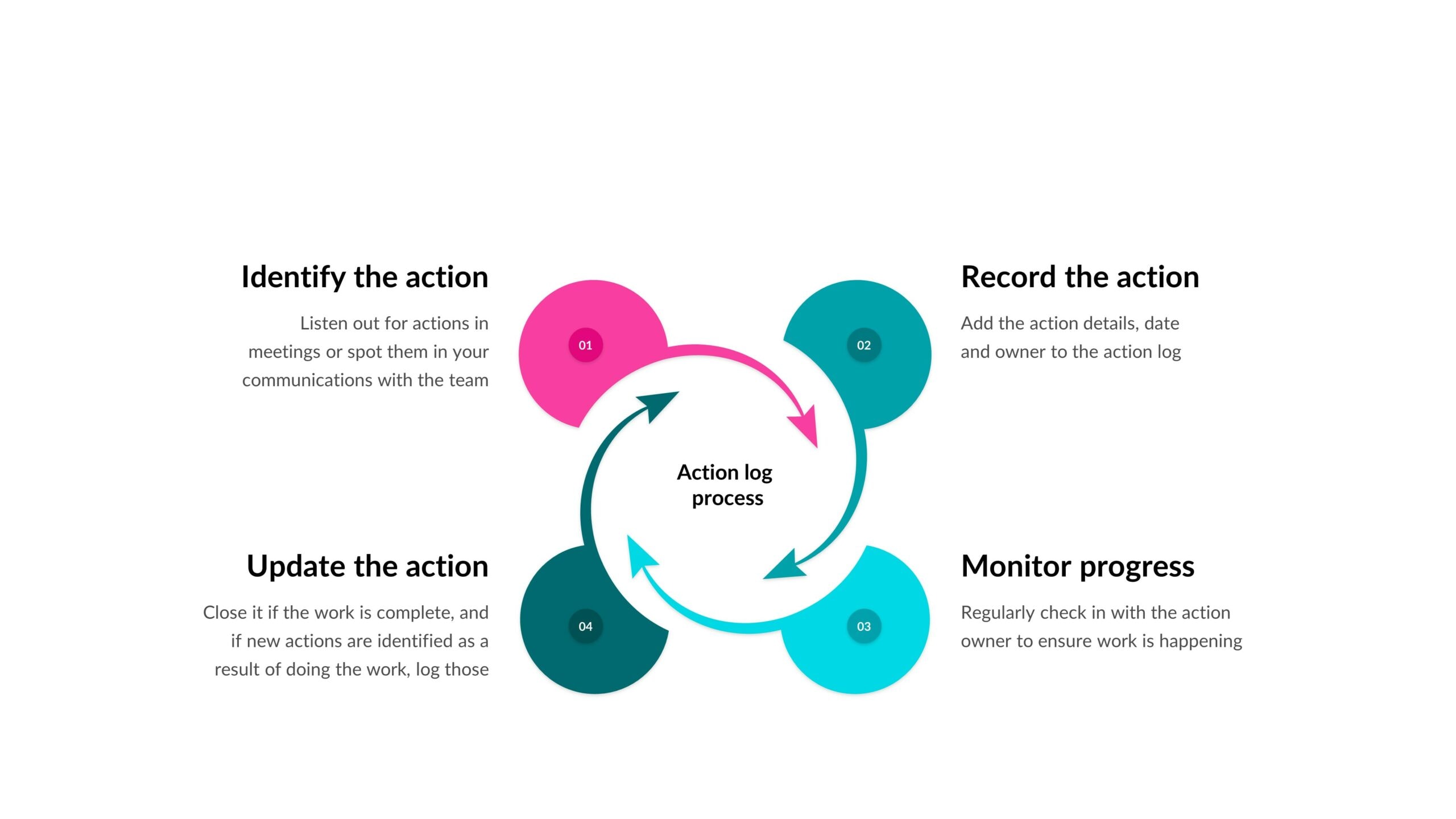
Monitor progress
Regularly check in with the action owner to ensure work is happening.
Update the action
On the log, update the action to record the latest progress. Write down what has happened and what is still outstanding. This is to help you remember — and it’s also useful for tasks that are taking ages so you can see how many times you chased and why it still isn’t done.
Close the action if the work is complete. If new actions are identified as a result of doing the work, log those separately.
For example, if your action is ‘complete slide deck’ then another action that follows on might be ‘get approval for slide deck’ or ‘share slides with vendor’.
What’s the difference between tasks on the action log and tasks on the schedule?
How do you decide whether a task is worthy of going on the project schedule, or whether it’s ‘just’ an action that can go in the log?
My rule of thumb is this:
If it’s an action that could have come from meeting minutes, then it goes in the action log.
All the small daily things that come up as you go about the work of managing the project can be included. For example, here are some tasks that you would not put in the schedule:
- Circulate a presentation following a meeting
- Follow up with another department about their input to the project
- Write an article for the staff magazine
- Organize
team building or social events - Phone someone to get their expert input on something
- Find out when something e.g. an approval meeting is happening and feed that back to the group
- Set up a meeting or organize follow up conversations
- Process purchase orders, quotes and invoices
- Prepare an ad hoc report as requested by the project sponsor
And so on.
Some of these are project admin activities. Some are small tasks that will take less than an hour.
I would just do them, email myself a reminder about them, create a calendar appointment to block out the time to do them or add them to a sticky note or to my notebook.
You shouldn’t fill up your schedule with those or you’ll constantly be updating it and that’s more work than recording things in a spreadsheet – and you project schedule will very soon be hundreds of lines.
Anything that represents a work package or deliverable needs to go on the project schedule.
Download the free action log template
Sign up to access the Resource Library here and I’ll message you back a link where you can download all of my free checklists, guides, and templates including the project action log.
The only thing I ask is that you don’t sell it on. As if you would!
FAQ
What are the benefits of an action log?
The benefits of an action log are: keeping all actions together in one consolidated location, making it easy to see who is doing what, making it easy to see the status of open actions, and improving communication in the team.
What’s the purpose of an action log?
The purpose of an action log is to consolidate actions into one place to save time when you’re tracking and monitoring progress.
What is a project action?
A project action is something that needs to be done. It’s normally a smaller task than one that would be on the project schedule, like something agreed between the team in a meeting or an administrative or organizational activity.