Projects are done by people. Whether that’s
just you, or whether you have a team of many hundreds, a project team is how
work gets done.
Working with people is the main part of
project management. You need to know how to get people on your team and get
them to do the work at the right times. Project resource management is how you
do this.
In this article, I’ll show you what project
resource management is, set out a simple process to do it, describe the tools
to help and give you tips to overcome some of the common issues.
Resource Management Definition
Let’s start by defining resource
management.
Resource management is simply planning, getting and using the resources
you need efficiently.
What are the Types of Resource?
So what kind of resource are we talking
about?
Mostly, when we say ‘project resource’ we
mean people. However, a resource could also be:
- A room you need to book or hire, or other facilities
- Equipment, like a cement mixer or a sewing machine
- Raw “ingredients”, like sand or flour or other materials
- Services, like credit card processing services
- IT software or hardware
- Things that will be used up as part of the project, like flyers you give out to
promote your new café opening
And most importantly:
- Money. Cash is a huge a resource for projects.
Generally, resources are either people,
money or goods that you need to deliver your project.
The Project Resource Management Process
I’m broadly drawing this project resource management process from A Guide to the Project Management Body of Knowledge (
As background, the PMBOK® Guide – the Seventh Edition did not talk so specifically about processes, but the Eighth Edition brought them back, under the umbrella of performance domains.
We earn a commission if you click this link and make a purchase, at no additional cost to you #ad
Step 1: Make a Resource Management Plan
Plan out what resources you need for the project. Basically this means making a big list, based on discussion with your team, and using information from the Project Charter, plan and your general business knowledge. You can then create roles and responsibilities, a RACI matrix, a project organization chart and resource breakdown structure.
You might want to take this even further
and document exactly how you are going to estimate how much time resources will
be required for, how you are going to ‘win’ scarce resources, and what risks
you might face around securing the resources.
PMI calls this ‘Plan Resource Management’.
All of this gets written up into your
Resource Management Plan. In my experience, it’s easier to include a short
section in your main project management plan that covers resource management,
instead of creating a separate document.
Step 2: Estimate Resource Requirements
Now you know the type of resource you need,
you have to think about how much time you need them for.
You probably won’t need specialist subject
matter experts throughout the life of the project – you’ll just call in the
lawyers or the PR expert as and when you need them. But there are probably some
people and materials you’ll need throughout the project.
In this step, you estimate what their
commitment needs to be.
This is also done as part of the planning stage of the project management lifecycle.
Step 3: Get the Resources
You know what you need. Now you need to do
the negotiating, influencing, badgering to get the people and other resources
you need at the times you need them. Jump through whatever hoops your business
requires of you.
We’re now in the ‘executing’ i.e. doing stage of the project, having moved beyond planning.
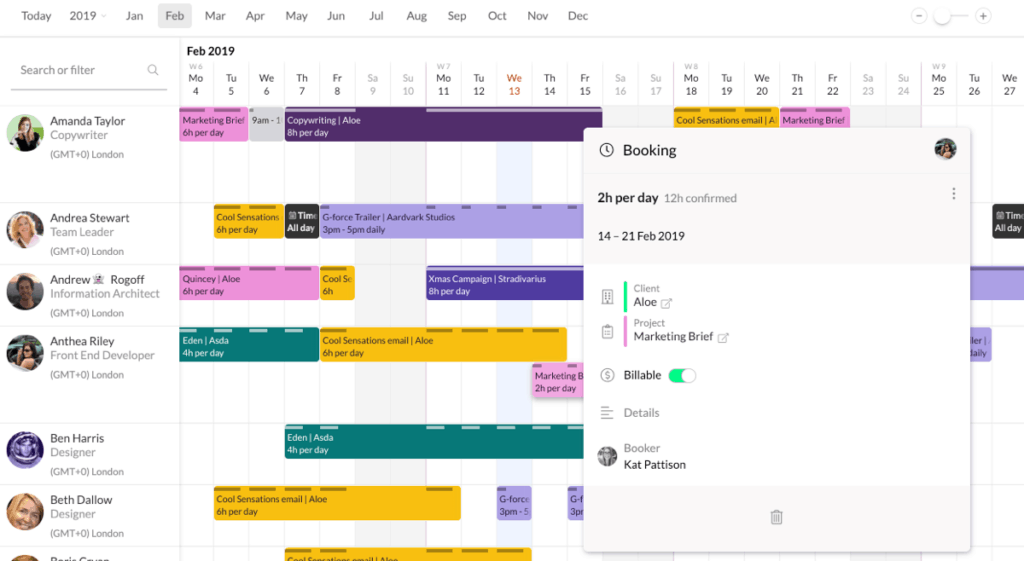
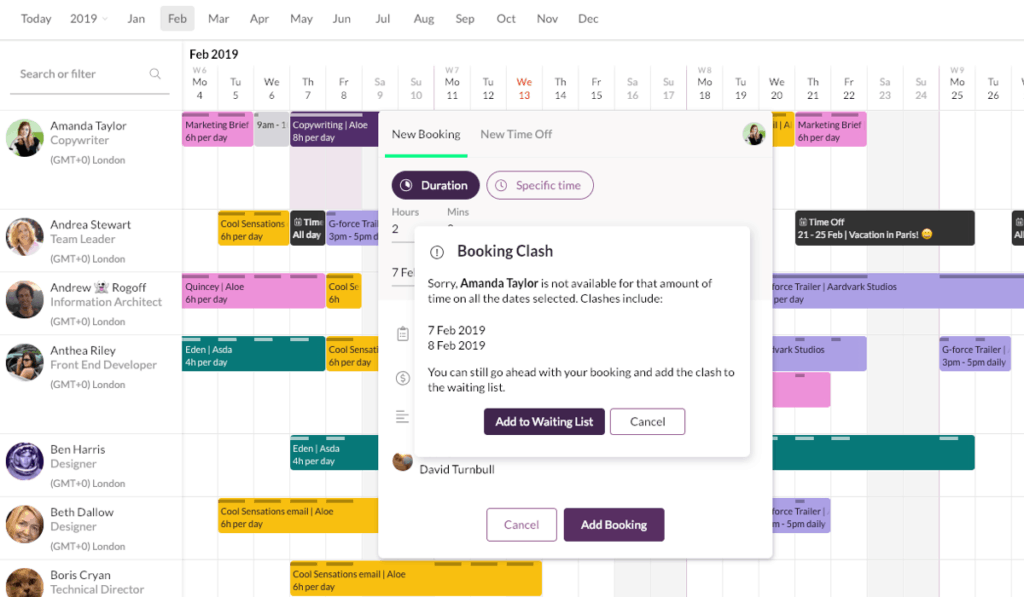
Note: You might have to review your project schedule and plans at this point because inevitably someone will have booked holidays at the exact time you need them to do system testing, or something. While this is a step-by-step process, you should approach it iteratively, and keep refining your resource management as necessary.
What is Resource Leveling?
When you first get your resources and apply them to your project plan, the result is going to look uneven. You’ll have people supposed to be working 150 hours a week, and some individuals sitting around doing nothing on some days.
Resource leveling is the task of smoothing it all out and rearranging resources to avoid burnout and keep the project moving forward. You might need to get extra people in during the busy points, or stretch out the project tasks over a longer period so one resource isn’t overloaded.
Your goal is to get to a point where your planned resource utilization (how much resource you need) is the same as resource availability (how much resource you have).
PMI calls this step ‘Acquire Resources’. In real life, it’s often a bit harder than it sounds!
Step 4: Lead the Team
As your project moves forward, you should
show leadership and management skills. Here’s what it looks like:
- Make sure people know what they are supposed to do, when they need to do it, and who else should be involved.
- Set up team meetings.
- Give them access to project management software that they need to do their jobs.
- Meet with them regularly 1-to-1.
- Think about their training needs so they have the skills required to complete their tasks.
Basically, be a nice project manager to work with and an ethical human being. A lot of that is in creating a good team culture and helping people to do their best work.
Holiday time is a particular point to be wary of. Think about how you (and others on the team) will handover work before vacation time so you are prepared.
If critical chain method for scheduling is new to you, then I recommend reviewing the basics because it will give you a different way to look at handoffs between individuals. It’s a way of rethinking the whole approach to resource dependencies, even if you don’t use the whole process on your project.
Step 5: Monitor and Control Resourcing
This isn’t really a formal step; it’s something that you do throughout your project, as part of your general monitoring and controlling project management work.
It looks like making sure people are available at the right time to do the right work. It also covers resource reporting, flagging problems, taking corrective action, dealing with change requests, updating baselines, checking in with assumptions and that kind of thing.
Remember the other resources!
While most of your resource challenges will
probably come from the people, pay attention to the work required to deal with
your other resources too.
Make sure suppliers have contracts and know
what they are supposed to deliver when. Book or hire the resources you need in
a timely fashion. Give them back when you don’t need them any longer. Be
constantly looking ahead for when resources might trip you up.
An example: I was working on a project that needed a software update. We finished the work just before the end of year change freeze, so we delayed the update until the New Year. All fine. However, what I didn’t know was that as soon as change freeze was over, the infrastructure running the software was due for an upgrade. That meant I couldn’t get the software change through for another 6 weeks. If I had known about the resource dependency then, I would have tried harder to get the change completed and installed before the change freeze.
So what tools and techniques have you got
at your disposal to manage all of this?
Project Resource Management Tools & Techniques
The first tool available to you is your
brain. Much resource management relies on professional judgement and talking to
the right people.
The second tool available to you is
software. Many project management tools have resource management capabilities.
More on those in a minute.
Then you’ve got more specific tools and
techniques, the main one being…
Estimation
Resource estimation is always tricky. People
tend to be overly optimistic about how long they need to do a task.
People also often fail to factor in that if
they are working
on multiple projects, they are less productive and take longer to complete
tasks because they switch between projects. So watch out for that.
Make sure the person responsible for doing
the work also has some input into how long they think the work will take.
Tip: Schedule resources for only 80% of their time. People can’t be productive on your project 100% of the week. Everyone needs a coffee break. (Plus, they will answer calls and emails to do with other projects, have team meetings with colleagues that are nothing to do with your project etc.)
Other Tools and Techniques
There are lots of tools and techniques for project resource management. Here are the important ones (to me) are:
- Meetings (I still laugh that this is considered a tool/technique)
- Negotiation, because it’s tough to convince people to give up their good team members for project work
- AI tools and predictive analytics
- Control charts and data analysis
- Problem solving, so you can work out what to do when that lorry full of important materials doesn’t show up
And, of course, decent software to do the
heavy lifting.
Common Resource Management Tools
Most project management software tools
allow some degree of resource management. For example, MS Project lets you
create a resource pool and assign tasks to an individual.
However, much resource management in
project management software is incidental and really only relates to task
allocation.
The problem then comes that you rely on communicating with other managers or you have to assume your resources will flag a problem with their availability. There comes a point when organizations need to start thinking about resource management best practice and use a tool that lets everyone see who is available when for what work.
Look for a tool that gives you:
- a resource management dashboard
- resource calendars
- the ability to do resource capacity planning and forecasting (because forecasting on projects is so important!)
- an easy to use interface.
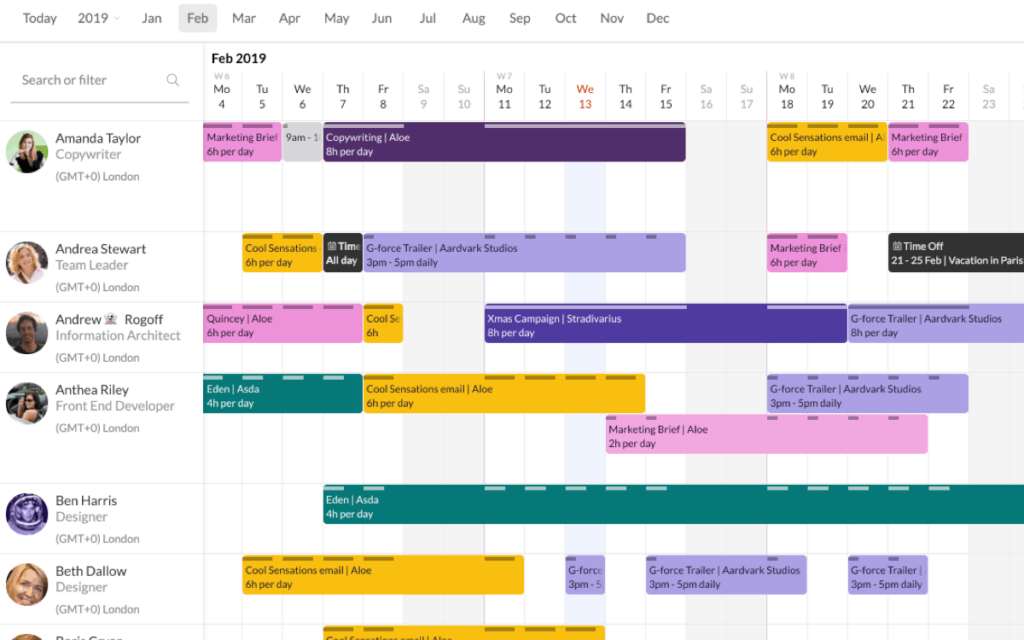
Many people start out using spreadsheets or Outlook/Google calendar to manage resources, but it gets messy and they eventually need to graduate to something fit for purpose, like ResourceGuru.
What Does PRINCE2® Say About Resource Management?
PRINCE2® doesn’t say a lot about resource management. Resources are derived from the plan, and your planning activity includes assessing resource availability, assigning them to tasks and resource leveling.
The basic principle for resources is that
they are released to the project manager on a stage by stage basis to give some
control.
How to Deal with Project Management Resource Issues
Regardless of what tool you use, you will
hit issues with resource management. Here are a few of the common ones and what
you can do about them.
You have resource allocation issues
These happen when you can’t allocate people
when you want to because they are busy and it’s one of the most common
scheduling mistakes. They might be working on other projects, or they might
be out of the business on vacation or planned medical absence, or maternity
leave. Or for any reason.
Once I was waiting on someone to complete a
task and then found out they had been made redundant the week before and no one
had told me.
Fix by: Work hard to get visibility of resource
availability. Talk to line managers. Ask people to tell you about planned
absence. Build a culture of ‘team’ so that they think to tell you if they
aren’t available. And be prepared to problem solve on the day you find out they
aren’t around and you need them urgently.
You have productivity issues
You planned properly, with robust
estimates, but you aren’t making as much progress as you think you should.
This can happen when your plan included
generic or unnamed resources. The productivity of the person assigned to do the
task is different to the fictional productivity level of the generic person on
the plan.
For example, you may have estimated based
on the assumption that a designer had 5 years’ experience, but you get an apprentice.
They are still capable of doing a good job, but it takes them longer.
Fix by: Resource management best practice is to tweak
the project plan to fit the productivity levels of named resources as soon as you know who they are. Keep
your plan under review.
Your team doesn’t have the right skills
You might have great people, but they don’t
have the right skills. That could happen because the requirement for a new
skill comes later in the project, as you are working, and you didn’t foresee
the requirement. Or just because your business doesn’t have people with those
skills.
Fix by: Building training into your plan. The sooner
you identify needs, the sooner you can make sure you upskill the team with
coaching, mentoring, formal training or something else. Or you could decide to
buy in a contract resource who does have the skill (in that case, plan in some
knowledge transfer so you aren’t stuck when they leave)
Your estimates are no good
This can happen when the person estimating
isn’t the person doing the work.
Fix by: There’s no easy win here. If your estimates are
looking wonky, go back and re-estimate. Review the assumptions you made at
estimating time. Get some help! And make sure the people doing the work are
involved in saying how long it is going to take.
There we have it. Resource management is so important for project teams. It improves efficiency, keeps everyone on the same page and makes sure you’ve got the right people for the job available at the right time. In other words, you can’t manage a project without a good resource management process and the tools to support you.