I learned to write a Terms of Reference by copying someone else’s, and luckily for me, it wasn’t a bad example. I also remember looking at a lot of ToR templates online and then deleting a lot of the placeholder headers which I didn’t think would work for my environment.
However, if you’re starting from a rubbish internal template, the same vague, unhelpful language gets passed down from document to document.
If you’re new to ToRs, this article includes lots of examples, so start here to get a feel for what they should look like and include. Then hop over to my guide to how to write one (which comes with a free template) to build out your own.
Below, I’ll share examples from three Terms of Reference documents: a steering group, a project workstream, and a change advisory board. The same principles apply across all three, but the specifics differ.
What makes a ToR worth reading
Most terms of reference fail in one of two ways. Either they’re so vague they could apply to any group in any organization (“The committee will oversee progress and provide strategic direction” — yes, thank you, very helpful), or they’re so dense with process that nobody reads past page one.

A ToR that actually does its job tends to have four things in common.
1. It’s specific to this group. The purpose statement is specific to what the group is for. Anyone reading it should be able to tell immediately what this group exists to achieve. If you could swap the name at the top for a different committee and nothing else would need to change, it’s not specific enough.
2. It’s short enough to be read. Our steering group ToR fits on a slide. Your document doesn’t need to be eight pages. Short is better!
3. It’s been agreed by the people it covers. A ToR that was written by the project manager and never properly socialized with the group isn’t really agreed governance. Give the people named in it a chance to read it, push back on it, and sign off on it. The things that they don’t agree with are often the most useful points to talk about, and that includes delegated authority and what decisions the group is allowed to make.
4. It gets used. The best ToR I’ve seen lived on the agenda as a standing reference point (at the back of each monthly steering deck, as a ‘reading room’ type appendix). When a decision came in that was outside the group’s authority, someone would say “That’s not ours to make, it’s not in our ToR.” If people aren’t referring back to it, then why have it at all?
Let’s look at some examples. These aren’t real life documents, so I’m not breaking any confidentiality clauses or anything. I’ve drafted up some examples to illustrate what you should be looking for in your ToRs.
Example 1: Steering Group ToR
Your steering group needs clear terms of operation so they know what is in their remit to approve.
The key sections I’d expect to see are:
- Purpose
- Responsibilities
- Membership i.e. the stakeholders who need to show up
- Quorum and decision making
- Delegated authority
- Meeting schedule: frequency, duration, format, standing agenda
- Inputs and outputs (more on this below)
- Review: not compulsory but helpful if your project/program is going on for some time. This covers when the document will next be looked at.
It’s helpful to start out with some contextual and clarifying information, like you can see in the screenshot below.
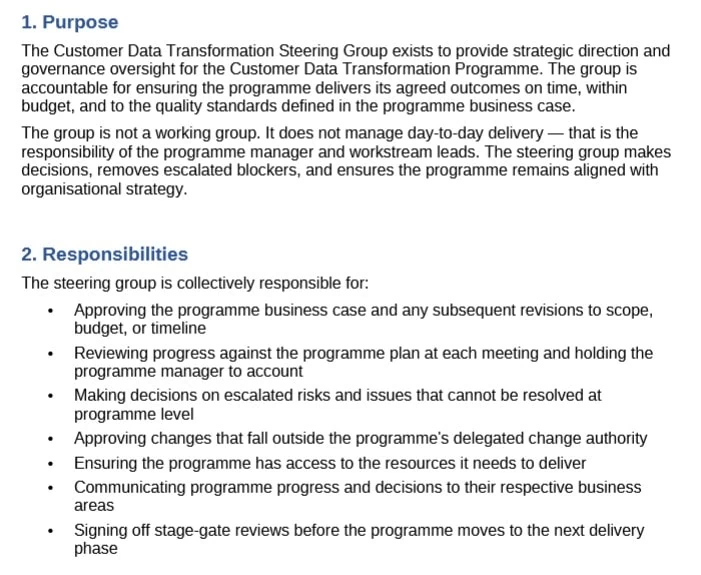
As you can see from the purpose statement, it’s very specific, which is what you need. Compare that to the version I see more often:
“The Steering Group will provide oversight and strategic direction for the project and ensure it is delivered successfully.”
Yeah, no thanks.
What’s also helpful in a ToR designed to support a regular project management meeting is to define how they make decisions and what the decision-making boundaries are. Here are the sections on being quorate and authority that I’ve copy/pasted from Word.
Quorum and decision-making
A quorum is three voting members, one of whom must be either the Chair or the Senior Responsible Owner. Decisions will be made by consensus where possible. Where consensus cannot be reached, the Chair has the casting vote.
Decisions made outside of meetings (for example, by email or urgent approval) must be ratified at the next scheduled meeting and recorded in the minutes.
What’s missing here, and that you might like to include, is a section on how the group expects to handle conflict, particularly around decision-making. What happens when two members disagree and the Chair’s casting vote is needed, is there an expectation that dissenting views get recorded? What happens when you’ve got an even number of attendees one month, does the Chair’s vote still count as the casting vote?
That’s the kind of thing that only becomes important when things get difficult, which is exactly when you want it written down.
Delegated authority
The steering group has authority to approve:
- Budget variations up to 15% of the approved programme budget without further board approval
- Scope changes that do not alter the core programme objectives
- Timeline extensions of up to three months
Changes outside these thresholds must be escalated to the Executive Board for approval.
Have you ever sat in a steering group where nobody was sure what they could actually sign off? That moment where someone says, “I think we need to take this to the board,” and half the room isn’t sure if that’s true… It’s very common, and a good ToR is what prevents it (or should prevent it!).
Feel free to take that wording and adapt it for your template.
As it’s a meeting-related document, I also think it’s helpful to have segments on what you need before the meeting and what you get out of it, like these below.
Inputs and outputs
At each meeting, the program manager will provide:
- A program highlight report (standard template)
- An updated risk register, flagging any risks rated red or escalated since the last meeting
- A decisions log showing outstanding decisions and any new requests
- Any stage-gate documentation if a phase review is scheduled
The outputs of each meeting are:
- Agreed minutes including decisions made and actions assigned
- An updated decisions log
- Any approved change requests.
Then it’s clear to the project sponsor and other attendees what reporting they can expect from the meeting. And it sets up the expectation of what (as project or program manager) are going to do afterwards. I’m sure you don’t personally need the prompt, but at least others will know what to expect!
Read next: How to use a ToR to improve meetings.
Example 2: Project workstream ToR
Meeting ToRs are OK, but when you need to describe the work that is happening, that’s when this document really comes into its own. I remember a project where I wrote workstream ToRs for each team/department/functional area and I was worried about handing them over for us to discuss but actually people loved the clarity.
I’d expect to see these sections:
- Purpose i.e. description of what the workstream covers
- Scope of work (in and out)
- Deliverables i.e. not the whole work breakdown structure, just a list of high-level deliverables
- Workstream structure i.e. who is the lead, who are the members, who represents this workstream on the steering group or project board. Link to your roles and responsibilities document or RACI matrix to save replicating it here
- Ways of working i.e. what meetings there will be and what decisions can be made within the workstream without needing to be escalated
- Key milestones
- Risks
- Assumptions
The project scope section is where you want to spend most of your effort. Here’s a screenshot of a good scope section, albeit for a project where the brief is quite small. You can make your section much longer if you’ve got more to include.
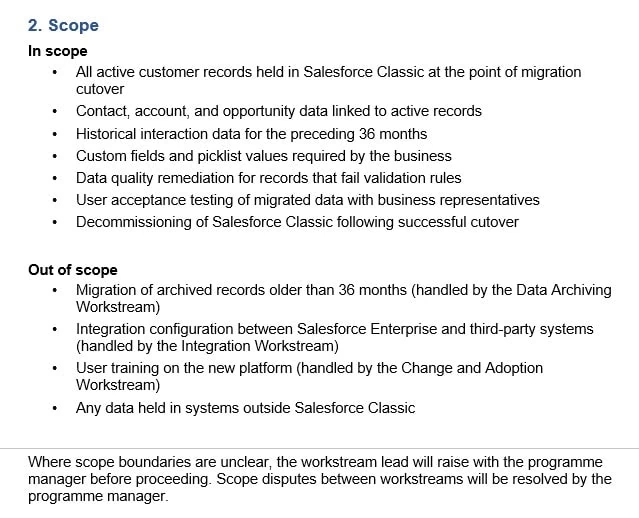
Watch out for making this whole document too high-level to be useful, because that just means you’ll be duplicating what should be in here in some other document. Don’t turn this into a copy of the project objectives from the PID, project proposal or statement of work, especially if it’s only covering one workstream, not the whole initiative.
Example 3: Change Advisory Board (CAB) ToR
Finally, let’s look at a Change Advisory Board ToR, which is a committee that has the brief of reviewing and approving (normally IT) changes before they go into production.
This example is useful because a CAB ToR is very process-driven. It’s less about a group of people deciding things within a project context and more about a defined process with clear entry and exit criteria. You’ll probably have to take your project to CAB if it includes IT changes, so you will be reading their ToR rather than being responsible for writing them yourself (unless you are setting up the CAB).
The key sections are similar to the steering template:
- Purpose
- Scope of authority
- Membership i.e. Chair and Deputy, standing members, people who might get invited for particular reasons + change owner who presents their changes
- Quorum rules and decision making
- Meeting procedures and meeting frequency
- Change submission requirements i.e. what you have to submit if you want a change approved
- Emergency change process: always worth a read as a project manager as we end up doing these more often than I would like!
- Release freeze period (often around financial year end and major holidays like end of year)
- Review period i.e. when the ToR will next be looked at and updated.
Here’s some text copied and pasted from the document so you can see how these sections are filled out.
Purpose
The IT Change Advisory Board (CAB) is responsible for reviewing, assessing, and authorising changes to IT systems, infrastructure, and services. Its purpose is to protect the stability of live services while enabling the organisation to change at the pace the business requires.
The CAB is not a barrier to change. It exists to make sure changes are well-planned, risks are understood, and rollback options are in place before changes go into production. A change that cannot answer basic questions about risk and rollback is not ready for CAB. It is not the CAB’s job to do the planning for the change owner.
Scope of authority
The CAB reviews and authorises:
- All standard changes to production systems that have not been pre-approved as part of the standard change library
- All major changes to infrastructure, platforms, or core business applications
- Any change during a release freeze period regardless of category
- Changes referred upward from the technical team where risk assessment is uncertain
The following are outside CAB scope:
- Pre-approved standard changes listed in the standard change library (these may proceed without CAB review)
- Emergency changes: these follow the emergency change process in Section 7
- Changes to non-production environments, unless they affect shared services
This works because it’s got in it what people want to know. They need to know how to escalate and who to, and what the emergency process is. Too often, the ‘what happens when it all goes wrong’ isn’t covered, and the ToR assumes everything will be fine all the time with everyone following the process perfectly. That never happens, so include what people need to know about work that happens out of hours, or needs escalation and so on.
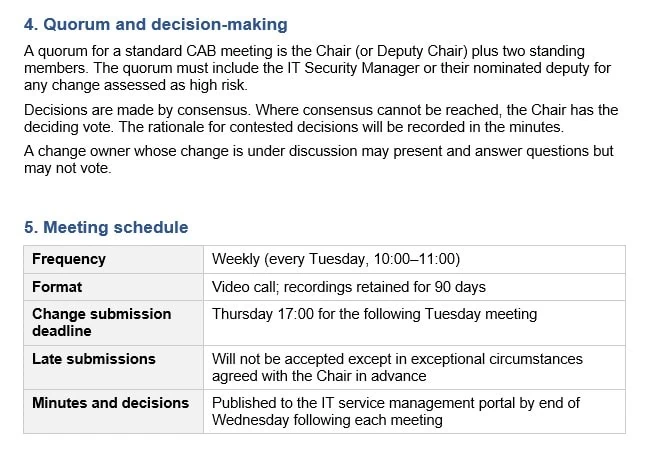
Below is a screenshot of the section on quorum rules and the meeting schedule, to give you an idea of what they could look like.
If this was for an advisory committee rather than a decision-making committee, the contents would look different.
What works
What you’ve hopefully seen is that the strongest examples of Terms of Reference have some things in common.
They are written for the people who need to use them. OK, an auditor might read them, but they are practical, working documents that are used throughout the project lifecycle and business operations.
They make decisions easier rather than harder. Because the people making the decisions are clear about their boundaries and what they can decide about.
They get revisited rather than forgotten. Your ToR should be a living document, so feel free to update it with relevant dates, change the names when people move on and keep it a living document. The steering group that made sense at the start of a transformation program might need different authority thresholds six months in.
But they only work if they get used. Which means it needs to be short enough to read, specific enough to be useful, and visible enough that people actually refer to it. Stuck in a SharePoint folder with a version number and a review date nobody has ever checked, that’s either a sign that it’s in everyone’s subconscious and they no longer need to refer to it (yey!) or that it’s out of date (boo!).
If you’re starting from scratch, the terms of reference template in my template library will give you the structure in Microsoft Word. If you’re trying to get more out of your meetings specifically, the meeting terms of reference article covers that in more detail.