


A timeline in project management is a visual representation of the project’s schedule, tasks and milestones from start to finish. It’s created in the project planning phase and referenced and revised throughout project execution.
Timeline templates can schedule projects faster and improve workload management, prioritization, change management and progress tracking. This collection covers a range of timeline formats, from Gantt charts and milestone charts to implementation plans and event timelines, giving teams a visual scheduling tool for any project type. Download these free timeline templates to schedule projects from inception to completion.
The following free timeline templates can be used to make a timeline in a variety of tools, from Excel spreadsheets to Google Docs and Sheets. There are ones that service construction and manufacturing, though any industry will profit from project timeline templates.
Free timeline templates provide essential tools for accurate scheduling, such as a PERT chart and critical path templates. All of these timeline templates help with planning, keep the entire project team on track and accountable, and quickly onboard new team members.
Use this Excel timeline template to map activities, processes or projects over a year. Project managers can use this free timeline template to see who is responsible for what, whether they’re a team member or a department in the organization.
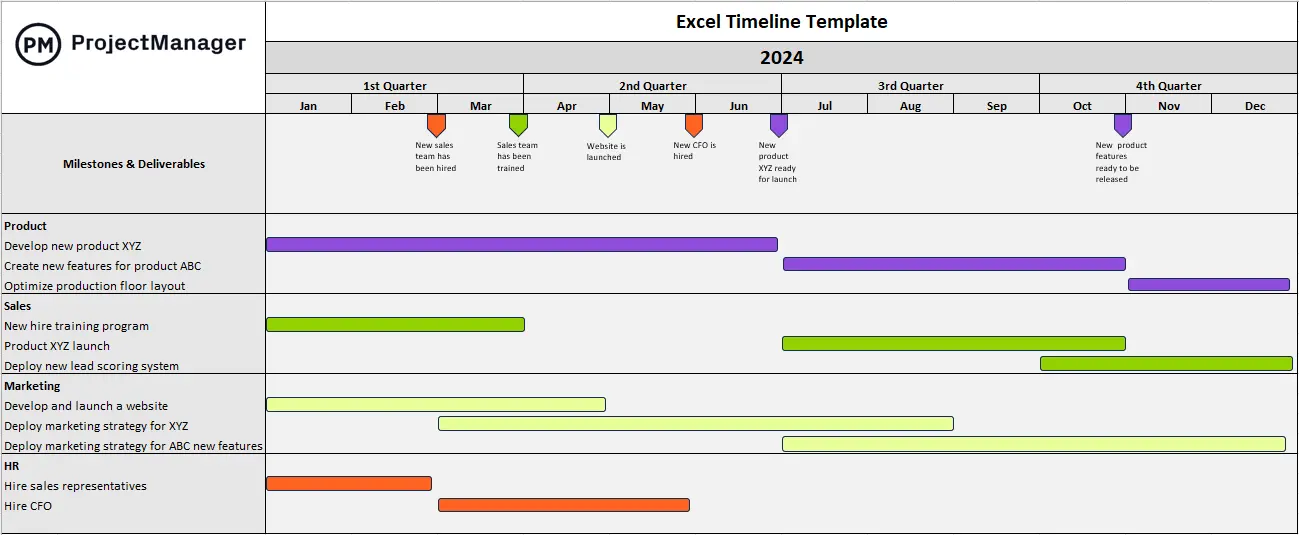
The flexibility of this timeline template allows it to serve several different purposes. It can be used as a project timeline to estimate the duration of a project and visualize the order tasks will be completed. It can also be used as a product roadmap to show product development teams the activities they need to execute from ideation to final launch. Finally, using this free template timeline as a strategic roadmap shows all the projects an organization will execute over time to achieve the overall strategic goals and objectives of its strategic plan.
Timeline templates are useful, but they’re not great for project management. They require manual updates, which takes time away from more important tasks. These are static documents so they aren’t collaborative. Therefore, even free timeline templates aren’t the most efficient way to create, manage and track a project schedule, project management software is.
ProjectManager is award-winning project and portfolio management software that has powerful roadmap tools to manage programs and portfolios. They collect all projects and display them on a Gantt chart with resource management, time tracking and task management features. Users can filter by assignee, project manager or customer to make forecasts, see which projects are open and who’s assigned to tasks, as well as highlight key metrics to keep stakeholders informed. This is all done in real time to keep everyone on the same page. Get started with ProjectManager today for free.
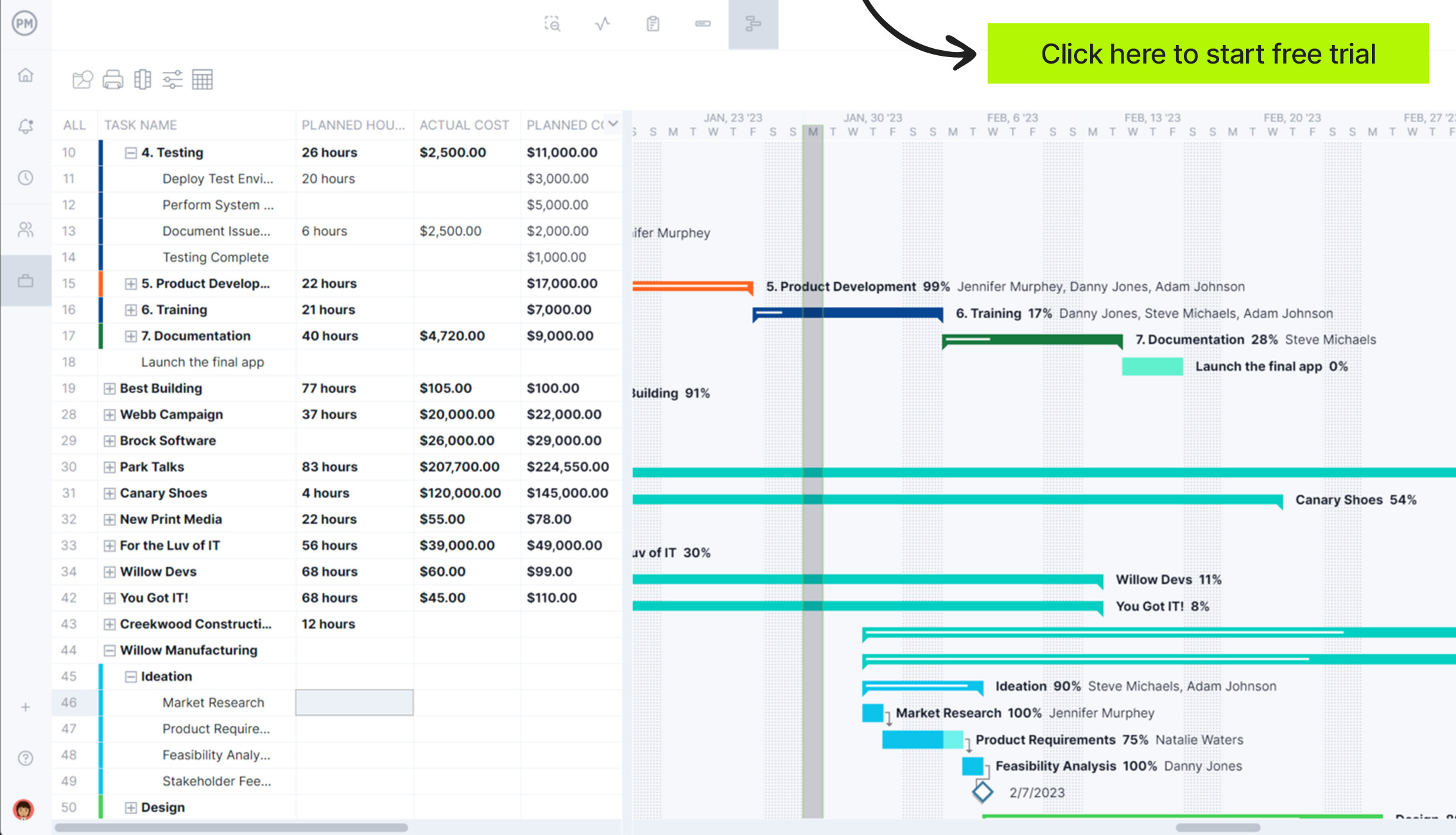
Gantt charts are used in project management to build schedules and organize tasks. They are part spreadsheet and part graphical representation of the project schedule. The timeline is displayed as a bar chart that shows the start and finish dates of all project tasks.
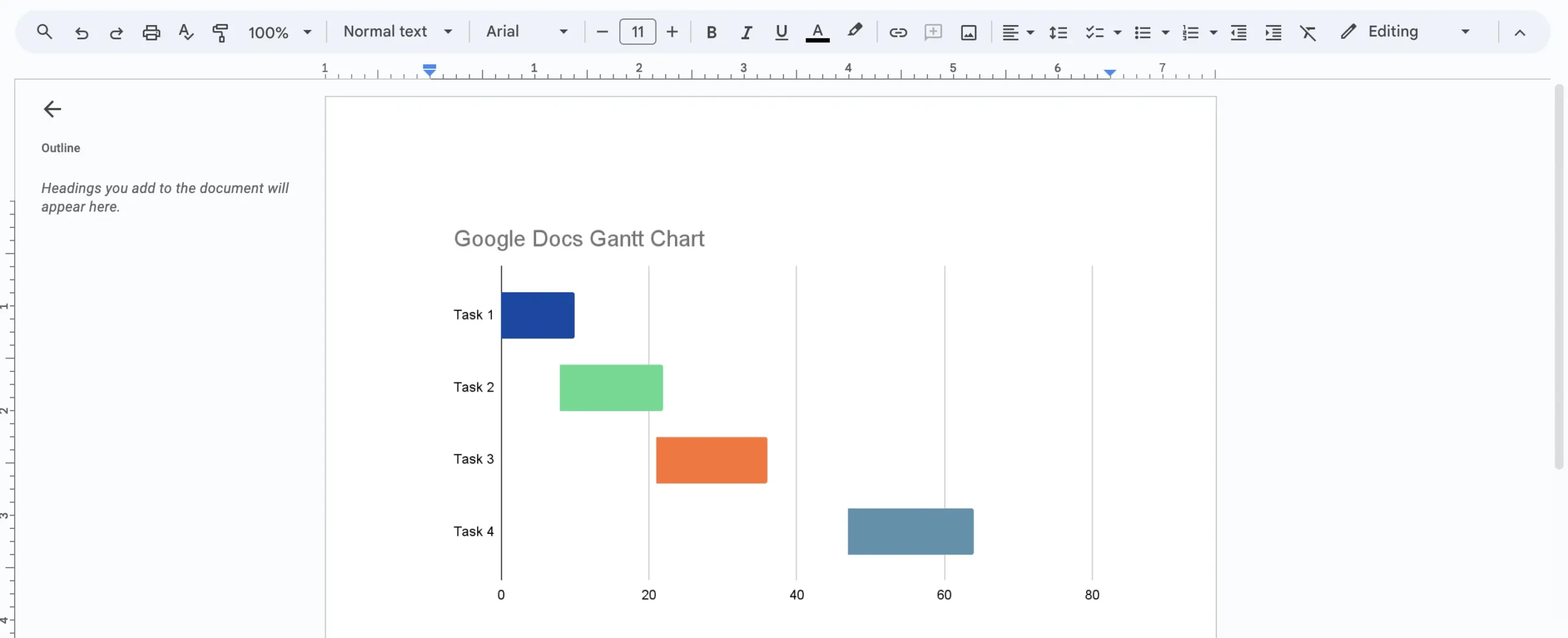
Making a Gantt chart in Google Docs allows teams to store and share the document online. This fosters collaboration in a way that a static Excel document can’t. This free timeline template can provide a high-level view of the project for reporting purposes when updated and shared with stakeholders.
Excel spreadsheets have their limits, but for those looking for an easy way to build a Gantt chart, this free timeline template is the way to go. It doesn’t have all the bells and whistles of Gantt chart software, but can organize tasks and create a timeline showing the entire project on one page.
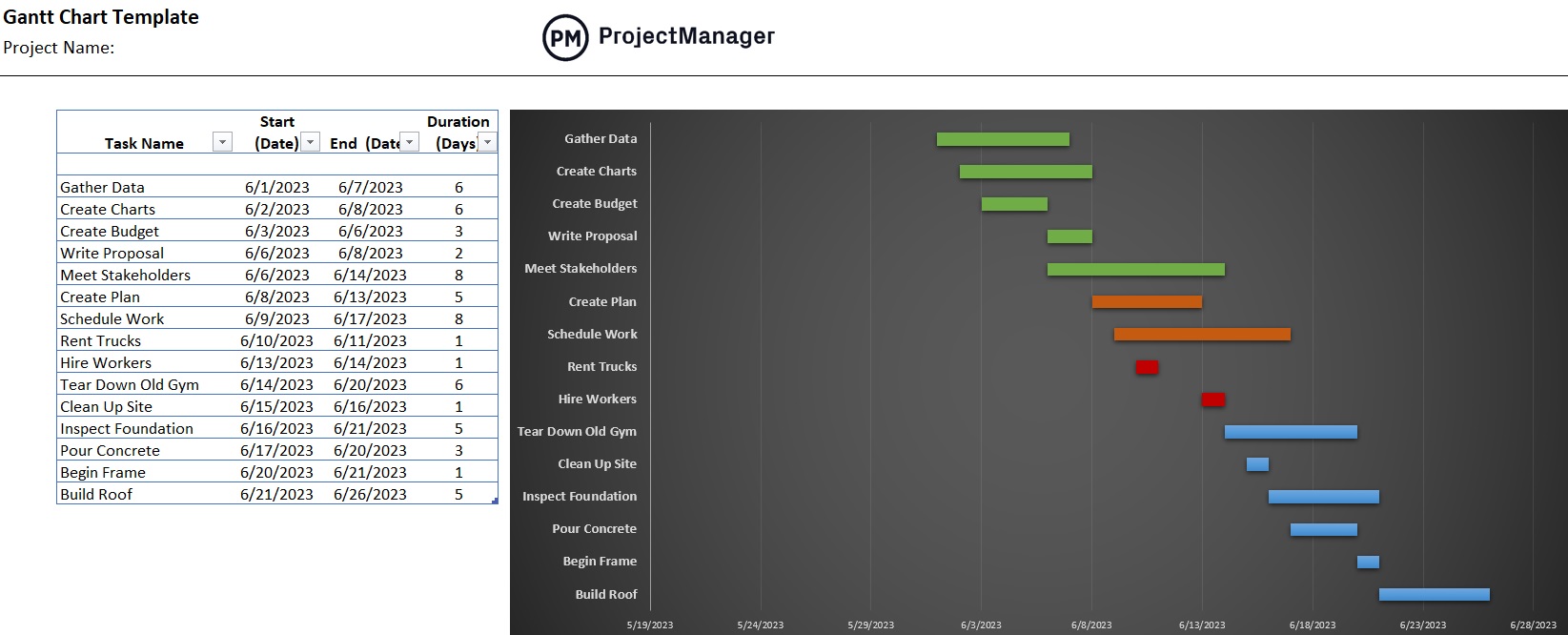
On the left-hand side of the timeline template is a simple spreadsheet. All project tasks can be listed, with their start and end dates. Then add the duration each task is expected to take. Once this information has been fed into the template, the right-hand side bar chart automatically populates. Users can then add color to differentiate project phases.
Gantt charts are notoriously difficult to create, which is why many opt for project management software. But for those not ready to upgrade and still need a Gantt chart to schedule project work, there are timeline templates that have done the hard work.
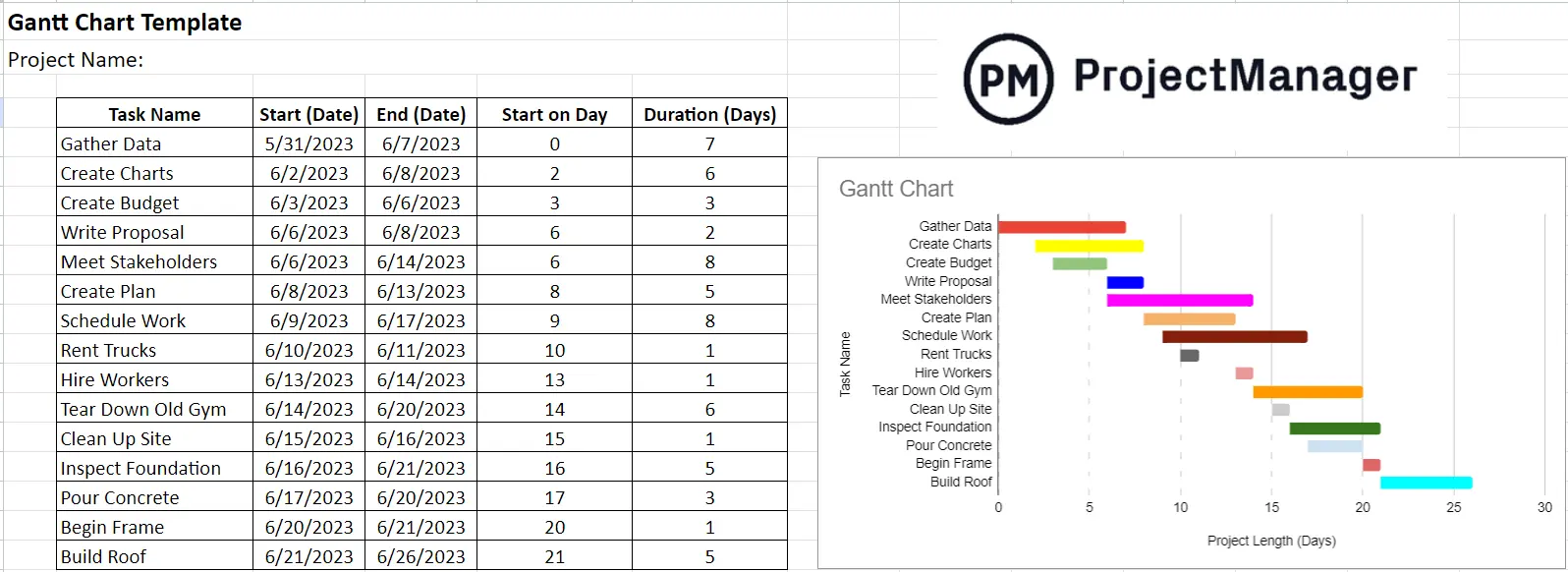
Using this free timeline template fosters collaboration, unlike Excel spreadsheets, as it’s cloud-based. Plus, many people are already used to working with Google’s products. The Gantt chart template for Google Sheets can easily be shared and fully integrated with other Google products. It’s understandable why some prefer this type of timeline timesheet.
A milestone chart shifts focus from day-to-day tasks to the moments that define project progress – key deliverables, phase completions, approvals and deadlines. For stakeholders who don’t need the full detail of a Gantt chart, a milestone timeline provides a clear, high-level view of where the project stands and what is coming next.
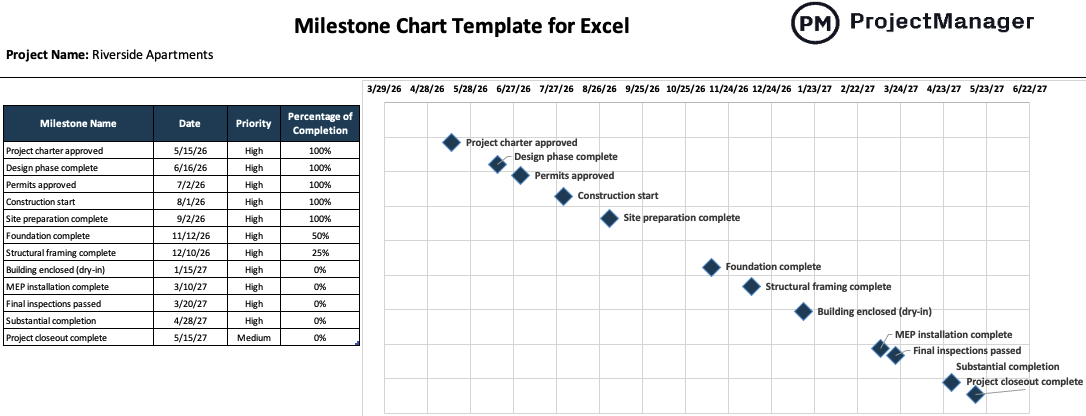
This milestone chart template for Excel maps project milestones along a horizontal timeline with dates and completion indicators that make it easy to track progress at a glance. It works well for executive reporting, stakeholder presentations and project kickoffs where clarity and simplicity matter more than granular scheduling detail.
PERT charts are used in project management to schedule projects. They organize and coordinate tasks. PERT is an acronym for program evaluation review technique, and a PERT chart is a timeline template that breaks down each task so they can be analyzed to estimate the minimum time needed to complete the project.
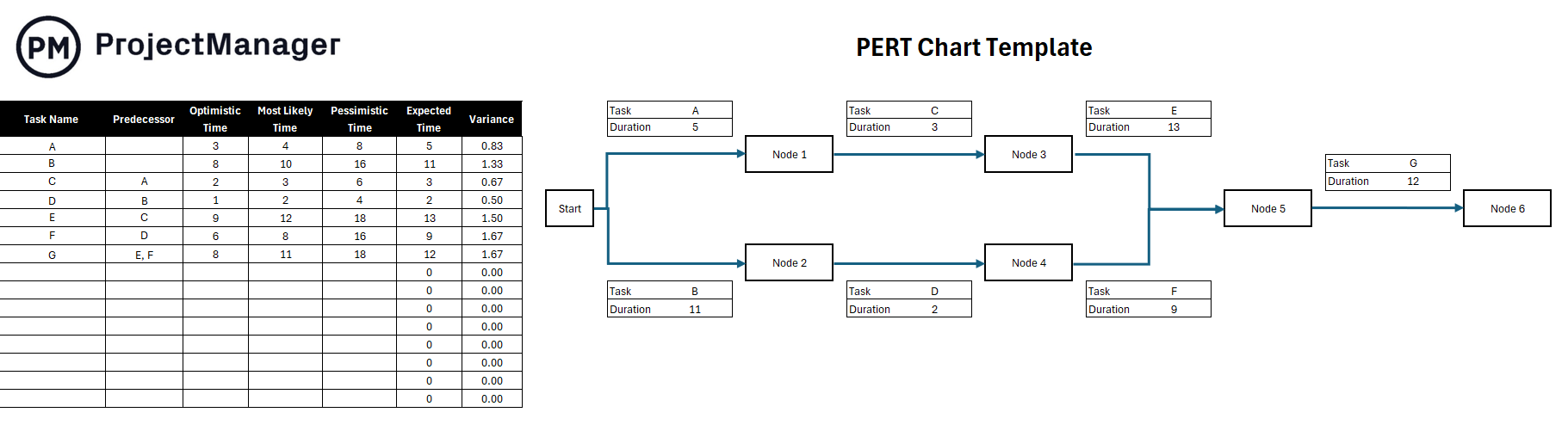
The PERT chart works by using nodes, which are represented by rectangles or circles on the timeline template, to show events and milestones that occur during the project. Vectors connect the nodes. These are lines that stand for the different tasks that must be completed. This allows project managers to visualize dependencies between steps.
The critical path in project management is the longest sequence of tasks that must be completed on time for a project to finish successfully. It identifies essential and non-essential tasks. This allows project managers to make informed decisions if there are issues regarding time, cost or scope.
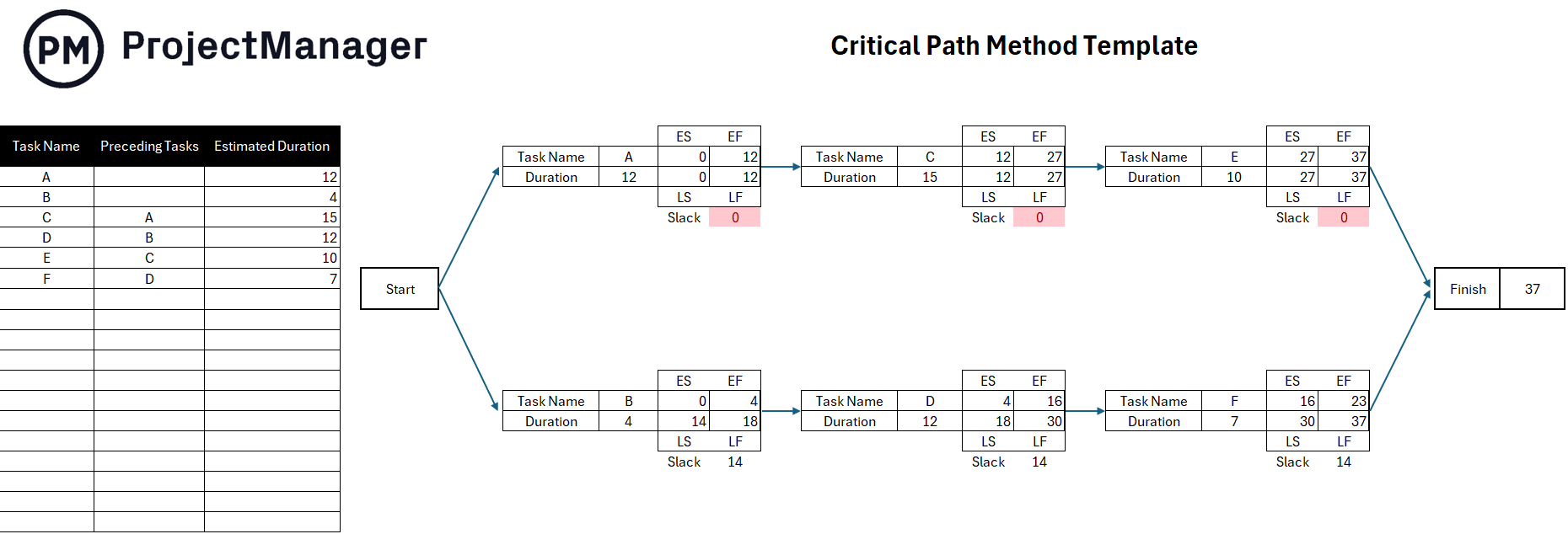
This free timeline template will improve accuracy and flexibility when scheduling projects, especially more complex ones. Project managers can see which tasks need to be prioritized and how long it’ll take to complete them. This timeline template can also be used to communicate clearly between the project manager and stakeholders.
Timeline templates come in a variety of styles. A project calendar is a type of timeline that captures a month’s worth of activity. This allows the project manager and the team to see the entire month’s tasks in one place, including highlighting important dates.
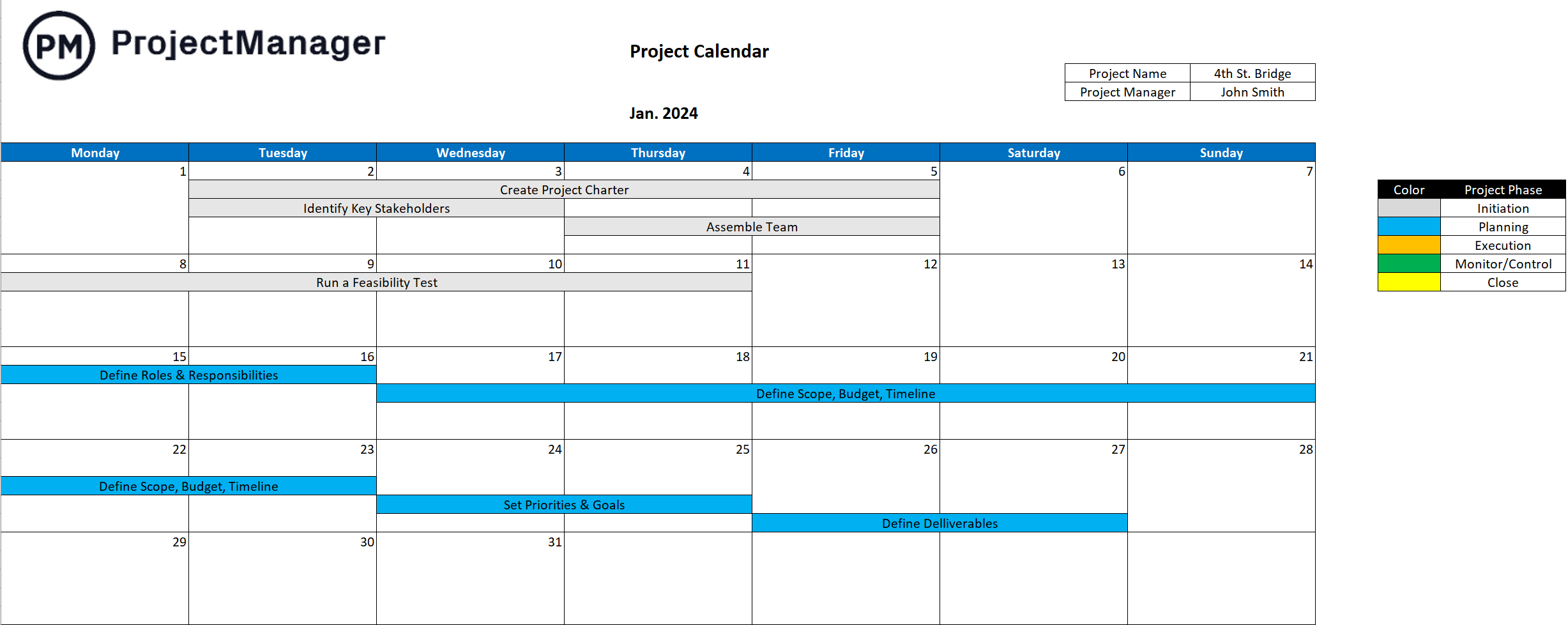
This project timeline can foster better task management, team collaboration and communication when workflows change. Project managers can use the calendar to show the team’s availability when there are holidays and other things that can interfere with assigning tasks efficiently.
Another way to create a project timeline template is with Google Sheets, which is the Google version of a spreadsheet. It’s a free alternative to project management software and one that many people are already familiar with. It’s easier than Excel and better and, like Google Docs, cloud-based, which means there’s no downloading or saving files.
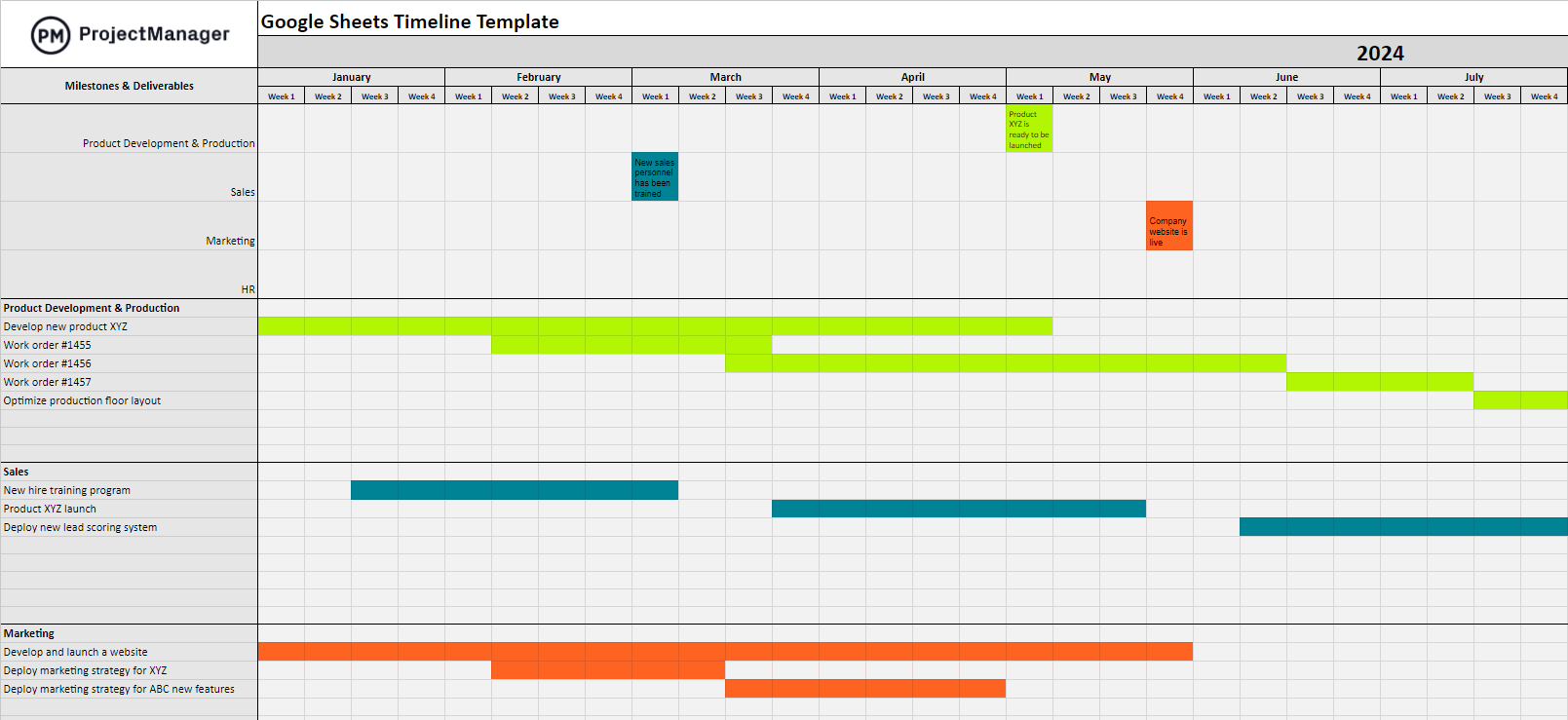
Google Sheets timeline templates are not real Gantt charts. There’s no workflow automation, for example, and they’re not as easy to use as Gantt chart software. But they can schedule projects, show the duration of tasks and mark milestones and deliverables.
For those in manufacturing, a production schedule helps balance supply and demand when producing a commodity. This free timeline template is built for manufacturing. It’s flexible enough to respond to fluctuating demand and sets up inventory to avoid stockouts.
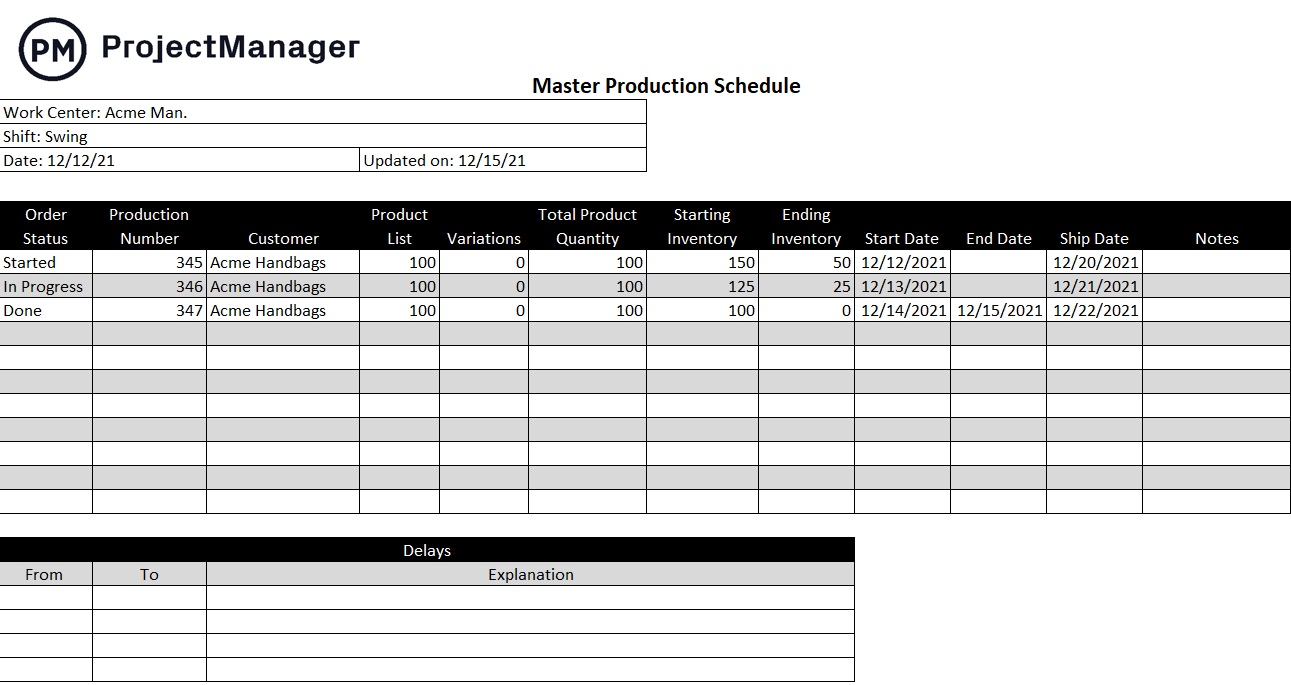
Use this free timeline template as part of the larger supply chain management. It can manage resources, but also assist sales by keeping them aware of production schedules to give customers more accurate fulfillment dates.
Construction projects use timelines to schedule work. These projects are very structured and lend themselves to the hierarchical structure of a Gantt chart that can coordinate not only tasks but also resources, costs and tracking.
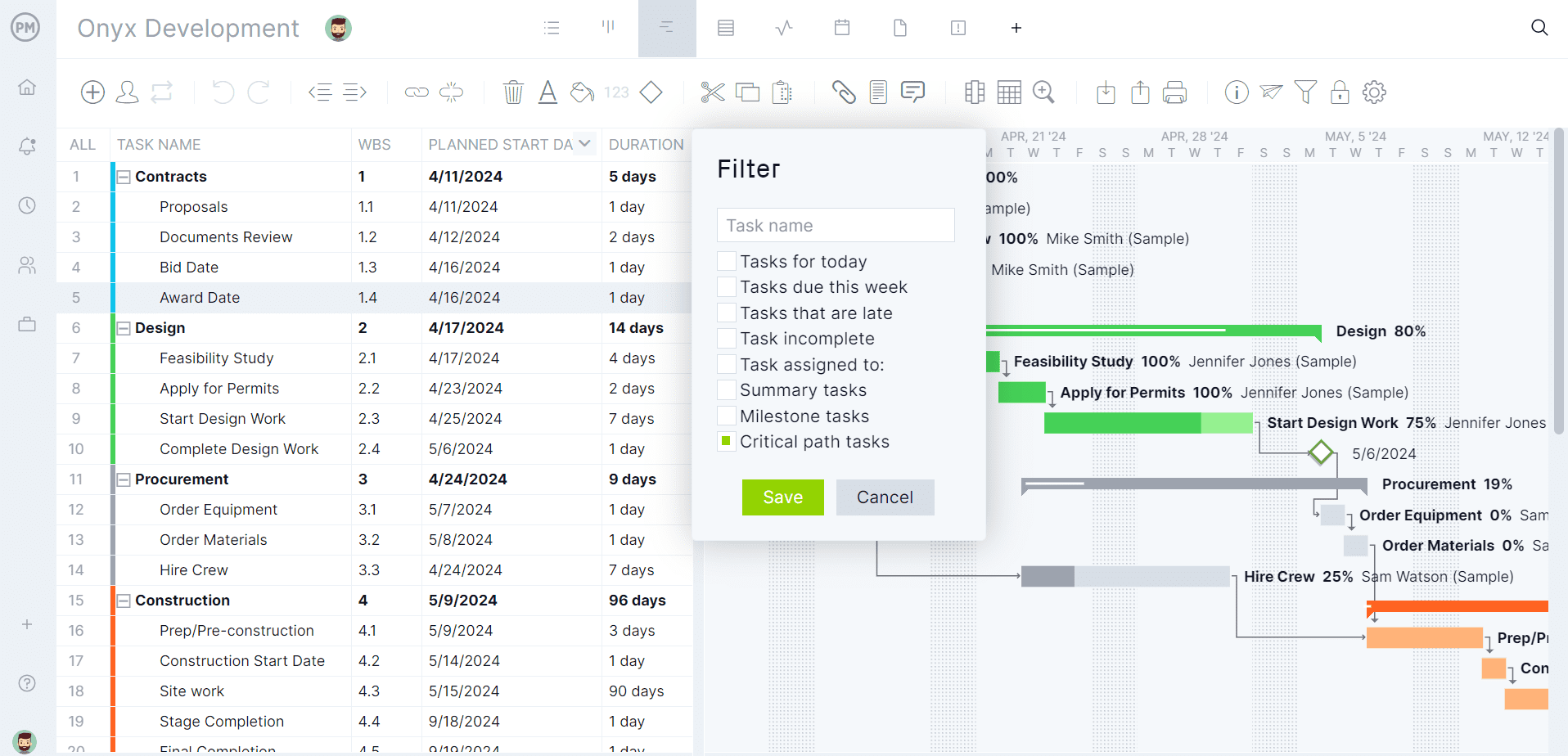
Opening up this free timeline template in ProjectManager gives users access to powerful Gantt charts that link dependencies, filter for the critical path and set baselines. But it also links with multiple project views, such as kanban boards, task lists, calendars and more. There are resource management features to balance workload, risk and issue tracking, dashboards and reports to monitor progress in real time, more than any mere template can do.
Translating a plan into action requires more than a task list. An implementation plan template structures the work into phases with owners, deadlines and dependencies, giving teams a timeline they can follow from day one. It bridges the gap between the project plan and the work happening on the ground.
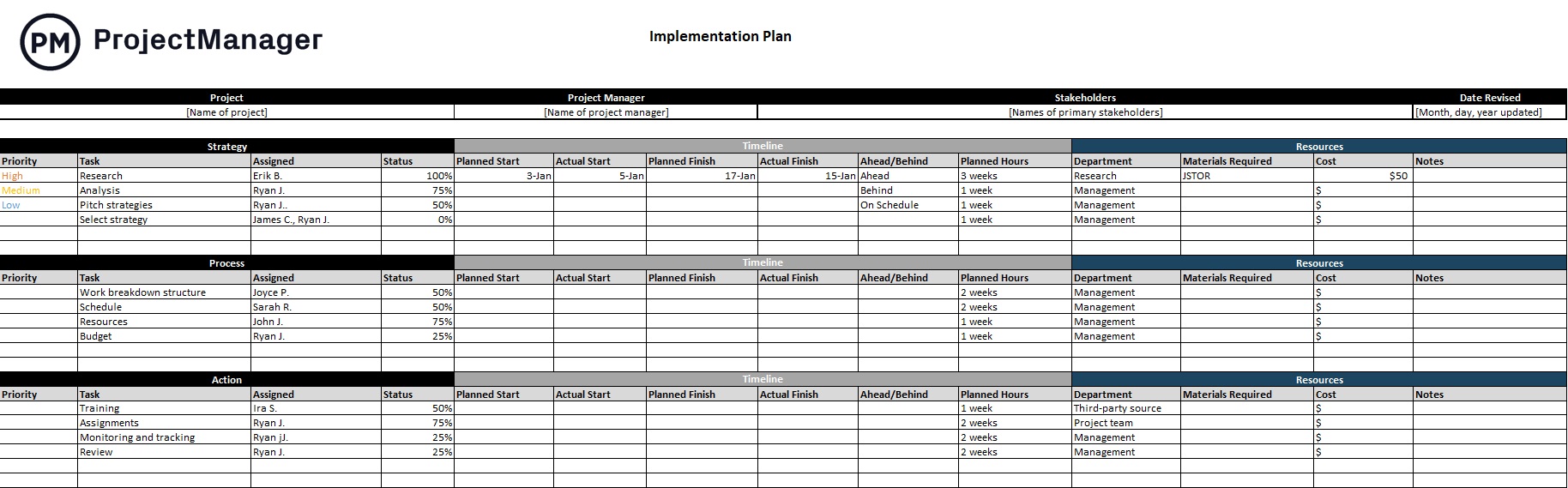
This implementation plan template for Excel breaks the project into sequential steps with columns for task description, assigned owner, start date, end date and status. Teams can use it to coordinate cross-functional rollouts, system deployments or process changes where a clear, phased timeline keeps everyone aligned and accountable.
Events are time-bound projects with multiple workstreams running simultaneously – venue, vendors, staffing, marketing and logistics all converging on a single date. An event plan template gives organizers a structured timeline to coordinate every moving part and ensure nothing is missed as the event date approaches.
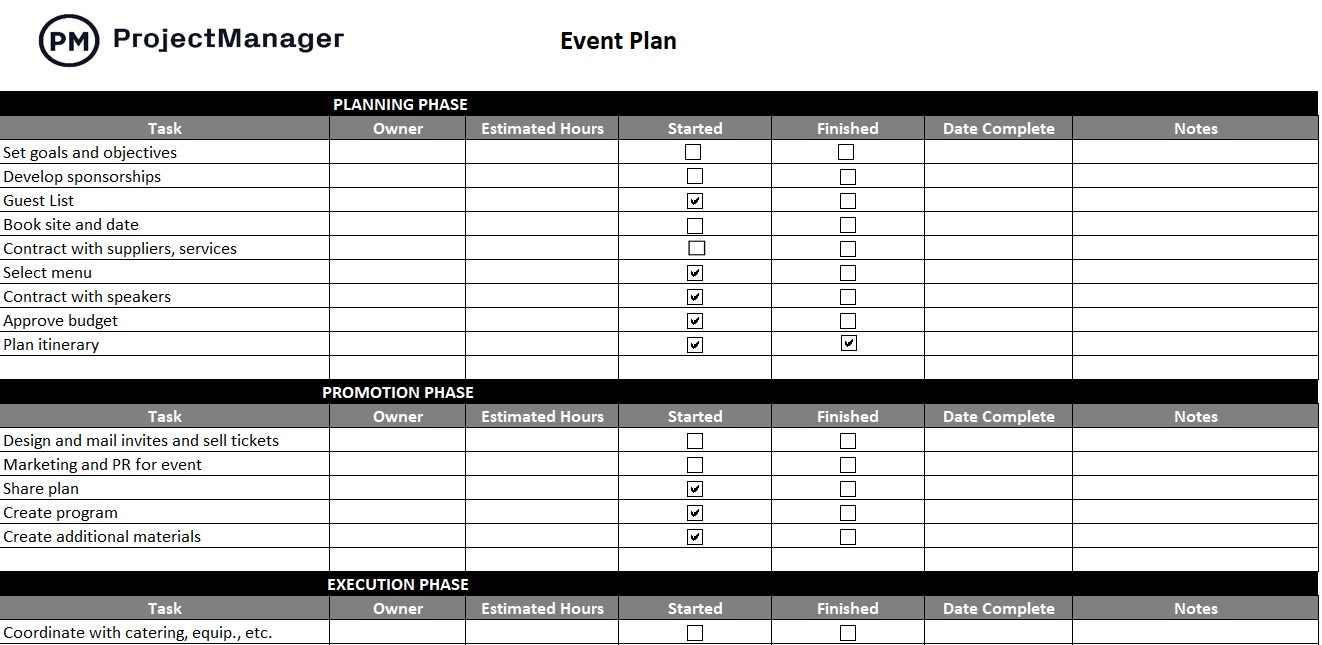
This event plan template for Excel breaks the event into phases from initial planning through execution and post-event wrap-up, with tasks, owners and deadlines organized in a clear timeline layout. Event managers can adapt it to conferences, product launches, fundraisers or any occasion where scheduling and coordination determine success.
ProjectManager Works Better Than Timeline Templates
Creating a timeline, managing it throughout the life cycle of a project and tracking progress to ensure that it adheres to the schedule can be done on templates. The only question is why? Templates are static documents. They’re taking teams away from their work to manually update the timeline templates. They’re not collaborative. It’s like managing a project without real-time data to make insightful decisions. Project management software solves the problem of templates. ProjectManager is award-winning project and portfolio management software that makes it simple to create, manage and track timelines in real time, whether for one project, a program or a portfolio. We’ve already shown the power of Gantt charts or roadmaps for scheduling projects, but there are also features to manage those resources on the timeline and monitor their progress and costs.
Use Resource Management to Balance Workloads
The project timeline only sets up the project for successful completion. The resources are what execute it, whether the team or the tools, equipment and materials they require to do their jobs. Those resources can, first, be scheduled on the Gantt chart or roadmap, but then they need to be monitored to ensure that the work is being done. Secure timesheets can help track labor costs and provide a window into the percentage of work done for each team member. Then use the team page or color-coded workload chart to view resource utilization. Managers can quickly see who is overallocated or underutilized and then balance their workload from that page to keep everyone working at capacity and staying on schedule.

Monitor Progress With Real-Time Dashboards and Reports
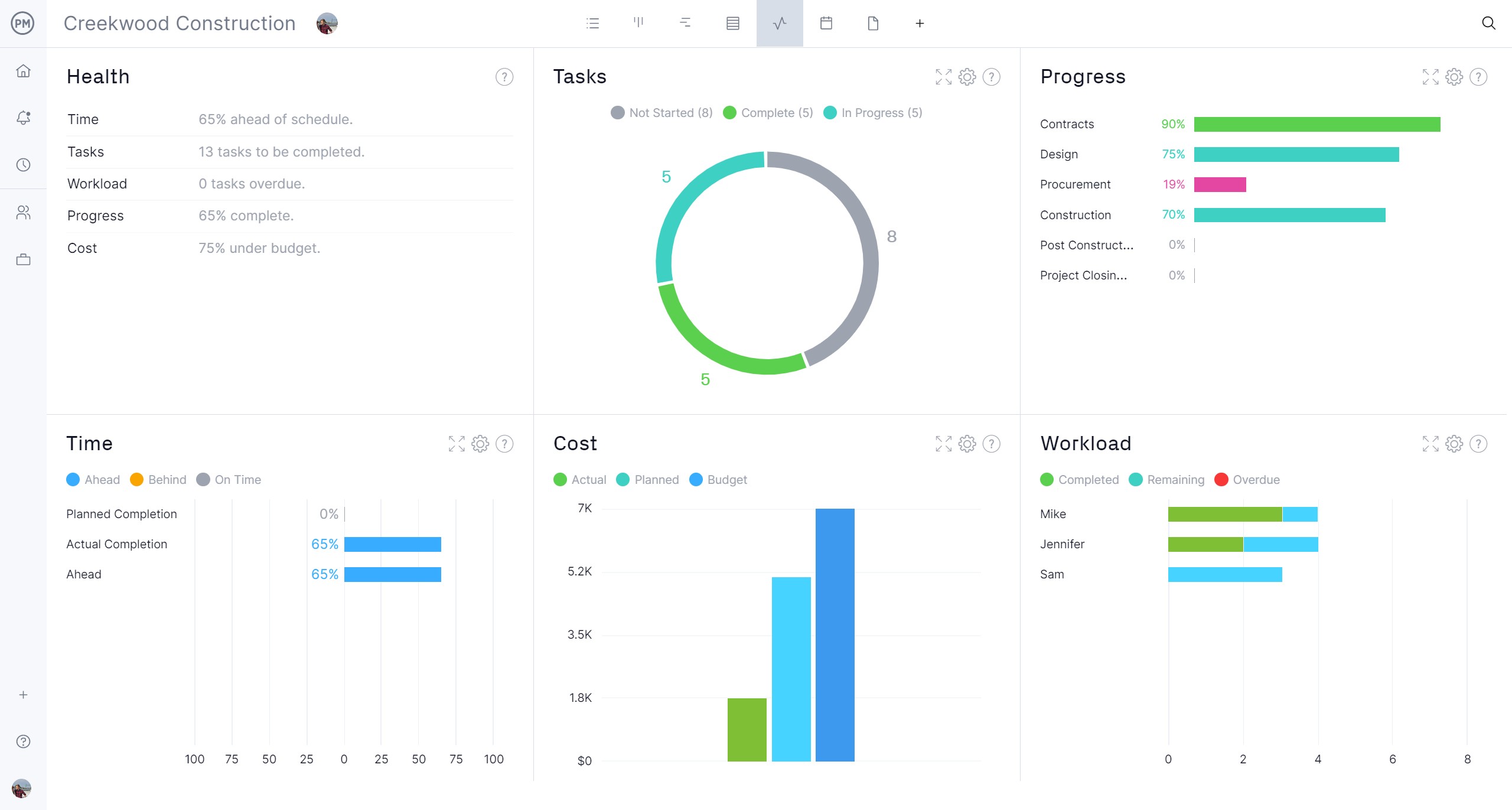
Keeping to the schedules means managers have to have real-time data to track the actual progress against the planned progress. Once they’ve set the baseline in the Gantt chart, this information is automatically updated and delivered throughout the software. For example, the taskbars on the Gantt chart are shaded to represent the percentage complete for that task. But there are more robust tools, such as the real-time project or portfolio dashboard, which displays easy-to-read graphs showing key performance indicators (KPIs), such as time, tasks, workload and more for a high-level overview of the project. Get deeper into the data with customizable reports on project status, portfolio status, workload, variance, timesheets and more. Filter the report for details or to be more general for stakeholders, which can get the reports in a variety of formats to stay updated.
Related Free Template Content
These free timeline templates are but a drop in the deep bucket of free templates available on our site. We have free project management templates for Excel, Google and Word that address every phase of managing projects across multiple industries. Below are some of the roundup posts that collect templates under a theme.
ProjectManager is online project and portfolio management software that connects teams whether they’re in the office, out in the field or anywhere in the world. They can share files, comment at the task level and stay up to date with email and in-app notifications. Join teams at Avis, Nestle and Siemens who use our software to deliver successful projects. Get started with ProjectManager today for free.