
In this 2026 buyer’s guide we’ll review the best construction management software for small businesses on the market, explain their features and determine what types of construction firms would benefit the most from them.
What Is a Small Construction Business?
A construction small business is an independently owned construction company or contractor that completes residential or light commercial projects with tight budgets, a relatively small workforce and limited resources.
More specifically, the software alternatives reviewed in this guide are intended for:
- General Contractors: Small firms that manage residential or light commercial construction projects while coordinating subcontractors, schedules, budgets and client communication.
- Home Builders & Remodelers: Companies specializing in custom homes, additions, renovations, remodels and other residential improvement projects.
- Specialty Trade Contractors: Businesses focused on a specific trade such as electrical, plumbing, HVAC, roofing, concrete, drywall, flooring or painting.
- Landscape & Outdoor Construction Companies: Contractors that build decks, patios, retaining walls, outdoor kitchens, fences, pools, irrigation systems and other exterior improvements.
- Small Commercial Contractors: Construction companies that complete tenant improvements, office renovations, retail build-outs and other small commercial construction projects.
What Is Construction Management Software for Small Businesses?
Running a small construction business means managing projects without the administrative support that larger firms often have. For that reason, construction management software for small businesses should bring project planning, monitoring and reporting tools together into a single platform to support the day-to-day operations of construction projects while remaining affordable and easy to implement.
Key Features of Construction Management Software for Small Businesses
The features below are the capabilities we looked for when comparing and ranking the software in this 2026 buyer’s guide, and they should also be the key factors you consider when choosing the right platform for your business.
- Project Planning: Small contractors often juggle several jobs at once with the same crews and equipment, so planning tools should make it easy to coordinate overlapping projects.
- Project Scheduling: Keeping projects on schedule is critical for small contractors because delays increase labor costs, postpone payments and tie up crews needed elsewhere.
- Resource Planning: Whether you have one crew or five, every employee and piece of equipment needs to stay productive. Resource planning features help do that.
- Job Cost Tracking: Small contractors rely on every project turning a profit. Job cost tracking tools help monitor construction costs as work progresses to quickly identify cost overruns.
- Estimating & Budgeting: The software should help build accurate estimates for making competitive bids that still leave room for profit.
- Time Tracking: Paper timesheets waste valuable time and often lead to payroll mistakes. Online time tracking features let crews clock hours from the job site while giving owners accurate labor costs.
- Team Collaboration: When the office, field crews and subcontractors aren’t working from the same information, mistakes happen. Built-in communication tools keep everyone aligned.
- Document Management: Keeping everything organized in one searchable location prevents crews from working with outdated documentation.
- Task Management: Breaking projects into clear daily and weekly assignments helps managers crews know exactly what needs to be completed next, identify bottlenecks and follow up on unfinished work.
- Reporting & Dashboards: Small business owners need answers quickly, not dozens of reports. Real-time dashboards should show project health at a glance.
Best Construction Management Software for Small Businesses
Now that we understand what to look for in construction management software for small contractors, let’s look at some of the best brands in the market and see how they rate against that feature set, pros and cons, price and more.
1. ProjectManager
ProjectManager is construction project and portfolio management for businesses of any size to help manage projects and field teams with cloud-based software. It’s the most effective alternative to costly construction software or overly complex tools that require a steep learning curve and much training to master. This tool has everything one needs to plan, schedule and execute a construction project from start to finish, accessible in the office or on mobile devices for Android and iOS on the job site. Resource management features help plan, manage and track resource allocation, balancing workload and keeping teams working at capacity.
Robust Cost Estimating Tools
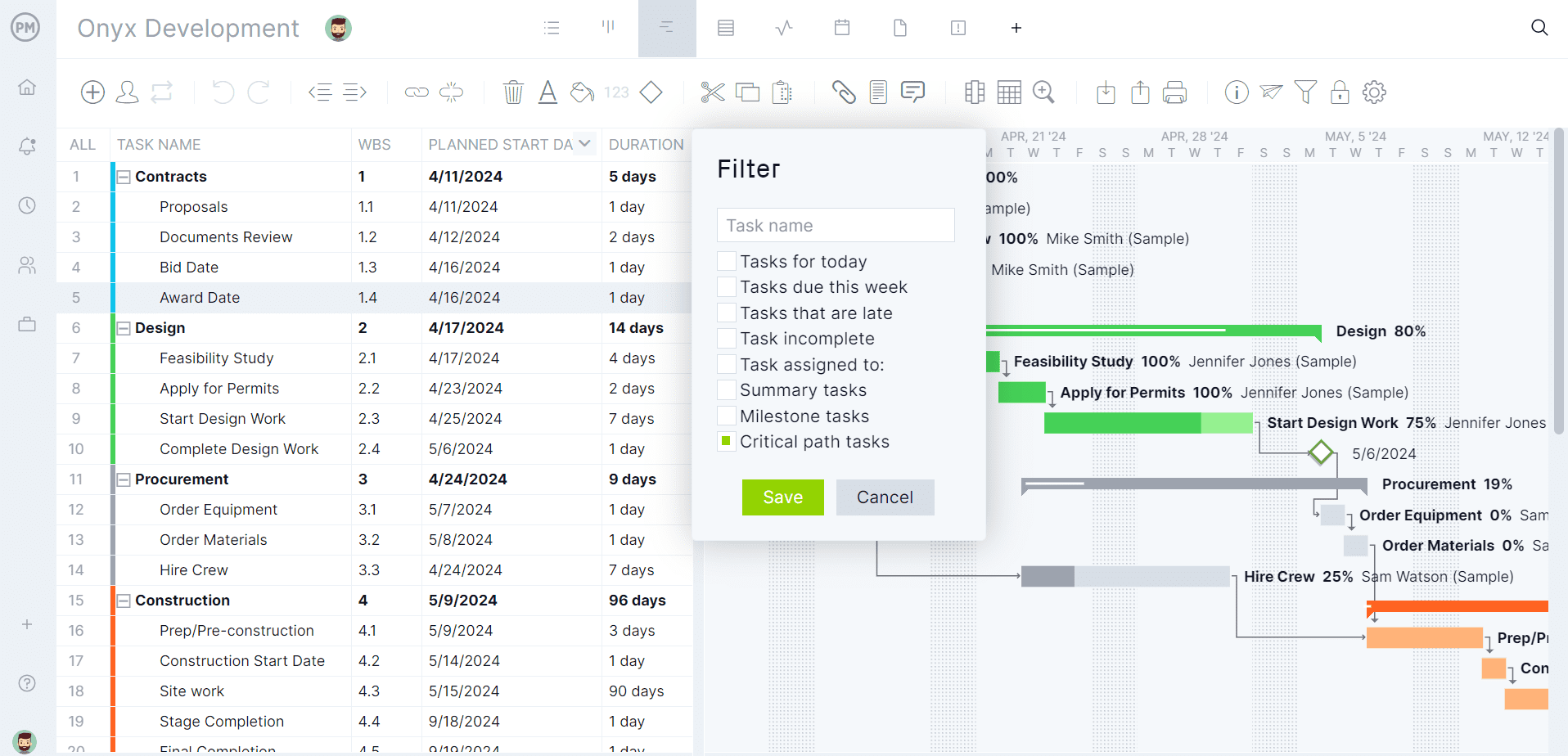
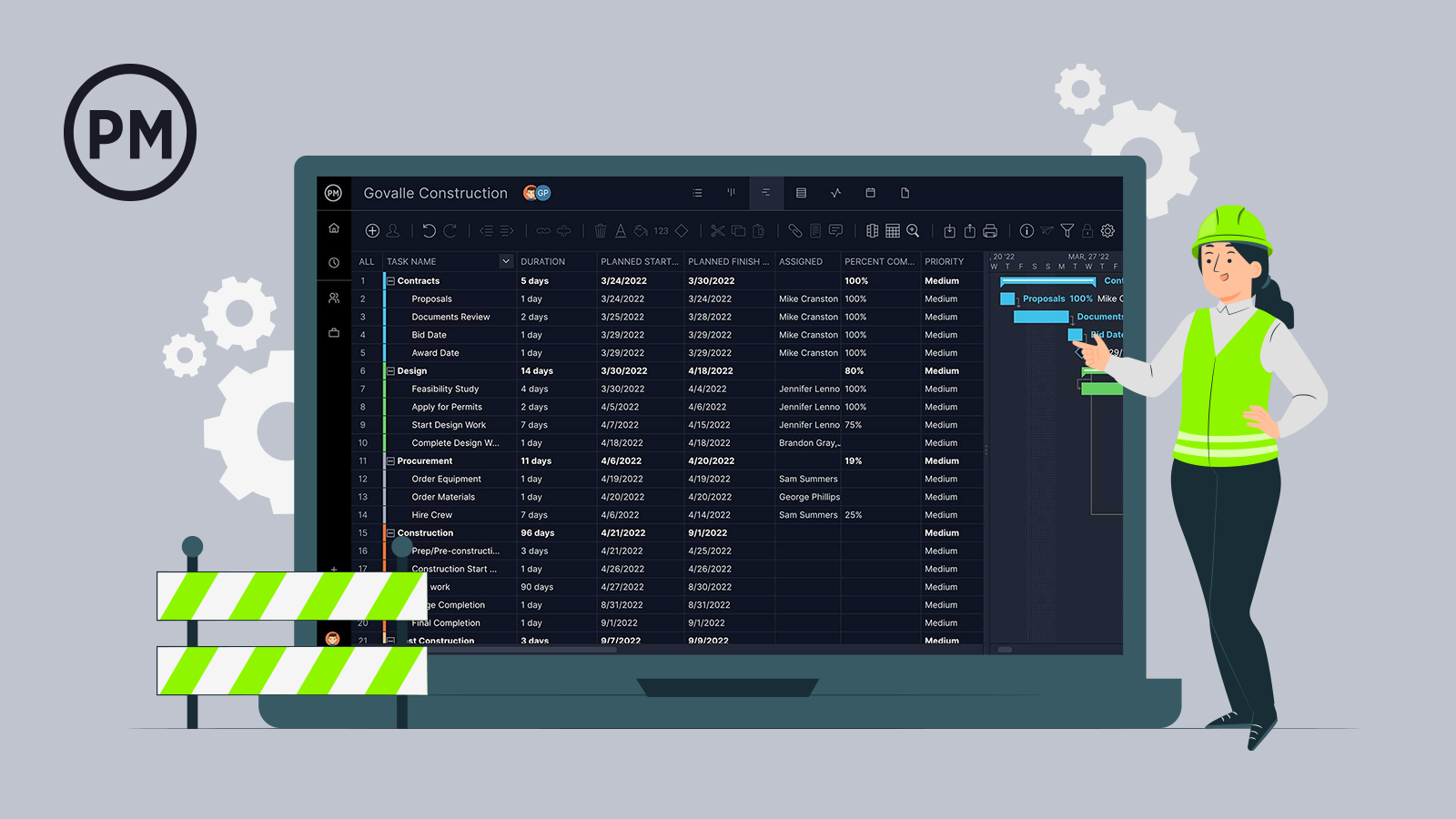
Powerful Gantt charts allow general contractors to create detailed budgets, inputting various costs, such as labor, materials, equipment and overhead. The software allows for a structured breakdown of costs into categories and subcategories, which help manage and track expenses. Resources can be allocated for specific tasks with associated costs to better estimate total project expenses based on resource needs.
Time spent on tasks can be tracked with secure timesheets to estimate and track labor costs in real time, including hourly rates and overtime. Old projects can be archived and used to provide historical data when estimating costs for future projects. The collaborative platform allows team members to contribute their insights based on experience and skills to create accurate cost estimates. Gantt chart features such as linking all four types of task dependencies and filtering for the critical path help keep the project on track and avoid cost overruns.
Real-time Project Cost Tracking Dashboards & Reports
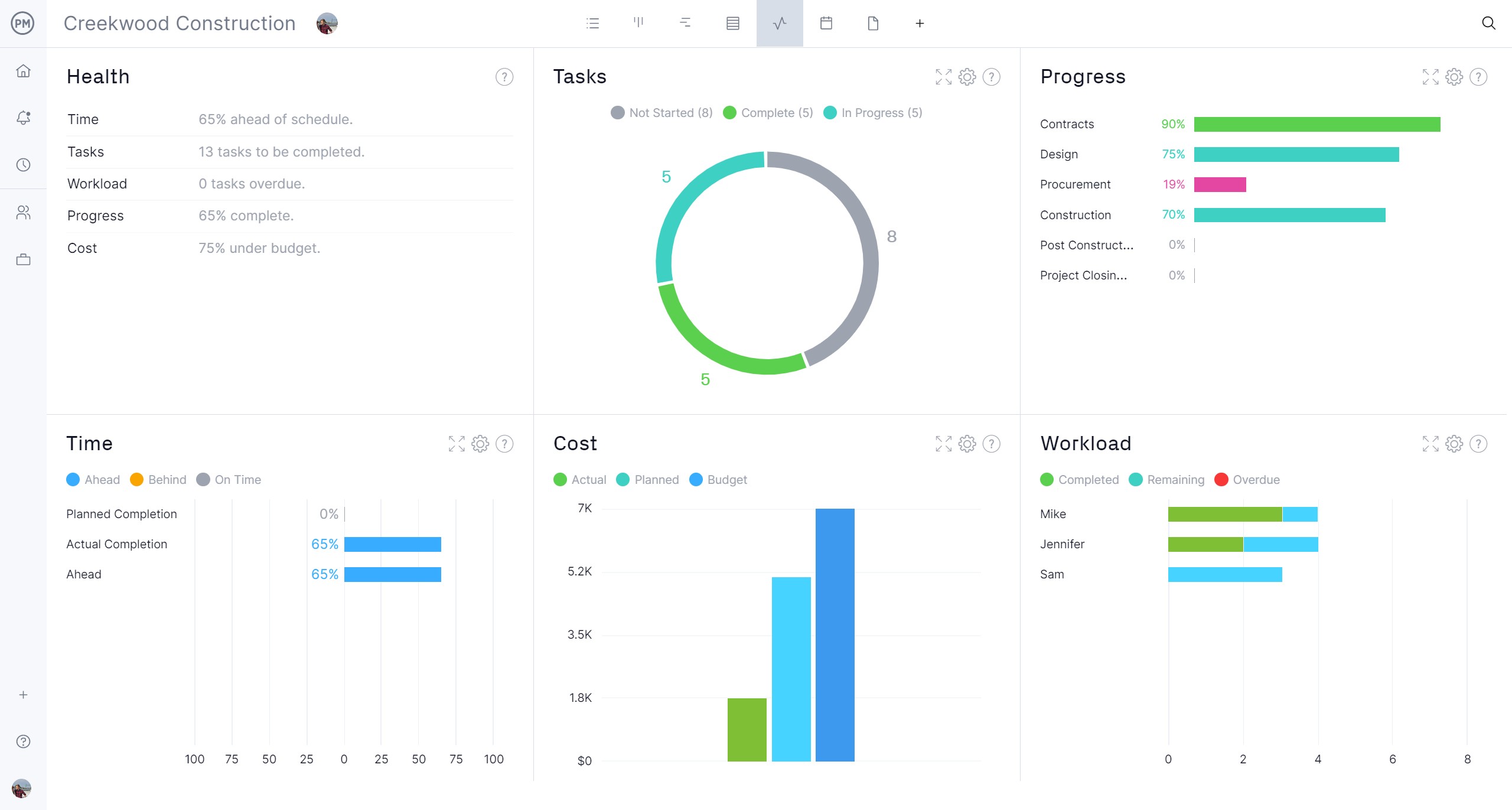
Estimating and planning is only the beginning. This construction management software for small businesses also ensures that the execution of the project aligns with the schedule and budget. Once a baseline is set on the Gantt chart, the plan is captured and can now be compared to actual expenditures in real time. One way to track costs is with the live project and portfolio dashboard, which automatically collects data and displays the budget, actual and planned costs in easy-to-read graphs and charts.
There are other key performance indicators (KPIs) such as tasks, workload and more, that impact the budget as well. For more details, customizable status, portfolio, variance, timesheet, workload and more reports can be filtered to fine details for the project team or a more general overview to share with stakeholders, keeping them updated.
Multiple Project Planning Views
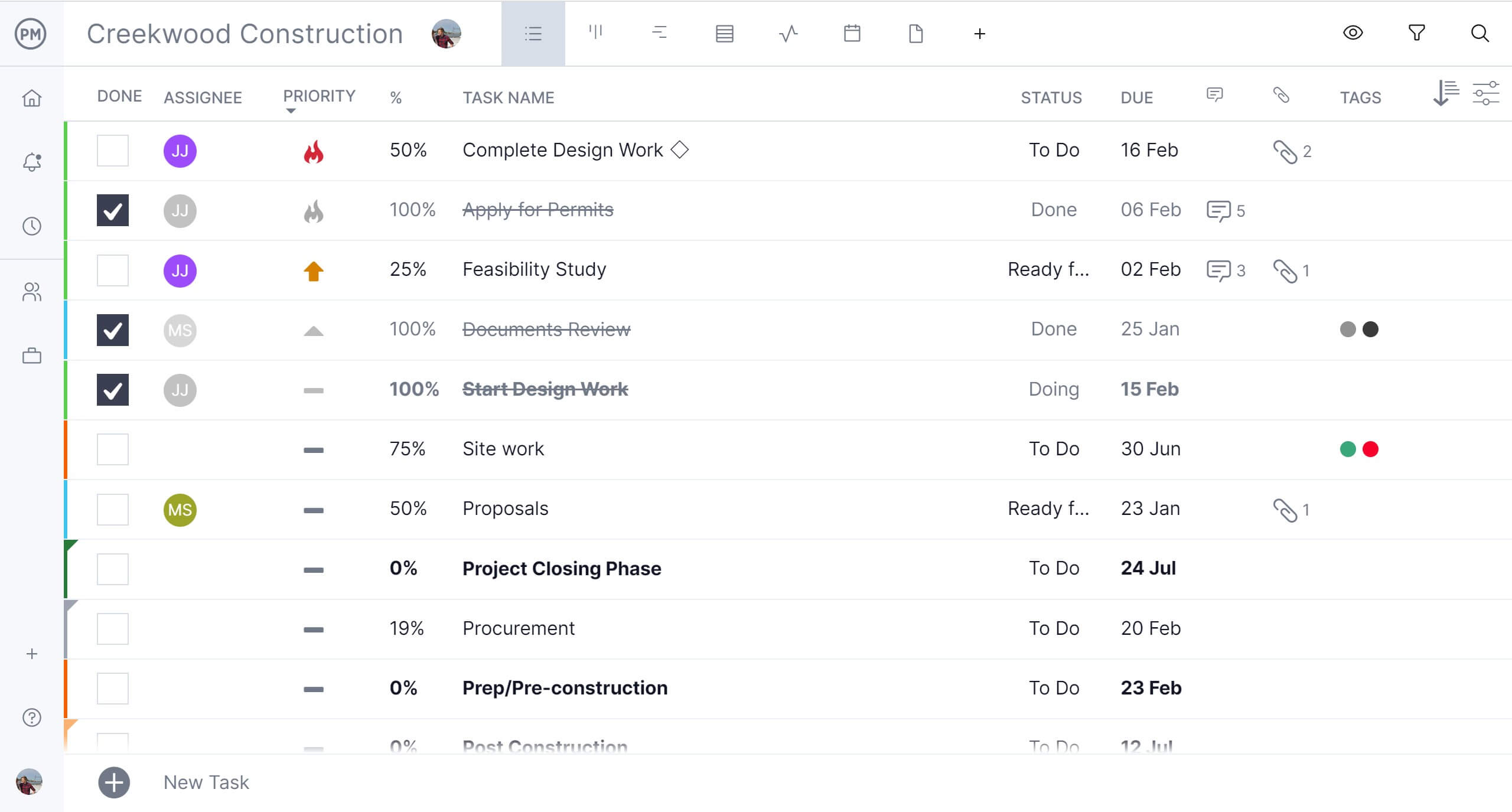
Another reason this tool tops our list is the multiple project views. While general contractors live on Gantt charts, field teams don’t need all those features when executing their tasks. The plans on the Gantt chart are reflected across the software, allowing the construction crew and subcontractors to visualize their workflow and manage backlog on kanban boards or use task lists for punch lists and more. There’s also a calendar view that provides a monthly overview of the project that stakeholders will find valuable to keep them informed on progress.
ProjectManager tops this list because it has these features as well as resource management features to balance workload, version control, global search, automated workflows with task approval settings, unlimited file storage, works on Macs and so much more. Construction firms big and small flock to it as an affordable construction management software for small firms. Get started with ProjectManager today for free.
ProjectManager Video
Watch the video below to better understand how ProjectManager can help small construction businesses.
ProjectManager Pros & Key Features for Small Construction Businesses
- Manages multiple residential or light commercial projects without juggling spreadsheets, emails and separate scheduling tools.
- Resource planning prevents small crews and equipment from being double-booked across overlapping construction projects.
- Real-time dashboards help owners quickly spot schedule delays and budget issues before they affect profitability.
- Mobile app lets field crews update progress, submit timesheets and communicate directly from active job sites.
- Integrates with Quickbooks, Acumatica, MYOB and many other ERP and accounting solutions.
ProjectManager Cons & Limitations for Small Construction Businesses
- Doesn’t include built-in bid management features for creating proposals and winning new projects.
- No dedicated RFI, submittal or punch list workflows found in construction-specific software platforms.
- Some construction accounting workflows still require integration with dedicated accounting software.
Who Is ProjectManager for?
- Small general contractors managing several residential or light commercial projects that need stronger scheduling, resource planning and cost visibility.
- Growing construction firms moving beyond spreadsheets and looking for one platform to plan jobs, assign work and track progress.
- Contractors with shared crews who need to avoid double-booking labor, equipment or supervisors across overlapping job sites.
- Construction owners who want real-time dashboards to see schedule delays, workload issues and budget performance without chasing updates.
- Field-heavy teams that need mobile access for task updates, timesheets, communication and project files from active job sites.
ProjectManager Pricing
- Team plan: $18/user/month, billed monthly. $15/user/month, billed annually.
- Business plan: $32/user/month, billed monthly. $28/user/month, billed annually.
- Enterprise: Contact sales
ProjectManager Reviews
Get your free
Construction Schedule Template
Use this free Construction Schedule Template to manage your projects better.
2. BuilderTrend
BuilderTrend is cloud-based construction project management software for small businesses. It’s designed specifically for home builders, remodelers and specialty contractors. It has a full suite of tools from planning and budgeting to communication and documentation. This is a good tool for those who are making the move from spreadsheets to a tool that can help them prepare bids, material takeoffs, invoices and work-in-progress reports. It has real-time updates and excellent customer support to train and respond to issues.
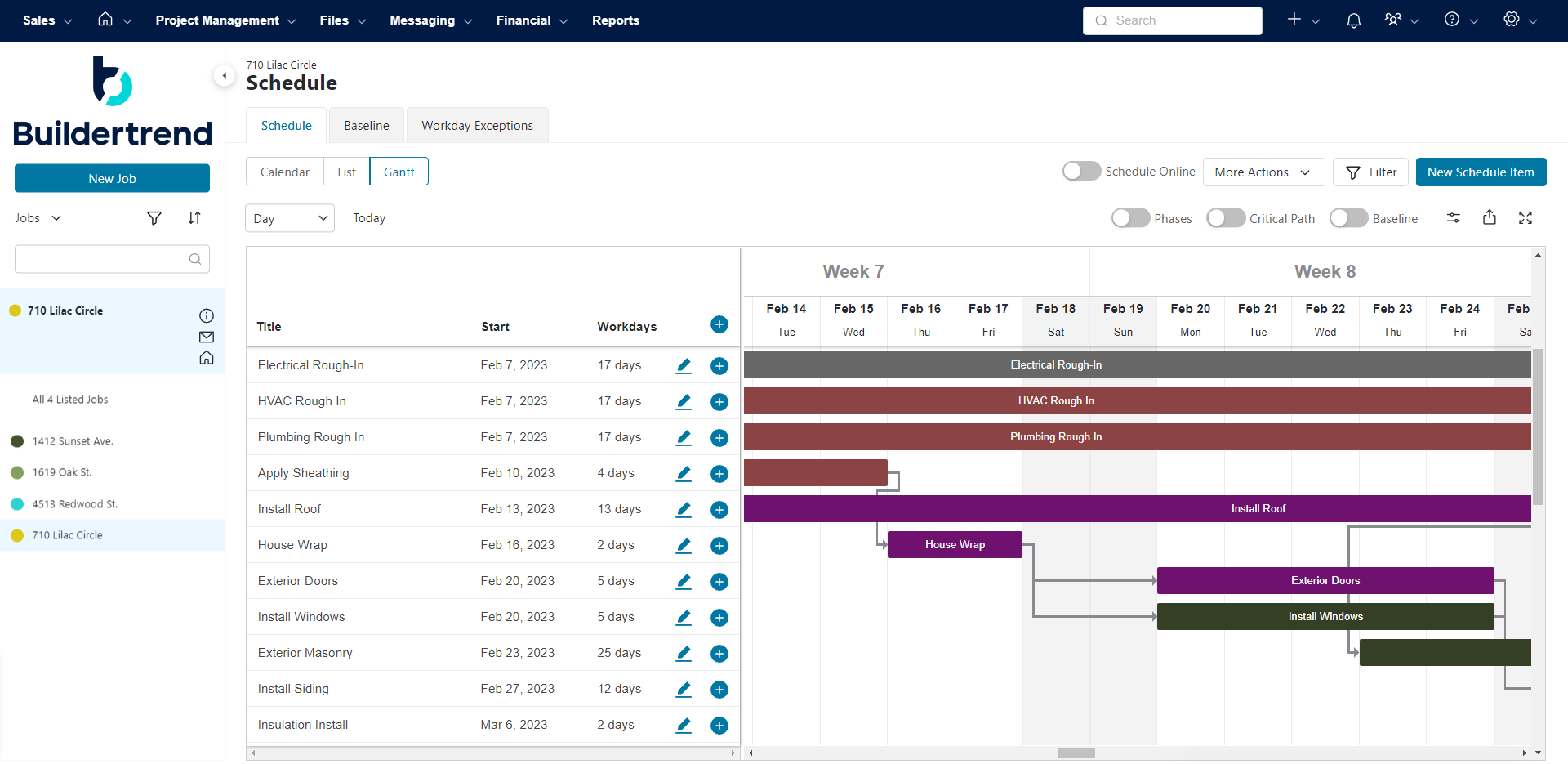
However, small construction companies will bulk at the price for those features. And it’s a good thing that they have strong customer support because, despite a user-friendly design, there is a steep learning curve to master all the tools offered by the software. Users have also complained about the lack of customization options for specific workflows. The fact that it can’t track individual costs is also a big minus when calculating the value of investing in this project management solution. That and the lack of dashboards or reports to track the budget are the final nails in the coffin.
Buildertrend Video
Watch the video below to better understand how Buildertrend can help small construction businesses.
Buildertrend Pros & Key Features for Small Construction Businesses
- Built specifically for residential builders, remodelers and specialty contractors managing multiple client projects simultaneously.
- Client communication tools keep homeowners informed through schedules, selections, change orders and project updates.
- Budgeting and financial tracking help small contractors monitor project costs and protect profit margins throughout construction.
- Scheduling tools coordinate crews, subcontractors and project milestones while adapting to construction schedule changes.
- Mobile apps let field teams update daily progress, communicate with the office and access project information on-site.
Buildertrend Cons & Limitations for Small Construction Businesses
- Higher subscription costs may be difficult to justify for very small contractors with only a few active projects.
- No free plan or free trial, making it harder to evaluate before committing to a subscription.
- Gantt charts lack built-in cost tracking, requiring separate tools to monitor schedule and budget together.
- Includes a time clock but lacks full project timesheets for detailed labor tracking across multiple jobs.
- Broad feature set may require additional training for small teams transitioning from spreadsheets or basic software.
Who Is Buildertrend for?
- Custom home builders that need to manage selections, client communication, schedules, budgets and change orders in one residential-focused platform.
- Residential remodelers handling kitchens, bathrooms, additions and whole-home renovations where homeowner communication is a major part of the job.
- Specialty contractors working directly with homeowners who need polished proposals, project updates and client-facing communication tools.
- Design-build firms that want to connect preconstruction, budgeting, scheduling and customer communication across the full residential project lifecycle.
- Growing residential contractors willing to pay more for a construction-specific platform with strong client management features.
BuilderTrend Pricing
- Custom pricing: Contact sales for a quote
BuilderTrend Reviews
3. Smartsheet
Smartsheet is construction management software for small contractors who are familiar with Excel and prefer a spreadsheet-based tool. While not exclusive to construction, many firms will use this tool as its features can be tailored to meet the needs of small construction businesses. It offers real-time collaboration with a mobile app to stay in touch with teams on the job site. There are cost-tracking and reporting tools to track performance and financial metrics. And it’s a centralized storage for project documents with version control and access permissions.

The pros are also the cons in terms of its spreadsheet interface. This is especially true as users move to more advanced features that have a steep learning curve due to complex formulas. Since this isn’t exclusively construction management software, it’s limited to use in that industry. Even the tools offered often require manually setting up features whereas construction software does that automatically. There are some cost-estimating features, but they’re limited and may not suit the needs of most general contractors.
Smartsheet Video
Watch the video below to better understand how Smartsheet can help small construction businesses.
Smartsheet Pros & Key Features for Small Construction Businesses
- Familiar spreadsheet interface makes the transition from Excel much easier for small construction companies.
- Customizable sheets help contractors track schedules, budgets, material deliveries and subcontractor progress in one place.
- Reporting and dashboard tools provide owners with a quick overview of project status and budget performance.
- Flexible workflows adapt to residential, remodeling and light commercial construction projects without requiring complex configuration.
- Free trial and mobile apps make it easy for small teams to evaluate the platform before committing.
Smartsheet Cons & Limitations for Small Construction Businesses
- Spreadsheet-first design lacks many construction workflows available in purpose-built construction management software.
- Many construction processes require custom setup instead of working out of the box.
- Limited estimating and job costing capabilities compared to software built specifically for construction contractors.
- No dedicated tools for RFIs, submittals, punch lists or construction document management.
- Managing larger or more complex construction projects can become difficult as spreadsheets continue growing.
Who Is Smartsheet for?
- Spreadsheet-driven contractors that already manage projects in Excel and want a more collaborative, cloud-based way to organize work.
- Small commercial contractors that need flexible tracking for schedules, budgets, materials, subcontractors and project documents.
- Construction office teams comfortable building custom workflows instead of using rigid, construction-specific software templates.
- Contractors with simple projects that need better visibility and reporting but don’t require deep construction management features.
- Teams transitioning slowly from manual spreadsheets to project management software without completely changing how they work.
Smartsheet Pricing
- Pro plan: $12/user/month, billed monthly. $9/user/month, billed annually.
- Business plan: $24/user/month, billed monthly. $19/user/month, billed annually.
- Enterprise: Contact sales
Smartsheet Reviews
4. Jobber
Jobber is mostly known as field service management software, which can include construction management software for small businesses. It has scheduling and dispatching tools to manage appointments and invoicing capabilities. A centralized database helps manage client information, communication and project history. There are also multiple task management tools, including kanban boards, task lists and daily logs.
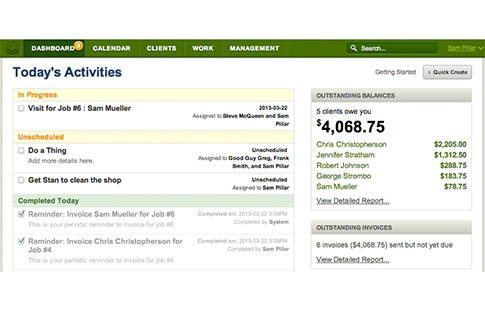
The interface is simple but may be too basic as it creates a poor experience for users. However, the lack of advanced features is more likely to turn users away from this tool. Small construction firms will also find the cost of running the software prohibitively expensive, especially for those who need multiple users or additional features, such as Gantt charts that aren’t part of its feature set. The features available have limited customization, which might not meet the needs of all businesses.
Jobber Video
Watch the video below to better understand how Jobber can help small construction businesses.
Jobber Pros & Key Features for Small Construction Businesses
- Well suited for small contractors managing service jobs, repairs, maintenance and residential construction projects.
- Scheduling and dispatching tools help assign crews, organize appointments and respond quickly to customer requests.
- Job costing, quotes, invoicing and payment tools simplify the administrative side of running a small contracting business.
- Unlimited users let growing companies add office staff and field crews without increasing licensing costs.
- Mobile apps allow crews to access job details, update work status and collect information directly from the field.
Jobber Cons & Limitations for Small Construction Businesses
- Better suited for service contractors than companies managing complex, multi-phase construction projects.
- No Gantt charts for planning construction schedules with dependencies and critical project milestones.
- Resource planning capabilities are limited for coordinating multiple crews, equipment and overlapping construction jobs.
- Project management features aren’t as robust as software designed specifically for construction project delivery.
- No free plan, requiring contractors to purchase a subscription after the trial period ends.
Who Is Jobber for?
- Service contractors managing short jobs, repairs, installations, maintenance calls and recurring customer work.
- Residential trade businesses such as HVAC, plumbing, electrical, landscaping or handyman companies that need scheduling and dispatching.
- Small contractors with field crews that need mobile access to job details, customer information, invoices and work status.
- Owner-operators who care more about quotes, appointments, payments and customer communication than complex project scheduling.
- Growing service businesses that want to organize daily field operations before investing in heavier construction project management software.
Jobber Pricing
- Core: $49/month (1 user), billed monthly. $29/month (1 user), billed annually.
- Connect: $139/month, includes up to 5 users, billed monthly. $99/month, includes up to 5 users, billed annually.
- Grow: $199/month, includes up to 10 users, billed monthly. $149/month, includes up to 10 users, billed annually.
Jobber Reviews
5. Contractor Foreman
Contractor Foreman is construction management software for small contractors up to mid-sized construction companies. It manages scheduling, budgeting, document management and communication. It’s especially useful in managing bids, invoicing and payments. There is also a mobile app for field workers. The price isn’t cheap, but tends to be within the range of affordable compared to other construction project management solutions.
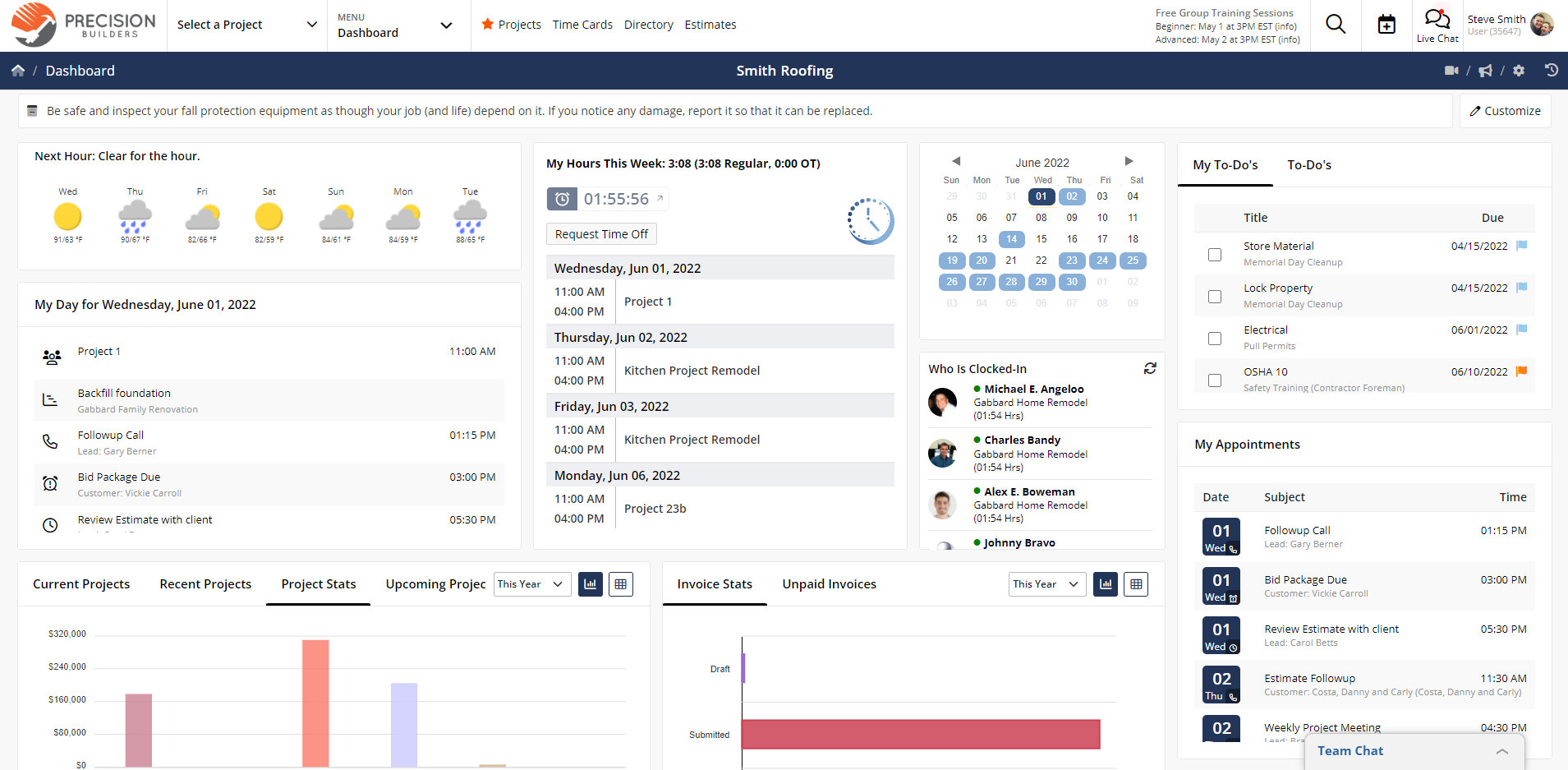
The user interface is outdated and not the most user-friendly. The lack of takeoff features is sure to disappoint some construction companies, but maybe not as much as the performance issues that some users have reported, especially with the mobile app. While contractors often seek integrations with other third-party apps they use, this tool is limited in what it works with compared to others on this list.
Contractor Foreman Video
Watch the video below to better understand how Contractor Foreman can help small construction businesses.
Contractor Foreman Pros & Key Features for Small Construction Businesses
- Designed specifically for small contractors managing residential and light commercial construction projects.
- Bid management tools help organize proposals and streamline the process of winning new construction work.
- Daily logs, job costing and work order tracking keep project documentation organized from start to finish.
- Document management centralizes drawings, contracts, permits and other project files for office and field teams.
- Free trial allows small construction businesses to evaluate the platform before committing to a subscription.
Contractor Foreman Cons & Limitations for Small Construction Businesses
- User interface can feel dated compared to newer construction management software platforms.
- Doesn’t include built-in construction takeoff tools for measuring quantities directly from project plans.
- Limited budget reporting and cost tracking compared to software with more advanced financial management capabilities.
- No free plan, requiring contractors to purchase a subscription after the trial period ends.
- Growing contractors may eventually outgrow some reporting and project controls as operations become more complex.
Who Is Contractor Foreman for?
- Small general contractors that want construction-specific tools for bids, daily logs, documents, work orders and job costing.
- Residential builders and remodelers that need practical construction workflows without paying for enterprise-level software.
- Light commercial contractors managing projects that require better documentation, scheduling, communication and cost control.
- Budget-conscious contractors looking for many construction features in one platform at a more accessible price point.
- Growing contractors that need more structure than spreadsheets but aren’t ready for a complex enterprise construction system.
Contractor Foreman Pricing
- Basic: $49/month, billed annually.
- Standard: $132/month, billed quarterly. $105/month, billed annually.
- Plus: $206/month, billed quarterly. $166/month, billed annually.
- Pro: $282/month, billed quarterly. $221/month, billed annually.
- Unlimited: $415/month, billed quarterly. $332/month, billed annually.
Contractor Foreman Reviews
6. CoConstruct
CoConstruct is construction management software for small businesses that specialize in custom home construction and remodeling. It has a range of tools for managing projects, including online billing and purchase order management, to-do lists for task management and communications to streamline and enhance collaboration. It has a user-friendly interface and strong client communication features to keep them informed, which improves trust.
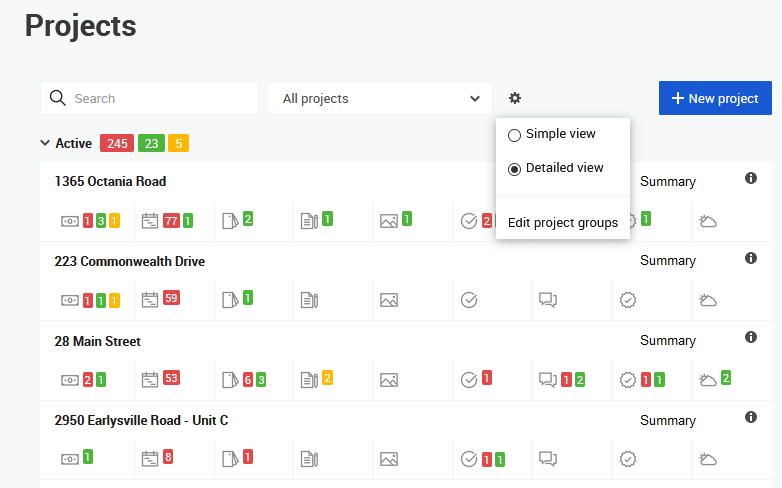
Issues arise with project and cost tracking features, which are limited and their limitations will be felt when managing construction or remodeling projects. The cost can be a hurdle too high to clear from smaller construction firms and the learning curve is steep enough that time will need to be set aside for training. There’s no free trial or free plan to kick the tires on this tool, which might put it out of touch for general contractors who want to take the software out for a test drive.
CoConstruct Pros & Key Features for Small Construction Businesses
- Designed for custom home builders and remodelers managing residential construction projects from start to finish.
- Online billing and purchase order tools simplify financial management throughout the construction project lifecycle.
- Job costing features help contractors compare actual project costs against budgets as work progresses.
- Client communication tools keep homeowners informed about selections, schedules, approvals and project updates.
- Mobile apps give field teams access to project information and updates directly from the job site.
CoConstruct Cons & Limitations for Small Construction Businesses
- Project tracking and reporting capabilities are less robust than dedicated construction project management platforms.
- Lacks comprehensive dashboards for monitoring project costs, schedules and overall business performance.
- Learning the platform can take time, especially for contractors transitioning from spreadsheets or simpler software.
- No free trial, making it difficult for small businesses to evaluate before purchasing.
- No free plan, requiring an upfront software investment for even the smallest construction companies.
Who Is CoConstruct for?
- Custom home builders who need to manage client selections, budgets, schedules and purchase orders throughout the homebuilding process.
- Residential remodeling companies handling kitchens, bathrooms, additions and whole-home renovations with frequent homeowner communication.
- Design-build contractors looking for one platform to coordinate estimating, project management and client collaboration.
- Boutique residential builders that prioritize customer experience with online approvals, project updates and transparent communication.
- Construction businesses specializing in high-end residential projects where client involvement extends throughout planning and construction.
CoConstruct Pricing
- Custom pricing: Contact sales for a quote
CoConstruct Reviews
7. Monograph
Monograph is construction management software for small businesses that focus on architecture and engineering. It focuses on project planning, resource management and financial tracing. There is built-in time tracking that helps to create accurate billing and resource management. Real-time collaboration facilitates communication and collaboration. While comprehensive reporting offers valuable insights into project performance and financials, which leads to more insightful decision-making.
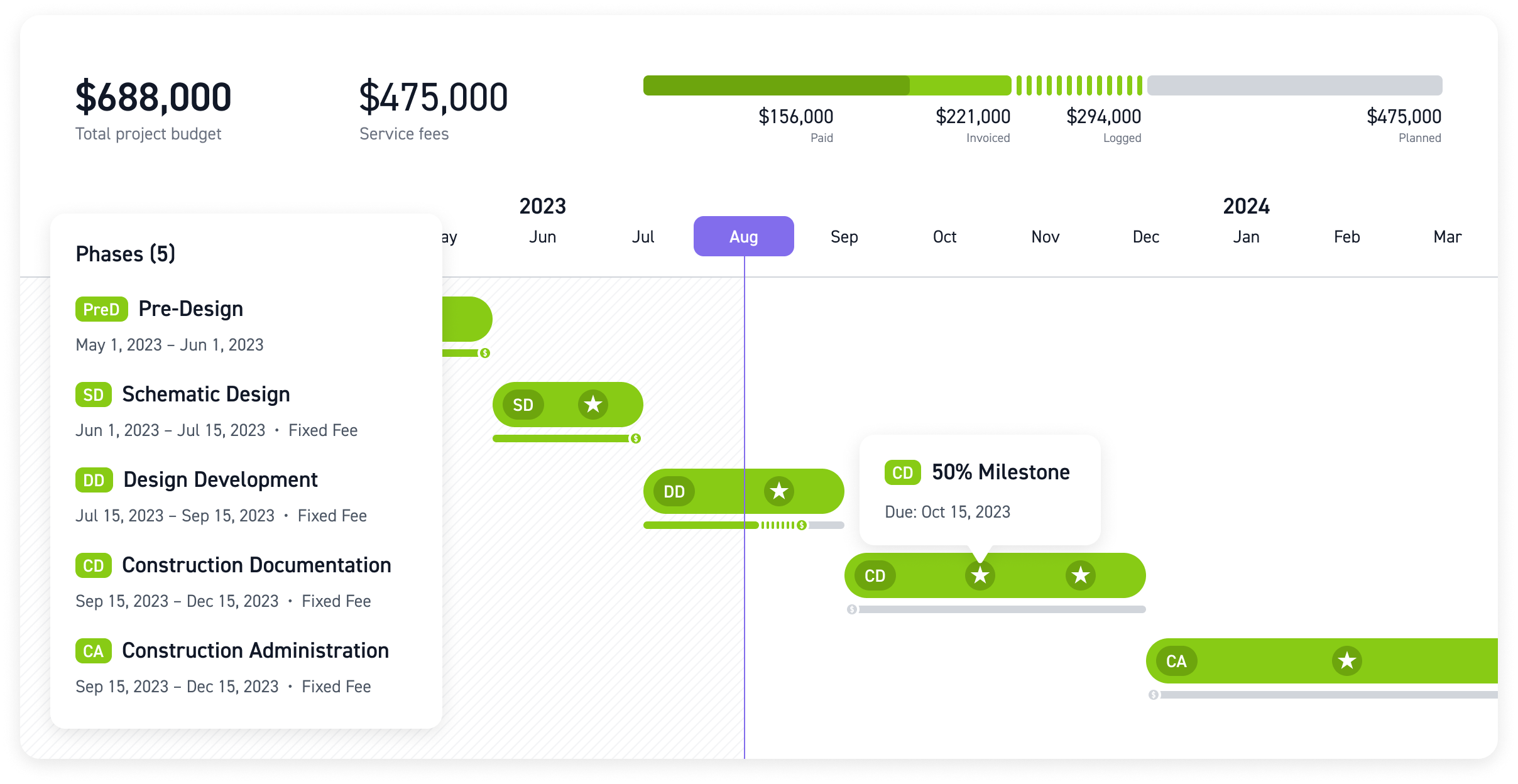
Maybe because this is super-specialized software the cost is relatively expensive, especially for small businesses that require multiple licenses or advanced features. Smaller construction firms might also be frustrated with the features that are suited for larger, more complex projects. The features are also limited in terms of customization, which impacts workflows and reporting. All that and the fact that it takes a long time to understand how to use the tool will be one red flag too many.
Monograph Video
Watch the video below to better understand how Monograph can help small construction businesses.
Monograph Pros & Key Features for Small Construction Businesses
- Excellent choice for design-build firms that combine architectural design and construction management services.
- Resource planning tools help allocate architects, engineers and project staff across multiple active projects.
- Built-in time tracking simplifies labor management and improves visibility into project profitability.
- Real-time collaboration keeps office staff and project teams aligned on project progress and deliverables.
- Financial planning tools provide insight into project performance from the design phase through project completion.
Monograph Cons & Limitations for Small Construction Businesses
- Primarily designed for architecture firms rather than general contractors or specialty trade contractors.
- Pricing may be difficult to justify for small construction companies with limited software budgets.
- Construction project management capabilities are less comprehensive than dedicated contractor-focused platforms.
- Learning the platform requires time, especially for teams unfamiliar with architecture-focused workflows.
- Limited customization may restrict firms with highly specialized construction management processes.
Who Is Monograph for?
- Architecture firms that manage project planning, staffing, budgets and profitability across multiple design projects.
- Design-build firms combining architectural design with construction services that need stronger resource and financial planning.
- Engineering consultancies coordinating multidisciplinary teams, project schedules and billable hours from a single platform.
- Small architectural practices looking to replace spreadsheets with software focused on project financial performance and resource utilization.
- Construction companies with in-house design teams that place equal importance on design management and project delivery.
Monograph Pricing
- Custom pricing: Contact sales
Monograph Reviews
Related Project Management Software Content
Construction management software for small businesses is a niche. For those looking for a broader review of project management solutions, follow the links below to our most reviewed product roundups.
ProjectManager is online project and portfolio management software that connects teams whether they’re in the office or on the job site. They can share files, comment at the task level and stay updated with email and in-app notifications. Get started with ProjectManager today for free.