What Is a Kaizen Board?
A kaizen board is a visual management tool used to identify, prioritize, track and implement continuous improvement ideas. It is commonly used in manufacturing, warehousing, healthcare and construction to improve processes, reduce waste and solve operational problems.
A kaizen board organizes improvement opportunities into stages such as review, approval, implementation and completion. Teams use it to make improvement efforts visible, assign ownership and monitor progress from idea generation through execution.
Get your free
Kaizen Board Template
Use this free Kaizen Board Template for Excel to manage your projects better.
What Is the Purpose of a Kaizen Board?
Continuous improvement efforts often fail because ideas are discussed but never acted upon. A kaizen board creates a structured process for capturing opportunities, assigning responsibility and tracking progress.
The goal is to turn employee observations into measurable improvements that reduce waste, improve quality, increase safety or streamline workflows. By making improvement activities visible, teams can focus on solving problems systematically rather than relying on informal conversations or isolated initiatives.
A kaizen board helps guide continuous improvement efforts, but that’s just the beginning. If you’re ready to implement continuous improvement across your organization, try ProjectManager.. ProjectManager is award-winning project management software that gives businesses across industries the tools they need to ensure projects are completed on time, within budget and within scope. It allows project managers to make detailed project schedules, estimate costs, allocate resources, set budgets, track progress and compare planned versus actual project outcomes using real-time dashboards and reports to identify delays or cost overruns quickly. Get started with ProjectManager for free today.
Who Typically Uses a Kaizen Board
Kaizen boards were first adopted in manufacturing environments as part of lean manufacturing practices pioneered by Toyota. Production teams used them to identify inefficiencies, eliminate waste and improve operational performance through small, incremental changes.
Rather than relying solely on management-driven initiatives, workers closest to the production process were encouraged to submit improvement ideas. This approach became a core element of the Toyota Production System and helped establish continuous improvement as a daily operational practice.
Related: 16 Lean Manufacturing Tools & Techniques
Over time, the use of kaizen boards expanded beyond factory floors. Today, organizations in healthcare, construction, warehousing, logistics, maintenance and other operations-focused industries use them to manage process improvements. While the industries differ, the objective remains the same: create visibility into improvement opportunities, assign accountability and track actions that lead to better performance.
Benefits of Using Kaizen Boards
Improvement initiatives are more likely to succeed when teams have a clear process for capturing ideas and following through on them. A kaizen board provides visibility into improvement efforts, keeps projects organized and helps ensure that valuable suggestions move from discussion to implementation instead of being forgotten.
- Creates a centralized location for tracking improvement opportunities, making it easier to monitor progress and accountability.
- Encourages employee participation by giving team members a structured way to contribute ideas and solutions.
- Improves transparency by allowing managers and staff to see the status of improvement initiatives at a glance.
- Helps prioritize high-impact opportunities so teams can focus resources on changes that deliver measurable results.
- Supports a culture of continuous improvement by turning problem-solving into an ongoing operational practice rather than an occasional effort.
Kaizen Board Template
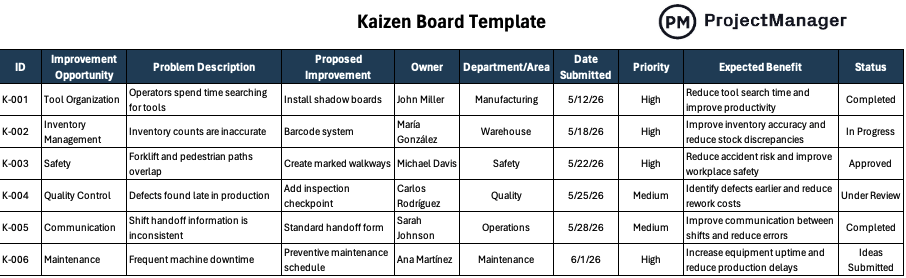
Use this free Excel kaizen board template to document, prioritize and track continuous improvement initiatives. The template includes fields for improvement opportunities, problem descriptions, proposed solutions, ownership, department, submission dates, priority levels, expected benefits and status updates. It provides a centralized view of improvement efforts and helps teams monitor progress from idea submission through implementation.
Kaizen Board Example
To better understand how a kaizen board works, let’s look at a practical example. Imagine a manufacturing company that produces industrial equipment and wants to improve efficiency, reduce safety risks and minimize production delays. While operations are running smoothly overall, managers recognize that small process issues continue to create unnecessary costs and lost productivity. To encourage continuous improvement, the company implements a kaizen board to capture, evaluate and track employee suggestions.
The board organizes improvement opportunities into individual records, each with a problem description, proposed solution, owner, department, submission date, priority level, expected benefit and status. This structure allows supervisors and team members to quickly see what improvements have been identified, who is responsible for them and how far along they are in the implementation process.
| Improvement Opportunity | Problem Description | Proposed Improvement | Owner | Department | Date Submitted | Priority | Expected Benefit | Status |
| Tool Organization | Operators spend time searching for tools | Install shadow boards | John Miller | Manufacturing | 5/12/26 | High | Reduce tool search time and improve productivity | Completed |
| Inventory Management | Inventory counts are inaccurate | Barcode system | María González | Warehouse | 5/18/26 | High | Improve inventory accuracy and reduce stock discrepancies | In Progress |
| Safety | Forklift and pedestrian paths overlap | Create marked walkways | Michael Davis | Safety | 5/22/26 | High | Reduce accident risk and improve workplace safety | Approved |
| Quality Control | Defects found late in production | Add inspection checkpoint | Carlos Rodríguez | Quality | 5/25/26 | Medium | Identify defects earlier and reduce rework costs | Under Review |
| Communication | Shift handoff information is inconsistent | Standard handoff form | Sarah Johnson | Operations | 5/28/26 | Medium | Improve communication between shifts and reduce errors | Completed |
| Maintenance | Frequent machine downtime | Preventive maintenance schedule | Ana Martínez | Maintenance | 6/1/26 | High | Increase equipment uptime and reduce production delays | Ideas Submitted |
Several departments are represented in this example. Manufacturing personnel have identified time lost searching for tools and proposed installing shadow boards to improve workstation organization. Warehouse staff are working on a barcode system to address inventory inaccuracies, while the safety department has recommended creating marked walkways to reduce the risk of forklift-related accidents. Quality teams are reviewing an additional inspection checkpoint to identify defects earlier in the production process.
Not every improvement is at the same stage. Some initiatives have already been completed, such as the tool organization project and the standardized shift handoff form. Others are still being reviewed, approved or actively implemented. By displaying all improvement efforts in one location, the kaizen board provides transparency and helps ensure that valuable ideas are not forgotten after they are submitted.
Notice that each item also includes an expected benefit. This encourages teams to focus on improvements that produce measurable results, such as reducing downtime, improving inventory accuracy, increasing productivity or lowering rework costs. As projects are completed, managers can compare actual outcomes against these anticipated benefits to evaluate the effectiveness of their continuous improvement efforts.
ProjectManager Is a Robust Project Management Software
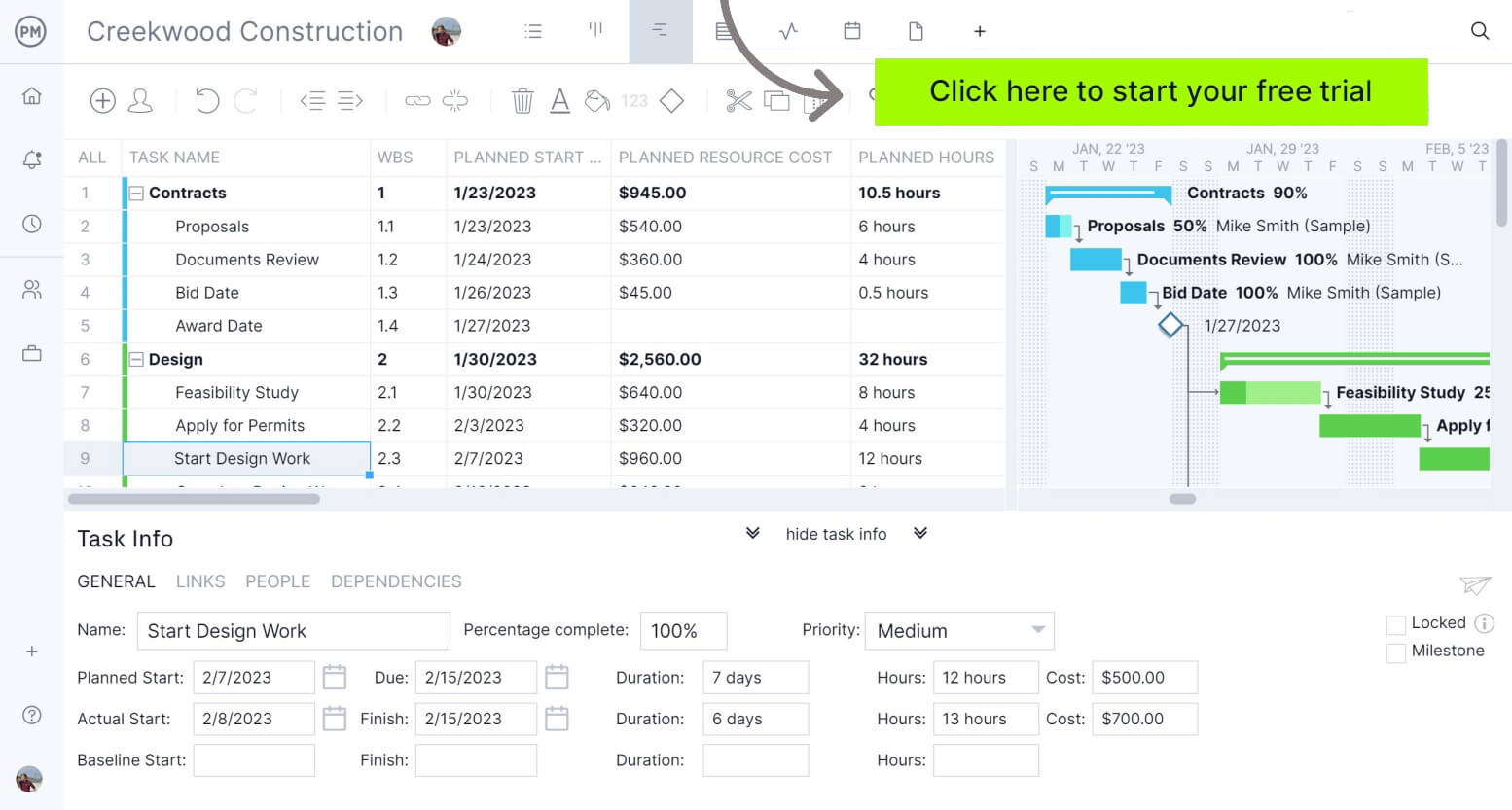
ProjectManager is an online project management platform that provides a robust feature set of project planning, scheduling and tracking tools, including Gantt charts, kanban boards, task lists and real-time dashboards and reports. With these tools, teams across industries can manage continuous improvement, build detailed schedules, assign resources and monitor progress, costs and timelines.
ProjectManager also delivers AI-powered project insights to support better decision-making and connects with over 100 tools like Microsoft Project, Acumatica and Jira. With its open API and wide range of integrations, organizations can seamlessly link ProjectManager to their existing systems.
Watch the video below to learn more!
If you need a tool to help you manage projects, then sign up for our software now at ProjectManager. Our online software helps teams across industries plan, track and oversee projects as they unfold. Sign up for a free 30-day trial today!