
Solega Co. Done For Your E-Commerce solutions.
  • Home
  • E-commerce
  • Start Ups
  • Project Management
  • Artificial Intelligence
  • Investment
  • More
    • Cryptocurrency
    • Finance
    • Real Estate
    • Travel
No Result
View All Result
  • Home
  • E-commerce
  • Start Ups
  • Project Management
  • Artificial Intelligence
  • Investment
  • More
    • Cryptocurrency
    • Finance
    • Real Estate
    • Travel
No Result
View All Result
No Result
View All Result
Home E-commerce

Search Console’s New AI Data Is a Start

Solega Team by Solega Team
June 29, 2026
in E-commerce
Reading Time: 4 mins read
0
Search Console’s New AI Data Is a Start
0
SHARES
0
VIEWS
Share on FacebookShare on Twitter


Google’s new “Generative AI” section in Search Console is now widely available.

Per the Google Search Central blog, the section (at Performance > Search Results > Generative AI) reports on a page’s visibility in AI Overviews and AI Mode, as well as genAI features in Discover.

The section includes:

  • URLs with impressions in Google’s AI answers,
  • Number of impressions for each URL within a set period,
  • Searchers’ countries and devices by URL.

Unfortunately, the section provides no filters to identify which search feature produced which impressions.

What’s an impression?

The section’s sole metric is impressions. Yet there’s no definition of that term. Google’s John Mueller says an impression (i) is when a URL appears anywhere in an AI answer, and (ii) does not require an action.

Thus, an impression does not, evidently, mean a human viewed it.

For example, AI Overviews requires clicking both the “Show More” and “Show all” buttons to see all citations. Yet those URLs will count as impressions whether or not a searcher sees them.

The “Show more” opens the full answer:
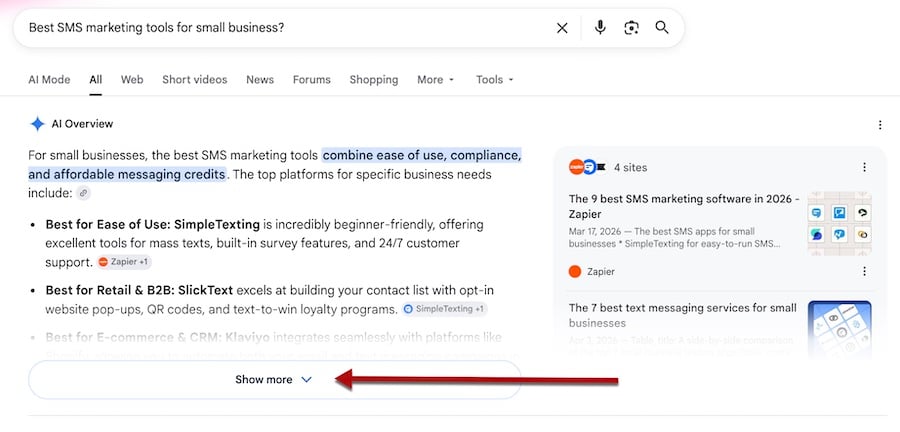
Google search results for "Best SMS marketing tools for small business?" showing a partially expanded AI Overview that recommends SMS platforms by category. A red arrow points to the "Show more" button at the bottom that reveals the full answer.

In AI Overviews, URLs that appear after clicking “Show more” (for the complete answer) count as impressions. Click image to enlarge.

The “Show all” opens the full set of cited sources:
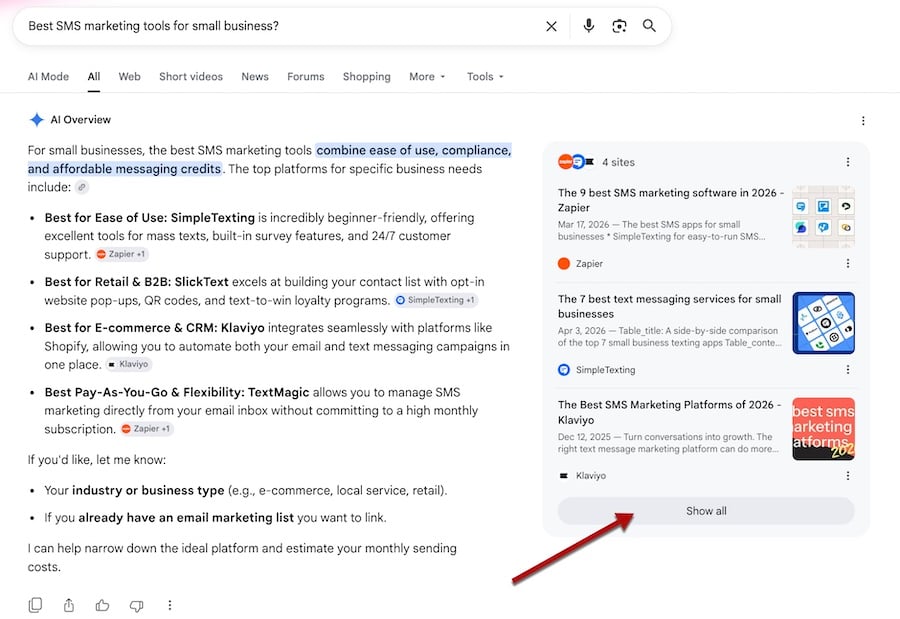
Google search results for "Best SMS marketing tools for small business?" An AI Overview on the left recommends platforms by use case, while a panel on the right cites four source articles. A red arrow points to the "Show all" button beneath the cited sources.

Clicking the “Show all” link reveals all cited sources and includes them as impressions in Search Console. Click image to enlarge.

Some AI answers in Google search require an additional click. For example, “People also ask” boxes do not produce answers without clicking on a question. In that case, presumably Search Console counts an impression only after the click for cited URLs, whether visible or not.

If the searcher asks a follow-up question in AI Mode, the cited URLs will likely count as impressions, even if included in the previous answer.
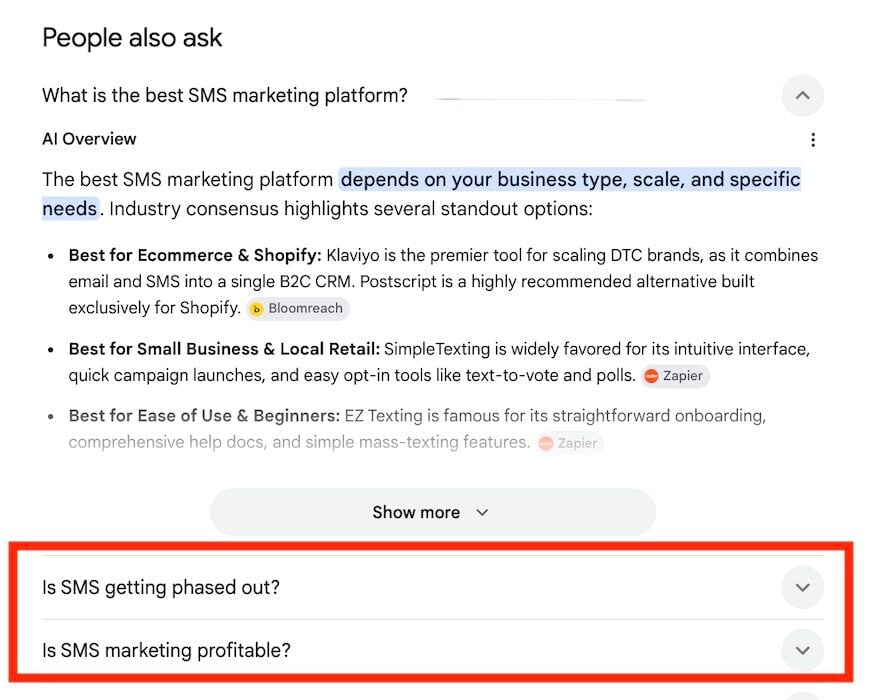
Google "People also ask" section with the question "What is the best SMS marketing platform?" expanded to reveal an AI Overview. A red arrow points to the question. The answer lists platform recommendations by category, followed by a "Show more" button and additional collapsed questions.

“People also ask” boxes do not produce answers (or impressions) without clicking on a question. Click image to enlarge.

How to use

Search Console’s new Generative AI report shows no click-through data and provides no feature-specific filters. To make it actionable:

  • Download the top-traffic URLs in Performance > Search Results,
  • Download the top-impression URLs from the “Generative AI” section,
  • Combine the two in Excel.

The Excel spreadsheet reveals:

  • High-traffic URLs with little or no AI visibility. Try to optimize these pages for AI answers with better structure and clearer solutions.
  • URLs with strong impressions in genAI answers but limited traffic. Improve traditional search rankings by updating the pages or linking to them internally (or both).

Blocking AI

Concurrent with the “Generative AI” rollout, Search Console now allows sites to block content and URLs in AI answers. The new feature (Settings > AI controls > Search generative AI) defaults to allowing those items.

A separate toggle, when clicked, blocks them, although I know of no reason for ecommerce businesses to do that.




Source link

Tags: ConsolesDataSearchStart
Previous Post

Is It Worth It To Sell Your Gold Online?

Leave a Reply Cancel reply

Your email address will not be published. Required fields are marked *

POPULAR POSTS

  • ChatUp AI Unfiltered Video Generator: My Unfiltered Thoughts

    ChatUp AI Unfiltered Video Generator: My Unfiltered Thoughts

    0 shares
    Share 0 Tweet 0
  • How to Configure Proxy Server Settings on iPhone in 2025

    0 shares
    Share 0 Tweet 0
  • Health-specific embedding tools for dermatology and pathology

    0 shares
    Share 0 Tweet 0
  • 20 Best Resource Management Software of 2025 (Free & Paid)

    0 shares
    Share 0 Tweet 0
  • 10 Ways To Get a Free DoorDash Gift Card

    0 shares
    Share 0 Tweet 0
Solega Blog

Categories

  • Artificial Intelligence
  • Cryptocurrency
  • E-commerce
  • Finance
  • Investment
  • Project Management
  • Real Estate
  • Start Ups
  • Travel

Connect With Us

Recent Posts

Search Console’s New AI Data Is a Start

Search Console’s New AI Data Is a Start

June 29, 2026
Is It Worth It To Sell Your Gold Online?

Is It Worth It To Sell Your Gold Online?

June 29, 2026

© 2024 Solega, LLC. All Rights Reserved | Solega.co

No Result
View All Result
  • Home
  • E-commerce
  • Start Ups
  • Project Management
  • Artificial Intelligence
  • Investment
  • More
    • Cryptocurrency
    • Finance
    • Real Estate
    • Travel

© 2024 Solega, LLC. All Rights Reserved | Solega.co