

Last updated: October 23, 2026
Primavera P6 is the better choice for very large, complex programs that need advanced CPM analysis, automatic resource leveling, earned value and XER files, usually managed by trained schedulers. ProjectManager is the better choice for teams that need critical path scheduling, baselines and resource management across several projects, with access for the whole team and a much shorter learning curve, at a lower per-user price.
The two tools are built for different jobs. P6 is a specialist scheduling tool used on projects with thousands of activities in industries like construction, engineering, energy and government, where contracts often require a P6 schedule. ProjectManager is online project management software that puts the schedule in front of the whole team: project managers, team members and stakeholders can view it, update progress and see workload across every project from a browser or phone.
This comparison covers scheduling, resource management, team access, file compatibility, reporting, ease of use and pricing, with an honest look at when each tool is the right fit.
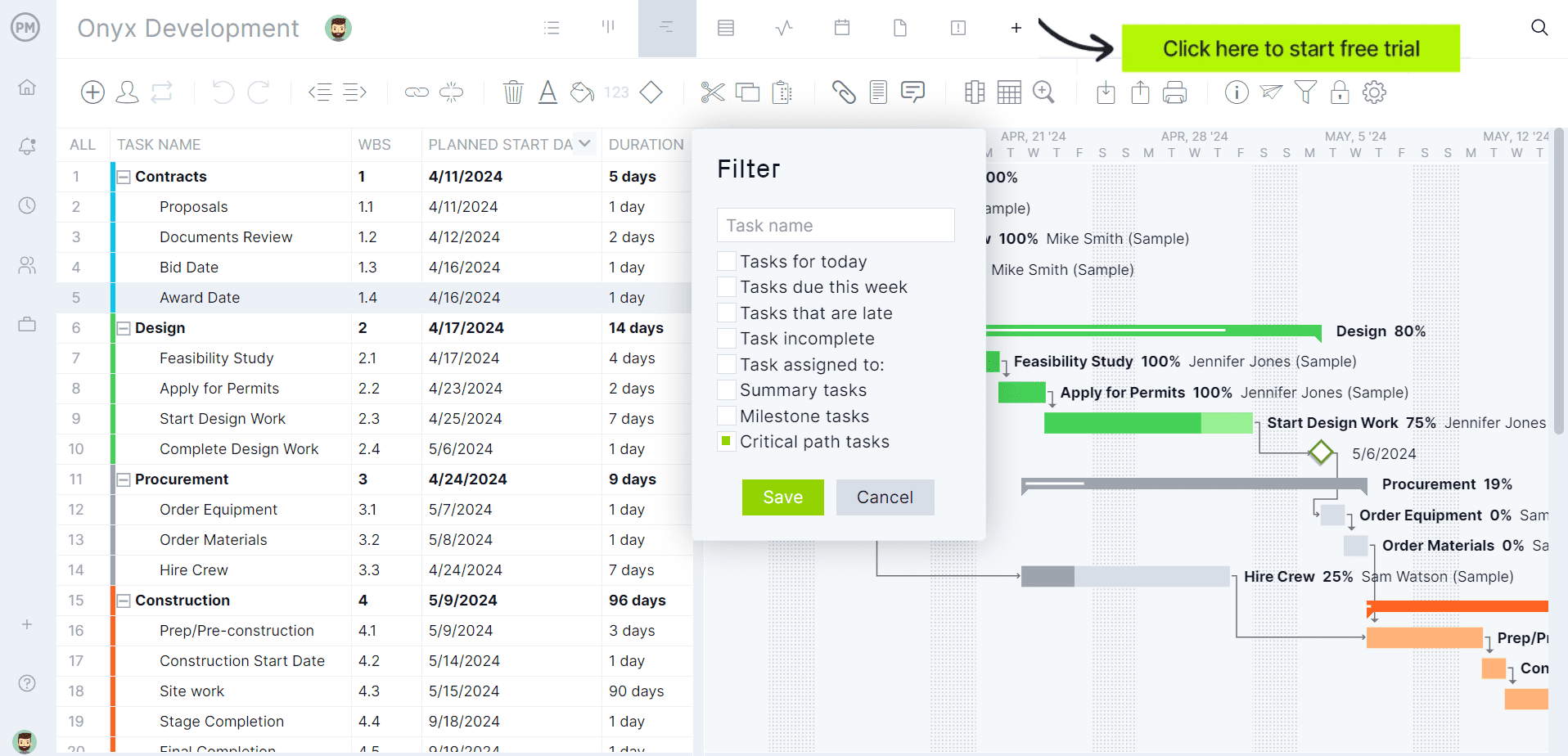
Try ProjectManager’s critical path scheduling on your own schedule. Get started with ProjectManager today for free.
ProjectManager vs. Primavera P6 at a Glance
| ProjectManager | Primavera P6 | |
|---|---|---|
| Best for | Teams managing several projects at once, from small businesses to enterprises | Large, complex programs with professional schedulers |
| Platform | Browser on any operating system, plus iOS and Android apps | P6 Professional: Windows desktop. P6 EPPM: web-based |
| Critical path | Yes, critical path filter on the Gantt chart | Yes, full CPM analysis with total float and multiple float paths |
| Dependency types | All four, with lag | All four, with lag |
| Baselines | Yes | Yes, multiple baselines |
| Resource management | Workload page showing hours across all projects, with manual rebalancing | Detailed resource loading with automatic resource leveling |
| Earned value | Not a core feature | Yes, built in |
| Team access | Browser and mobile access for the whole team | Mostly used by schedulers; others usually report progress through them or separate modules |
| Other views | Gantt, task list, kanban board, calendar, sheet and dashboards | Gantt, network diagrams, WBS and reports |
| File import | MPP, Microsoft Project XML, Excel, CSV | XER, P6 XML, Excel and others |
| XER support | No | Yes, native format |
| Learning curve | Days for most users | Weeks to months, usually with formal training |
| Starting price | $15/user/month (Team), $28/user/month (Business) | P6 Professional: about $2,500 per user license plus about $550 a year in support |
| Free trial | 30 days | No public free trial |
Prices are list prices and change often. P6 pricing varies by region, license type and discount, so check with Oracle or a reseller.
What Is ProjectManager?
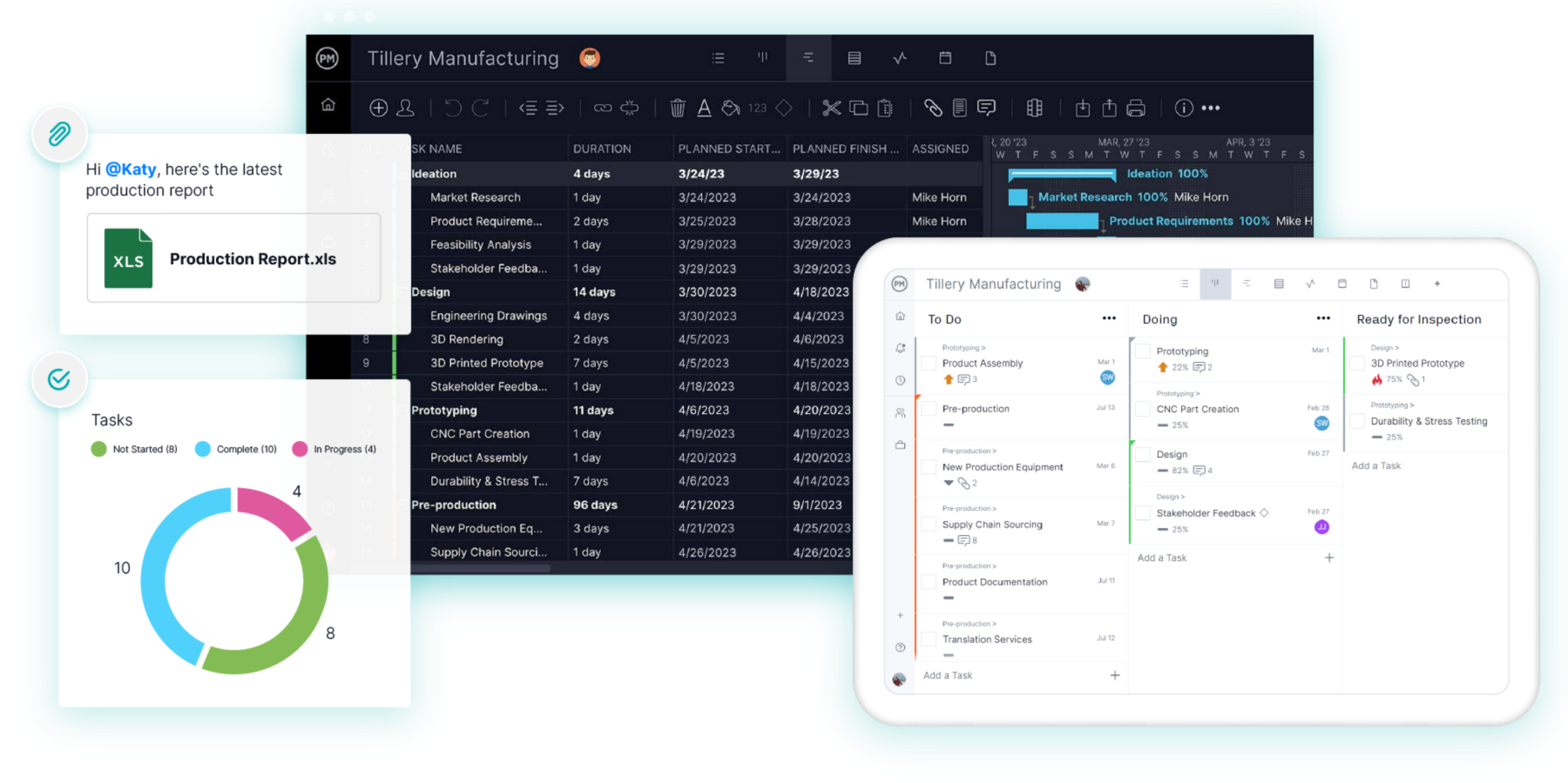
ProjectManager is online project management software for planning, scheduling and tracking projects, used by teams in industries such as construction, IT, manufacturing and professional services. Schedules are built on Gantt charts with all four dependency types, lag, a critical path filter and baselines. The workload page shows each team member’s assigned hours across every project, and timesheets, dashboards and reports track progress and cost. Because it runs in a browser and on mobile, the whole project team can work in the same schedule, not just the scheduler.
What Is Primavera P6?
Primavera P6 is Oracle’s enterprise project scheduling software, used mainly on large construction, engineering, energy and infrastructure projects. It comes in two main versions: P6 Professional, a Windows desktop application for detailed scheduling, and P6 EPPM, a web-based version for managing portfolios of projects across an organization. P6 is known for deep CPM analysis, resource leveling and earned value, and its XER file format is a common requirement in owner and government contracts.
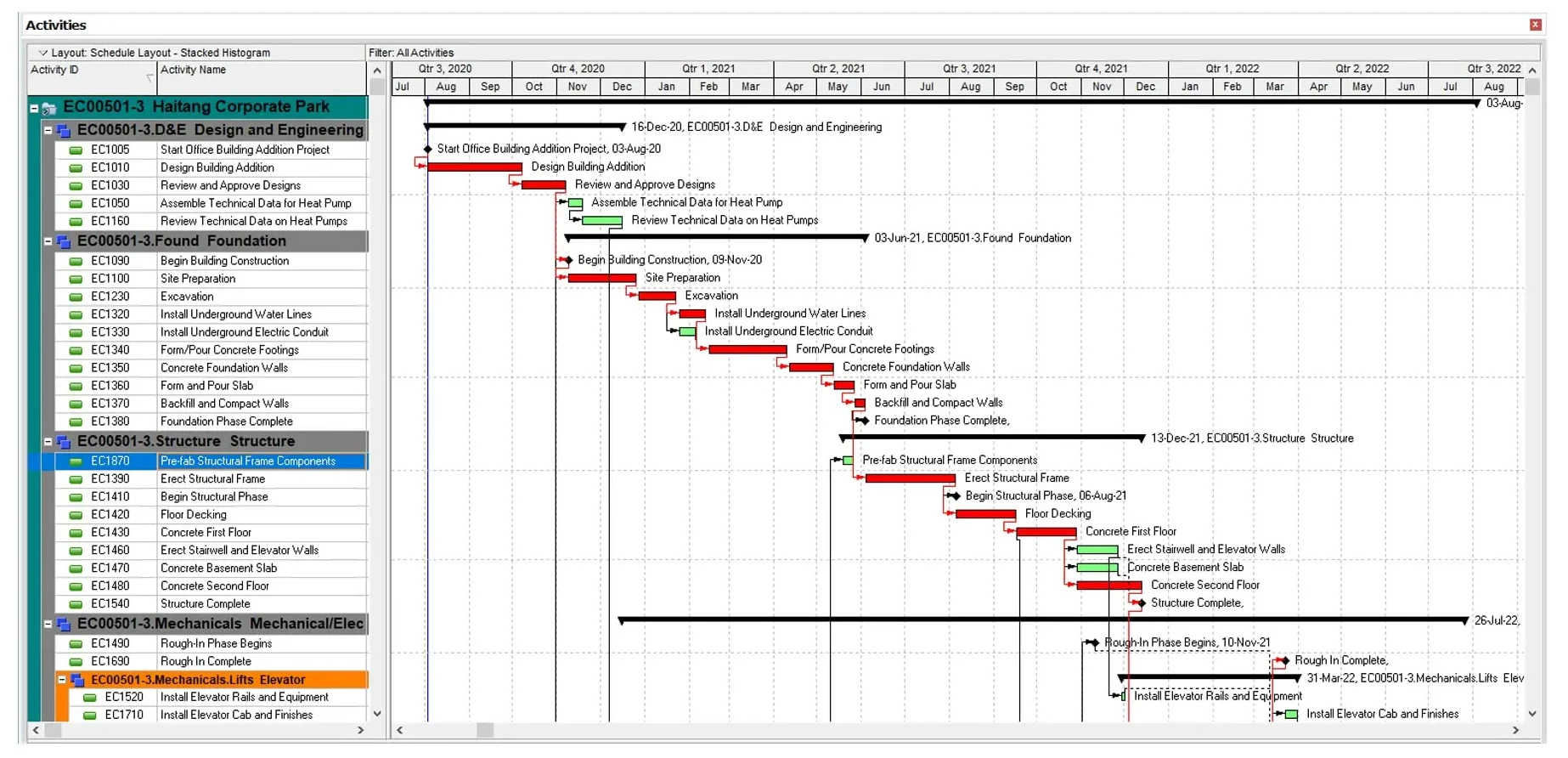
ProjectManager vs. Primavera P6: Feature Comparison
Critical Path Scheduling
Both tools calculate the critical path, but P6 goes deeper. P6 calculates early and late dates and total float for every activity, supports multiple float paths and handles schedules with tens of thousands of activities. That depth matters on a power plant build or a large infrastructure program where a scheduler has to prove exactly which delay drove the finish date.
ProjectManager covers what most project schedules need. Link tasks with finish-to-start, start-to-start, finish-to-finish or start-to-finish dependencies, add lag for waiting periods like approvals or vendor lead times, then apply the critical path filter on the Gantt chart to see only the tasks with zero float. When a design review slips three days, linked tasks like development and testing move with it, and the filter shows the new path.
Verdict: P6 for advanced CPM analysis on very large schedules. ProjectManager for clear, easy-to-update critical path schedules on everyday projects.
Resource Management
P6 has detailed resource loading and automatic resource leveling, which can shift activities to resolve overallocation across a large schedule. It’s powerful, but setting it up takes time and expertise.
ProjectManager focuses on seeing and fixing conflicts across projects. The workload page shows every team member’s assigned hours by day across all your projects, with over-assigned days in red, and you can reassign hours from the same page. Equipment, contractors and other resources that don’t need a login can be added with no license cost, so a double-booked piece of equipment shows up the same way a double-booked team member does. ProjectManager doesn’t level resources automatically.
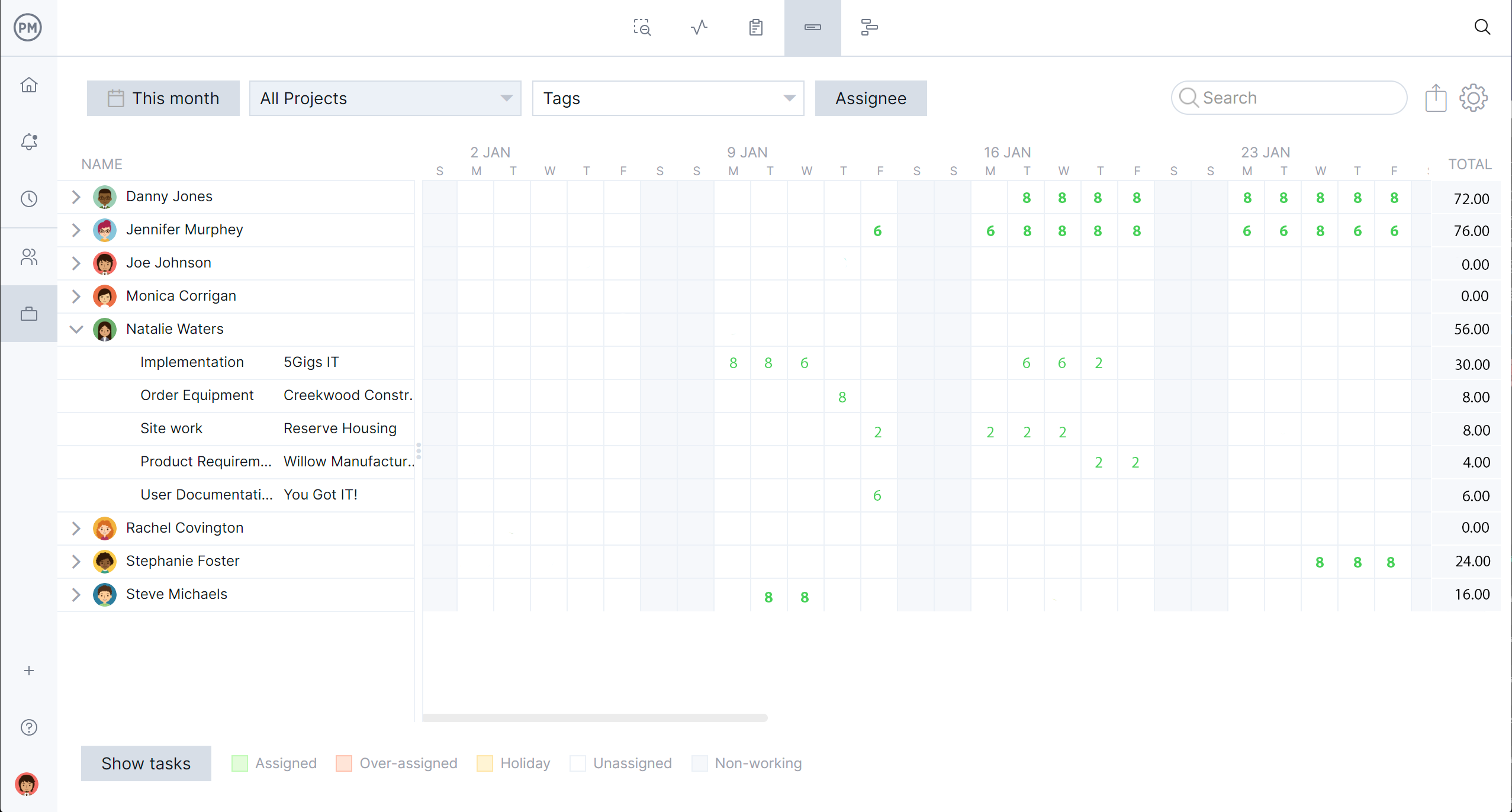
Verdict: P6 for automatic leveling on large, resource-loaded schedules. ProjectManager for a fast, visual view of who’s overbooked across several projects.
Team Access and Collaboration
This is the biggest practical difference. In many organizations, only trained schedulers work in P6 itself. Everyone else sees the schedule as a PDF or report, and progress comes back by email or through separate modules such as Progress Reporter.
In ProjectManager, team members and stakeholders can open the schedule in a browser or on the mobile app, update percent complete, log time and comment on tasks. Everyone works from the same live schedule.
Verdict: ProjectManager.
File Compatibility
P6 uses XER and P6 XML, which many owners, agencies and claims consultants require. ProjectManager imports Microsoft Project (MPP and Microsoft Project XML), Excel and CSV files and exports to MPP, XML, Excel and CSV, but it doesn’t read or write XER files.
Verdict: P6, if your contracts require XER submittals.
Reporting and Earned Value
P6 has built-in earned value analysis and detailed schedule reports suited to formal project controls and delay claims. ProjectManager has real-time dashboards for health, cost, progress, workload and time, plus reports such as variance and timesheet reports that can be exported to PDF, Excel or CSV.
Verdict: P6 for formal project controls and earned value. ProjectManager for quick, shareable status reporting.
Ease of Use
P6 is built for professional schedulers. New users typically need formal training and weeks of regular use before they’re comfortable, and many project managers never reach that point. ProjectManager is designed so project managers and team members can build and update schedules without specialist training.
Verdict: ProjectManager.
Pricing
P6 Professional costs about $2,500 per user for a perpetual license, plus about $550 a year in support, according to Oracle list pricing. P6 EPPM and cloud subscriptions are priced separately and usually go through Oracle or a reseller. ProjectManager costs $15 per user per month on the Team plan and $28 per user per month on the Business plan (when paying annually), which includes resource management, with a 30-day free trial.
For example, giving 10 people access to P6 Professional would cost about $25,000 in licenses up front plus about $5,500 a year in support. Ten users on ProjectManager’s Business plan would cost about $3,360 a year.
Verdict: ProjectManager, especially when more than one or two people need access.
When to Choose Primavera P6
P6 is the better choice in these situations:
- Your contract requires P6 or an XER submittal. Many public agencies and large owners specify it. ProjectManager can’t produce XER files.
- Your schedules are very large. Programs with tens of thousands of activities, multiple float paths and complex code structures are what P6 was built for.
- You need automatic resource leveling or earned value. P6 has both built in for formal project controls.
- You have trained schedulers. If a dedicated scheduling team already knows P6, the learning curve is already paid for.
- You may need to support delay claims. Claims consultants and forensic schedulers usually work in P6.
When to Choose ProjectManager
ProjectManager is the better choice in these situations:
- You run several projects at once and share people between them. The workload page shows everyone’s hours across all projects in one view.
- The whole team needs to see and update the schedule. Team members can work in the schedule from a phone or browser.
- Your contracts don’t require XER. Most projects outside large public and capital programs don’t.
- More than one or two people need access. Per-user monthly pricing costs far less than P6 licenses for a whole team.
- You don’t have a dedicated scheduler. Project managers can build critical path schedules without weeks of training.
- You need more than a schedule. Task lists, kanban boards, timesheets and dashboards are in the same tool.
Some organizations use both: P6 for the master schedule and contract submittals, and ProjectManager for day-to-day planning, resource scheduling and team updates. If you go that route, decide which schedule is the source of truth, because changes won’t sync between the two automatically.
How to Switch From Primavera P6 to ProjectManager
To switch from P6 to ProjectManager, export your schedule from P6 in a format ProjectManager can import, set up the project’s working days, then import the file and check the logic against the original. ProjectManager imports Microsoft Project (MPP or Microsoft Project XML), Excel and CSV files, but not XER.
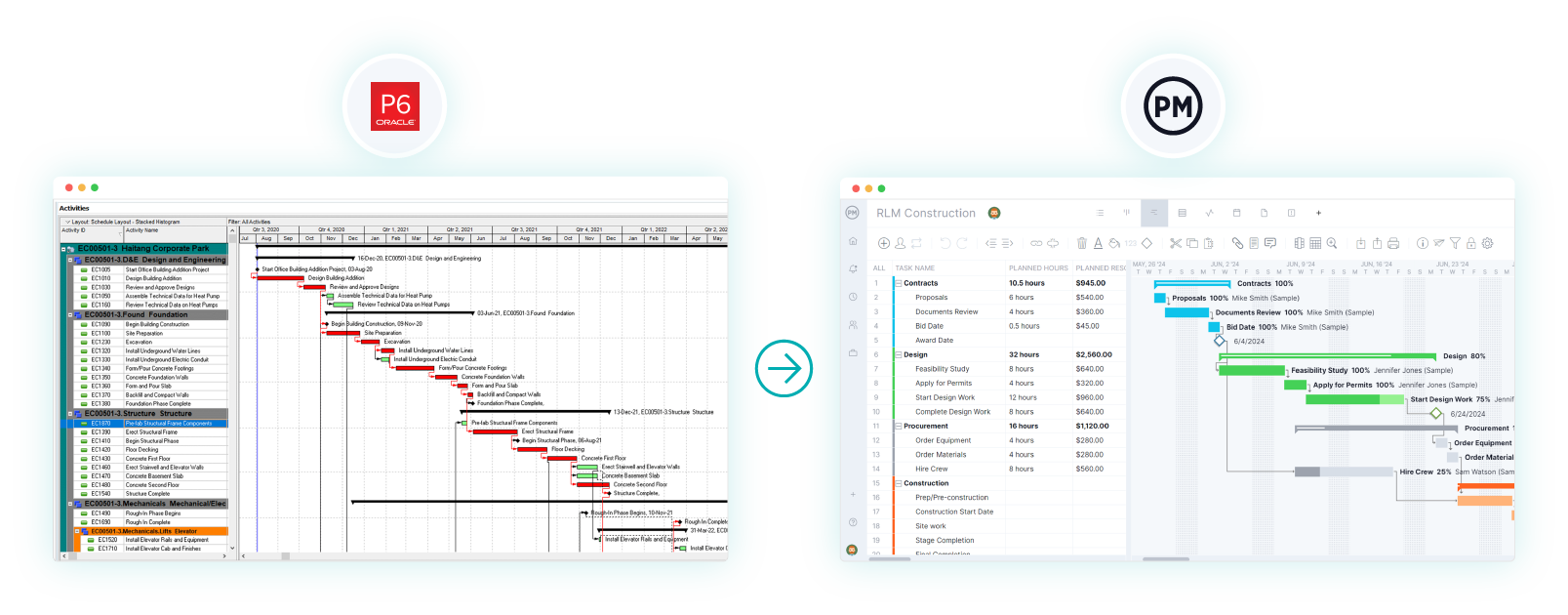
- Export from P6. A Microsoft Project file keeps the most data, because ProjectManager imports tasks, assignees, dependencies and planned dates from MPP and Microsoft Project XML. Otherwise, export activities to a spreadsheet and save it as Excel or CSV.
- Set working days. Create the project with the + button, choose Project and set working days to match your P6 calendar before importing.
- Import. Choose Import File, click select file and follow the prompts. For Excel or CSV, map your columns to the Gantt columns.
- Check the logic. Compare durations and dependencies with P6, re-link any missing predecessors and add lag where needed.
- Filter for the critical path and set a baseline. Confirm the critical path matches P6, then set a baseline in Gantt settings.
Keep your original XER file in case an owner asks for it later.
ProjectManager vs. Primavera P6 FAQ
Is ProjectManager a replacement for Primavera P6?
For most teams, yes. ProjectManager covers critical path scheduling, dependencies, lag, baselines and resource management across projects. It isn’t a full replacement if your contracts require XER submittals, or if you need P6’s automatic resource leveling and earned value on very large programs.
Can ProjectManager open Primavera P6 files?
No. ProjectManager doesn’t read XER or P6 XML files. Export the schedule from P6 to Microsoft Project format, Excel or CSV, then import it into ProjectManager.
Is ProjectManager easier to use than Primavera P6?
Yes. P6 is built for trained schedulers and usually needs formal training. ProjectManager is designed so project managers and team members can build and update schedules without specialist training.
Does ProjectManager show the critical path like P6?
Yes. In ProjectManager, link tasks with dependencies, then apply the critical path filter on the Gantt chart to show only tasks with zero float. P6 offers deeper float analysis, including multiple float paths, which matters mainly on very large schedules.
How much does Primavera P6 cost compared with ProjectManager?
P6 Professional costs about $2,500 per user for a perpetual license plus about $550 a year in support, based on Oracle list pricing. ProjectManager costs $15 to $28 per user per month, depending on the plan, with a 30-day free trial.
Does ProjectManager work on a Mac?
Yes. ProjectManager runs in any modern browser on Windows or Mac and has iOS and Android apps. P6 Professional is a Windows desktop application, though P6 EPPM runs in a browser.