


Last updated: November 13, 2026
Primavera P6 Professional has no native macOS version, so Mac users either run it through a workaround such as a Windows virtual machine or switch to a scheduling tool that works on a Mac. Among the alternatives, ProjectManager fits Mac users and mixed Mac and PC construction teams who want critical path scheduling in any browser, OmniPlan fits individual schedulers who want a native Mac app, and Procore fits general contractors who need to view XER schedules inside a construction management platform. Merlin Project suits teams that use only Apple devices, and Smartsheet suits teams that work in spreadsheets.
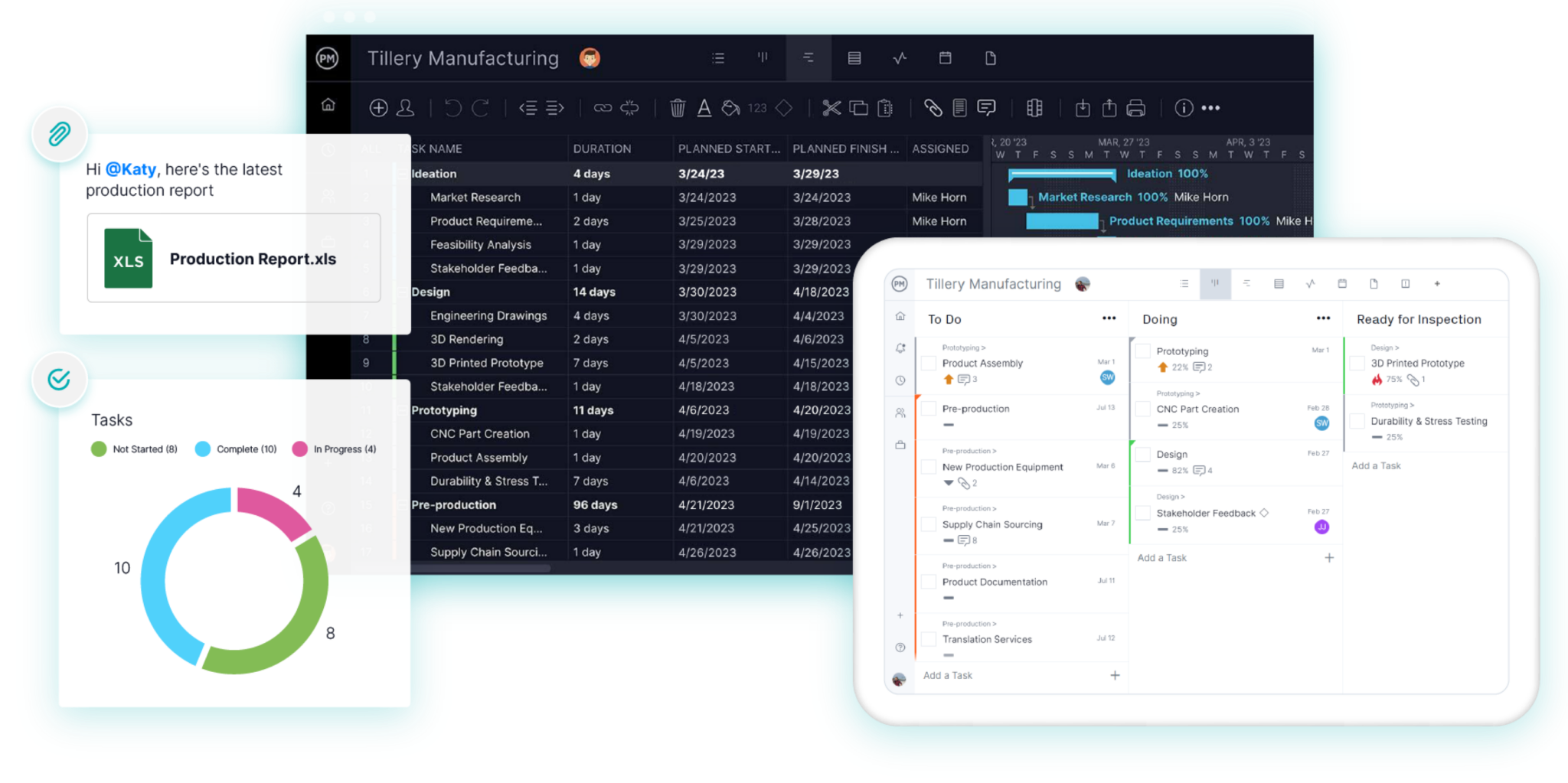
ProjectManager is online project management software for construction scheduling that runs in any browser on a Mac. Build schedules on a Gantt chart with all four dependency types, filter for the critical path, set baselines and share the schedule with Mac and Windows users. Get started with ProjectManager today for free.
Does Primavera P6 Work on a Mac?
Not natively. Primavera P6 is Oracle’s enterprise scheduling software, and it comes in two main versions. P6 Professional is a Windows desktop application, so it doesn’t install on macOS. P6 EPPM is web-based, so if your organization runs it, you can reach it from a browser. P6 shares schedules as XER or XML files, and many owners and agencies require schedule submittals in XER format.
That leaves Mac users with two paths. If you need P6 itself, for example because your contract requires XER submittals, you can run it on a Mac through one of the workarounds below. If you don’t, a scheduling tool that runs on a Mac may be simpler. For more on P6 itself, see the best Primavera P6 alternatives for construction.

How to Run Primavera P6 on a Mac
Each workaround below gives you a way to run P6 Professional or reach P6 EPPM from a Mac. All of the Windows-based options also need a Windows license and a P6 license, and the same workarounds apply to other Windows-only schedulers such as Microsoft Project desktop and Asta Powerproject. See Microsoft Project for Mac for more on these setups.
Virtual Machines (Parallels Desktop, VMware Fusion, VirtualBox)
A virtual machine runs Windows in a window on your Mac, so you can install P6 Professional inside it and use it next to your Mac apps. Parallels Desktop is a paid subscription, VMware Fusion Pro has been free for personal, educational and commercial use since November 2024, and VirtualBox is free but harder to set up.
On a Mac with Apple silicon (an M-series chip), a virtual machine runs the Arm version of Windows 11, and VirtualBox supports Windows guests on Apple silicon only from version 7.2. Before you buy licenses, check Oracle’s tested configurations for your P6 release to see whether Windows on Arm is supported, and test P6 in a trial virtual machine. If it doesn’t run reliably, use an Intel Mac, a Windows PC or a remote Windows machine instead. Virtual machines also need plenty of memory and storage, so large P6 schedules can run slowly on a smaller Mac.
Boot Camp (Intel Macs Only)
Boot Camp is Apple’s utility for installing Windows on a separate part of an Intel Mac’s drive. It runs Windows natively, so P6 Professional runs as it would on a PC. Boot Camp only works on Macs with an Intel processor, not on Macs with Apple silicon, and you have to restart the Mac every time you switch between macOS and Windows.
P6 EPPM in a Web Browser
If your organization uses P6 EPPM, the web-based version, you can open it in a browser on your Mac without installing Windows. Oracle lists the browsers it supports for each P6 release in its tested configurations, so check whether Safari or another macOS browser is listed for your version. Ask your P6 administrator which browsers your EPPM version supports before you rely on it. EPPM is an enterprise deployment, so this option only works if your company or the owner already runs it.
Windows App (Remote Desktop) to a Windows PC or Cloud Machine
Windows App, which Microsoft renamed from Microsoft Remote Desktop in 2024, connects your Mac to a Windows PC in the office or a Windows machine in the cloud. P6 Professional runs on that machine and you control it from your Mac over the internet or a local network. Nothing runs on the Mac itself, so Apple silicon isn’t an issue, but slow connections cause lag, and someone has to keep the Windows machine running.
Oracle’s Mobile App
Oracle’s P6 documentation library for version 26 includes a Mobile App section. Whether you can use it depends on how your organization has set up P6, so ask your P6 administrator. It’s a way to check and update work from a phone, not a replacement for P6 Professional on a Mac.
When to Consider an Alternative Instead
A workaround makes sense when you’re required to deliver XER files. Many owners and agencies require XER schedule submittals, and if your contract says so, you’ll still need P6 or a tool that can read and write XER files. ProjectManager doesn’t import or export XER files, and neither do most Mac-friendly tools.
If your schedule doesn’t have to be submitted as an XER file, an alternative is often simpler. Here’s when it’s worth a look:
- Cost. Running P6 on a Mac means paying for P6, a Windows license and often a virtual machine subscription for each scheduler.
- Performance and setup. Virtual machines need memory and storage, Apple silicon adds Windows on Arm questions, and remote desktops depend on your connection.
- Your team uses Macs too. A workaround gets the scheduler into P6, but the project manager on a MacBook and the superintendent who needs the schedule on an iPhone still can’t open it. A browser-based tool lets everyone see and update the same schedule.
- You need less than P6 offers. Most building projects don’t need enterprise portfolio structures or code libraries. They need critical path, baselines and a schedule everyone can see.
Primavera P6 Alternatives for Mac Compared
| Tool | Best for | Mac access | XER import/export | MPP import/export | Critical path | Baselines | Collaboration | Starting price |
|---|---|---|---|---|---|---|---|---|
| ProjectManager | Mac users and mixed Mac and PC construction teams that don’t need XER | Browser; iPhone and Android apps | No | Imports and exports MPP, lossless for schedule data | Yes, critical path filter | Yes, with variance reports | Mac and Windows users on the same schedule; unlimited free read-only guests | $15/user/month (Team), billed annually |
| OmniPlan | Individual schedulers who want a native Mac app and offline work | Native Mac, iPad and iPhone apps | Not documented | Imports and exports MPP (Pro) | Yes | Yes, unlimited | Publish and sync (Pro); no Windows version | $199.99 one-time (Standard) |
| Procore | General contractors who need to view XER schedules inside a construction management platform | Browser; iOS app | Imports XER as a read-only schedule | Imports MPP as a read-only schedule | Yes, in Procore Scheduling | Schedule version snapshots | Unlimited users; documents, RFIs and submittals | Quote only, based on annual construction volume |
| Merlin Project | Teams that use only Apple devices | Native Mac, iPad and iPhone apps | Not documented | Opens MPP; exports Microsoft Project XML | Yes | Yes, dynamic baseline | Sync through iCloud Drive or Dropbox; free read-only access | $22.99/month or $229.99/year (Mac) |
| Smartsheet | Teams that want spreadsheet-style scheduling | Browser; iPhone, iPad and Android apps | No | Imports MPP; exports Microsoft Project XML | Yes, Pro and above | One per sheet, Business and above | Shared sheets; free Contributors and Guests | $9/member/month (Pro), billed annually |
Prices are list prices as of November 2026 and change often.
5 Best Primavera P6 Alternatives for Mac
1. ProjectManager
ProjectManager fits most Mac users replacing P6 who don’t have to deliver XER files, from a scheduler on a MacBook to a construction team with a mix of Macs and PCs. It runs in any modern browser on macOS, Windows and Linux, so nobody needs Windows or a virtual machine. Its Gantt chart links tasks with all four dependency types and lag, a critical path filter shows which activities drive the finish date, and baselines with variance reports show how far the schedule has drifted.
Here’s a typical case. A project manager on a MacBook builds the schedule for a medical office building, sets a baseline and shares it with the team. The superintendent checks the week’s activities and updates progress in the iPhone app, the office staff on Windows PCs work in the same schedule in a browser, and the workload page shows each crew’s hours across every job (Business plan and above). The one thing it can’t do is P6 files: ProjectManager doesn’t import or export XER, so if an owner requires XER submittals, you’ll still need P6 or a tool that reads XER. For a full comparison, see ProjectManager vs. Primavera P6.
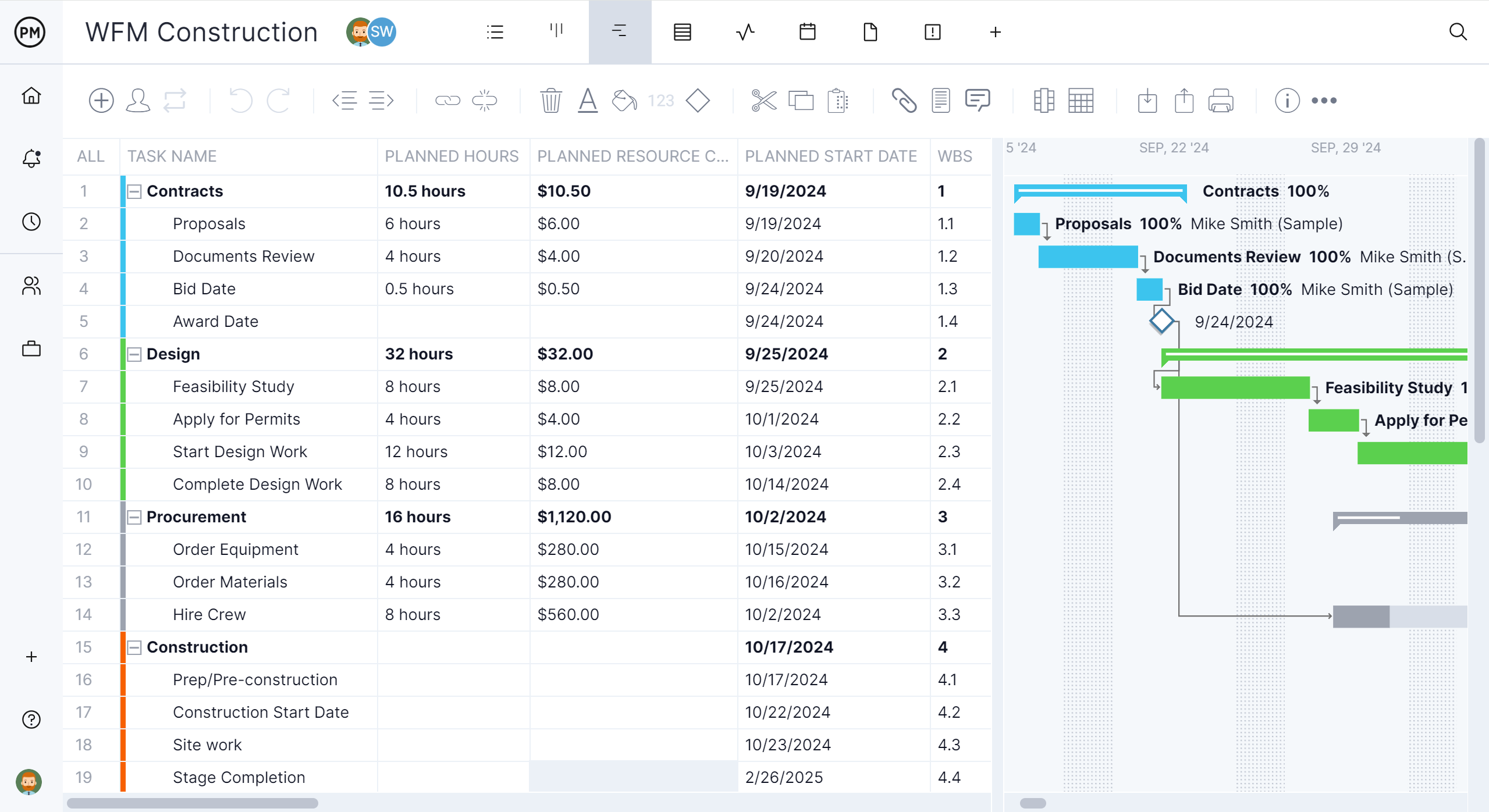
Mac access: Runs in any modern browser on macOS, Windows and Linux, plus iPhone and Android apps. On an iPad, ProjectManager runs in the browser. There’s no native Mac desktop app.
Best for: Mac users and mixed Mac and PC construction teams who want critical path scheduling, baselines and workload across jobs without running Windows, and who don’t need to submit XER files.
Key features
- Gantt chart with finish-to-start, start-to-start, finish-to-finish and start-to-finish dependencies, plus lag
- Critical path filter, baselines and variance reports
- Workload page showing hours across all projects (Business plan and above), with equipment and subcontractors as resources at no license cost
- Timesheets, dashboards and portfolio views
- Import of MPP, Microsoft Project XML, Excel and CSV files, and export to MPP, XML, Excel and CSV
Pros
- The same schedule works on Macs, PCs and phones, with nothing to install
- Unlimited free read-only guests on the Team and Business plans, so owners can view the schedule
- MPP import and export, lossless for schedule data
Cons
- No XER import or export, so it can’t replace P6 for XER submittals
- No native Mac desktop app and no offline mode
- The workload page needs the Business plan, and the Team plan is limited to 10 users and 20 projects
Pricing: Team $15/user/month, Business $28/user/month (billed annually), Enterprise by quote. 30-day free trial.
2. OmniPlan
OmniPlan from The Omni Group is a native project planning app for Mac, iPad and iPhone, and it’s the closest thing to a desktop CPM scheduler built for Apple devices. It calculates the critical path, supports all four dependency types with lead and lag, keeps as many baselines as you want and levels resources automatically. The Pro edition adds Monte Carlo simulation for schedule risk, Microsoft Project import and export and multi-user collaboration.
Native Mac apps such as OmniPlan are a strong fit for individual schedulers who want a desktop app or work offline, such as a scheduler who plans on a MacBook and reviews the schedule on an iPad in the site trailer. Its documentation doesn’t mention XER files, and there’s no Windows or browser version, so colleagues on PCs can’t open the schedule in OmniPlan.
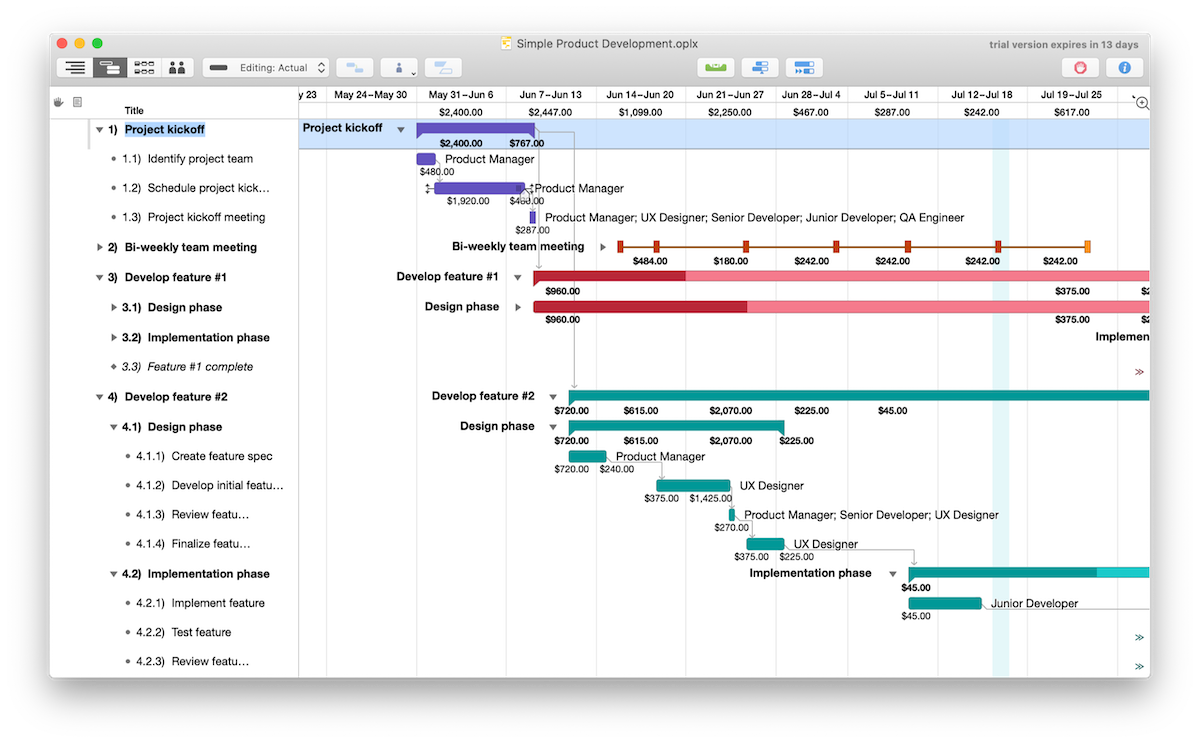
Mac access: Native macOS app (macOS 12 or later) with iPad and iPhone apps. There’s no Windows or browser version.
Best for: Individual schedulers who want a native Mac and iPad app with CPM scheduling, offline work and a one-time purchase.
Key features
- All four dependency types with lead and lag, critical path and unlimited baselines
- Automatic resource leveling
- Monte Carlo simulation and a multi-project dashboard (Pro)
- MPP and XML import and export (Pro)
Pros
- Native Apple apps that work without an internet connection
- One-time purchase option instead of a subscription
- Exports MPP files for Microsoft Project users (Pro)
Cons
- XER files aren’t documented
- No Windows or browser version
- Microsoft Project files, collaboration and Monte Carlo need the Pro edition
Pricing: Standard $199.99 and Pro $399.99, one-time, or a $199.99/year subscription that includes Pro features. 14-day free trial.
3. Procore
Procore is a full construction management platform covering documents, RFIs, submittals, budgets, quality and safety, and it runs in a browser on a Mac. Unlike the other tools here, it reads XER files: Procore imports XER and MPP files as read-only schedules, so a scheduler on a MacBook who receives an XER file from an owner can share it with the whole project team without opening P6. Procore Scheduling, generally available since February 2026, lets teams build and edit their own schedules with all four dependency types and lag, the critical path, lookaheads and automatic schedule version snapshots.
Procore suits general contractors who want the schedule inside the rest of the project record. An imported XER schedule doesn’t become an editable Procore schedule, so moving off P6 means rebuilding the schedule in Procore Scheduling. Pricing is by quote and based on annual construction volume.
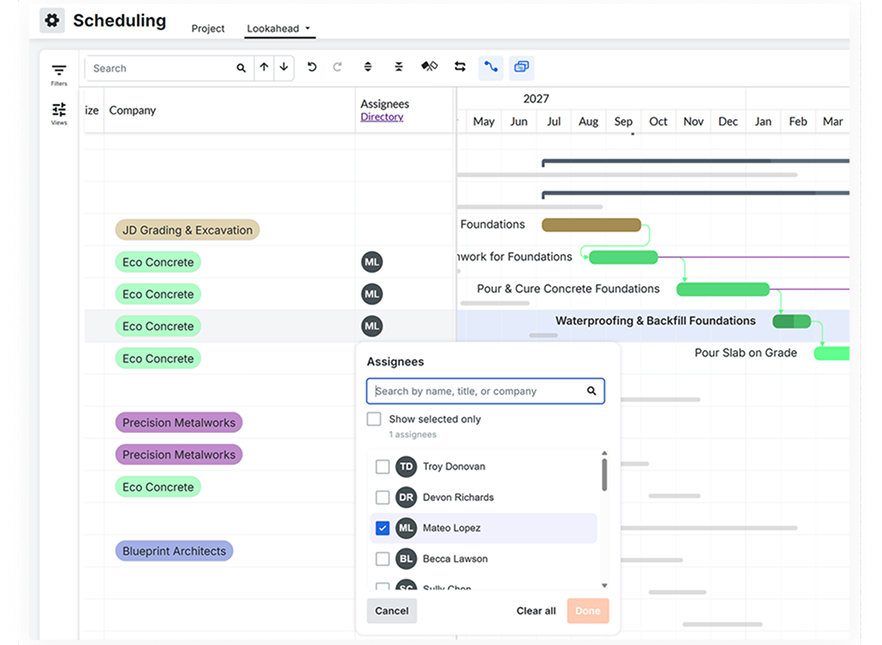
Mac access: Runs in a browser on a Mac, plus an iOS app. Procore’s user guide lists Scheduling actions as web-only.
Best for: General contractors who need to view owners’ XER schedules and manage the schedule inside a full construction management platform.
Key features
- Read-only import of P6 XER and Microsoft Project MPP schedules
- Procore Scheduling with all four dependency types and lag, critical path and lookaheads
- Automatic schedule version snapshots with “Compare to current”
- Documents, RFIs, submittals, budgets, quality and safety tools
Pros
- Opens XER files on a Mac without P6
- Unlimited users on the contract
- Brings the schedule together with the rest of the project record
Cons
- Imported XER schedules are read-only and don’t become editable Procore schedules
- Pricing is based on annual construction volume and can be high for smaller contractors
- More platform than you need if scheduling is the main problem
Pricing: By quote, based on the products you choose and your annual construction volume.
4. Merlin Project
Merlin Project from ProjectWizards is a native project management app for Mac, iPad and iPhone. It supports all four dependency types with lead and lag, shows the critical path, levels resources and shares resource pools across projects. Merlin Project 9 uses a dynamic baseline, so you can compare the schedule with any past date without saving a baseline in advance.
Merlin Project suits teams where everyone uses Apple devices. Files sync through iCloud Drive or Dropbox, simultaneous edits are merged, and people without a subscription can open projects read-only. Its documentation doesn’t mention XER files, it exports Microsoft Project XML rather than MPP, and colleagues on Windows can’t use it.
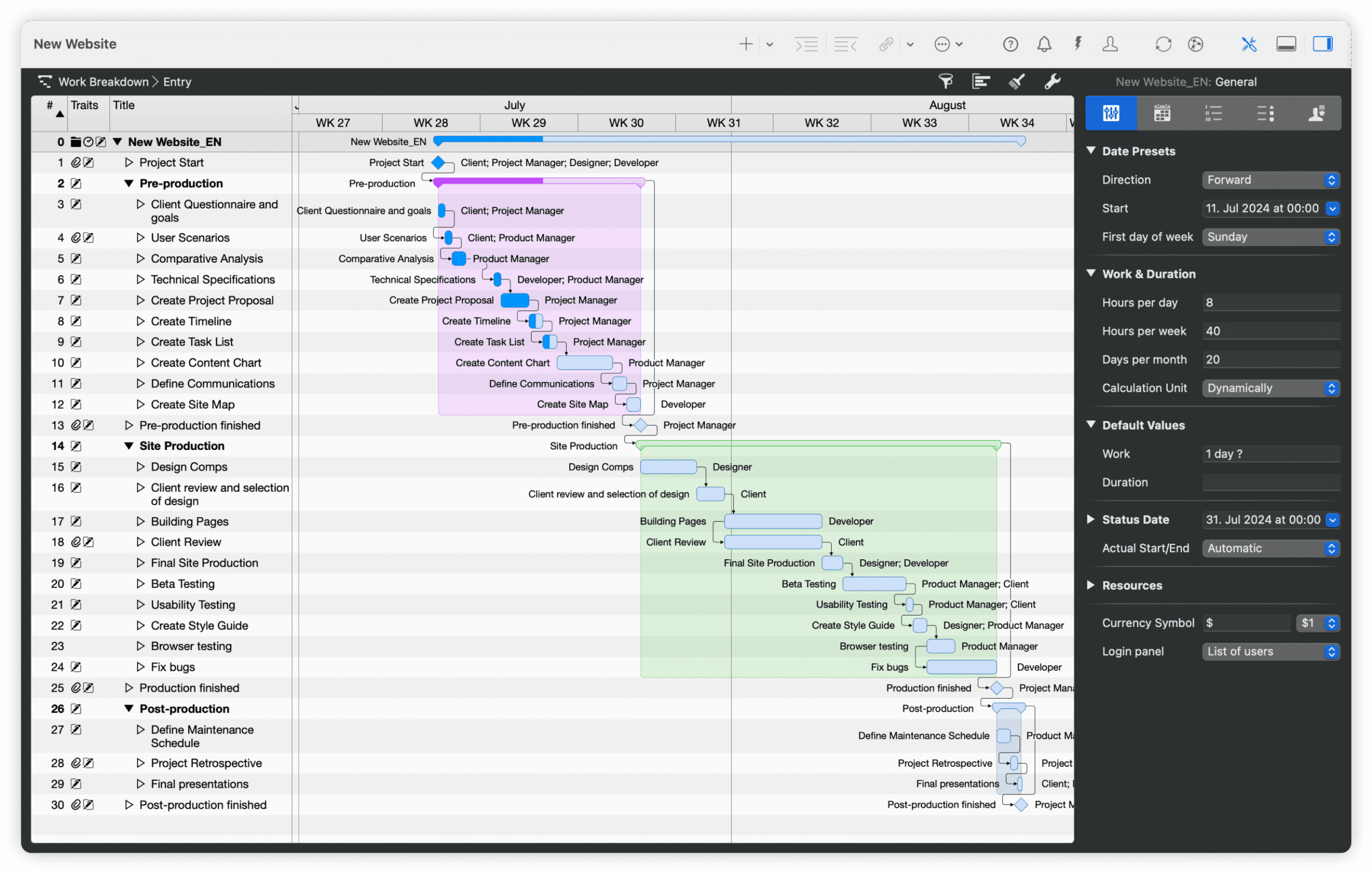
Mac access: Native macOS app (macOS 13 or later) with iPad and iPhone apps. There’s no Windows or browser version.
Best for: Teams that all use Apple devices and want a native scheduler with resource leveling, offline work and sync through iCloud or Dropbox.
Key features
- All four dependency types with lead and lag, and critical path
- Resource leveling and shared resource pools
- Dynamic baseline
- Opens MPP, XML and MPX files; exports Microsoft Project XML
Pros
- Native Apple apps that work offline and sync when you reconnect
- Simultaneous edits merge through iCloud Drive or Dropbox
- Free read-only access for people without a subscription
Cons
- XER files aren’t documented
- No Windows or browser version
- Subscription only, and the Mac and iPad apps are separate subscriptions
Pricing: Merlin Project for Mac $22.99/month or $229.99/year. Merlin Project for iPad (also covers iPhone) $9.99/month or $99.99/year. Merlin Project Express (Mac, fewer features) $6.99/month or $69.99/year. 30-day free trial.
5. Smartsheet
Smartsheet is a spreadsheet-style work management platform that runs in a browser on a Mac. Its Gantt charts support all four dependency types with lag, critical path highlighting is on the Pro plan and above, and baselines, one per sheet, need the Business plan. It imports MPP files directly, though Microsoft Project constraints don’t carry over.
Smartsheet suits teams that think in rows and columns more than CPM logic. It doesn’t read XER files, it exports Microsoft Project XML rather than MPP, and full resource planning comes from a paid add-on. Smartsheet’s Mac and Windows desktop app is being retired on or after January 6, 2027, so Mac users should plan on the browser version.

Mac access: Runs in a browser on a Mac, plus iPhone, iPad and Android apps. On mobile, the Gantt view is available in reports only.
Best for: Construction teams that want spreadsheet-style scheduling with forms and dashboards, and don’t need XER.
Key features
- All four dependency types with lag; critical path on Pro and above
- Baselines, one per sheet (Business and above)
- Direct MPP import; Microsoft Project XML export for Gantt sheets
- Grid, Gantt, card and calendar views, forms and dashboards
Pros
- Familiar to anyone who works in spreadsheets
- Free Contributors, and free external Guests who can edit on Business and above
- 30-day free trial
Cons
- No XER import or export
- Baselines need the Business plan, and resource planning is a paid add-on
- No native Mac app once the desktop app is retired
Pricing: Pro $9/member/month billed annually ($12 monthly). Business $19/member/month billed annually ($24 monthly). Enterprise by quote. 30-day free trial.
For more options, including Windows tools such as Asta Powerproject, see the best Primavera P6 alternatives, and for construction tools that run on a Mac, see the best construction software for Mac.
How to Move a P6 Schedule Into ProjectManager
To move a P6 schedule into ProjectManager, export it from P6 in a format ProjectManager imports, then import it in your browser and check the logic. ProjectManager imports MPP files, Microsoft Project XML, Excel and CSV. It doesn’t read XER or P6 XML files, so the export step decides how much of the schedule carries over.
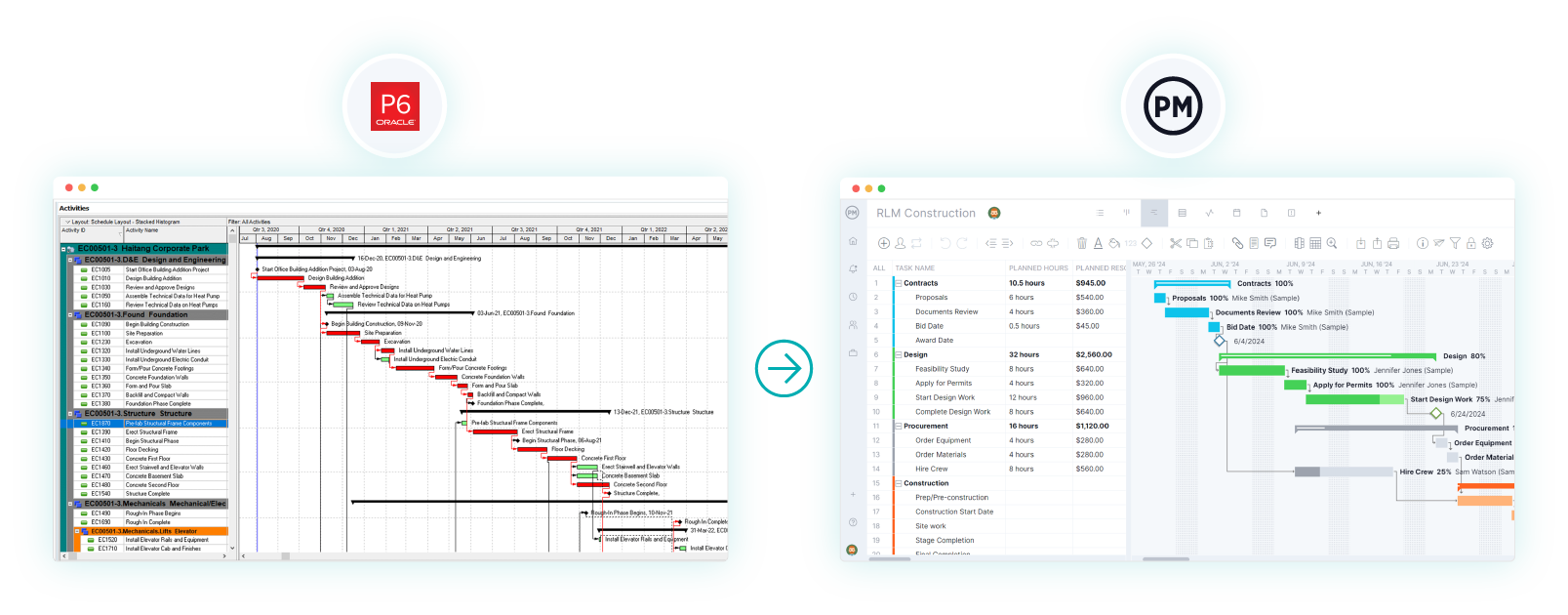
- Choose your export route. A Microsoft Project file is the better route, because ProjectManager imports tasks, assignees, dependencies and planned dates from MPP and Microsoft Project XML files. If your P6 version can export to Microsoft Project format, or a colleague can open the schedule in Microsoft Project and save it as MPP, use that. ProjectManager’s XML import is built for XML exported from Microsoft Project, so test an XML file exported from P6 before relying on it. Otherwise, export the activities to Excel with activity names, durations, start and finish dates and predecessors.
- Set working days first. In ProjectManager, click the + button and choose Project, then set your working days to match your P6 calendar, such as a five-day or six-day work week. Working days are hard to change once the project exists. Add any global holidays now too, since they can’t be added to existing projects.
- Import the file. Choose Import File when creating the project, or click the import icon on the Gantt ribbon of an existing project. Click select file, upload the file and click next. For an Excel or CSV file, map your columns to the Gantt columns. For an MPP or XML file, choose the task list only or all data.
- Check dependencies and lag. Compare durations and dependencies with the P6 schedule. Re-link any activities that came through without predecessors, and add lag where the P6 schedule had it. Imported actual hours don’t go into timesheets, so add those separately if you need them.
- Filter for the critical path. Turn on the critical path filter and check that it matches P6. If it doesn’t, look for missing links, constraints that didn’t carry over or working days that don’t match the P6 calendar.
- Set a baseline. Once the schedule matches, set a baseline in Gantt settings so you can track variance from the start.
Keep the original XER file. If an owner later asks for an XER submittal, you’ll have the P6 version on record.
Scheduling on a Mac? Start a free 30-day trial, import your schedule in your browser and turn on the critical path filter. Try ProjectManager free.
Primavera P6 for Mac FAQs
Does Primavera P6 work on a Mac?
Not natively. P6 Professional is a Windows desktop application, so Mac users run it in a virtual machine such as Parallels Desktop, VMware Fusion or VirtualBox, with Boot Camp on Intel Macs, or over Windows App on a remote Windows machine. If your organization runs P6 EPPM, you can open it in a browser. Mac users who don’t need XER files can switch to ProjectManager, online project management software with Gantt charts, critical path, baselines and workload management across projects.
Can I run P6 on an M-series Mac?
Possibly, but test it first. On Apple silicon Macs, a virtual machine runs the Arm version of Windows 11, Boot Camp isn’t available, and P6 Professional support for Windows on Arm should be checked against Oracle’s tested configurations for your P6 release. You can also run P6 on a remote Windows machine through Windows App. ProjectManager runs in a browser on any M-series Mac, so there’s nothing to emulate.
Can I open XER files on a Mac?
Yes, with the right tool. Procore imports XER files as read-only schedules in a browser, and P6 itself can open them through a Windows virtual machine or remote desktop. ProjectManager doesn’t import or export XER files, so if you need to read or deliver XER, use P6 or a tool that supports it. If the owner can send a Microsoft Project file instead, ProjectManager imports MPP files in any Mac browser.
Is there a Mac version of Primavera P6?
No. Oracle doesn’t make a macOS version of P6 Professional, which is Windows-only. P6 EPPM is web-based, so it can be reached from a browser on a Mac if your organization runs it and supports your browser. Native Mac schedulers such as OmniPlan and Merlin Project, and browser-based tools such as ProjectManager, give Mac users critical path scheduling without Windows, though none of them is documented to read XER files.
What’s the best Primavera P6 alternative for Mac?
It depends on whether you need XER. If you must submit XER files, keep P6 through a workaround, or use Procore to view XER schedules. If you don’t, ProjectManager fits most Mac users and mixed Mac and PC teams, with all four dependency types and lag, a critical path filter, baselines and workload across projects in any browser, plus an iPhone app. OmniPlan suits individual schedulers who want a native Mac app.
Related Content
ProjectManager is project management software for Mac and PC users that construction teams use to schedule and track projects. Build schedules with all four dependency types, critical path and baselines, see crew workload across jobs and share the schedule with the office and the field. Try it with a free 30-day trial.