
What Is Job Management?
Job management is a process used to plan, assign, schedule and track individual jobs from start to completion. It is commonly used in construction, manufacturing, maintenance and field service operations to coordinate work, control costs and ensure tasks are completed on time. It connects planning with execution by organizing resources, timelines and job data in one workflow.
ProjectManager is an award-winning project management software that helps teams across industries plan, schedule and track work from start to finish. Create detailed job schedules, manage resources, monitor costs and compare planned versus actual performance with a full suite of powerful tools including Gantt charts, kanban boards, real-time dashboards and much more. Get started for free today.
What Industries Use Job Management?
Across operations-driven environments, work is often organized into individual jobs that must be planned, scheduled and completed efficiently. Job management is used in industries where teams handle repeatable or service-based tasks, rely on coordination between people and resources and need clear visibility into progress, timelines and costs.
Construction
On any construction project, work is broken down into clearly defined jobs such as excavation, framing, electrical installation and inspections. Managing those jobs requires tight coordination between crews, subcontractors and equipment. Job management helps organize schedules, assign responsibilities, track progress and control costs so projects stay on timeline and avoid delays caused by miscommunication or poor planning.
Manufacturing
Production environments rely on repeatable jobs like machining, assembly and quality checks that must follow a precise sequence. Each job depends on materials, labor and machine availability, which creates scheduling pressure. Job management ensures that work orders are prioritized correctly, resources are allocated efficiently and production flows without bottlenecks that can slow output or increase operating costs.
Field Service Management
Service-based businesses operate around individual jobs such as repairs, installations and maintenance visits performed at customer locations. Dispatching technicians, managing service windows and tracking job status are critical for meeting stakeholder expectations. Job management allows teams to assign work quickly, monitor technician activity and close jobs efficiently while maintaining accurate records for billing and follow-ups.
Maintenance and Facilities Management
Ongoing operations depend on maintenance jobs like inspections, preventive servicing and emergency repairs to keep assets running. These tasks must be scheduled around usage, downtime and resource availability. Job management provides visibility into upcoming work, tracks completed tasks and helps teams respond faster to issues while reducing the risk of equipment failure or operational disruption.
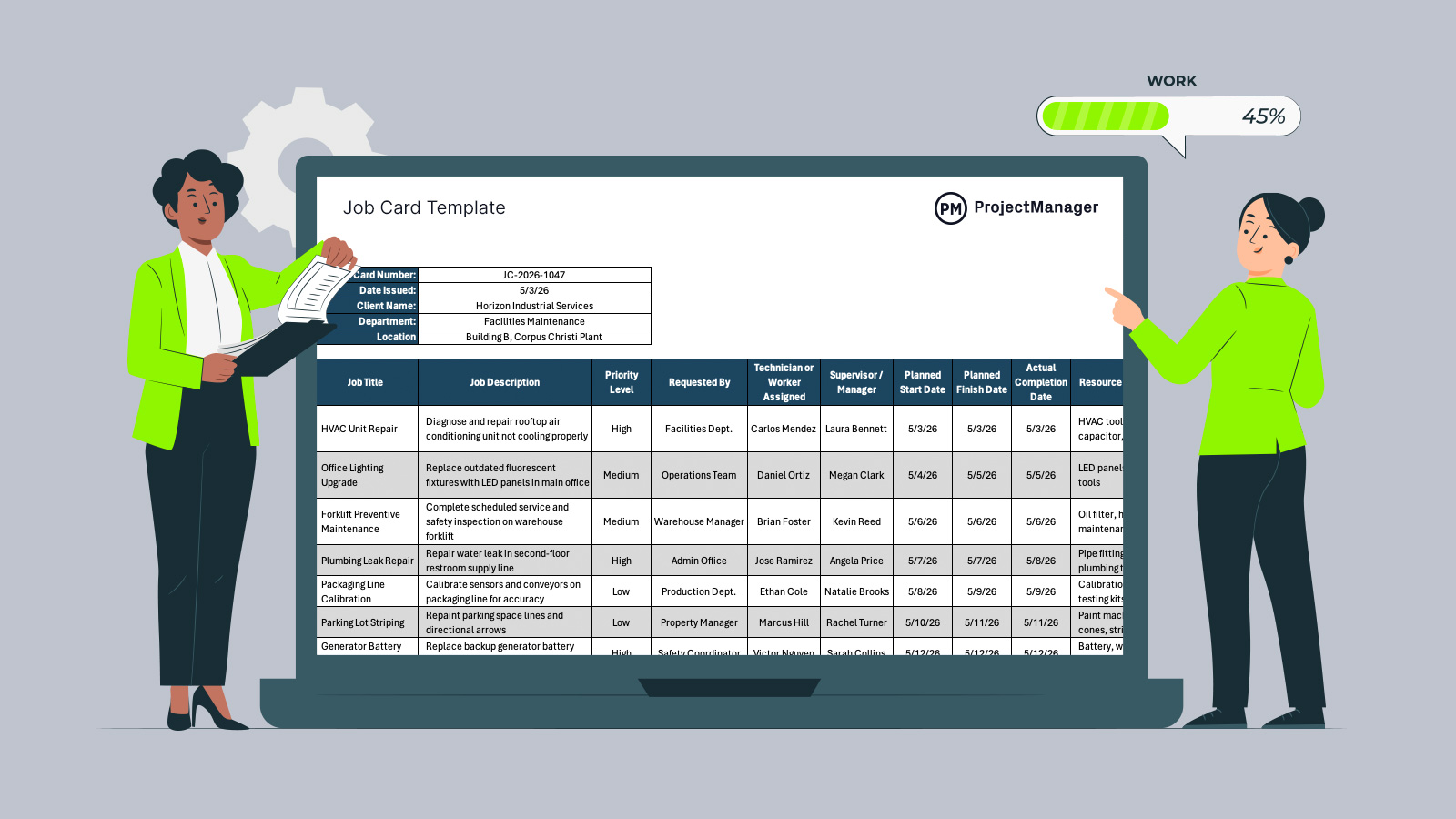
Get your free
Job Card Template
Use this free Job Card Template for Excel to manage your projects better.
Job Management Phases
Work doesn’t move forward by accident. Breaking jobs into structured phases gives teams a clear path from initial request to final delivery, helping coordinate resources, control costs and keep project timelines realistic as work progresses.
Job Planning
The process starts with job planning, where teams define the scope of work, identify required materials, assign responsibilities and outline how the job will be completed. Getting this step right prevents confusion later and gives everyone a clear understanding of what needs to happen before execution begins.
Job Costing
With the plan in place, attention shifts to job costing, which involves estimating labor, materials and equipment expenses tied to the work. Establishing accurate costs early helps set budgets, supports pricing decisions and reduces the likelihood of unexpected overruns during execution.
Job Scheduling
After costs are defined, job scheduling organizes tasks into a timeline and assigns them to the right people and resources. This step ensures that work happens in the correct sequence, avoids conflicts and keeps teams aligned on deadlines and priorities.
Job Tracking
As work progresses, job tracking provides visibility into what’s been completed, what’s in progress and what’s falling behind. Monitoring performance in real time allows teams to adjust workloads, resolve issues quickly and keep the job moving according to plan.
Job Reporting
Once the job is underway or completed, job reporting captures key details such as work performed, costs, issues and outcomes. These records support decision-making, help evaluate performance and provide documentation for billing, audits or future planning.
What Is Job Management Software?
Job management software is a digital tool used to plan, schedule, assign and track jobs from start to completion. It is commonly used in construction, manufacturing and field service operations to coordinate teams, manage workloads and monitor project progress in real time. It centralizes job data, helping teams stay organized and make faster decisions during execution.
Key Features of Job Management Software
Different tools support job execution in different ways, but most platforms are built around a core set of features that help teams plan work, organize tasks and maintain visibility as jobs move forward.
Gantt Charts
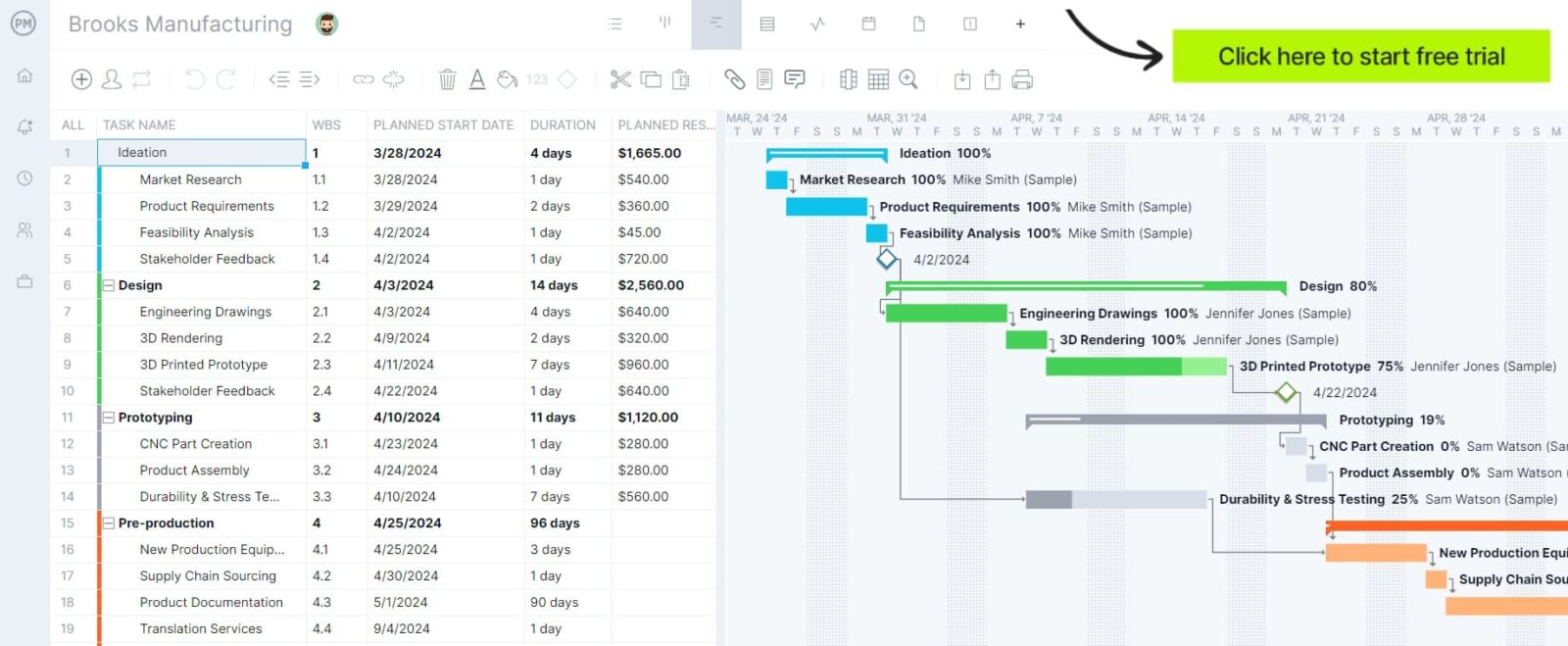
When timelines start getting complex, Gantt charts provide a clear visual of how jobs unfold over time. Teams can map out tasks, set durations and define dependencies between activities. This makes it easier to adjust schedules, prevent overlaps and keep work flowing in the right sequence as priorities or conditions change.

Kanban Boards
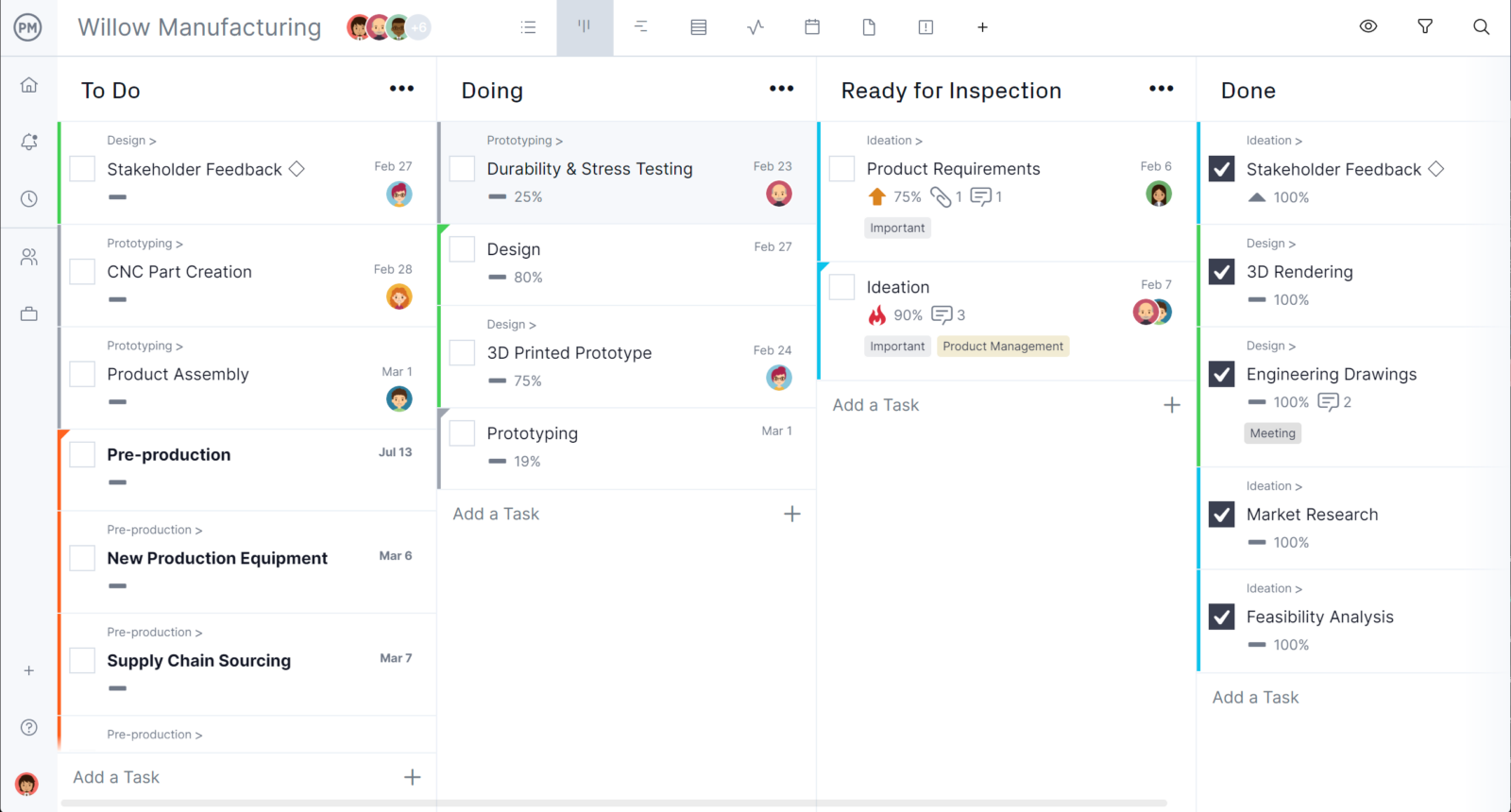
For teams managing multiple jobs at once, kanban boards offer a flexible way to track work as it moves through different stages. Tasks are organized into columns such as planned, in progress and completed, making it easy to spot bottlenecks and balance workloads without needing to constantly update detailed schedules.
Task Lists
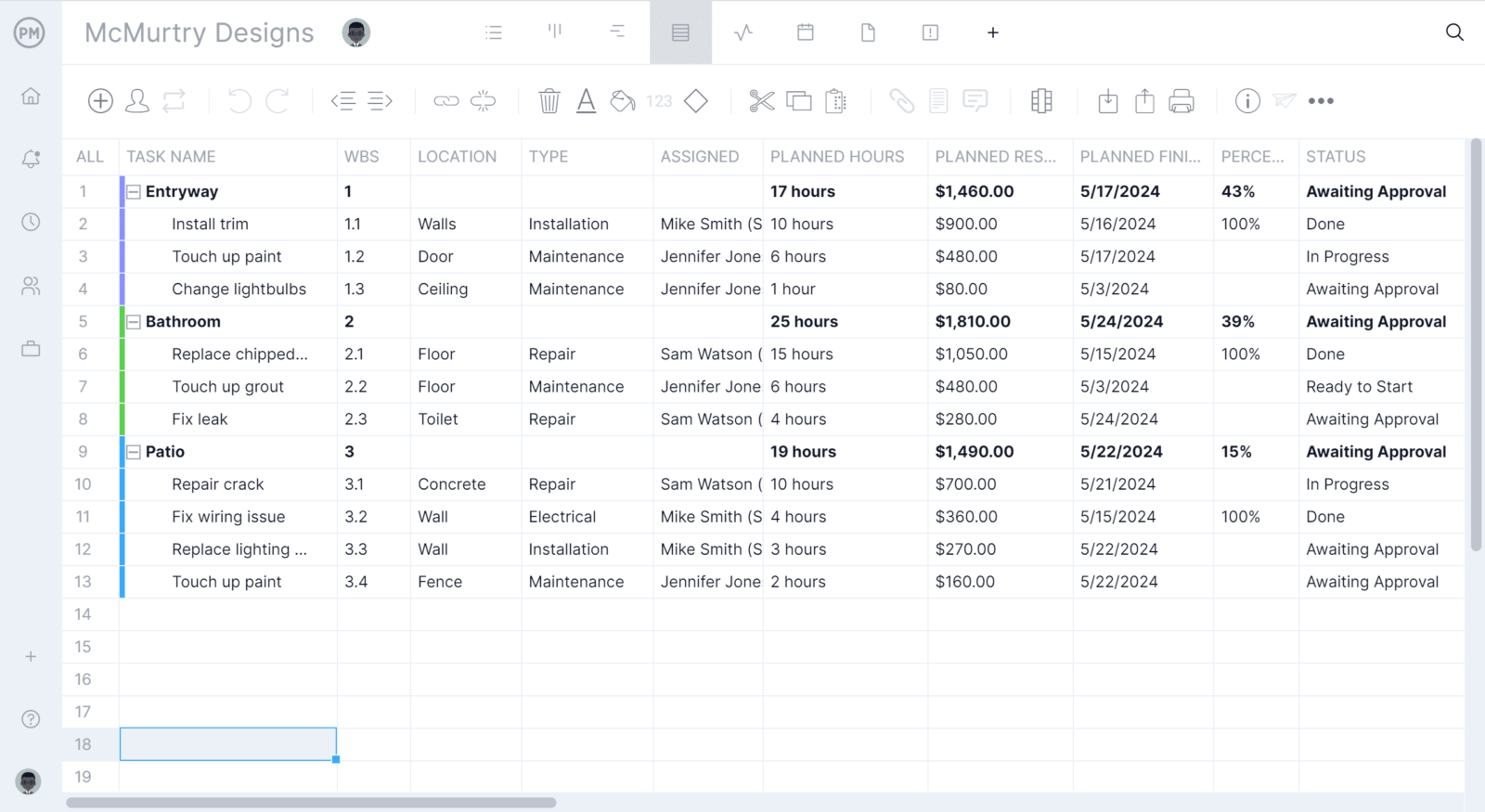
At a more granular level, task lists break jobs down into actionable steps that can be assigned and tracked individually. Each task includes details like deadlines, assignees and status updates, giving teams a straightforward way to manage daily work and ensure nothing falls through the cracks during execution.
Job Tracking Dashboards
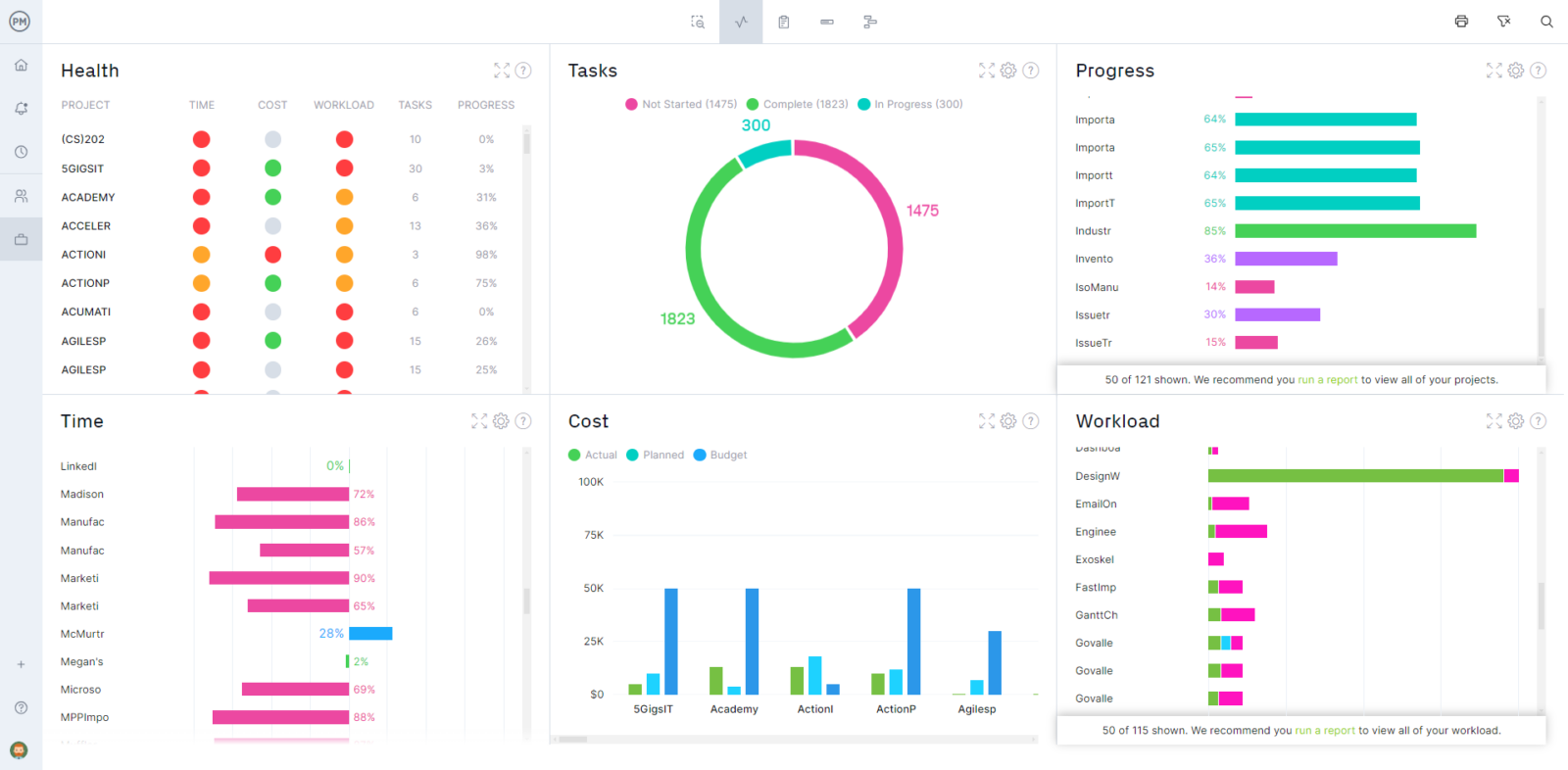
As jobs move forward, dashboards give teams a real-time snapshot of progress, workload and performance across multiple jobs. Visual metrics make it easier to spot delays, monitor task completion and understand where attention is needed. Instead of digging through reports, teams can quickly assess status and make informed decisions to keep work on track.
Cost Estimating & Tracking
Before work begins, a good job management software should allow users to estimate the cost of the resources needed to execute a job, including labor, materials, equipment and components. During execution, it should also compare estimated costs against actual job costs, helping teams determine whether they are staying within budget or impacting overall profitability.
Resource Management
Coordinating people and equipment requires tools that make resource allocation visible and manageable. Features like workload charts, timesheets and performance dashboards help teams assign work efficiently and monitor utilization. Tracking resource costs alongside availability allows organizations to balance workloads, avoid overuse and maintain control over expenses throughout the job lifecycle.
Job Management Documents
Clear documentation keeps jobs organized, repeatable and accountable. Each phase relies on specific documents to define scope, schedule work, track costs and record outcomes. Without them, teams rely on assumptions, which leads to delays, errors and budget issues. Standardized documents ensure consistency, improve communication and create reliable records for planning, execution and analysis.
Job Planning
- Scope of Work: Describes what the job includes, outlining tasks, deliverables and boundaries so teams understand exactly what needs to be completed and what falls outside the job.
- Work Order: Provides a structured summary of the job, including instructions, assigned personnel and required resources, serving as the main reference for execution.
- Material Requisition Form: Lists materials needed for the job and authorizes their request, ensuring teams have what they need before work begins.
- Equipment List: Identifies tools and machinery required to complete the job, helping teams prepare and avoid delays caused by missing equipment.
- Resource Plan: Outlines how labor and equipment will be allocated, ensuring the right people and assets are available when needed.
Job Scheduling
- Job Schedule: Organizes tasks into a timeline, showing when each activity should start and finish to keep work on track.
- Gantt Chart: Visualizes the job schedule with task durations and dependencies, making it easier to manage sequencing and adjust timelines.
- Work Plan: Breaks down the job into actionable steps with assigned responsibilities and deadlines to guide execution.
- Crew Schedule: Assigns workers to specific shifts or tasks, helping balance workloads and ensure coverage across the job.
- Shift Calendar: Maps out working hours and shifts over time, helping coordinate labor availability and avoid scheduling conflicts.
Job Costing
- Cost Estimate Sheet: Calculates expected costs for labor, materials and equipment before the job starts to establish a budget.
- Job Cost Sheet: Tracks actual expenses as the job progresses, allowing teams to compare against estimates.
- Labor Cost Log: Records hours worked and associated wages to monitor labor spending throughout the job.
- Materials Cost Tracker: Tracks the cost and usage of materials to prevent overspending and ensure accurate accounting.
- Equipment Cost Log: Captures costs related to equipment usage, rental or maintenance tied to the job.
Job Tracking
- Task List: Breaks the job into individual tasks that can be assigned and tracked to ensure steady progress.
- Timesheet: Records time spent by workers on tasks, providing visibility into labor usage and productivity.
- Progress Report: Summarizes the current status of the job, highlighting completed work and any delays.
- Daily Log: Documents day-to-day activities, issues and conditions to maintain a continuous record of job execution.
- Issue Log: Tracks problems that arise during the job and documents how they are resolved.
Job Reporting
- Job Report: Provides a full summary of the job, including work performed, resources used and overall outcomes.
- Completion Report: Confirms that all job requirements have been met and documents final results.
- Performance Report: Evaluates how the job performed against schedule, cost and quality expectations.
- Downtime Report: Records periods when work stopped and explains the reasons, helping identify inefficiencies.
- Maintenance Report: Documents maintenance work completed, including actions taken and the condition of equipment afterward.
Free Job Management Templates
If you’re not ready for job management software yet, try exploring our library of free templates. We’ve created over 100 project management templates for Excel, Word and Google Sheets. Here are some that can help with job scheduling.
Job Card Template
A job card template helps teams document job details, including tasks, assigned workers, materials and status updates. It creates a clear record that improves communication, accountability and job tracking.
Gantt Chart Template
A Gantt chart template helps teams plan job timelines by organizing tasks, durations and dependencies in a visual schedule. It improves coordination, prevents delays and keeps work aligned.
Kanban Board Template
A kanban board template helps teams manage jobs by organizing tasks into visual workflow stages. It improves visibility, highlights bottlenecks and allows teams to track progress efficiently.
ProjectManager Is a Robust Job Management Software
ProjectManager is an online project management solution that provides a complete set of work planning, scheduling and tracking tools, including Gantt charts, kanban boards, task lists and real-time dashboards and reports. With these features, teams across industries can build detailed job schedules, assign resources and monitor progress, costs and timelines.
ProjectManager also delivers AI-powered project insights to support better decision-making and connects with over 100 tools like Microsoft Project, Acumatica and Power BI. With its open API and wide range of integrations, organizations can seamlessly link ProjectManager to their existing systems. Watch the video below to learn more!
Related Job Management Content
If you need a tool to help you manage projects, then signup for our software now at ProjectManager. Our online software helps teams across industries plan, track and oversee projects as they unfold. Sign up for a free 30-day trial today!