



Last updated: November 5, 2026
ProjectLibre is the better choice for individuals and students who need a free desktop scheduling tool, want to open Microsoft Project files at no cost or work alone and offline. ProjectManager is the better choice for teams that need to work on one schedule online, share it with people on any device, track time and workload across projects and send updated MPP files back to Microsoft Project users.
The two tools are built for different situations. ProjectLibre Desktop is free, open-source scheduling software installed on your computer, and ProjectLibre describes it as built for one person managing a single project. ProjectManager is online project management software where project managers, team members and stakeholders work in the same live schedule from a browser or a phone.
This comparison covers scheduling and Gantt charts, Microsoft Project compatibility, collaboration, resources and time tracking, platforms and pricing, with an honest look at when each tool is the right fit.
Try ProjectManager on your own schedule: import an MPP or XML file and share it with your team. Get started with ProjectManager today for free.
ProjectManager vs. ProjectLibre at a Glance
| ProjectManager | ProjectLibre Desktop | |
|---|---|---|
| Best for | Teams that collaborate on schedules online and manage several projects | Individuals and students who need free desktop scheduling |
| Price | $15/user/month (Team), $28/user/month (Business), billed annually; no free plan | Free and open source |
| Platform | Any modern browser on macOS, Windows and Linux; no desktop app | Desktop app for Windows, macOS and Linux |
| MPP import | Yes, plus Microsoft Project XML, Excel and CSV | Yes, opens MPP files |
| MPP export | Yes, plus XML, Excel and CSV | No; saves in its own format or as Microsoft Project XML |
| Critical path | Yes, critical path filter on the Gantt chart | Yes, with float |
| Baselines | Yes, with variance reports | Yes, plus earned value |
| Collaboration | Real-time: shared schedule, comments, file attachments and notifications | Single user; files are shared by sending them |
| Mobile apps | iOS and Android | None |
| Time tracking | Timesheets, plus a workload page across all projects (Business and above) | No timesheets; resources, costs and workloads within one project |
| Offline use | No; needs an internet connection | Yes; files stay on your computer |
| Free trial | 30 days | Not needed; the desktop app is free |
Prices are list prices as of November 2026 and change often. ProjectLibre also sells a separate paid cloud product, covered below.
What Is ProjectManager?
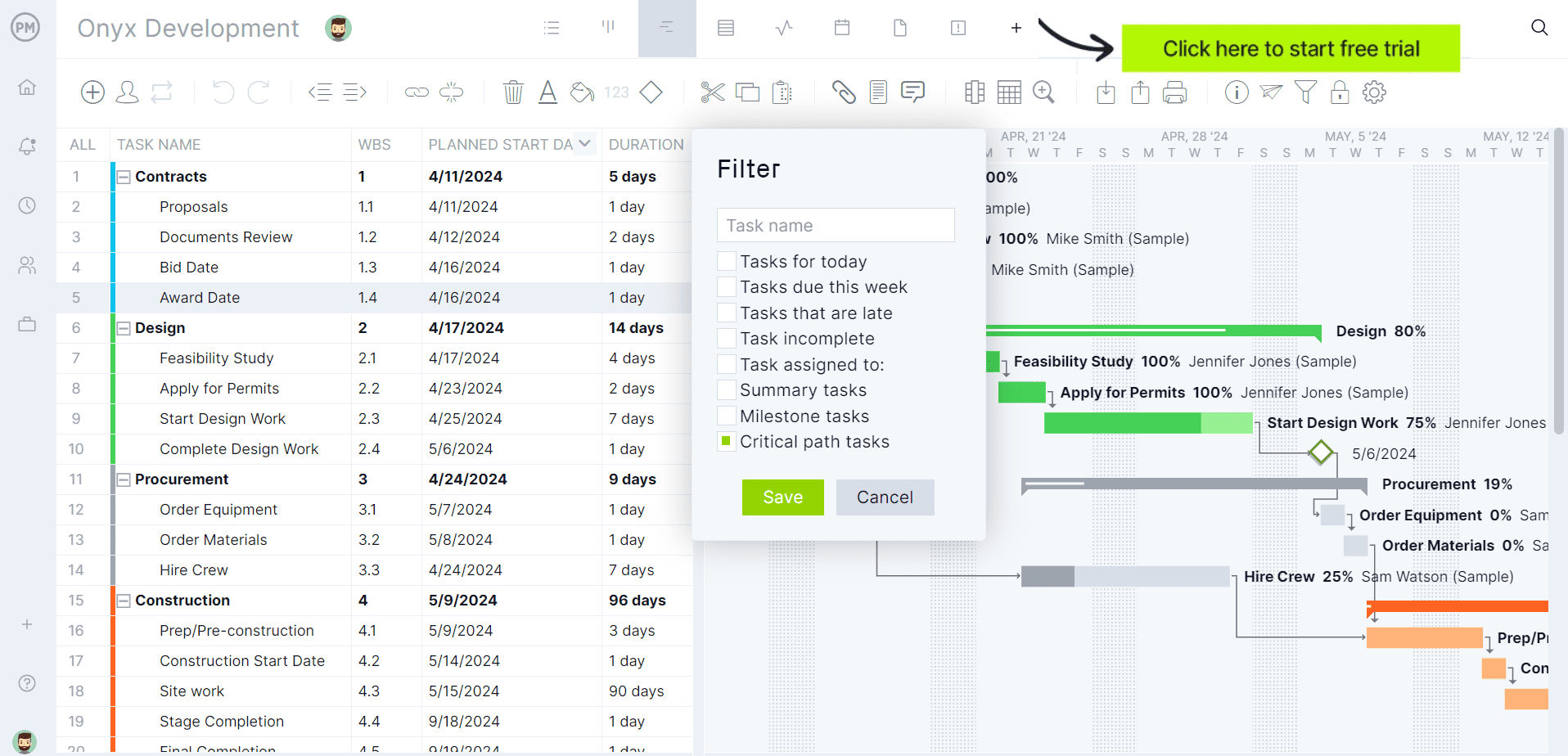
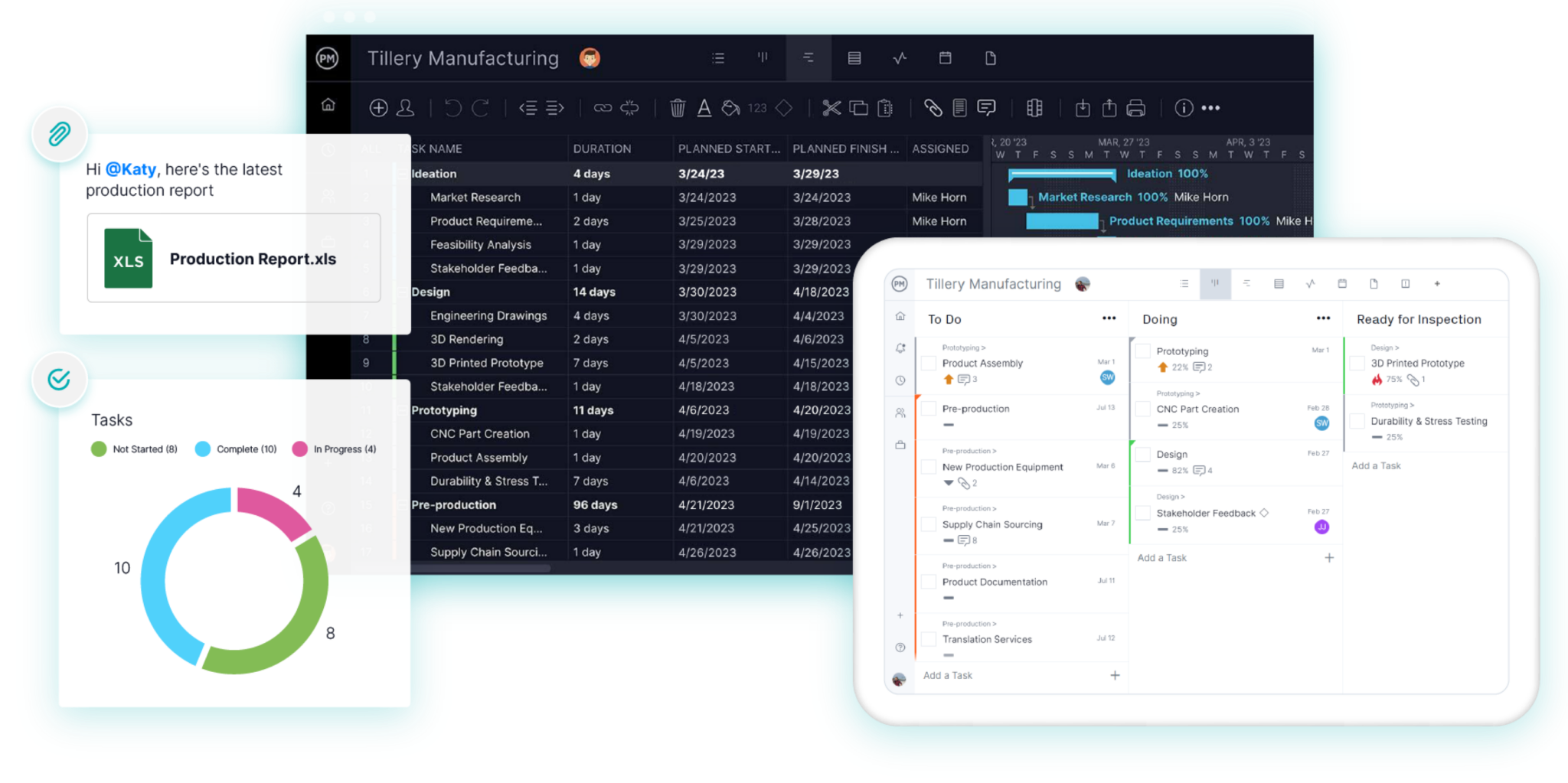
ProjectManager is online project management software for planning, scheduling and tracking projects as a team. Schedules are built on Gantt charts with all four dependency types, lag, a critical path filter and baselines, and the same tasks can be viewed as a sheet, board, list or calendar. Team members update tasks, comment, attach files and log time from a browser or the iOS and Android apps, and dashboards, portfolio views and a workload page show progress and hours across all your projects. Integrations include Microsoft Teams, Power BI, QuickBooks Online, Acumatica and ChatGPT.
What Is ProjectLibre?
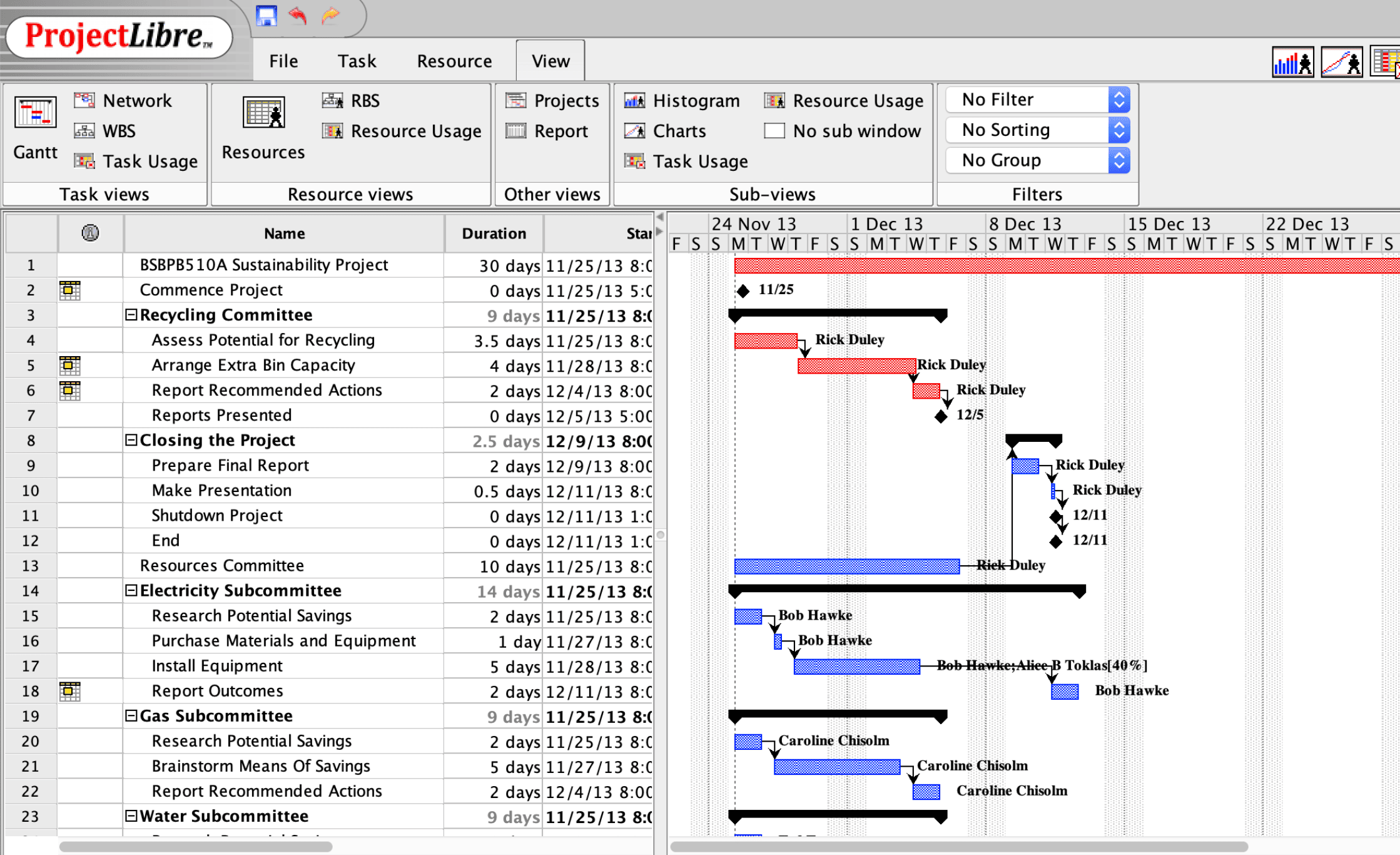
ProjectLibre is free, open-source project scheduling software that’s often used as a free alternative to Microsoft Project. ProjectLibre Desktop runs on Windows, macOS and Linux and includes Gantt charts, WBS, network diagrams, the critical path, resources, costs, baselines and earned value. It opens Microsoft Project files, and ProjectLibre describes the desktop app as built for an individual project manager working on a single project, with files that stay on your computer. The current desktop version, 1.9.8, was released in April 2025.
ProjectLibre also sells ProjectLibre Cloud, a separate browser-based product for teams with real-time collaboration, shared resource pools, portfolio management, resource leveling and an AI copilot. For more, see What Is ProjectLibre?
ProjectManager vs. ProjectLibre: Feature Comparison
Scheduling and Gantt Charts
Both tools handle professional scheduling. ProjectLibre Desktop supports dependencies, constraints, calendars, baselines, milestones, the critical path and float, and it adds network diagrams and earned value, which suit students learning scheduling and project managers who want classic project controls on one project.
ProjectManager covers what most team schedules need. Link tasks with finish-to-start, start-to-start, finish-to-finish or start-to-finish dependencies, add lag for approvals or lead times, then apply the critical path filter on the Gantt chart to see the tasks that drive the finish date. Set a baseline and use variance reports to see how far the schedule has drifted. Read more about the critical path method.
Verdict: A tie for core scheduling. ProjectLibre if you need network diagrams and earned value at no cost; ProjectManager if the schedule needs to be shared and updated by a team.
MPP and Microsoft Project Compatibility
Both tools open Microsoft Project files, but only one sends them back. ProjectLibre Desktop opens MPP files at no cost, which makes it a common choice for opening MPP files without Microsoft Project. It saves in its own format or as Microsoft Project XML, not as MPP.
ProjectManager imports MPP, Microsoft Project XML, Excel and CSV files and exports to MPP, XML, Excel and CSV. MPP import and export are lossless for schedule data: tasks, durations, dates, dependencies and WBS structure stay intact when you import with “all data” and export back to MPP. Imports also bring in assignees, the most recent baseline and custom columns. Attachments and comments aren’t imported, and imported actual hours don’t map to timesheets automatically.
Verdict: ProjectLibre to open MPP files for free. ProjectManager if you need to send updated MPP files back to Microsoft Project users. For more options, see the best Microsoft Project viewers.
Collaboration and Sharing
This is the biggest practical difference. ProjectLibre Desktop is a single-user app, so sharing a schedule means sending the file, and two people can’t work on the same plan at once. ProjectLibre points teams to its paid cloud product for collaboration.
In ProjectManager, everyone works in the same live schedule. Team members and stakeholders open it in a browser or on the mobile app, update progress, comment on tasks, attach files and get notifications when something changes.
Verdict: ProjectManager.
Resources and Time Tracking
ProjectLibre Desktop manages resources, assignments, rates, costs, workloads and earned value within an individual project. It doesn’t have timesheets or a view of people’s work across several projects.
ProjectManager tracks resources across projects. The workload page shows each person’s assigned hours across all projects, with over-assigned days highlighted, and you can reassign work from the same page (Business plan and above). Timesheets record actual hours, and dashboards show time and cost across projects.
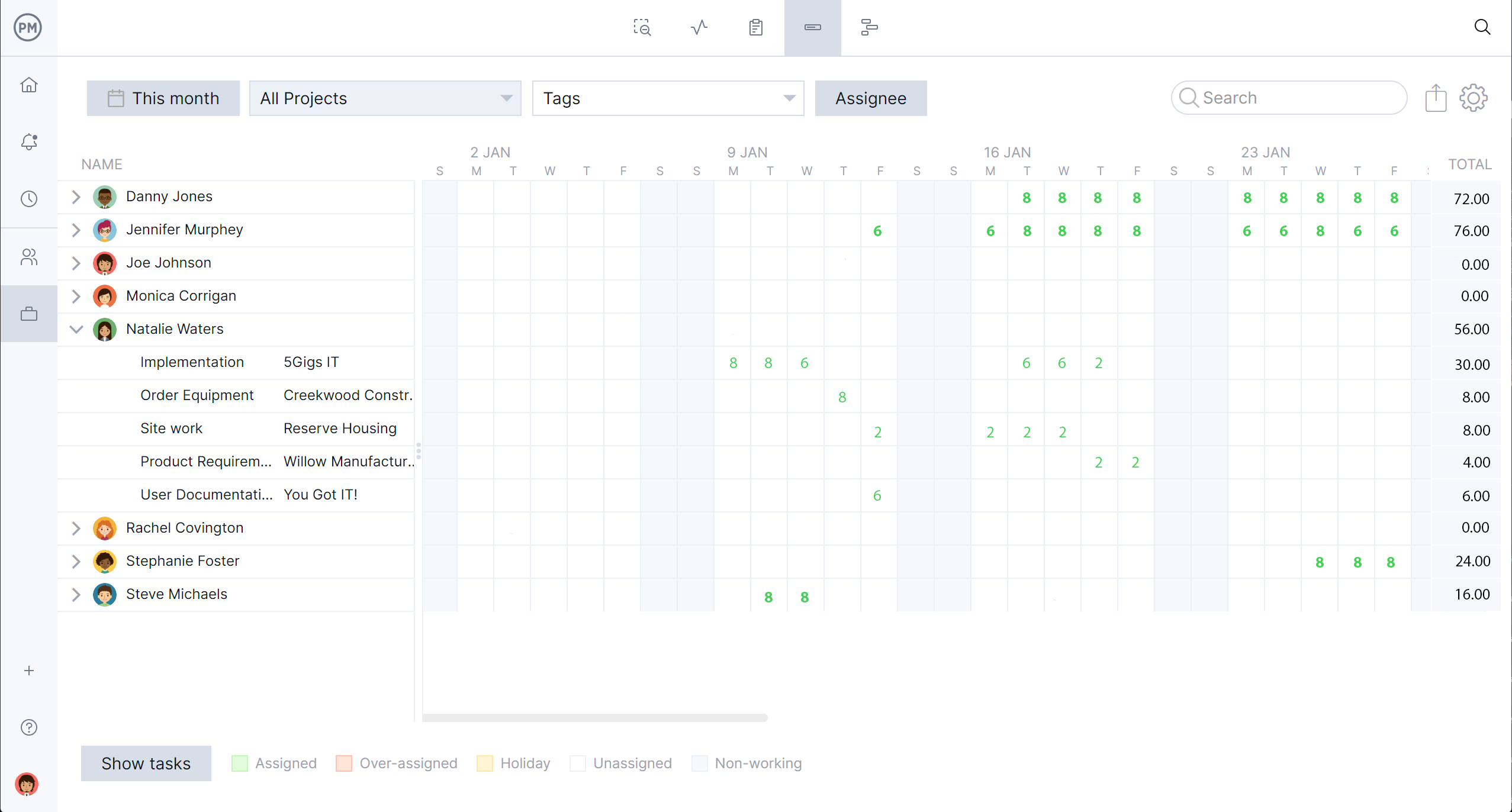
Verdict: ProjectLibre for cost and earned value on one project. ProjectManager for time tracking and workload across several projects.
Platforms and Access
ProjectLibre Desktop installs on Windows, macOS and Linux and works offline, with files kept on your computer. It has no mobile app.
ProjectManager runs in any modern browser on macOS, Windows and Linux, with iOS and Android apps, so people can open the schedule from any device. It has no desktop application and needs an internet connection. For Mac users, see the best Microsoft Project alternatives for Mac.
Verdict: ProjectLibre for offline desktop work. ProjectManager for access from any device.
Pricing
ProjectLibre Desktop is free and open source, with no subscription. ProjectManager costs $15 per user per month on the Team plan and $28 per user per month on the Business plan, billed annually, with Enterprise by quote and a 30-day free trial. ProjectManager has no free plan.
For teams, the closer comparison is ProjectLibre Cloud, which costs $9.99 per user per month for ProjectLibre Core and $29.99 per user per month for Enterprise/PMO Cloud, both billed annually. Five people on ProjectManager’s Business plan cost $1,680 a year.
Verdict: ProjectLibre Desktop if cost is the deciding factor and you work alone. Compare ProjectManager with ProjectLibre Cloud if your team needs to collaborate.
Pros and Cons
ProjectManager
Pros
- Real-time collaboration on one schedule, with comments, file attachments and notifications
- Imports and exports MPP files, so updated schedules can go back to Microsoft Project users
- Timesheets, dashboards and a workload page across all projects
- Browser access on any operating system, plus iOS and Android apps
Cons
- Not free: plans start at $15/user/month billed annually, and there’s no free plan
- No offline desktop app; it needs an internet connection
- The workload page needs the Business plan or above
- Earned value isn’t a core feature
ProjectLibre Desktop
Pros
- Free and open source, with no subscription
- Opens MPP files without Microsoft Project
- Critical path, baselines, network diagrams and earned value
- Runs offline on Windows, macOS and Linux
Cons
- Single user, with no real-time collaboration in the free version
- Doesn’t save back to MPP
- No mobile apps or timesheets
- Resources and costs are managed one project at a time
Which One Should You Choose?
Choose ProjectLibre if you work alone and want free scheduling, and choose ProjectManager if a team needs to work on the schedule together.
- Students and individuals learning scheduling: ProjectLibre Desktop. It’s free and covers the critical path, baselines and earned value.
- Anyone who only needs to open an MPP file: ProjectLibre Desktop, at no cost.
- A project manager working alone and offline: ProjectLibre Desktop.
- Teams that update one schedule together: ProjectManager, with a live schedule in the browser and on mobile.
- Teams sharing people across several projects: ProjectManager, for timesheets and workload across all projects.
- Teams exchanging files with Microsoft Project users: ProjectManager, because it exports updated MPP files.
For a wider comparison, see the best Microsoft Project alternatives and Microsoft Project vs. ProjectManager.
How to Move a ProjectLibre Project Into ProjectManager
To move a ProjectLibre project into ProjectManager, save it from ProjectLibre as Microsoft Project XML, then import the XML file into ProjectManager with all data and check the logic. You can also import the original MPP file if you still have it.
- Export from ProjectLibre. Open the project in ProjectLibre Desktop and use Save As to save it in Microsoft Project XML format.
- Set working days. In ProjectManager, click the + button, choose Project and set working days to match your ProjectLibre calendar before importing.
- Import the file. Choose Import File when creating the project, or click the import icon on the Gantt ribbon of an existing project. Click select file, upload the XML file and choose all data.
- Check dependencies. Compare durations and dependencies with the original schedule, and re-link anything that didn’t come through.
- Turn on the critical path filter. Check that it shows the tasks that drive the finish date.
- Set a baseline. Once the schedule is right, set a baseline in Gantt settings so you can track variance from there.
Keep your original ProjectLibre file in case you need it later.
Want to see your schedule in ProjectManager? Start a free 30-day trial and import your Microsoft Project XML file. Get started with ProjectManager today for free.
ProjectManager vs. ProjectLibre FAQ
Is ProjectLibre really free?
Yes. ProjectLibre Desktop is free and open source, with no subscription. ProjectLibre Cloud, a separate product for teams, is paid, starting at $9.99 per user per month billed annually.
Can ProjectLibre open MPP files?
Yes. ProjectLibre Desktop opens Microsoft Project files so you can keep working on them, which is why many people use it to open MPP files without a Microsoft Project license.
Can ProjectLibre save MPP files?
No. ProjectLibre Desktop saves in its own format or as Microsoft Project XML, which Microsoft Project can open. If you need to send an MPP file back to someone, ProjectManager imports and exports MPP files.
Is ProjectLibre good for teams?
ProjectLibre Desktop isn’t built for teams. ProjectLibre describes it as built for an individual project manager working on a single project, with no real-time collaboration. Teams can use ProjectLibre Cloud or a team tool such as ProjectManager, where everyone works in the same live schedule.
What’s the difference between ProjectLibre and ProjectLibre Cloud?
ProjectLibre Desktop is the free, open-source desktop app for one person working on one project. ProjectLibre Cloud is a paid, browser-based product for teams, adding real-time collaboration, shared resource pools, portfolio management, resource leveling and an AI copilot. ProjectLibre Core costs $9.99 per user per month and Enterprise/PMO Cloud costs $29.99 per user per month, both billed annually.
Does ProjectManager work offline like ProjectLibre?
No. ProjectManager runs in a browser and on iOS and Android apps and needs an internet connection. If you need to work fully offline, ProjectLibre Desktop is the better fit.