

If you’ve spent any time comparing tools, you already know open source project management software isn’t a niche curiosity anymore — it’s a legitimate, budget-friendly alternative to the big commercial platforms. Here’s what’s actually worth your attention in 2026.
What Is Open Source Project Management Software?
Open source project management software is any planning, tracking, or collaboration tool whose source code is publicly available for anyone to inspect, modify, and redistribute — usually under a license like MIT, GPL, or MPL. Unlike proprietary platforms such as Asana or Monday.com, teams aren’t limited to whatever the vendor decides to build or how they decide to price it. Most of these tools can be self-hosted on a company’s own servers, giving full control over data, or used through a paid cloud version offered by the same team that maintains the open source core. In practice, that means teams get the core functionality — tasks, boards, timelines, reporting — completely free, with the option to pay only for hosting, support, or premium features if and when they need them.
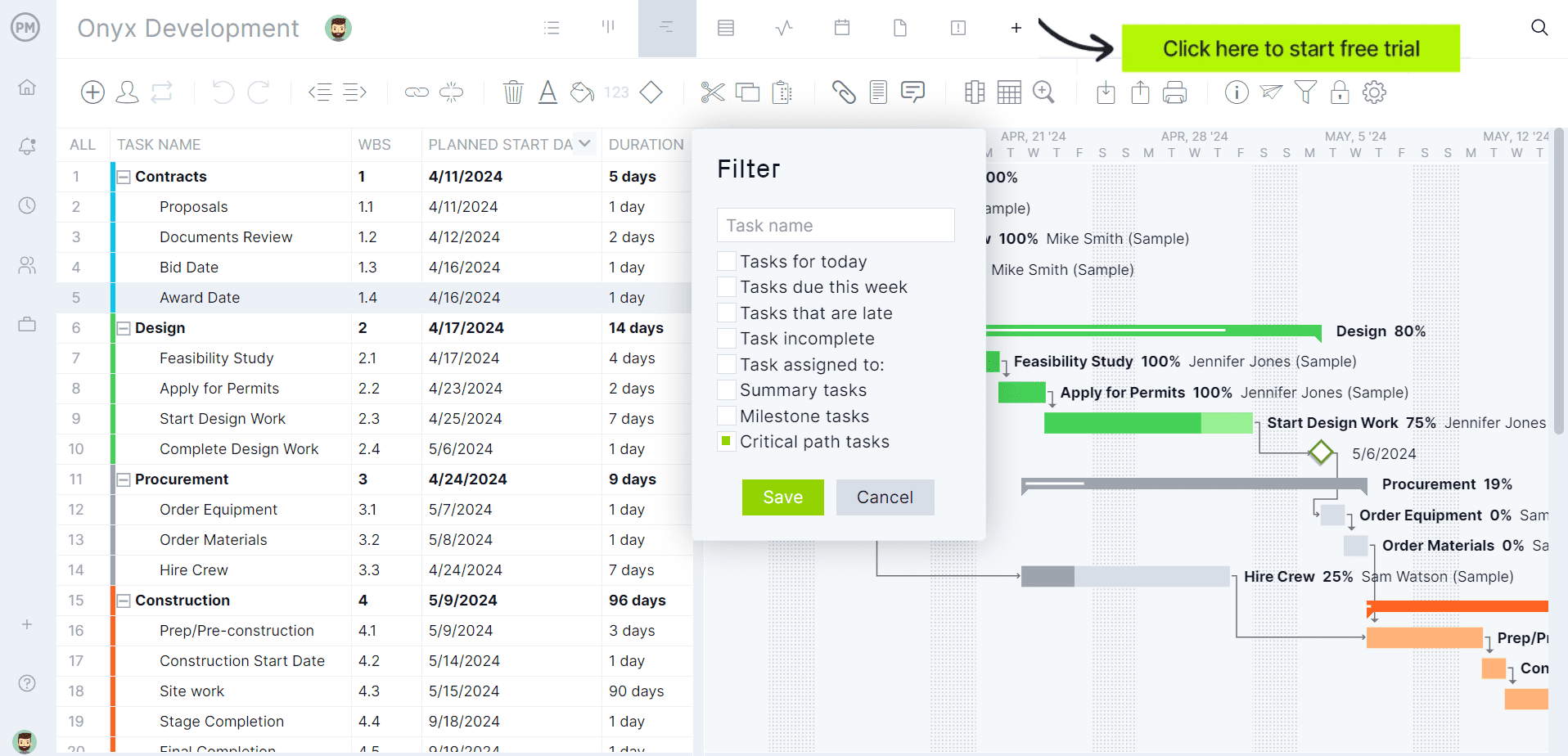
ProjectManager is award-winning project and portfolio management software that is less expensive to maintain, easier to learn and more efficient than self-hosting and configuring open source project management tools. Rather than install, patch and maintain your own server, ProjectManager has multiple project views, from Gantt charts that automatically update, link all four types of task dependencies, filter for the critical path and can set a baseline to track project variance in real time. Plus, there are kanban boards, calendars, task lists and other tools to plan, schedule and track projects from start to finish. Get started with ProjectManager today for free.
Plus, ProjectManager connects natively with QuickBooks, Acumatica and MYOB Acumatica, syncing tasks, timesheets and costs between project and finance teams automatically. It also links to 100+ tools like Microsoft Project, Excel, Salesforce and Zapier.
Why Do People Seek Open Source Project Management Software?
Most people don’t go looking for “open source” as an end in itself — they go looking for a way out of a problem. Usually, that problem is one or several of the following: the per-seat pricing of commercial project management software has gotten out of hand as the team grows, there are compliance or data residency requirements that make self-hosting non-negotiable, or the team has hit a wall with a proprietary tool’s rigid feature set and just wants the freedom to customize the software to match how it actually works.
There’s also a trust dimension here — some teams simply don’t want their project data, client information, or roadmap sitting on a third-party vendor’s servers, especially in regulated industries like healthcare, finance, or government. And for technical teams in particular, there’s an added appeal: if the tool doesn’t do something they need, they can fork it, extend it, or build a plugin, rather than filing a feature request and waiting.
Pros of Open Source Project Management Software
The advantages here go well beyond “it’s free.” Open source project management tools give organizations a level of control, transparency, and long-term flexibility that proprietary SaaS platforms generally can’t match, though realizing those benefits does require some technical willingness on the team’s part.
- Lower total cost of ownership: No mandatory per-seat licensing fees. Organizations may still pay for hosting, support, or an enterprise tier, but they’re not locked into recurring costs just to keep using the software.
- Full data control and self-hosting: Teams decide where their project data lives, which matters enormously for organizations with compliance, privacy, or data residency requirements.
- No vendor lock-in: Because the code is open, teams are never at the mercy of a single company’s roadmap, pricing changes, or acquisition. They can always fork or migrate.
- Deep customization: Teams with development resources can modify workflows, build integrations, or extend features in ways a closed platform simply won’t allow.
- Community-driven security and improvement: With the code publicly viewable, vulnerabilities tend to get spotted and patched faster, and features often evolve based on real community contributions rather than a single vendor’s priorities.
Cons of Open Source Project Management Software
None of this comes for free in a practical sense — the trade-off for that control and flexibility is usually time, technical skill, or both. Before committing to an open source tool, organizations should be honest about whether their team actually has the capacity to manage what it’s taking on.
- Self-hosting overhead: Someone on the team needs to set up, secure, back up, and maintain the server infrastructure — that’s a real, ongoing responsibility, not a one-time task.
- Inconsistent documentation and support: Community-maintained tools don’t always have the polished docs or guaranteed SLAs available from a paid vendor, so troubleshooting can take longer.
- Steeper learning curve: Interfaces are often less refined or intuitive than modern commercial competitors, especially for non-technical end users.
- Uneven long-term stability: Some projects lose momentum, change ownership, or get abandoned by their original maintainers, which can leave adopters stranded mid-migration.
- Hidden costs at scale: “Free” software can still require paid plugins, premium support contracts, or dedicated staff time — the savings aren’t always as large as they first appear once labor is factored in.
Open Source Project Management Software Comparison Table
The table below summarizes how the open source project management software in this list compares to each other and explains their key tools, who is their target audience and what our verdict is, so you have a clear picture of the open source project management software alternatives in the market.
| Software Name | Key Tools | Target Audience | Our Verdict |
| OpenProject | Work package tracking, Gantt charts, Scrum/kanban boards, per-project wikis, on-premises hosting. | Organizations that need data sovereignty and support for both agile and traditional methodologies. | Good, the most complete option here. Enterprise features and support cost extra if you need them. |
| Redmine | Flexible issue tracking, role-based access, Gantt/calendar views, wikis, forums, plugin ecosystem. | Technical teams that want deep configurability and are comfortable setting it up themselves. | Good for flexibility and stability, not so good if you want a modern-feeling interface out of the box. |
| Trac | Wiki-integrated issue tracking, timeline view, roadmap/milestones, native Git and Subversion integration. | Software teams that want issue tracking fused directly with version control, with minimal process overhead. | Good for low-ceremony dev teams, not so good if you need modern PM features like sprints or kanban boards. |
| Taiga | Backlog management, Scrum sprint boards, kanban boards, team performance dashboards. | Agile teams, especially mixed developer/designer teams, that want an intuitive Scrum and kanban tool. | Good for usability, not so good on long-term certainty, since its founding company has wound down. |
| ProjectLibre | Gantt charts, network diagrams, work breakdown structures, resource histograms, MPP file import/export. | Teams and academics migrating off Microsoft Project who want a familiar desktop interface. | Good as a free MS Project alternative, not so good for real-time team collaboration since it’s desktop-based. |
| Odoo Project (Community Edition) | kanban/Gantt/calendar task views, timesheets, sales order and invoicing integration, profitability reports. | Businesses that already use, or plan to use, other Odoo apps like CRM, Sales, or Accounting. | Good if you want PM tied to billing and operations, not so good if you just need a simple standalone task tool. |
| Plane | Work item tracking, sprint cycles with burndown charts, wiki-style pages, REST API and webhooks. | Development teams that want a modern, Jira/Linear-style interface without the commercial license cost. | Good for a clean, fast-moving modern tool, not so good if you need the maturity of a longer-established platform. |
| Tuleap | End-to-end ALM, Scrum/kanban/SAFe support, requirement-to-test traceability, on-premises hosting. | Regulated industries like aerospace, defense, and healthcare that need full lifecycle traceability. | Good for compliance-heavy organizations, not so good for small teams that just need lightweight task tracking. |
| ZenTao | Product/project/quality management, bug tracking, sprint planning, Git/GitLab/Jenkins integrations. | Teams that want product management, testing, and project tracking consolidated into one platform. | Good value with an unlimited free tier, not so good if you need Gantt charts, which are a paid-tier feature. |
| Vikunja | List/kanban/Gantt/table views, recurring tasks and reminders, Todoist/Trello/MS To-Do import. | Individuals and small teams that want a fast, privacy-first task manager rather than a heavyweight suite. | Good for speed and simplicity, not so good if you need enterprise-grade reporting or complex ALM workflows. |
This summary table is a useful bird’s-eye view, but it can only tell part of the story. To actually pick the right tool, it helps to understand the reasoning behind each recommendation — why one platform suits a compliance-heavy enterprise while another is better left to a five-person team managing a to-do list. The breakdowns below go deeper into each option, covering exactly what it does best and who should be looking at it first.
Best Open Source Project Management Software of 2026
Now that the basics are covered — what open source project management software actually is, why teams go looking for it, and where the trade-offs lie — it’s time to get into specifics. Below is a rundown of the ten strongest options on the market right now, with an honest breakdown of what each one does best and who it’s actually built for.
1. OpenProject
OpenProject is one of the few open source tools that can flex between agile, waterfall, and hybrid methodologies without feeling like a compromise, which is exactly why it tends to be the first name that comes up in this category. It positions itself as the leading free and open source project management software, and it’s built to support the entire project lifecycle — from initial planning through implementation, controlling, and completion — under whichever methodology a team prefers, including formal frameworks like PRINCE2 or PM².
Data sovereignty is a genuine differentiator here: the software can be installed entirely on an organization’s own infrastructure, and it’s even used as a component of Germany’s openDesk government productivity suite. The free Community edition covers a wide range of features and plugins at no cost, while the Enterprise tier layers on professional support, add-ons, and additional security features like two-factor authentication for organizations that need them.
Main Use Cases for OpenProject
- Running full project lifecycles under classic, agile, or hybrid methodologies like PRINCE2 or PM²
- Work package tracking with Gantt charts for scheduling and dependency management
- Agile team management using Scrum and kanban boards side by side
- Centralized documentation and knowledge-sharing through per-project wikis
- Meeting security and data-residency requirements via self-hosted, on-premises deployment
Who Is OpenProject for?
- Organizations that need to prove data sovereignty and control exactly where their project data lives
- Public sector and government teams with strict security and compliance requirements
- Mixed teams that run some projects as agile and others as traditional waterfall
- Companies with the Linux/Mac technical know-how to self-host and maintain the Enterprise on-premises edition
- Organizations that want a “buy once, grow into it” tool rather than a rigid, single-method platform
OpenProject: Our Verdict
OpenProject is the strongest pick, covering agile, waterfall, and hybrid methodologies with genuine self-hosting and data sovereignty. The free Community edition is generous, but unlocking full value requires Linux/Mac admin skills or an Enterprise upgrade. Best for mid-to-large organizations wanting one tool to grow into, not small teams needing something simple.
2. Redmine
Redmine has earned its reputation the hard way: it’s been around for years, it’s cross-platform and cross-database by design, and its module system means teams only turn on what they actually need — wikis, forums, repositories, time tracking — at the individual project level. It won’t win any beauty contests, and its own documentation doesn’t pretend otherwise, but it’s built on Ruby on Rails for stability and it supports multiple projects and subprojects from a single installation, each with flexible, role-based access control.
Where Redmine really separates itself is depth of configurability: workflow transitions can be defined per issue type and per role, custom fields can be added to issues, time entries, projects, and users, and the plugin ecosystem extends the core into agile boards, helpdesk ticketing, and CRM functionality. It rarely says “no” to a workflow — it just requires someone willing to configure it.
Main Use Cases for Redmine
- Managing multiple projects and related subprojects from a single installation
- Flexible issue tracking with fully custom workflows per issue type and role
- Auto-generated Gantt charts and calendars based on issue start and due dates
- Centralizing documentation and discussion through per-project wikis and forums
- Integrating with version control systems like Git, Subversion, CVS, Mercurial, and Bazaar
Who Is Redmine for?
- Technical teams who are comfortable configuring roles, permissions, and workflows themselves
- Organizations that already use LDAP and want built-in authentication and account provisioning
- Software and dev teams that want issue tracking tied directly to their source code repository
- Admins who want granular, role-based control over exactly what each user can see and do
- Teams that value stability and configurability over a modern, polished UI
Redmine: Our Verdict
Redmine trades polish for power — its modular design and per-role workflow customization make it endlessly flexible, backed by a mature plugin ecosystem. The dated interface and setup effort mean it rewards technical teams willing to configure it properly. Not for anyone wanting to log in and start working immediately.
3. ProjectLibre
ProjectLibre has built its name on sheer reach: the desktop edition stands as the most widely distributed project management software in the world, with more than 8 million downloads across 193 countries and adoption at over 1,700 universities. For teams migrating off Microsoft Project, it’s built specifically to ease that transition — the interface mirrors Project’s ribbon-style menu and column layout closely enough that existing MPP files can simply be opened and continued, with minimal relearning required.
Under the hood it covers the classic toolkit of plan-driven project management: Gantt charts, network diagrams, work breakdown structures, resource histograms, and cost tracking with labor, hourly rate, material usage, and fixed-cost fields. The desktop application itself remains free and open source with no licensing fees, while the company’s separate Cloud offering layers on multi-user collaboration, portfolio dashboards, and AI-assisted project creation for teams willing to pay a subscription for those extras.
Main Use Cases for ProjectLibre
- Migrating existing Microsoft Project files (MPP) into an open source alternative without losing data
- Building Gantt charts, network diagrams, and work breakdown structures (WBS) for classic project planning
- Resource management and resource histograms to track workload and allocation
- Cost management, including budget tracking and cost performance reporting
- Academic and training use, given its adoption across more than 1,700 universities
Who Is ProjectLibre for?
- Teams and individuals migrating away from Microsoft Project who want a familiar interface
- Project managers who need traditional, plan-driven scheduling rather than lightweight task boards
- Budget-conscious teams, government agencies, and non-profits that need a zero-cost desktop tool
- Academics and students, given its heavy presence in university project management courses
- Organizations that may eventually want to graduate to the company’s paid Cloud/AI edition for team collaboration
ProjectLibre: Expanded Verdict
ProjectLibre is the best free Microsoft Project replacement available, mirroring its interface and opening MPP files without friction. It’s desktop-first, though, so real-time team collaboration isn’t native to the free edition. Great for solo planners and waterfall projects, less so for collaborative, cloud-first teams.
4. Wekan
Wekan fills a very specific gap: teams that want the visual simplicity of a Trello-style board without handing their task data over to a third-party server. It’s a lightweight, self-hosted kanban application released under the MIT license, built around boards, lists, swimlanes, and cards, with each card carrying titles, descriptions, due dates, labels, and comments for collaboration.
Because it’s open source, the underlying code is available for anyone to inspect and audit for security vulnerabilities, and self-hosting means an organization never has to trust an outside company with sensitive board data — a meaningful distinction for institutions with strict data-sovereignty or privacy requirements. Access controls can be set at the board level or per user, giving administrators fine-grained control over who can view or edit specific work. It’s not trying to be a full project management suite; it’s trying to be the best, most privacy-respecting kanban board available, and by most accounts it succeeds at that narrower goal.
Main Use Cases for Wekan
- Visualizing workflow stages with boards, lists, swimlanes, and cards
- Running self-hosted kanban boards for teams with strict data-privacy requirements
- Managing personal or team task lists with due dates, labels, and comments
- Controlling access with board-level and user-level permissions
- Auditing and inspecting the underlying code for security, thanks to its fully open-source nature
Who Is Wekan for?
- Teams that want a Trello-style board but need to self-host for privacy or data-sovereignty reasons
- Small teams or individuals who want a simple, visual way to track “To Do, Doing, Done” style workflows
- Organizations that want full data ownership without giving up real-time collaborative editing
- Technical users comfortable with Docker-based deployment and basic server maintenance
- Anyone prioritizing a lightweight, no-frills kanban tool over a heavier full-suite PM platform
Wekan: Our Verdict
Wekan delivers exactly what it promises: a lightweight, self-hosted Trello alternative with full data control and MIT-licensed transparency. It’s not trying to be a full PM suite, and it shows — no Gantt charts, sprints, or reporting depth. Best for teams wanting a simple, privacy-respecting kanban board, not complex project management.
5. Trac
Trac takes a fundamentally different approach than most tools on this list: instead of trying to be a full project management suite, it positions itself as a minimalistic, web-based system that stays out of the way of a team’s established development process. Developed by Edgewall Software and released under the modified BSD license, Trac pairs an enhanced wiki with issue tracking, and its defining feature is how tightly those two things are woven together — wiki markup can be used directly in issue descriptions and commit messages, creating seamless links between bugs, tasks, changesets, files, and wiki pages.
A built-in timeline shows all current and past project events in order, making it easy to get an overview of a project’s history, while the roadmap view lays out upcoming milestones. Trac integrates natively with both Subversion and Git, which is a big part of why it has been adopted by long-running software projects. It doesn’t chase modern UI trends or agile ceremony, and it doesn’t pretend to — its mission statement is explicitly to help developers write great software while imposing as little process overhead as possible.
Main Use Cases for Trac
- Tracking bugs, features, and tasks tightly integrated with source code changes
- Maintaining a project wiki that cross-links directly to issues and commits
- Reviewing project history and progress through a chronological timeline view
- Planning and communicating upcoming work through the roadmap and milestone system
- Managing software projects that live on Git or Subversion repositories
Who Is Trac for?
- Software development teams that want issue tracking fused directly with version control
- Open source and long-running projects that value low-ceremony, minimalist tooling
- Technical teams comfortable running and maintaining a Python-based web application
- Organizations that prioritize documentation-as-you-go via an integrated wiki over separate tools
- Teams that want their existing development process left largely untouched by the tool
Trac: Our Verdict
Trac knows exactly what it is: a minimalist, wiki-integrated issue tracker tightly fused with Git and Subversion. That focus makes it great for developer-first teams, but it lacks kanban boards, sprints, or dashboards entirely. A solid pick for low-ceremony dev shops, a poor fit for anyone wanting modern PM features.
6. Taiga
Taiga was built to solve a very specific frustration: the founding team at Kaleidos couldn’t find an agile project management tool that was both intuitive and visually appealing for developers and designers working side by side. That origin story still shows up in the product today — Taiga is explicitly designed for cross-functional teams that work agile across both Scrum and kanban frameworks, and it lets teams switch between or blend the two rather than forcing a single methodology.
The feature set covers the full agile lifecycle: backlog management for capturing and prioritizing deliverables as a team, dedicated Scrum boards with epics, sub-tasks, and role-based estimations, and a kanban board built to be intuitive without sacrificing depth. A team performance dashboard, including what Taiga calls its “team health Iocane function,” adds a layer of visibility that goes beyond simple task counts. It’s worth noting that Taiga’s founding company, Kaleidos, has wound down, so anyone adopting the tool long-term should keep an eye on how ongoing maintenance develops.
Main Use Cases for Taiga
- Running Scrum sprints with backlog management, sprint boards, and role-based estimation
- Visualizing work with a customizable, intuitive kanban board
- Blending Scrum and kanban practices within the same team or project
- Monitoring team performance and health through built-in dashboards
- Coordinating cross-functional collaboration between developers and designers on the same platform
Who Is Taiga for?
- Agile teams that want a purpose-built Scrum or kanban tool rather than a general-purpose PM suite
- Startups and small-to-medium teams that value an intuitive, visually clean interface
- Cross-functional teams mixing developers and designers who need a shared, non-technical-friendly workflow
- Organizations that want the option to self-host for free or move to a paid cloud plan
- Teams comfortable monitoring the project’s ongoing maintenance given its uncertain post-Kaleidos future
Taiga: Our Verdict
Taiga remains one of the best-designed agile tools in open source, with intuitive Scrum/kanban boards built for mixed developer-designer teams. The real risk isn’t the software — it’s uncertainty around long-term maintenance since founding company Kaleidos wound down. Adopt with a migration plan in mind.
7. Odoo Project (Community Edition)
Odoo Project is a different kind of entry on this list, because it isn’t a standalone project management tool — it’s the project management module inside Odoo, a much larger open source business management suite that also covers CRM, sales, inventory, accounting, and more. The Community edition is free and open source, released under the LGPLv3 license, and gives full access to the underlying source code for customization.
Within the Project app itself, teams can manage tasks across kanban boards, Gantt-style timelines, calendar views, and list views, with task records supporting attachments, messages, deadlines, stages, and dependencies. Because it’s part of the wider Odoo ecosystem, projects and tasks can be created directly from sales orders, and time spent on tasks can be automatically tied into invoicing — a workflow that’s hard to replicate in a standalone PM tool. The trade-off is that Odoo Project makes the most sense for organizations that want project management wired into broader business operations, not for teams that just need a simple, lightweight task tracker.
Main Use Cases for Odoo Project (Community Edition)
- Managing tasks with kanban boards, Gantt timelines, and calendar views in one app
- Connecting project and task creation directly to sales orders and client billing
- Tracking planned versus effective hours through integrated timesheets
- Generating project profitability and status reports directly from project data
- Collaborating on task content in real time using Odoo’s native HTML editor
Who Is Odoo Project (Community Edition) for?
- Organizations that already use, or plan to use, other Odoo apps like CRM, Sales, or Accounting
- Service-based businesses that want project work tied directly to invoicing and billing
- Teams that want project management as part of a broader ERP system rather than a standalone tool
- Businesses with the technical resources to self-host and customize the open source Community edition
- Teams that don’t need a simple, low-setup task manager and are comfortable with more system-wide complexity
Odoo Project (Community Edition): Our Verdict
Odoo Project shines when task work needs to connect to billing, sales, and operations — not as a standalone tracker. Teams already in the Odoo ecosystem get real value; everyone else gets more complexity than needed. Strong for operationally-minded businesses, poor fit for simple, lightweight task tracking.
8. Plane
Plane is the newest tool on this list, and it markets itself directly as an open source alternative to Jira, Linear, and ClickUp — a positioning that reflects its design priorities: a clean, modern interface and a fast-moving feature set aimed at teams that find older open source PM tools visually dated. Plane ships a free Community Edition under the AGPL-3.0 license, which teams can self-host via Docker or Kubernetes, alongside a separate free cloud tier for teams that don’t want to manage infrastructure.
The Community Edition is genuinely full-featured rather than a stripped-down trial: it includes unlimited projects, work items, cycles, modules, pages, five different layout views, intake, dashboards, estimates, a REST API, and webhooks. Work item tracking supports rich text editing, attachments, comments, labels, custom statuses, and configurable work item types including epics, while sprint planning (referred to as “cycles”) comes with burn-down charts and velocity tracking built in. A separate Commercial Edition exists for larger organizations that need additional governance, compliance, and integration capabilities on top of the open core.
Main Use Cases for Plane
- Tracking work items, bugs, and epics with rich text, labels, and custom statuses
- Running sprint-style planning cycles with burn-down charts and velocity tracking
- Self-hosting a full-featured, Jira-like tool via Docker or Kubernetes at no licensing cost
- Combining project tracking with built-in wiki-style pages in the same workspace
- Extending workflows through the REST API and webhooks for custom integrations
Who Is Plane for?
- Teams that want a modern, Jira/Linear-style interface without the commercial license cost
- Development teams that need sprint planning, epics, and velocity tracking out of the box
- Organizations that want to self-host on Docker or Kubernetes without hitting user limits
- Teams that want the option to graduate to a Commercial Edition for governance and compliance needs
- Fast-moving teams that value active development and frequent new feature releases
Plane: Expanded Verdict
Plane brings a genuinely modern interface and a full-featured free Community edition, rivaling Jira and Linear without licensing costs. Its youth means a shorter track record than more established tools like Redmine or OpenProject. Ideal for teams wanting something current and actively developed over battle-tested maturity.
9. Tuleap
Tuleap positions itself as an all-in-one Agile Application Lifecycle Management (ALM) platform rather than a simple task tracker, and that framing matters — it’s built for organizations that need requirements, development, testing, and delivery under one roof, with full traceability between them. Rather than forcing teams into a single way of working, Tuleap explicitly refuses to impose a fixed framework: teams can run Scrum, kanban, SAFe, V-model, DevOps, or a custom hybrid process side by side, and workflows, fields, and views can be tuned to match existing processes instead of requiring a rebuild from scratch.
This flexibility is a big part of why Tuleap has found a home in regulated, high-stakes industries — aerospace, defense, automotive, healthcare, and other sectors where traceability from requirement to test to delivery isn’t optional. The open source solution can be hosted entirely internally, which has made it attractive to organizations pursuing sovereign, auditable infrastructure, and a French-based support team is available for configuration, training, and ongoing help rather than leaving self-hosters to figure it out alone.
Main Use Cases for Tuleap
- Managing complex ALM workflows spanning requirements, development, testing, and delivery in one platform
- Running Scrum, kanban, SAFe, or hybrid agile processes side by side across different teams
- Achieving end-to-end traceability for compliance-driven industries and standards like CMMI and ITIL
- Centralizing collaboration between developers, QA, product owners, and business stakeholders
- Migrating teams off Jira while preserving structured, auditable project history
Who Is Tuleap for?
- Organizations in regulated industries — aerospace, defense, automotive, healthcare — that need full requirement-to-delivery traceability
- Large industrial groups and public institutions that need a scalable, compliance-ready ALM platform
- Teams running multiple methodologies (Scrum, kanban, SAFe, V-model) that don’t want to be boxed into just one
- Organizations prioritizing data sovereignty and internal hosting over SaaS-only alternatives
- Teams migrating from Jira who want an open source platform with dedicated vendor support available
Tuleap: Expanded Verdict
Tuleap is built for full requirement-to-delivery traceability, making it a natural fit for aerospace, defense, and healthcare compliance needs. That depth comes with real setup overhead, so it’s overkill for small teams wanting a simple board. Best reserved for organizations with genuine compliance or audit requirements.
10. ZenTao
ZenTao markets itself as the first open source project management software from China, and since its founding in 2009 it has grown into a genuinely comprehensive, all-in-one platform covering product management, project management, quality/test management, document management, and even organizational and office management in a single system. Rather than stitching together separate tools for bug tracking, test case management, and project planning, ZenTao’s own positioning is that it replaces the need to integrate several systems together, folding that functionality into one application.
The Community edition is free forever, with no user limits or time restrictions, and it’s dual-licensed under ZPL and AGPL with API-enabled modules for teams that want to extend or integrate it further. Feature-wise, ZenTao supports both Scrum and Waterfall approaches, with product backlogs, sprint and release planning, burndown charts, kanban boards, and bug tracking all built in, plus integrations with Git, GitLab, SVN, SonarQube, and CI/CD pipelines like Jenkins. Paid tiers — ZenTao Biz and ZenTao Max — layer on things like Gantt charts, LDAP integration, and advanced reporting for organizations that outgrow the free edition.
Main Use Cases for ZenTao
- Running end-to-end Scrum workflows: product backlog, sprint planning, and burndown tracking
- Consolidating bug tracking, test case management, and test results in one quality management module
- Managing document and organizational workflows alongside core project management
- Integrating with Git, GitLab, SVN, and SonarQube for code-linked project tracking
- Triggering CI/CD builds directly through GitLab and Jenkins integrations
Who Is ZenTao for?
- Teams that want product, project, and quality management consolidated into a single application
- Organizations that would otherwise be stitching together separate bug tracking, testing, and PM tools
- Scrum and Waterfall teams that need both methodologies supported without switching platforms
- Development teams already using Git, GitLab, or Jenkins who want tight CI/CD integration
- Budget-conscious organizations that want an unlimited-seat free tier with a clear upgrade path to paid support
ZenTao: Expanded Verdict
ZenTao consolidates bug tracking, testing, and project planning into one platform with a genuinely unlimited free tier. Gantt charts, LDAP, and advanced reporting are locked behind paid tiers, so budget accordingly. Strong for teams wanting Scrum planning and dev-tool integration without immediate added cost.
11. Vikunja
Vikunja bills itself, simply, as “the task manager you actually own” — a self-hostable, open source to-do and project app licensed under the AGPLv3, built and hosted in the EU with privacy as a core design principle rather than an afterthought. It’s lighter-weight than most of the tools on this list, and deliberately so: it was built to give individuals and small teams a genuinely fast (every interaction targets under 100ms), no-nonsense alternative to proprietary to-do apps like Todoist, Trello, or Asana.
Tasks can be viewed as a classic list, a kanban board, a Gantt chart, or a detailed table, and small conveniences like “Quick Add Magic” let users type a due date or label directly into a task’s title rather than filling out separate fields. Migration is a genuine focus rather than an afterthought too — built-in import support exists for Todoist, Trello, and Microsoft To-Do, making it realistic for teams to actually switch rather than start from zero. Teams that don’t want to self-host can use Vikunja Cloud, a paid, EU-hosted managed option that directly funds the project’s continued development.
Main Use Cases for Vikunja
- Managing personal or team to-do lists with list, kanban, Gantt, and table views
- Migrating existing tasks over from Todoist, Trello, or Microsoft To-Do
- Self-hosting a lightweight, privacy-first task manager under full data control
- Setting recurring and reminder-based tasks for ongoing weekly or monthly work
- Sharing projects via link or with teams, with granular permission control
Who Is Vikunja for?
- Individuals and small teams that want a fast, lightweight task manager rather than a heavyweight PM suite
- Privacy-conscious users who want to inspect the code of the tools they use daily
- Teams migrating away from Todoist, Trello, or Microsoft To-Do who want a smooth, guided import
- Organizations in the EU (or those prioritizing EU data hosting) that value GDPR-aligned infrastructure
- Self-hosters comfortable running Docker who don’t want to manage a large, complex enterprise ALM system
Vikunja: Expanded Verdict
Vikunja is a fast, privacy-first task manager, not an enterprise ALM platform, and it’s honest about that scope. Easy migration from Todoist, Trello, or Microsoft To-Do makes switching low-friction, and EU hosting appeals to privacy-conscious teams. Best for individuals and small teams, not complex enterprise workflows.
ProjectManager Is the Best Alternative to Open Source Project Management Software
Open source project management software has real advantages — cost, control, customization — but teams looking for a competitively priced, less complicated and all-in-one solution are sure to be frustrated by the self-hosting requirements, the plugin-hunting and the technical overhead associated with running open source tools.
ProjectManager is award-winning project management software that is the go-to tool preferred by project managers, resource managers and their teams. Even those who are drawn to open source tools for the cost savings or the data control use our software to track work and stay on schedule, whether to avoid the setup and maintenance burden, get the flexibility of our mobile app, or because they want one fully supported system instead of stitching several open source tools together. But that’s only the start of the benefits of moving from a self-hosted open source tool to our software.
Multiple Project Management Views
Because every team works differently, project managers can plan and track work in whichever view suits the task at hand, then let everyone else see the same data in the view that suits them. Build out a project on the Gantt chart, link all four types of task dependencies, filter for the critical path and set a baseline to track planned versus actual progress in real time.
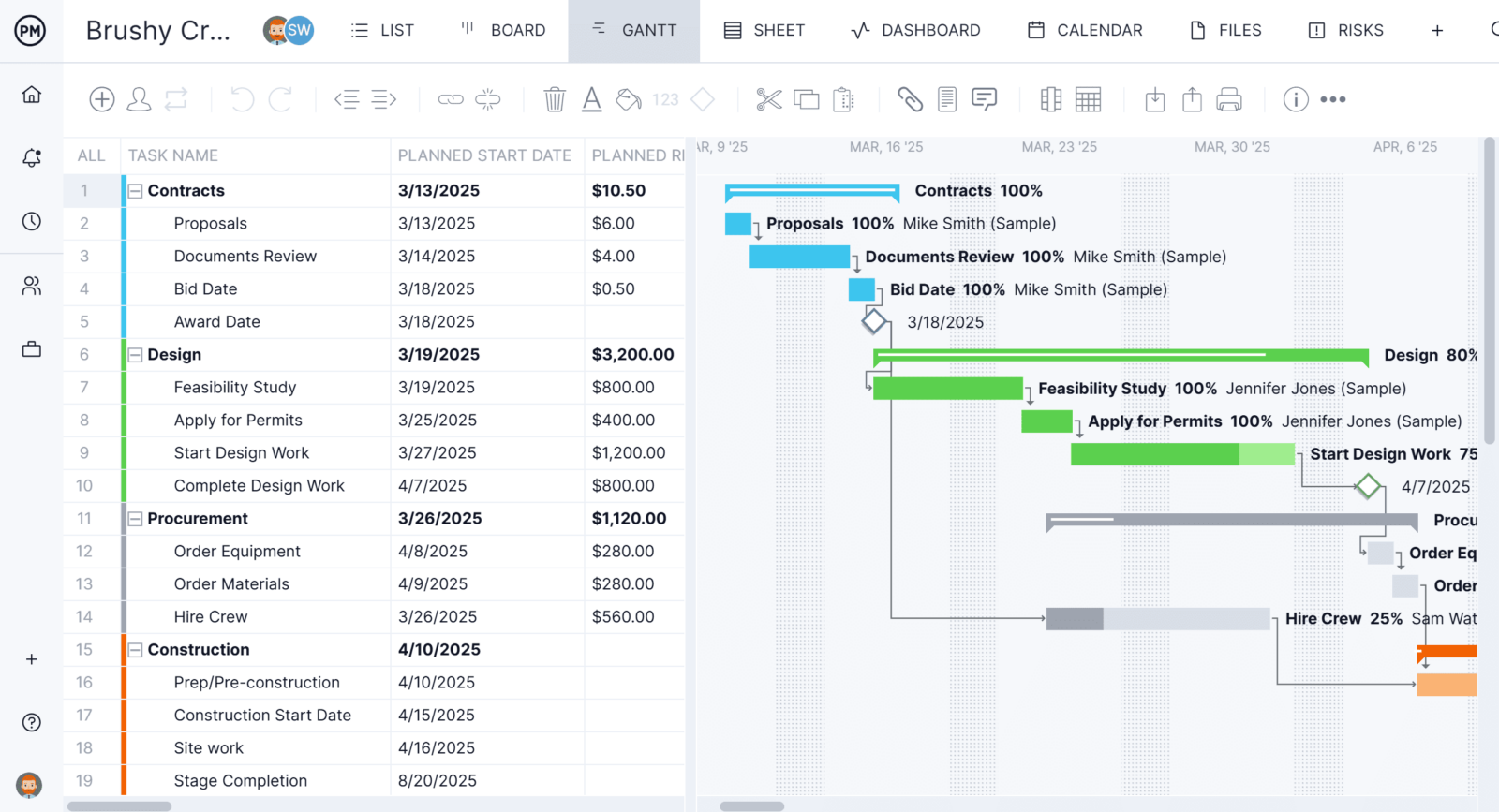
Prefer a more visual approach? The same tasks appear on a kanban board, where team members can drag and drop cards through custom workflow stages, no self-hosted plugin required. There’s also a calendar view for scheduling at a glance and a simple task list view for anyone who just wants to check off what’s due today. Because these views are all pulling from one shared set of project data, a status update made in one view is instantly reflected in all the others, so nobody is stuck reconciling spreadsheets, wikis or asking which version is current.
Robust Resource Planning Features
Because our tool has real-time connectivity to teams and progress, project managers can plan resources and track them throughout the project’s life cycle, without configuring a separate resource management plugin the way many open source tools require. This begins when onboarding team members to the project. Project managers can set the availability of the team, from PTO and time off to holidays. This makes it easier to assign team members to tasks. Both human and nonhuman resources, like equipment and materials, can be planned on the Gantt chart and then tracked on the team page or color-coded workload chart. This allows project managers to see at a glance who is overallocated or underutilized and balance the team’s workload right from those pages to keep them working at capacity and staying productive.

Real-Time Cost, Time and Cost Data Project Dashboards
Other features track resources and more in real time, without needing to install a separate reporting plugin or wait on a community-built add-on the way many open source tools require. For example, secure timesheets streamline the payroll process, but they also provide visibility into labor costs to help keep projects on budget. For a high-level overview of key performance metrics (KPIs), use the real-time project or portfolio dashboard. It automatically collects live data and displays it on easy-to-read graphs and charts that track cost, time, workload and more. To get deeper into the data, there are customizable reports on project and portfolio status, variance, workload and timesheets, to name a few. They can be filtered to show general progress and then shared with stakeholders to keep them updated.

ProjectManager is online project management software that connects teams whether they’re in the office or working remotely. They can share files, comment at the task level and stay updated with email and in-app notifications. Join teams across industries who use our software to deliver successful projects. Get started with ProjectManager today for free.