
Construction professionals often struggle to capture field data, track hours and maintain safety records across dispersed crews. Raken streamlines these tasks by combining daily reports, time tracking, production insights and safety tools into a single field‑first platform.
What Is Raken?
Raken is a construction field management platform used to capture field data, manage safety and quality tasks and coordinate project documents. It is commonly used by general contractors, specialty contractors and subcontractors to complete digital daily reports, time cards and production logs while staying connected with the office.
The software helps crews record work logs, photos, videos and notes, track labor and equipment hours, and assign tasks—all from a smartphone or tablet. Because Raken emphasizes real‑time field visibility, project managers and executives can monitor progress, identify trends and address issues quickly.
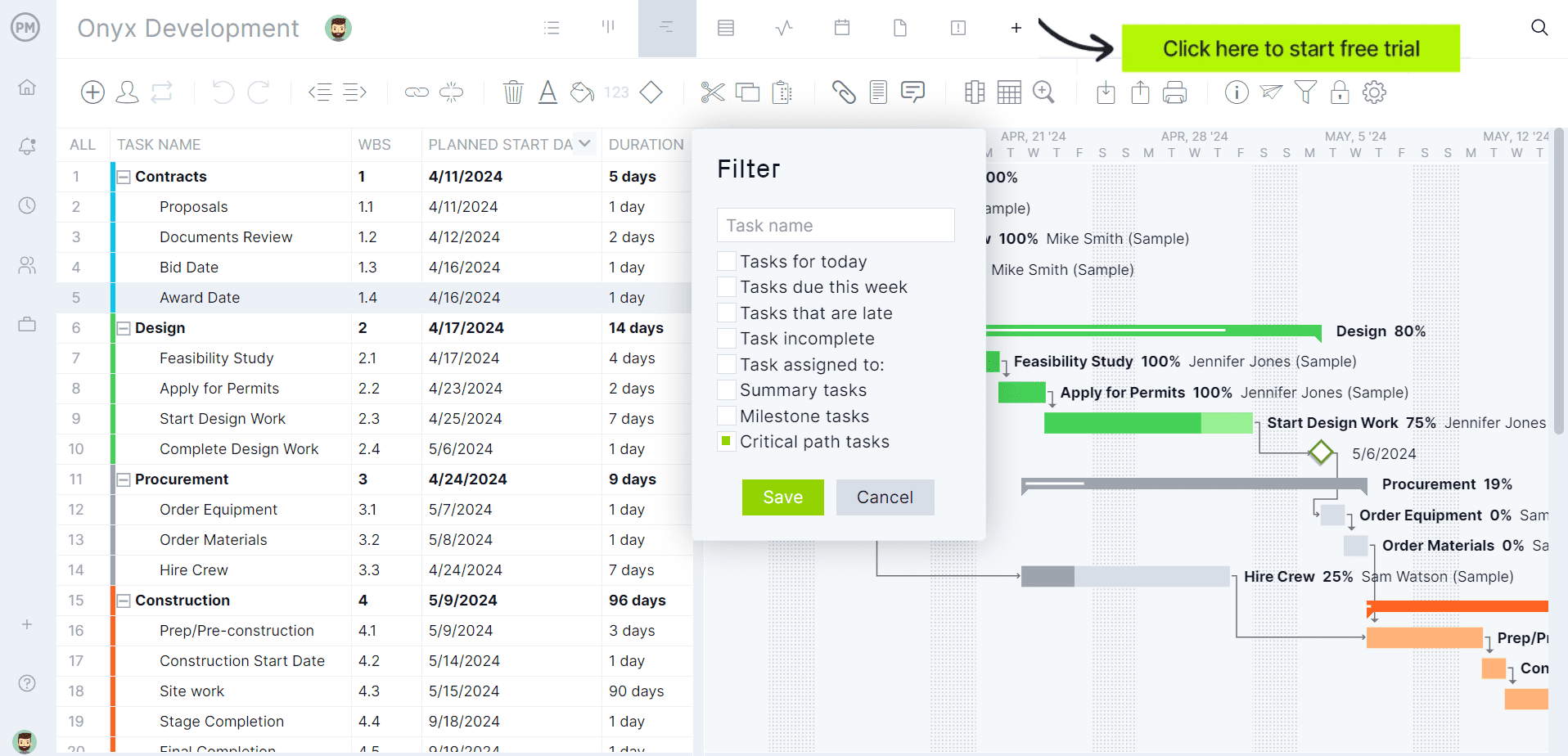
If you’re looking for software to plan, schedule and track construction projects from start to finish, try ProjectManager instead. ProjectManager is award-winning construction project management software that gives construction companies tools to ensure projects are completed on time, within budget and within scope. It allows project managers to create detailed construction schedules, estimate costs, allocate resources, set budgets, track progress and compare estimated versus actual project outcomes using real-time dashboards and reports to quickly identify delays or cost overruns. Get started with ProjectManager for free today.
Raken Plans & Pricing
Raken offers two paid subscription tiers. Each plan requires a minimum of three users and includes unlimited projects, so companies can scale without additional project fees. Advanced capabilities such as time tracking and safety management are only available on the higher tier.
| Pricing plan name | Price (per user/month) | What’s included |
| Basic | $23 | Unlimited projects, directory & messaging, daily activity feed, real‑time updates and jobsite data, branded daily reports, photos, videos & attachments, tasks and live chat & phone support. |
| Performance | $59 | Everything in Basic plus time tracking, production tracking, safety & quality management, RFIs, forms & document storage, insights dashboards and dedicated training and onboarding. |
Raken Views
Raken structures its interface around different “views” that present project information for specific workflows. Each view pulls from the same underlying data, so updates in one perspective instantly reflect across the platform.
- Dashboard view. Provides a high‑level snapshot of jobsite performance, summarizing daily reports, labor hours and production data so project leaders can quickly identify trends and potential issues.
- Daily log view. Field supervisors capture work logs, notes, photos, videos, weather and manpower details; the interface organizes entries chronologically for easy reference and compliance.
- Production view. Shows labor and equipment hours alongside quantities installed, helping crews compare planned versus actual productivity and make adjustments to stay on schedule.
- Safety & quality view. Centralizes toolbox talks, managed checklists, observations, incident reports and audits to ensure compliance and reduce risk on the jobsite.
- Tasks view. Lists open and completed tasks with due dates, assignees and attachments; supervisors can assign new work, track status and communicate updates.
- Forms view. Enables creation and reuse of digital forms such as RFIs, submittals and change orders; forms can be customized and shared with stakeholders.
- Documents view. Organizes project files and drawings in cloud storage; users upload PDFs, photos and specifications, annotate documents and share them with multiple recipients.
- RFIs view. Facilitates creating, assigning and tracking RFIs; notifications ensure timely responses and the workflow records ball‑in‑court responsibility.
Raken Key Features
Raken combines progress reporting, production tracking, safety and project management into one field‑focused solution. The following feature categories reflect how the platform supports crews in the field and office.
- Daily progress reporting: Crews complete branded reports with time‑stamped photos, videos and attachments; automated summaries and weather data are assembled into PDFs that can be shared instantly.
- Collaborator & segmented reports: Subcontractors and trades submit their own daily reports; teams can segment reports by supervisor, shift or location to simplify analysis.
- Mobile data capture: Field teams log work, notes, photos, videos, time, safety issues, cost codes, materials and equipment directly from mobile devices.
- Real‑time dashboards & AI summaries: A real‑time dashboard connects the field and office via the cloud, and AI automatically highlights key insights from daily reports.
- Time & production tracking: Labor hours, equipment usage and production quantities are captured through time cards, time clocks and kiosks; geofencing and AI photo ID support accurate time entry.
- Resource scheduling: Crews can plan labor and equipment assignments ahead of time to ensure resources are available and avoid site delays.
- Material & equipment tracking: Field crews log material deliveries, usage and inventory levels along with equipment locations, helping managers plan procurement and reduce downtime.
- Budget management & production insights: Raken provides dashboards to compare actual production against project budgets and identify trends; the Performance plan adds insights dashboards and compliance reporting.
- Safety & quality management: Toolbox talks, managed checklists, observations, incident reports and dashboards help crews prevent safety incidents and maintain quality standards.
Pros and Cons of Raken
Raken stands out for its field‑first design and intuitive interface, but some advanced capabilities are available only at higher price points and the platform focuses on project execution rather than long‑term planning.
Pros
Raken excels at simplifying field reporting and making project data accessible. Its all‑in‑one app helps crews stay compliant, while real‑time dashboards and AI summaries provide executives with immediate insights into jobsite health.
- All‑in‑one mobile app consolidates daily reports, time cards, production tracking, safety and RFIs.
- Unlimited projects with real‑time activity feeds and notifications keep teams informed.
- Field‑first design and intuitive interface drive high adoption and compliance among crews.
- Integrates with existing accounting, payroll and project management systems to reduce duplication.
- Dedicated onboarding and live support help companies ramp up quickly and maximize value.
Cons
Because Raken is purpose‑built for field execution, some companies may need supplementary tools for detailed planning, cost forecasting and enterprise‑grade resource management. Pricing is per user and advanced modules are only available in the Performance plan.
- Time tracking, production tracking, safety & quality management, RFIs and document storage are only available in the higher‑priced Performance plan.
- No free tier; entry‑level Basic plan still requires at least three paid users and lacks advanced project management features.
- Primarily focused on field reporting and compliance; companies with complex construction scheduling needs may require additional software.
- Raken does not offer built‑in Gantt charts or detailed project planning tools, so teams must rely on other platforms for long‑term scheduling.
- Resource scheduling focuses on assigning crews and equipment day‑to‑day; it lacks advanced resource leveling or forecasting features found in dedicated project planning software.
- The platform tracks production quantities and costs but does not provide full budget forecasting or cost management capabilities; users may need accounting integrations for detailed financial control.
- While Raken captures daily jobsite data and generates insights, it does not automate procurement or materials budgeting, so materials planning must be managed separately.
ProjectManager Is the Best Raken Alternative for Construction Project Management
Raken is particularly strong for managing field operations, including daily reports, inspections, RFIs, submittals and drawing management. However, its project planning and scheduling tools are less robust than those found in dedicated project management software such as ProjectManager.
ProjectManager offers a more comprehensive construction project management solution with advanced Gantt charts, critical path tracking, workload management, resource scheduling, portfolio roadmaps, real-time dashboards, kanban boards, timesheets and automated reports in a single platform.
In addition to traditional construction scheduling capabilities, ProjectManager includes AI-powered project insights, workflow automation and live performance tracking that help teams identify delays, manage risks and improve decision-making. The platform also supports an open API and more than 1,000 integrations with tools like Acumatica, QuickBooks, Microsoft Project, Slack and Google Workspace, allowing construction companies to connect operational and project data across their existing systems.
Watch the video below to learn more!
More Raken Alternatives
While Raken focuses on field reporting and compliance, some projects require broader functionality. The following construction software alternatives provide different capabilities across planning, collaboration and project control.
Procore
Procore is a cloud‑based construction management platform that manages projects from preconstruction through closeout. General contractors, owners and specialty contractors use Procore to keep projects on budget and improve returns by connecting field and office teams. The platform supports project execution, cost management and resource management and unifies budgets, contracts and field progress into a single source of truth.
Related: Procore for Project Management: Features, Pros and Cons
ProjectSight
ProjectSight (now part of Trimble Unity Construct) is a unified digital project and site management solution designed to centralize project truth for faster, more accurate builds. Contractors and owners use it to scale from basic site management to customizable project control, with traceable document management, 2D/3D visualization and unlimited free collaborators. Modules support daily reports, checklists, RFIs, submittals, BIM models, schedules, cost management and capital planning.
Fieldwire
Fieldwire is a mobile construction management platform used to coordinate tasks, track progress and manage construction documents in the field. Contractors, owners and trades use it to assign work on digital plans, share updates and maintain a single source of truth for drawings, tasks and inspections. Fieldwire’s views (Kanban boards, Gantt charts, calendar and list) and modules like RFIs, submittals, budget management and BIM viewer help crews collaborate and keep projects on schedule.
ProjectManager is online construction project management software that empowers teams to plan, manage and track their projects in real time. We connect architects and engineers in the office with your work crew on the job site so they can share files and comments to foster better collaboration. Get started with ProjectManager today for free.