



Once upon a time I used to try to plan my projects around dates when I knew I was going to be in the office. My colleagues joked that I planned the birth date of my first child around a major transformation project go live date (I didn’t). It turned out that we had to move that go live by three months, so I was on maternity leave with a new born when they eventually went live.
As experienced project managers know, when things change on a project, all your carefully planned deadlines switch around too.
In this article, we’ll look at how to plan and execute a handover to a colleague. Looking for specifics on how to write a handover email to your manager? I have a full article on that too, with templates, so be sure to check it out!
If your project is closing, read my guide to how to handover a project at closure instead.
Reasons to handover your work
At some point in your career, you are going to have to handover your project to someone else. That could happen for a number of reasons:
- Maternity leave
- Paternity leave
- Parental leave
- Planned medical leave
- Someone moving to backfill a role elsewhere in the organization
- Vacation time, annual leave or booked holidays
- Unpaid leave of absence
- Employee resignation or a departing employee (perhaps you) means work allocations have shifted around and you have to do a knowledge transfer to someone picking up your project permanently.
As you can see, those reasons split between a temporary handover (when someone else takes responsibility for your work for a short time) and a permanent handover (when you are leaving the project behind).
The process is pretty much the same, and either way, you need to feel confident handing over your work before your absence so you can actually switch off.
If you are leaving for good and handing over your work during your notice period, then you’ll want to be more inclusive and comprehensive. For temporary leave, you can focus mainly on passing over tasks that need to be completed during the time you are unavailable.
Vacation handovers
The most common reason for briefing someone else on your work is that you have a holiday planned. A vacation handover helps you both. It means you have to think about what might happen and plan for it. It helps your colleagues deal with stuff while you are away.
And most importantly, it means you can go away knowing that nothing will go wrong while you are out of the office.
A holiday handover tends to cover only the tasks that you need someone else to do on your behalf. That could include the following items:
- Briefing senior managers on the completion of a task
- Sending out a report (bonus points for you if you can pre-write some of it before you go)
- Being the point of contact in an emergency
- Being the point of contact for a supplier in case they need something
- Supervising the day-to-day activities of the project team and being a point of escalation if team leaders need something
- Being the approval point for key processes so that changes etc don’t get stuck in the workflow while you are away.
Mostly, projects can cope without you for a fortnight. It’s good to brief someone on what to do, but if they aren’t able to step up due to their own workload, it’s not the end of the world. Try to keep your expectations manageable.
The 10 tips below will help you put together a smooth transition plan, regardless of how long you are going to be away (or if you are ever coming back).
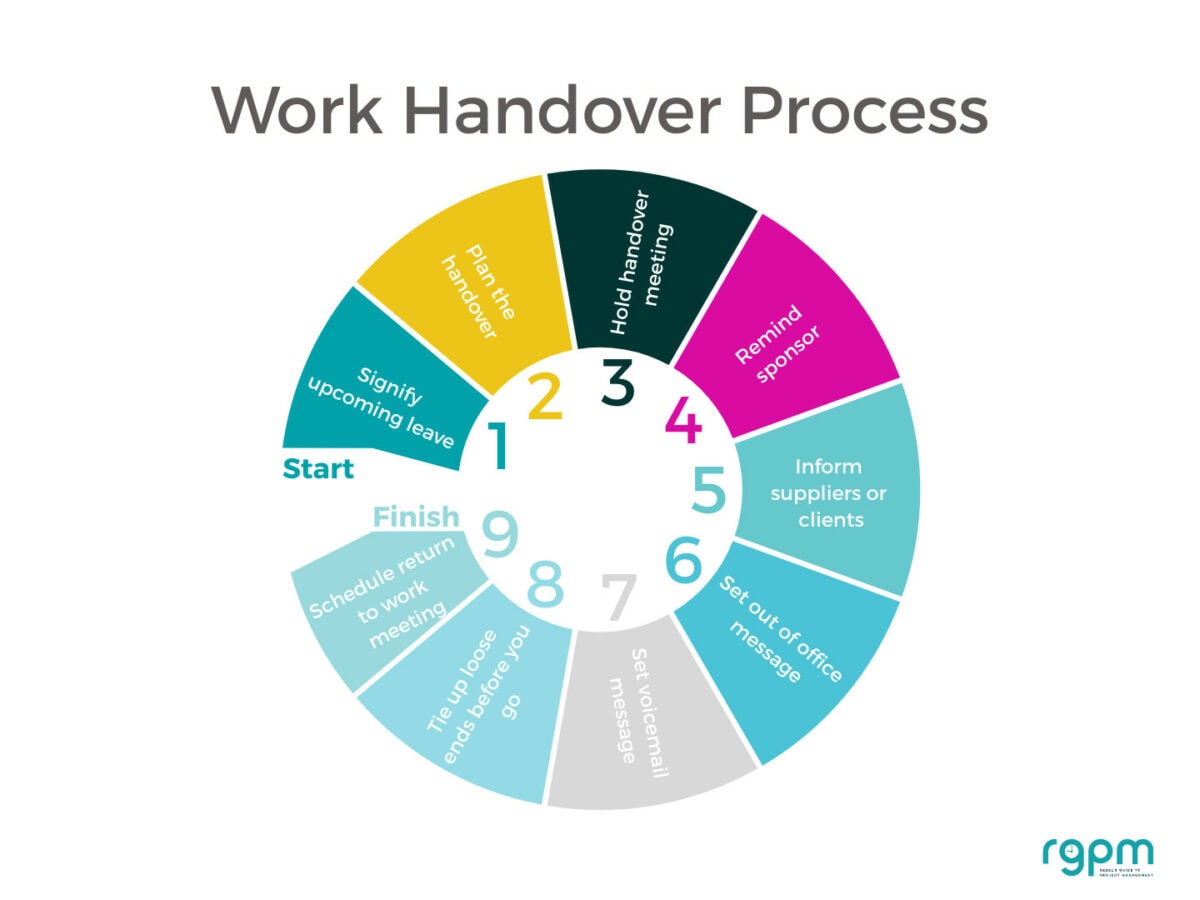
Here are 10 simple ways to leave your work behind and not worry about what’s going on back at base.
1. Check what will happen while you are away
Look at the calendar, project schedule, upcoming milestones, meetings, deadlines, reporting dates, approvals and supplier commitments.
Do a ‘while I’m away’ scan, looking for:
- What is due?
- What could go wrong?
- What decisions might be needed?
- Who might need me?
- What meetings are happening?
- What approvals could get stuck?
- What deadlines fall during my absence?
- What happens immediately after I return?
2. Decide what actually needs handing over
You don’t have to handover everything if you are only out of the office for a couple of weeks. Make smart decisions to minimize the workload for everyone else.
| While I’m away | Can wait | Finish before I go |
|---|---|---|
| Urgent decisions | Routine admin | Promised actions |
| Key meetings | Non-critical analysis | Reports |
| Approvals | Long-term planning | Stakeholder updates |
| Escalations | Nice-to-have tasks | Anything that would otherwise become someone else’s problem |
Think about this: If something goes wrong while I’m away, what is the most likely thing it will be?
For example:
- stakeholder disagreement
- missed deadline
- supplier issue
- approval delay
- team absence
- budget question
- technical problem
- project decision
- meeting where you’re normally the only person with context.
What can you do in advance to cover those scenarios, if anything? Your options normally are to prevent it, delegate it, escalate it or wait until you’re back and deal with it then. Consider what you want your handoveree to do so you can brief them in advance.

3. Choose your cover person
A good cover person:
- has sufficient authority
- understands the project or work area
- knows where information is stored
- has capacity
- knows when to escalate
- isn’t expected to do your entire job on top of theirs
They don’t have to do everything you normally do (because they physically won’t be able to). And sometimes we get told who it will be, so ask your manager if there is anyone they would like you to delegate to while you’re away.
Ideally, if you are going to be out of the office for only a short period of time, you should handover all your current projects to one colleague. Look at the resource plan for the team and consider who that might be.
4. Plan your handover to a colleague and create your notes
This might sound obvious but the first step is that you need to plan to handover your work and create ‘handover notes’. I do this in a notebook because I’m a pen and paper thinker. (Read more about how I organise a notebook.)
Your handoveree (that’s not really a word, I know) doesn’t need to know everything about the project. They simply need to be briefed on the necessary information:
- Main deliverables during this time, if any
- Things happening while you are away and what they need to do about them e.g. preparing weekly reports on your behalf
- Main risks or issues that are currently on the table and might need watching (take them through your RAID log)
- Main stakeholders and the project sponsor’s contact details so if anything urgent does come up they know who to talk to
- Where they can find information about the project
- Major decisions that should be taken during this time, if any, and what your recommendation would be and/or criteria for making that decision.
You may have other things to add to that list depending on your project and situation. For example:
- The steering group meets while you’re away: You can postpone or cancel the meeting, prepare the deck in advance and ask someone else to chair it, record the meeting and catch up afterwards.
- The supplier is due to deliver the revised design: Make sure the supplier knows who to send it to so it doesn’t sit in your inbox for 2 weeks.
- The project sponsor or PMO is expecting the monthly status report: Draft it in advance and ask someone else to finish it off or ask for an extension.
- The change request is awaiting approval: Ask the decision makers to copy in someone else when the decision is made so the work isn’t held up while you are away. Ask your cover person to chase after a certain time if they haven’t had a decision.
If you are preparing handover information as part of the recruitment process – to give to a new starter because your own responsibilities have changed or you are leaving – then you will want to include a comprehensive handover report.
That should cover all the important information, a list of key files, key processes, key contacts for each of the different teams involved, specific activities that are in progress or outstanding, current issues and how much time they should expect to be spending on keeping the work moving forward.
Tip: Long before you go, make sure your team has people in it capable of delegating to while you are away. This book has some tips to help support your team and manage your own workload.
5. Set your digital boundaries
Prepare to manage your digital presence while you are away.
I’ve seen more and more people using their email signature as a way to alert people to upcoming out of the office time. I think it’s a good idea. It reads a bit like this:
Email signature, contact details, etc
Advance notice: I’ll be out of the office from Tuesday 14 July until Friday 24 July.
The text is normally in red or bolded (or both) so it stands out.
I have no idea how effective this is and whether it just means you get a ton of emails on the day before you are due to leave, but it seems like a sensible thing to do in an environment where you have a lot of messages and people need to know where you are.
Before you go:
- Set your Outlook/Teams out-of-office
- Make sure your calendar reflects your absence — invite your manager or key stakeholders to a ‘meeting’ that lasts the duration of your holiday so they have a physical note in their calendars for your absence.
- Check your Teams status
- Delegate approvals where possible
- Check shared mailboxes
- Update voicemail if relevant
- Make sure your cover person has the required system permissions
- Test that delegated access actually works.
Set up an out of office email response message letting people know that you are away from your desk. You can automate it to go to internal recipients and then set a different one for external senders as well, if you’d like to tailor your responses.
Here’s an example of a bad out of office
message:
I’m
on annual leave until Friday. I’ll pick up your email on my return.
This doesn’t give the recipient any useful information because they cannot be sure which Friday you are talking about. Have you accidentally left your out of office message on from a previous absence?
And if they have an urgent query, they’ve now drawn a blank as you’ve given them no alternative contacts.
Microsoft Office/Teams/Outlook makes it easy to set autoresponders and out of office messages, and I’ve noticed that it prompts me to do so if I type something that looks like ‘I’ll be out of the office next week’ in an email to someone. There’s no excuse!
Autoresponder email template
This is a better email template:
I’m on annual leave until Friday 24 July. I won’t be accessing my email during this time. If your question is urgent, please contact:
Project Alpha: John Smith (telephone number xxx, email xxx@zzz.com)
Queries about invoices: Accounts Payable team (call xxx and choose option 3)
Other queries: Emma Jones (telephone number xxx, email xxx@zzz.com)
I’ll respond on my return.
List the contacts for each of your projects or major areas of responsibility if you have them (if you don’t, just stick your deputy on the list).
Check with each person that you name that they are happy to cover for you while you are away.
These are likely to be the people that are in your project workbook’s Contacts tab.
Think about whether you want this list of internal contacts to go to external senders. The amount of spam emails I get, I wouldn’t want my colleagues’ names to end up on sales people’s mailing lists. So consider having a different message for external senders.
It’s tricky responding to queries when someone you have never heard of before calls you up with a question about a project you know nothing about (that has happened to me).
If in doubt, put your manager as your out of office contact as he or she should be able to direct enquirers to the right person on your behalf.
Teams Tip: Your out of office Outlook email will show up in your Teams status alert, so colleagues using Teams will see that you are absent.
6. Meet your colleague to handover
Set up a meeting with the person who will be picking up your work. I find that it helps to create a document with all the key points. They can then use this as a reference and update it with anything that changes. If you are coming back, they can give it to you. If you’re gone for good, they can adapt your notes into something that’s relevant for their job description.
They will also be prepared (hopefully) to receive the handover, and they’ll have questions for you. They might even be using my list of what to do when you take over a project — perhaps you should read that too so you can check out the kinds of things they’ll be looking for!
For temporary handovers, make sure you are clear on what the priorities are (or should be) so they only have to focus on the really important stuff. Remember they have their own job to do too!
Walk your colleague through the judgement calls as well as the information. For example, say something like, “The RAID log says X is a medium risk. In reality, I’d keep an eye on it because the supplier has missed two dates already.” That’s the kind of thing that it’s hard to pass across in an email.
If you have an automated approvals process or a project management workflow, such as the
For tips on how to talk to someone about
picking up your work, read my guide
to delegating tasks.
You should remind your manager, project sponsor, customers and other stakeholders that you are going away or leaving. Your manager might have approved your time off, and others might know it’s coming, but they might not remember exactly when it is happening.
Give them lots of notice and introduce them to the new person who will be their temporary/permanent contact.
If you are on holiday and it’s that sort of project, let them know how they can contact you during your vacation, if you are prepared to take their calls. But don’t make yourself the emergency contact unless you’ve explicitly agreed that you are going to be available.
Remember: You don’t have to take calls or check your emails on holiday. You don’t have to be available, even if they ask.
Holiday handover email template to use with clients
Hello [name]
I thought I’d remind you that I’m out of the office from [date] to [date]. I can assure that I’ve handed off the important topics to [colleague] who is available to help you during this time. You can reach him/her on [contact details] if you need to get in touch while I’m away.
If it’s not urgent, feel free to email me and I’ll respond to your message on my return.
Kind regards
[your name]
If you want, you can include a statement about the latest progress, what next steps are, what they can be doing while you are off, or something like that.
Personalize as much as you can, especially if you are out of the office for more than a week.
Giving a last-minute-before-you-leave
update is going to reduce the emails you get on your return because they
(hopefully) won’t be chasing for routine status
reports.
8. Tie up loose ends
Don’t leave your colleagues with admin to
finish off. The point of a handover is not to get someone else to do your boring
work.
Spend a bit of time sorting out your inbox,
delivering on your promises and tidying up your workload so you aren’t leaving
(or coming back to) a massive mess.
Write a to do list of things that are
essential for when you come back, so you don’t spend your first day back in the
office wondering what on earth you were working on before you left.
The 5 things I check before every holiday
- Calendar – what happens while I’m gone?
- Commitments – what have I promised people?
- Dependencies – who is waiting for me?
- Decisions – what might someone need to decide?
- Consequences – what happens if nobody does anything?
This last situation has happened more often than you might think!
9. Plan for a handover back when you return
The last thing to do is to schedule time in your diary for your return so that you can pick the project up from the person who was looking after it for you. Don’t assume nothing has happened. You never know what they might have dealt with or done while you were away.
If you are leaving for good, draw confidence from the fact you prepared the best handover documents possible for the incoming employee. By all means stay in contact with your ex-colleagues, but don’t lose sleep over the work you left behind.
Also:
- Turn off your autoresponder email if you haven’t set it to auto-expire when you get back
- Update your voicemail to your standard message
- Book time with your team members so you can catch up on their work progress.
Make sure that you talk to your cover
person as soon as you can so that you get the context for any of those messages
that relate to the project.
10. Go on holiday and don’t look back!
Honestly.
If you are taking a vacation, don’t think about work. You’ll be more refreshed. Things are in good hands. And even if they aren’t, I promise you can sort it all out when you get back. The world will not end.
And if you are staying back while others are off, here are 7 ways to stay motivated and productive at work during the holidays.
If you want to think about work people, do it in the context of buying holiday treats for the team and bring back some local sweets or something. It’s always nice to thank the people that helped you while you were off.