Mac users often struggle to find project scheduling tools that don’t require workarounds or subscriptions. ProjectLibre for Mac enters the conversation as a lightweight alternative, especially for teams familiar with traditional planning tools but working within a macOS environment.
What Is ProjectLibre?
ProjectLibre is an open-source project management software that supports planning, scheduling and resource tracking through structured tools like Gantt charts and task lists. Built as an alternative to legacy desktop applications, it focuses on offline use and file compatibility. Its design reflects traditional project scheduling methods, making it useful for teams managing timelines, dependencies and resource allocation without relying on cloud-based systems.
Does ProjectLibre Work On Mac?
From a technical standpoint, ProjectLibre runs on macOS because it is developed using Java, which allows it to operate across different operating systems. Installation typically requires a compatible Java runtime environment, after which the application runs locally. Performance depends on system configuration, but no virtualization or emulation is required for standard use.
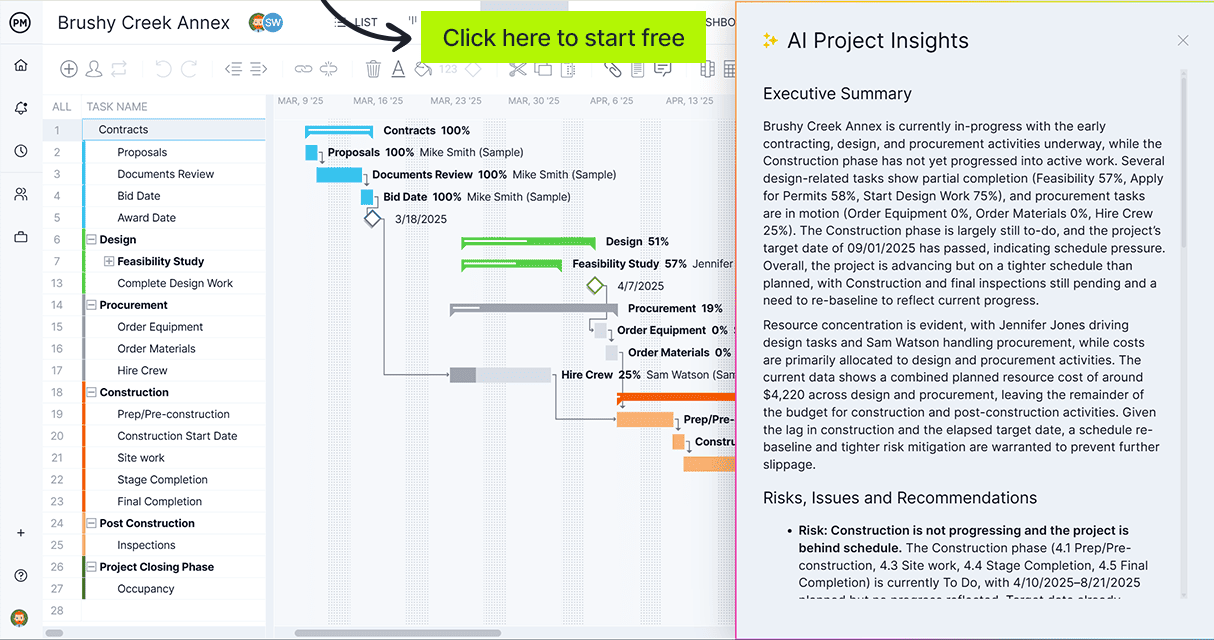
ProjectManager goes far beyond ProjectLibre for Mac by providing more advanced project management tools in a cloud-based platform that delivers real-time project dashboards and reports, AI-powered insights and online collaboration features—capabilities that ProjectLibre’s desktop, offline approach simply doesn’t provide. Get started with ProjectManager for free today.
Why Use ProjectLibre on Mac?
ProjectLibre is ideal for Mac users who want a lightweight, straightforward project planning tool without ongoing costs. Its open-source model removes licensing barriers, making it accessible for individuals and small teams.
Because it runs locally, it avoids reliance on internet connectivity or cloud infrastructure. This makes it especially useful in controlled environments where data privacy, offline access or budget constraints influence software decisions.
Related: 6 Best Project Management Software for Mac: Free & Paid
Key Features of ProjectLibre for Mac
ProjectLibre for Mac focuses on structured project planning by organizing tasks, timelines and resources into a single desktop interface. It supports detailed scheduling workflows, allowing teams to map dependencies, assign work and track progress using familiar planning tools without requiring cloud connectivity.
- Gantt chart view enables users to visualize project timelines, adjust schedules and manage task sequencing directly through an interactive interface.
- Task dependency management allows linking activities with finish-to-start or start-to-start relationships to reflect real execution order.
- Resource allocation tools help assign team members, define roles and monitor workload distribution across multiple project tasks.
- Critical path analysis identifies the sequence of tasks that directly impact project completion, helping prioritize scheduling decisions effectively.
- Work breakdown structure (WBS) support organizes complex projects into hierarchical task groups for better clarity and control.
- Cost tracking features allow users to estimate budgets, assign costs to tasks and monitor spending against planned values.
- Microsoft Project file compatibility enables importing and opening MPP files, making it easier to collaborate with teams using legacy tools.
Pros of Using ProjectLibre on Mac
Mac users benefit from a structured, cost-effective planning tool that supports traditional scheduling methods while remaining accessible for teams needing desktop-based control over project timelines and resources.
- No subscription fees make it an attractive option for individuals or teams working with limited software budgets.
- Cross-platform compatibility ensures files can be shared across Windows, Linux and Mac environments without major issues.
- Familiar interface reduces learning curve for users experienced with traditional project scheduling tools and methodologies.
- Offline functionality allows uninterrupted work without dependency on internet access or cloud-based services.
- Open-source nature provides transparency and flexibility for organizations that prefer customizable or community-driven tools.
Cons of Using ProjectLibre on Mac
Despite its accessibility, usability, integration, and performance limitations can affect teams expecting modern collaboration features or seamless workflows across multiple systems and stakeholders.
- Outdated user interface can feel less intuitive compared to modern project management software with cleaner designs.
- Lack of real-time collaboration makes it difficult for distributed teams to coordinate changes simultaneously.
- Limited integrations restrict connectivity with other tools such as CRMs, communication platforms or reporting systems.
- Performance may lag with larger or more complex project files, depending on system resources and configuration.
- No native cloud features means manual file sharing is required, increasing the risk of version control issues.
ProjectManager Is Better than ProjectLibre for Mac
ProjectManager offers an award-winning project management feature set that goes far beyond what ProjectLibre for Mac can provide, thanks to its Gantt charts, kanban boards, timesheets, workload charts and real-time project dashboards and reports. Unlike ProjectLibre, it enables teams to build dynamic project timelines, manage dependencies, allocate resources and track progress with real-time data.
With ProjectManager, teams can collaborate online from anywhere without relying on manual file sharing or version control workarounds. Updates happen in real time, which means changes to schedules, tasks or resources are instantly reflected across the entire project. This is especially valuable for distributed teams that need to stay aligned without delays or duplicated work.
Beyond core functionality, ProjectManager integrates with over 100 business tools, including Jira, Power BI and Azure DevOps, making it easier to connect project workflows with existing systems. Its open API supports custom integrations, while built-in AI-powered insights help identify risks, optimize schedules and improve decision-making across projects. Watch the video below to learn more!
Related ProjectLibre Content
ProjectManager is online project and portfolio management software that connects teams, whether they’re in the office or out in the field. They can share files, comment at the task level and stay updated with email and in-app notifications. Get started with ProjectManager today for free.